
1. Introduktion
This manual provides essential instructions for the safe and efficient operation of your Singingwood 030BT CD Player Boombox. Please read this manual thoroughly before using the device and retain it for future reference. The Singingwood 030BT is a versatile audio system featuring a CD player, AM/FM radio, Bluetooth connectivity, USB playback, and auxiliary input, designed for both home and portable use.
2. Sikkerhedsoplysninger
For at sikre sikker drift og forhindre skader, bedes du overholde følgende forholdsregler:
- Udsæt ikke enheden for regn, fugt eller ekstreme temperaturer.
- Undgå at placere enheden i nærheden af varmekilder eller i direkte sollys.
- Sørg for ordentlig ventilation; bloker ikke ventilationsåbninger.
- Use only the specified power source (AC cord or 6 x C batteries).
- Forsøg ikke at skille enheden ad eller ændre den. Overlad al service til kvalificeret personale.
- Opbevares utilgængeligt for børn.
3. Pakkens indhold
Bekræft at alle varer er til stede i pakken:
- Singingwood 030BT CD Player Boombox
- AC strømledning
- Brugervejledning (dette dokument)
4. Produktet er slutview
The Singingwood 030BT boombox features a user-friendly design with clearly labeled controls and ports. Familiarize yourself with the layout for optimal use.

Figur 4.1: Forside view of the Singingwood 030BT CD Player Boombox in Firemist Red.

Figure 4.2: Labeled diagram of the boombox controls and ports.
Nøglefunktioner:
- Sleek and User-Friendly Design: Easy-to-use buttons and an LED display for effortless operation.
- Klar stereolyd: Equipped with dual premium 3" front-firing speakers (2W x 2 RMS).
- Versatile CD Player: Supports CD, CD-R/RW, MP3 CDs, and audiobook CDs with shuffle (RAND) and repeat (REP) functions.
- AM og FM radio: Built-in tuner with a classic manual tuning knob.
- Bluetooth-streaming: Wirelessly connect your phone, tablet, or other Bluetooth-enabled devices.
- USB-afspilning: Afspil MP3 eller WMA files from a USB flash drive (up to 128 GB, FAT32 format).
- Praktiske funktioner: 3.5mm auxiliary (AUX) input and a headphone jack for private listening. The Function (FUNC) button allows easy mode switching.
- Dobbelt strømindstillinger: Operates with the included AC cord or 6 x C batteries (not included).
5. Opsætning
Tænd for enheden
The Singingwood 030BT offers two power options:
- AC strøm: Connect the included AC power cord to the AC IN jack on the back of the unit and then to a standard wall outlet.
- Batteristrøm: For portable use, insert 6 x C-size batteries (not included) into the battery compartment located on the bottom of the unit. Ensure correct polarity. Alkaline batteries are recommended for longer life.

Figure 5.1: Illustration of AC power connection and battery compartment.
6. Betjeningsvejledning
Use the Function (FUNC) button to switch between CD, USB, AUX, FM, AM, and Bluetooth modes.
6.1 Betjening af cd-afspilleren
- Press the FUNC button to select CD mode.
- Åbn dækslet til cd-rummet ved forsigtigt at løfte det.
- Place a CD (CD, CD-R/RW, MP3 CD, or audiobook CD) onto the spindle with the label side facing up.
- Close the CD compartment cover. The unit will begin reading the disc, and the track number will appear on the LED display.
- Brug knappen PLAY/PAUSE til at starte eller pause afspilningen.
- Use the B-SKIP (previous) and F-SKIP (next) buttons to navigate between tracks.
- Press the STOP/PROG button to stop playback.
- Press the REP/RAND button to activate repeat (single track or all tracks) or random playback.

Figure 6.1: Top-loading CD player with disc inserted.
6.2 AM/FM-radiobetjening
- Press the FUNC button to select FM or AM mode.
- Extend the telescopic antenna for FM reception. For AM reception, the unit has a built-in antenna.
- Rotate the TUNING knob to manually tune to your desired radio station.
- Adjust the VOLUME control knob to your preferred listening level.

Figure 6.2: Boombox displaying AM/FM radio functionality.
6.3 Bluetooth -parring
- Press the FUNC button to select Bluetooth mode. The LED display will show "BT" and flash, indicating it's in pairing mode.
- Aktiver Bluetooth på din smartphone, tablet eller anden Bluetooth-aktiveret enhed.
- Søg efter available devices and select "SINGING WOOD" from the list.
- Once paired, the "BT" indicator on the LED display will stop flashing and remain solid. You can now stream audio wirelessly to the boombox.
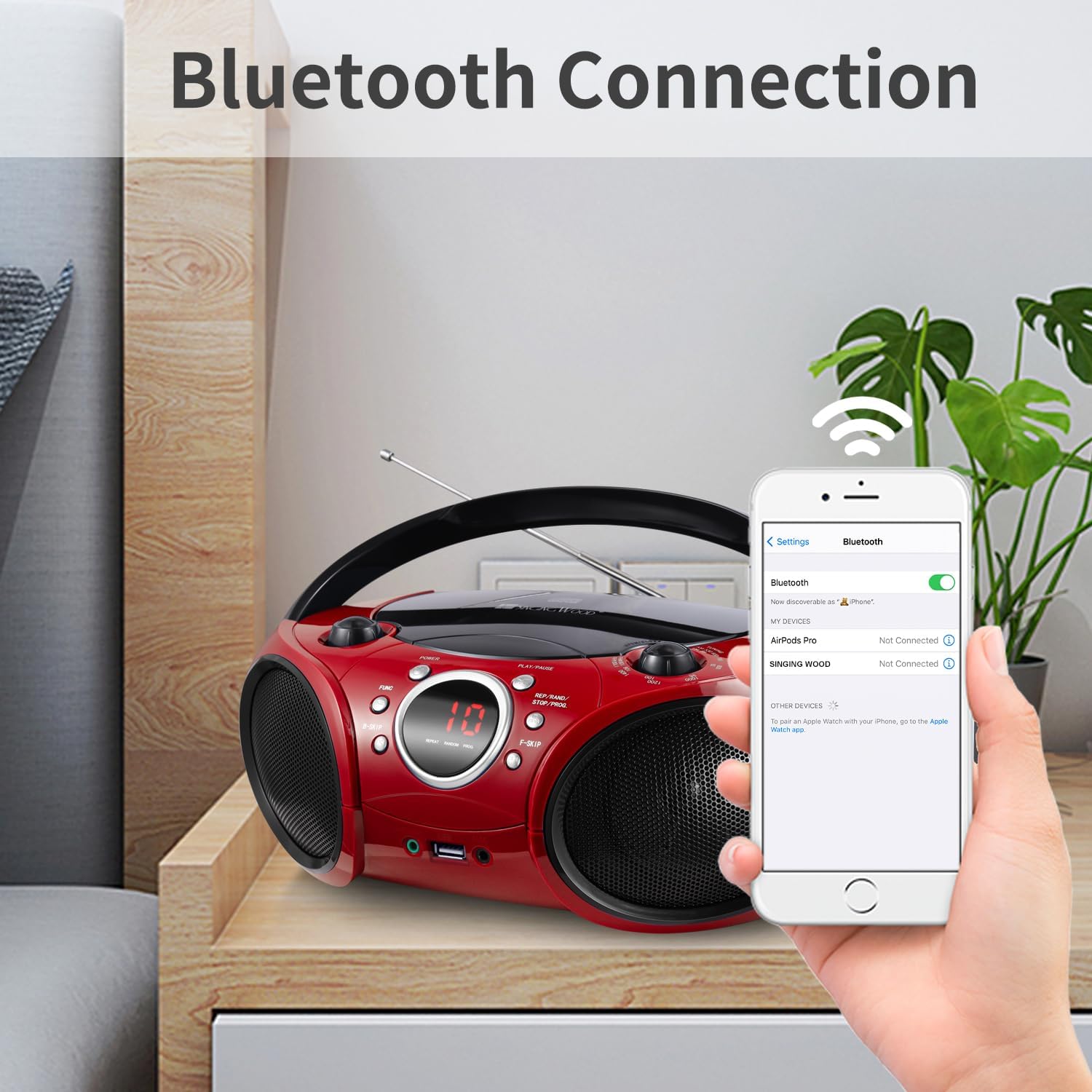
Figure 6.3: Bluetooth pairing with a mobile device.
6.4 USB-afspilning
- Insert a USB flash drive (FAT32 format, up to 128 GB) containing MP3 or WMA audio files i USB-porten.
- Press the FUNC button to select USB mode. The unit will automatically detect and begin playing audio files fra USB-drevet.
- Use the PLAY/PAUSE, B-SKIP, F-SKIP, and REP/RAND buttons to control playback, similar to CD mode.

Figure 6.4: USB flash drive inserted for audio playback.
6.5 Hjælpeindgang
Connect an external audio device (e.g., smartphone, MP3 player) to the 3.5mm AUX IN jack using a standard audio cable (not included). Press the FUNC button to select AUX mode, and audio from your connected device will play through the boombox speakers.
6.6 Hovedtelefonstik
For private listening, plug standard 3.5mm headphones into the HEADPHONE jack. The sound from the speakers will be muted automatically.
Video 6.1: En overview video demonstrating the features and design of the Singingwood SBX030BT CD Player Boombox, including its compact size, speaker quality, and various playback options like CD, radio, and Bluetooth.
Video 6.2: En videovisningasing the Singingwood SBX030 series boomboxes, highlighting features such as CD player, AM/FM radio, Bluetooth connectivity, USB playback, and auxiliary input across different models in the series.
7. Vedligeholdelse
To maintain the performance and appearance of your boombox:
- Rengør enheden med en blød, tør klud. Brug ikke slibende rengøringsmidler eller opløsningsmidler.
- Keep the CD compartment clean and free of dust.
- Når de ikke er i brug i længere perioder, skal batterierne fjernes for at forhindre lækage.
- Opbevar enheden et køligt, tørt sted væk fra direkte sollys.
8. Fejlfinding
If you encounter issues with your boombox, refer to the following common solutions:
| Problem | Mulig årsag | Løsning |
|---|---|---|
| Ingen strøm | Netledningen er ikke tilsluttet; Batterierne er opbrugt eller er isat forkert. | Check AC connection; Replace batteries or ensure correct polarity. |
| Ingen lyd | Lydstyrken er for lav; Forkert tilstand valgt; Hovedtelefoner er tilsluttet. | Increase volume; Press FUNC to select correct mode; Disconnect headphones. |
| CD springer over eller afspiller ikke | CD dirty or scratched; CD inserted incorrectly; Unsupported CD format. | Clean or replace CD; Reinsert CD correctly; Ensure CD is supported (CD, CD-R/RW, MP3 CD). |
| Dårlig radiomodtagelse | Antennen ikke strakt ud; Svagt signal. | Fully extend FM antenna; Reposition the unit for better reception. |
| Bluetooth forbinder ikke | Ghettoblasteren er ikke i parringstilstand; Enhedens Bluetooth er slået fra; Enheden er for langt væk. | Ensure boombox is in BT mode and flashing; Turn on device Bluetooth; Move device closer (within 30 ft). |
| USB afspilles ikke | USB drive not FAT32; Unsupported file format; USB-drev beskadiget. | Format USB to FAT32; Ensure files are MP3/WMA; Try a different USB drive. |
9. Specifikationer
| Feature | Detalje |
|---|---|
| Produktdimensioner | 11.8 x 9 x 4.8 tommer |
| Varens vægt | 3.79 pund |
| Modelnummer | SBX030BTR |
| Mærke | SYGENDE TRÆ |
| Forbindelsesteknologi | Auxiliary, Bluetooth, USB |
| Farve | Firemist Red |
| Højttaler type | Stereoanlæg |
| Fabrikant | Leaderwave |
| Strømindstillinger | AC cord or 6 x C batteries (6 VDC) |
| USB-understøttelse | Up to 128 GB, FAT32 format (exFAT/NTFS not supported) |
10. Garanti og support
For garantioplysninger eller teknisk support henvises til den dokumentation, der fulgte med dit køb, eller kontakt producenten direkte. Gem din købsbevis i tilfælde af garantikrav.