
MIFA A20
MIFA A20 Bluetooth-højttaler brugermanual
Model: A20
1. Produktet er slutview
The MIFA A20 is a portable Bluetooth speaker designed to deliver high-quality audio with powerful bass and True Wireless Stereo (TWS) capabilities. Its robust aluminum alloy housing ensures durability and a premium aesthetic. This manual will guide you through its features, setup, and operation.


2. Funktioner
- Exceptional Wireless Stereo: Connect two A20 speakers via a single device for huge stereo sound and double the volume; two exposed radiators let you see the sound.
- Impressive Bass: Dual drivers, triple radiators and Class-D chips ensure distortion-free crystal loud sound and strong bass with 30W peak power output.
- Lang afspilning: 4000 mAh rechargeable Li-ion battery offers 12 hours playtime at 70% volume; LED indicators to tell you the battery remaining; can play while charging.
- Endless Audio Options: Aux capability for non-Bluetooth devices; 32GB Micro SD card supported to save your phone's battery; built-in microphone for HD hands-free calls.
- Bluetooth 4.2: Instantly pairs with your Smartphone, Tablet, Laptop, iPhone, Samsung, etc.; auto-reconnects to the last used device within 66 feets away.
3. Pakkens indhold
Markér venligst feltet for følgende elementer:
- MIFA A20 Bluetooth Speaker
- USB opladningskabel
- 3.5 mm lydkabel (AUX)
- Brugermanual
4. Produktdiagram og betjeningselementer
Gør dig bekendt med højttalerens layout og kontrolknapper.
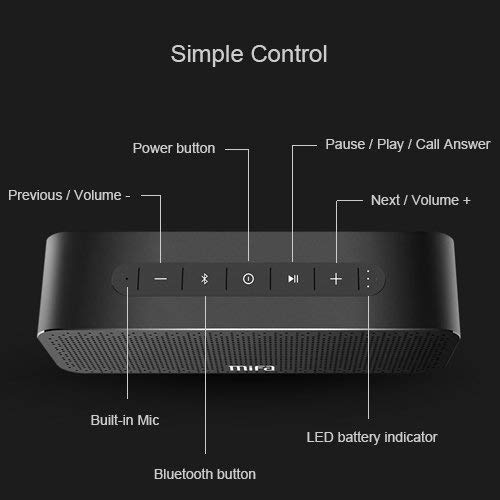
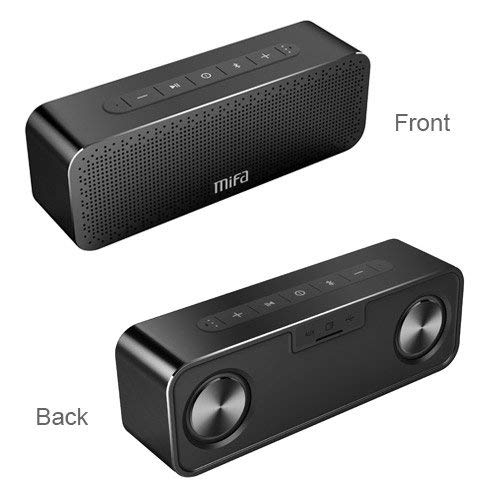
Kontrolknapper:
- Power knap: Tryk og hold for at tænde/slukke.
- Bluetooth knap: Tryk på for at gå ind i Bluetooth-parringstilstand.
- Play/Pause / Call Answer Button: Press to play/pause music; press to answer/end calls.
- Previous / Volume - Button: Press to go to previous track; press and hold to decrease volume.
- Next / Volume + Button: Press to go to next track; press and hold to increase volume.
Indicators and Ports:
- Indbygget mikrofon: Til håndfri opkald.
- LED batteriindikator: Viser batteristatus.
- Opladningsport: USB-port til opladning.
- AUX-indgang: 3.5 mm jackstik til kablet lydforbindelse.
- Micro SD -kortplads: Til afspilning af musik direkte fra et Micro SD-kort (op til 32 GB).
5. Opsætning
5.1 Opladning af højttaleren
Before first use, fully charge the speaker. Connect the provided USB charging cable to the speaker's charging port and the other end to a USB power adapter (not included) or a computer's USB port. The LED indicator will show charging status and turn off when fully charged.
5.2 Bluetooth -parring
- Turn on the MIFA A20 speaker by pressing and holding the Power button.
- The speaker will automatically enter Bluetooth pairing mode, indicated by a flashing blue LED. If not, press the Bluetooth button.
- Aktiver Bluetooth på din enhed (smartphone, tablet, bærbar computer), og søg efter tilgængelige enheder.
- Select "MIFA A20" from the list of devices.
- Når parringen er afsluttet, lyser LED-indikatoren konstant blåt, og du vil høre en bekræftelseslyd.
- The speaker will automatically reconnect to the last paired device when turned on, if within range.
5.3 Ægte trådløs stereo (TWS) parring
For at opnå en bredere stereolydtage, you can pair two MIFA A20 speakers together.
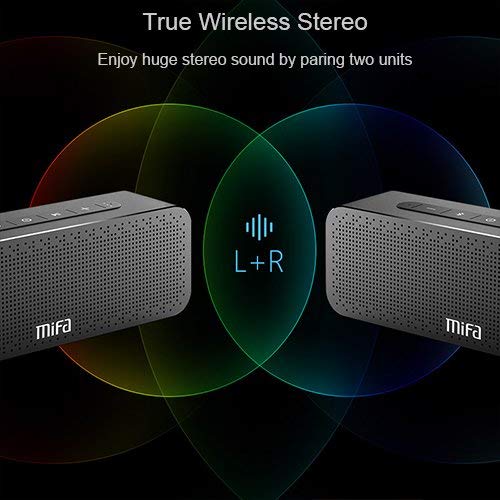
- Ensure both MIFA A20 speakers are turned on and not connected to any Bluetooth device.
- På den ene højttaler (dette vil være den primære højttaler) skal du trykke på Bluetooth-knappen og holde den nede, indtil du hører en meddelelse, der angiver TWS-parringstilstand.
- The two speakers will automatically search for and connect to each other. This may take a few seconds.
- Once connected, you will hear a confirmation sound, and the LED indicators on both speakers will change to reflect the TWS connection.
- Tilslut nu din enhed til den primære højttaler via Bluetooth som beskrevet i afsnit 5.2. Lyden afspilles i stereo gennem begge højttalere.
5.4 Using Micro SD Card
Insert a Micro SD card (up to 32GB, formatted to FAT32) with your music files into the Micro SD card slot. The speaker will automatically switch to Micro SD card mode and begin playing music.
5.5 Using AUX Input
Connect one end of the 3.5mm audio cable to the AUX input port on the speaker and the other end to the audio output jack of your non-Bluetooth device. The speaker will automatically switch to AUX mode.
6. Betjening af højttaleren
6.1 Musikafspilning
- Afspil/pause: Tryk på knappen Afspil/pause.
- Lydstyrke op: Tryk og hold Lydstyrke + knappen nede.
- Skrue ned for lyden: Tryk på lydstyrkeknappen - og hold den nede.
- Næste nummer: Short press the Next / Volume + button.
- Forrige nummer: Short press the Previous / Volume - button.
6.2 Håndfri opkald
Når højttaleren er tilsluttet via Bluetooth, kan den bruges til håndfri opkald.
- Besvar opkald: Press the Play/Pause / Call Answer button.
- Afslut opkald: Press the Play/Pause / Call Answer button during a call.
- Afvis opkald: Press and hold the Play/Pause / Call Answer button when a call comes in.
7. Vedligeholdelse
- Rensning: Brug en blød, tør klud til at rengøre højttaleren. Brug ikke slibende rengøringsmidler eller opløsningsmidler.
- Batteripleje: For at forlænge batteriets levetid bør du undgå at aflade højttaleren helt ofte. Oplad den regelmæssigt, selvom den ikke er i brug i længere perioder.
- Opbevaring: Opbevar højttaleren et køligt, tørt sted væk fra direkte sollys og ekstreme temperaturer.
- Vandtæthed: The speaker is designed to be waterproof (as per specifications). However, avoid submerging it in water for extended periods or exposing it to high-pressure water jets. Ensure charging port cover is securely closed when near water.
8. Fejlfinding
| Problem | Mulig årsag | Løsning |
|---|---|---|
| Højttaleren tænder ikke | Lavt batteri | Oplad højttaleren helt. |
| Ingen lyd | Lydstyrken er for lav; Enheden er ikke tilsluttet; Forkert inputtilstand | Increase volume on speaker and device; Ensure successful Bluetooth pairing or AUX connection; Check if correct input mode (Bluetooth/AUX/SD card) is selected. |
| Kan ikke parres via Bluetooth | Speaker not in pairing mode; Device Bluetooth off; Too far from speaker; Interference | Ensure speaker is in pairing mode (flashing blue LED); Turn on Bluetooth on your device; Move device closer to speaker; Turn off other Bluetooth devices nearby. |
| Forvrænget lyd | Volume too high; Low battery; Device too far | Reduce volume; Charge speaker; Move device closer to speaker. |
| TWS-parring mislykkes | Højttalere er allerede tilsluttet en enhed; Ikke i TWS-parringstilstand | Disconnect both speakers from any Bluetooth devices; Ensure both speakers are in TWS pairing mode. |
9. Specifikationer

| Feature | Detalje |
|---|---|
| Modelnavn | A20 |
| Materiale | Aluminium |
| Højttaler type | Bashøjttaler |
| Forbindelsesteknologi | Bluetooth, Auxiliary, Wireless |
| Bluetooth version | 4.2 |
| Wireless Range | Op til 66 fod (20 meter) |
| Højttaler Maksimal udgangseffekt | 30 watt |
| Lydudgangstilstand | Stereoanlæg |
| Surround Sound Kanalkonfiguration | 2.0 |
| Batterikapacitet | 4000 mAh |
| Batterilevetid | Op til 12 timer (ved 70 % volumen) |
| Micro SD-kort support | Op til 32 GB |
| Indbygget mikrofon | Ja |
| Er vandtæt | Ja |
| Farve | Sort |
10. Garanti og support
Garantioplysninger
The MIFA A20 Bluetooth Speaker comes with a 30 dages garanti fra købsdatoen, dækker fabrikationsfejl. Gem venligst din købsbevis i tilfælde af garantikrav.
Kundesupport
For any questions, technical assistance, or warranty inquiries, please contact MIFA customer support through the retailer's platform or the official MIFA webwebsted. Hav venligst din produktmodel og købsoplysninger klar, når du kontakter support.