
1. Introduktion
Tak for købetasing the MIFA A30 Bluetooth Speaker. This manual provides essential information for setting up, operating, and maintaining your device. Please read it thoroughly before use to ensure optimal performance and longevity of your speaker.
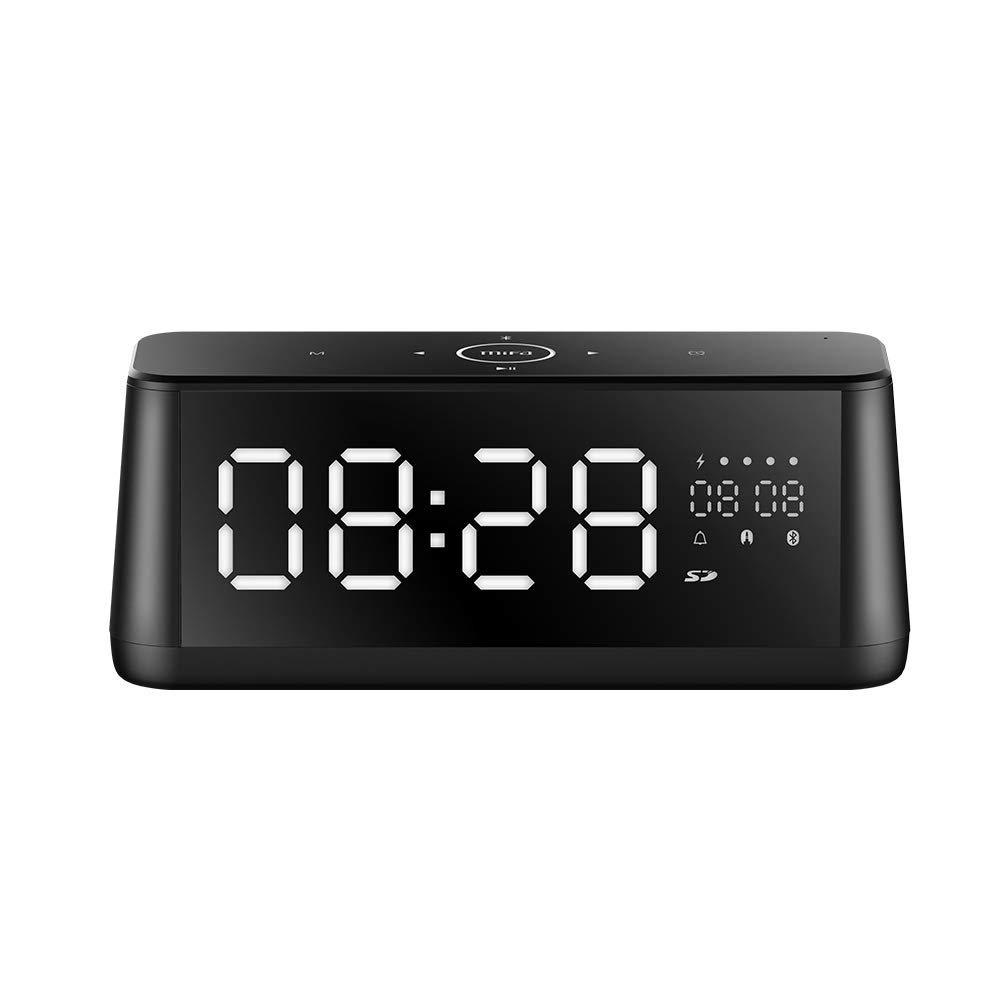
Billede 1.1: Forside view of the MIFA A30 Bluetooth Speaker, displaying the time on its large LED screen.
2. Sikkerhedsoplysninger
- Udsæt ikke højttaleren for ekstreme temperaturer, direkte sollys eller høj luftfugtighed.
- Undgå at tabe eller udsætte højttaleren for kraftige stød.
- Du må ikke selv adskille, reparere eller ændre enheden. Kontakt autoriseret servicepersonale for eventuelle reparationer.
- Keep the speaker away from water and other liquids, despite its waterproof rating, to prevent damage to ports when open.
- Brug kun det specificerede opladningskabel og den specificerede adapter.
- Rengør højttaleren med en blød, tør klud. Brug ikke slibende rengøringsmidler.
3. Pakkens indhold
Tjek venligst pakken for følgende varer:
- MIFA A30 Bluetooth Speaker
- USB opladningskabel
- 3.5 mm lydkabel
- Brugervejledning (dette dokument)
4. Produktet er slutview
4.1. komponenter
The MIFA A30 speaker features a robust design with advanced audio components for high-quality sound reproduction.

Billede 4.1: Eksploderet view illustrating the internal components of the MIFA A30, including two 15-watt drivers and two low-frequency passive radiators.
4.2. Control Panel and Ports
The speaker's top panel features capacitive touch controls, and the rear panel houses various connectivity ports.
Billede 4.2: Top-down view of the MIFA A30 control panel, indicating the functions of each touch button for mode, playback, volume, and clock adjustment.
- M (tilstand) knap: Tryk kort for at skifte mellem Bluetooth-, TF-kort- og AUX-tilstande.
- Bluetooth kontrol: Long press to turn off Bluetooth, short press to turn on.
- Forrige spor-knap: Kort tryk for at gå til det forrige nummer.
- Play/Pause/Hands-Free Button: Kort tryk for at afspille/sætte musik på pause. Kort tryk for at besvare/afslutte opkald. Langt tryk for at afvise opkald.
- Knappen til næste spor: Kort tryk for at gå til næste spor.
- Ur knap: Long press for clock adjustment.
- Lydstyrke op: Drej med uret for at øge lydstyrken.
- Skrue ned for lyden: Drej mod uret for at sænke lydstyrken.
- Mikrofon: Indbygget mikrofon til håndfri opkald.
- LED display: Shows time, date, battery level, and current mode.
5. Opsætning
5.1. Opladning af højttaleren
Before first use, fully charge the speaker. Connect the provided USB charging cable to the speaker's charging port and the other end to a USB power adapter (not included) or a computer's USB port. The LED display will indicate charging status.
5.2. Tænd/sluk
- For at tænde: Press and hold the Play/Pause button until the LED display lights up.
- For at slukke: Press and hold the Play/Pause button until the LED display turns off. The speaker will automatically screen out and power off to save battery after a period of inactivity.
6. Betjeningsvejledning
6.1. Bluetooth-parring
- Ensure the speaker is powered on and in Bluetooth mode (indicated by the Bluetooth icon on the LED display). If not, short press the 'M' button to switch to Bluetooth mode.
- Aktiver Bluetooth på din smartphone eller tablet, og søg efter tilgængelige enheder.
- Select "MIFA A30" from the list of devices.
- Når højttaleren er parret, udsender den en bekræftelseslyd, og Bluetooth-ikonet på displayet holder op med at blinke.
- The speaker will automatically re-connect to the last paired device when powered on, if the device is within range.
6.2. Afspilning af lyd
- Afspil/pause: Tryk kort på Play/Pause-knappen.
- Næste nummer: Tryk kort på knappen Næste spor.
- Forrige nummer: Tryk kort på knappen Forrige nummer.
- Lydstyrkejustering: Drej lydstyrkeknappen med uret for at øge lydstyrken, mod uret for at mindske lydstyrken.
6.3. Håndfri opkald
Når den er tilsluttet via Bluetooth til en smartphone:
- Besvar opkald: Tryk kort på Play/Pause-knappen.
- Afslut opkald: Tryk kort på Afspil/Pause-knappen under et opkald.
- Afvis opkald: Long press the Play/Pause button when a call comes in.
6.4. Afspilning med TF-kort
- Insert a Micro-SD (TF) card with supported audio files (FLAC/APE/MP3/WMA/WAV) into the TF card slot.
- Short press the 'M' button to switch to TF Card mode. The speaker will automatically begin playing music from the card.
6.5. AUX -indgang
- Connect one end of the 3.5mm audio cable to the speaker's AUX input port and the other end to the audio output of your device (e.g., MP3 player, computer).
- Short press the 'M' button to switch to AUX mode.
- Lyd vil nu afspilles via højttaleren fra din tilsluttede enhed.
6.6. Clock and Display Settings
- Justering af ur: Long press the Clock button to enter time setting mode. Use the Next/Previous buttons to adjust values and the Play/Pause button to confirm.
- Display Luminance: The LED display has 7 adjustable luminance levels. Refer to the full product documentation for specific adjustment steps, typically involving short presses of the Clock button or a combination with volume controls.
7. Vedligeholdelse
- Rensning: Wipe the speaker's surface with a soft, dry, lint-free cloth. Do not use liquid or aerosol cleaners.
- Opbevaring: Når højttaleren ikke er i brug i længere perioder, skal den opbevares køligt og tørt, væk fra direkte sollys og ekstreme temperaturer.
- Batteripleje: For at forlænge batteriets levetid bør du undgå at aflade batteriet helt ofte. Oplad højttaleren regelmæssigt, selvom den ikke er i brug.
8. Fejlfinding
| Problem | Mulig årsag | Løsning |
|---|---|---|
| Højttaleren tænder ikke. | Lavt batteri. | Oplad højttaleren i mindst 2 timer. |
| Ingen lyd. | Lydstyrken er for lav; forkert tilstand; enhed er ikke tilsluttet. | Increase speaker and device volume. Ensure correct mode (Bluetooth/AUX/TF Card). Re-pair Bluetooth device or check AUX cable connection. |
| Bluetooth-parring mislykkes. | Højttaler ikke i parringstilstand; enhed for langt væk; interferens | Ensure speaker is in Bluetooth mode. Move device closer to speaker. Turn off other Bluetooth devices. Try forgetting "MIFA A30" on your device and re-pairing. |
| TF Card not playing. | Forkert tilstand; ikke understøttet file format; card error. | Switch to TF Card mode. Ensure files are FLAC/APE/MP3/WMA/WAV. Reinsert TF card or try a different card. |
9. Specifikationer
| Feature | Detalje |
|---|---|
| Modelnavn | A30 |
| Højttaler type | Boghylde |
| Forbindelsesteknologi | Bluetooth 4.2, Auxiliary (3.5mm), Micro-SD (TF Card) |
| Lydudgangstilstand | Stereoanlæg |
| Højttaler Maksimal udgangseffekt | 30 watt (2 x 15W drivere) |
| Basforstærkning | Two low-frequency boosters |
| Batterikapacitet | 4000 mAh |
| Spilletid | Up to 10-12 hours (depending on volume and content) |
| Kontrolmetode | Kapacitivt berøringspanel |
| Vise | 7.2" x 2.8" Mirror LED Screen with 106 LEDs, 7-level adjustable luminance |
| Understøttede lydformater | FLAC/APE/MP3/WMA/WAV |
| Indbygget mikrofon | Yes, for hands-free calls |
| Vandtæt | Yes (Note: Ensure ports are covered for water resistance) |
| Farve | Sort |
| Monteringstype | Bordplademontering |
10. Garanti og support
The MIFA A30 Bluetooth Speaker typically comes with a 30-day warranty from the date of purchase, covering manufacturing defects. Please retain your proof of purchase for warranty claims.
For technical support, troubleshooting assistance beyond this manual, or warranty inquiries, please contact MIFA customer service through their official website or the retailer where the product was purchased. Provide your product model (A30) and purchase details when seeking support.