
Indledning
Thank you for choosing the MIFA A3 Soundbox Bluetooth Portable Speaker. This manual provides essential information for the safe and efficient use of your device. Please read it thoroughly before operating the speaker and retain it for future reference.
Sikkerhedsoplysninger
- Udsæt ikke højttaleren for ekstreme temperaturer, direkte sollys eller høj luftfugtighed.
- Undgå at tabe eller udsætte højttaleren for kraftige stød.
- Du må ikke selv adskille eller forsøge at reparere højttaleren. Kontakt kvalificeret servicepersonale.
- Keep the speaker away from water and liquids, despite its waterproof rating, to prevent damage to charging ports or internal components.
- Brug kun det specificerede opladningskabel og den specificerede adapter.
Pakkens indhold
Tjek venligst pakken for følgende varer:
- MIFA A3 Bluetooth Portable Speaker
- USB opladningskabel
- AUX lydkabel
- Brugervejledning (dette dokument)
Produkt overview
The MIFA A3 speaker features intuitive touch controls and multiple connectivity options. Familiarize yourself with the speaker's layout:
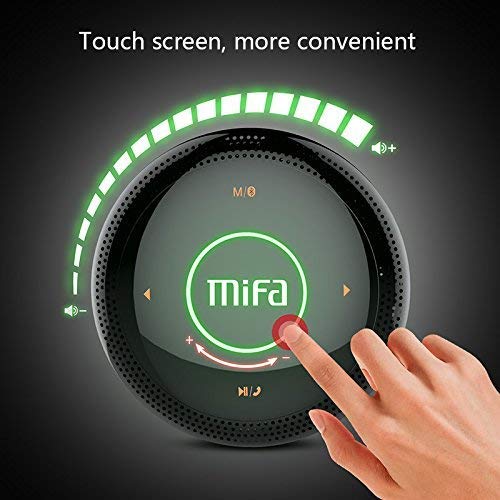
Figur 1: Top view of the MIFA A3 speaker, highlighting the touch-sensitive control panel. The panel displays volume indicators, play/pause, and track navigation buttons. A central 'Mifa' logo is also visible.
- Tryk på Kontrolpanel: Located on the top surface for volume adjustment, playback control, and mode selection.
- Mikrofon: Til håndfri opkald.
- Opladningsport: Micro USB-port til opladning.
- AUX-indgang: 3.5 mm lydstik til kablet forbindelse.
- Micro SD -kortplads: Til afspilning af musik direkte fra et hukommelseskort.
Opsætning
1. Opladning af højttaleren
Before first use, fully charge the speaker. Connect the provided USB charging cable to the speaker's charging port and the other end to a USB power adapter (not included) or a computer's USB port.
- Opladningsindikatorlampen lyser under opladning.
- The indicator will turn off or change color once fully charged.
- A full charge provides approximately 8 hours of continuous playtime.
2. Tænd/sluk
- For at tænde: Press and hold the Power button (usually integrated into the touch panel or a dedicated button) for 2-3 seconds until you hear an audible prompt or see an indicator light.
- For at slukke: Press and hold the Power button again for 2-3 seconds.
Betjeningsvejledning
1. Bluetooth-parring
- Sørg for, at højttaleren er tændt og i Bluetooth-parringstilstand (indikeret med et blinkende blåt lys eller en hørbar meddelelse).
- Aktiver Bluetooth på din enhed (smartphone, tablet, pc), og søg efter tilgængelige enheder.
- Select "MIFA A3" from the list of devices.
- Once paired, the speaker will provide an audible confirmation, and the indicator light will become solid blue.
- The speaker will automatically connect to the last-paired device when powered on, if that device's Bluetooth is active and within range.
2. AUX-forbindelse
For devices without Bluetooth, use the provided 3.5mm AUX audio cable:
- Connect one end of the AUX cable to the speaker's AUX input port.
- Tilslut den anden ende til hovedtelefonstikket på din lydenhed.
- Højttaleren skifter automatisk til AUX-tilstand.
3. Afspilning fra Micro SD-kort
Insert a Micro SD card (up to 32GB, FAT32 format) with music files into the designated slot. The speaker will automatically detect the card and begin playback.
4. Touch Control Operations
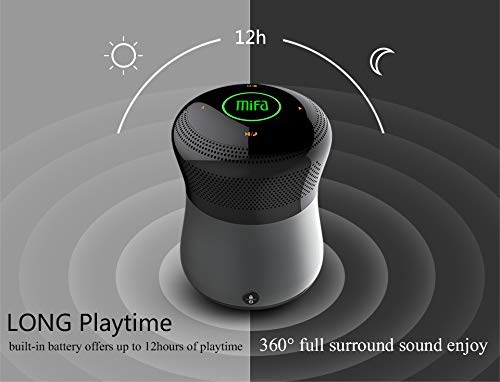
Figur 2: The MIFA A3 speaker shown with an overlay indicating "LONG Playtime" (up to 12 hours) and "360° full surround sound enjoy." This image emphasizes the speaker's battery life and audio dispersion.
- Lydstyrkekontrol: Slide your finger clockwise on the touch panel to increase volume, counter-clockwise to decrease.
- Afspil/pause: Tap the central Play/Pause icon.
- Næste nummer: Tap the "Next" arrow icon.
- Forrige nummer: Tap the "Previous" arrow icon.
- Mode Switch: Tap the "M/O" icon to cycle between Bluetooth, AUX, and Micro SD card modes.
- Låseknap: Press the lock icon to prevent accidental touch inputs.
5. Call Handling (Bluetooth Mode)
- Besvar opkald: Tap the Play/Pause icon when a call comes in.
- Afslut opkald: Tap the Play/Pause icon again.
- Afvis opkald: Press and hold the Play/Pause icon for 2 seconds.
Opretholdelse
- Rengør højttaleren med en blød, tør klud. Brug ikke slibende rengøringsmidler eller opløsningsmidler.
- Opbevar højttaleren et køligt og tørt sted, når den ikke er i brug i længere perioder.
- Charge the battery at least once every three months to maintain battery health.
Fejlfinding
| Problem | Mulig løsning |
|---|---|
| Højttaleren tænder ikke. | Sørg for, at batteriet er opladet. Tilslut til en strømkilde, og prøv igen. |
| Kan ikke parres via Bluetooth. |
|
| Ingen lyd. |
|
| Dårlig lydkvalitet. |
|
Specifikationer
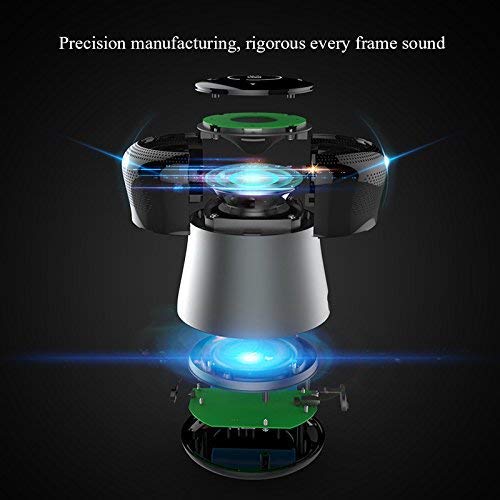
Figur 3: An exploded diagram of the MIFA A3 speaker, illustrating its internal components and structural design, emphasizing precision manufacturing.
| Model | MIFA A3 |
| Udgangseffekt | 10W |
| Forbindelse | Bluetooth 4.2, AUX, Micro SD Card |
| Batteri | 1800 mAh Li-ion |
| Spilletid | Op til 8 timer (ved 60 % volumen) |
| Opladningstid | Cirka 3-4 timer |
| Mikrofon | Indbygget til håndfri opkald |
| Vandtæt | Yes (as per product specifications, but general caution advised for ports) |
| Kontrolmetode | Røre |
| Kompatible enheder | Bærbar computer, pc, smartphone, tablet |
Garanti og support
MIFA products are designed to provide reliable performance. For warranty information or technical support, please refer to the warranty card included with your purchase or visit the official MIFA webwebsted. Gem din købsbevis til garantikrav.
For further assistance, you may contact MIFA customer support through their official channels.