
1. Introduktion
Thank you for choosing the Walfront LCD Digital Programmable Weekly Timer Switch. This device is designed for automatic control of various electrical appliances based on user-defined schedules. Please read this manual carefully before installation and operation to ensure proper use and to prevent damage.
2. Sikkerhedsoplysninger
Advarsel: Elektrisk installation bør kun udføres af kvalificeret personale. Afbryd strømmen før installation eller vedligeholdelse for at forhindre elektrisk stød.
- Sørg for, at input voltage matches the timer's specifications (24V for this model).
- Do not exceed the maximum load capacity of 16A 250VAC (resistive load).
- Hold enheden væk fra vand og for høj luftfugtighed.
- Do not attempt to disassemble or repair the unit yourself. Contact support if issues arise.
3. Produktet er slutview
The Walfront LCD Digital Programmable Weekly Timer Switch is a high-precision device built with durable, moisture-resistant, and corrosion-protected materials. It features a clear LCD display and supports up to 16 ON/OFF programs daily and weekly.
3.1 Nøglefunktioner
- High-quality construction for long lifespan.
- Automatic ON/OFF control for various electrical devices.
- Built-in 1.2V/40mA rechargeable battery for memory retention.
- Industrial-grade chip for high precision and strong anti-interference.
- Up to 16 ON and 16 OFF programming settings per day/week.
- LCD display showing real-time, hour, minute, and ON/AUTO/OFF status.
- DIN rail mounting design.
3.2 Komponenter

Billede 1: Front view of the Walfront LCD Digital Programmable Weekly Timer Switch. Shows the LCD display and control buttons.

Billede 2: Tilbage view of the timer switch, illustrating the wiring terminals and basic electrical specifications printed on the unit.
4. Opsætning og installation
This timer is designed for DIN rail mounting. Ensure the DIN rail is securely installed before attaching the timer.
4.1 Ledningsdiagram

Billede 3: Wiring diagrams showing direct connection (left) and connection with an AC contactor (right). The direct connection illustrates neutral and live wire inputs and load output. The AC contactor diagram shows 220V power input and output to the load device.
Direct Wiring: Connect the neutral and live wires to the designated input terminals (L and N). Connect the load to the output terminals (typically 3 and 4 for normally open, or 3 and 5 for normally closed, as indicated on the device). Refer to the diagram on the device for exact terminal numbering.
Wiring with AC Contactor: For higher loads, connect the timer to control an AC contactor. The timer's output will switch the coil of the contactor, which in turn controls the main power to the load. This setup is shown on the right side of Image 3.
4.2 Initial Power-Up and Battery Charging
Upon first use, connect the timer to power. The internal 1.2V/40mA rechargeable battery will begin charging. If the display is blank or shows incorrect time, allow it to charge for a few minutes. Press the "Reset" button (often labeled with a small 'R' or 'C' and requires a pointed object) to clear all settings and start fresh.
5. Betjeningsvejledning
5.1 Indstilling af aktuel tid
- Tryk på "CLOCK" button (often labeled with a clock icon) and hold it.
- Mens du holder "CLOCK", tryk på "D+" knappen for at indstille den aktuelle ugedag.
- Mens du holder "CLOCK", tryk på "H+" knappen for at indstille den aktuelle time.
- Mens du holder "CLOCK", tryk på "M+" knappen for at indstille det aktuelle minut.
- Slip "CLOCK" knappen. Tiden er nu indstillet.
5.2 Indstilling af 12/24 timers tilstand
By default, the timer operates in 24-hour mode. To switch between 12-hour (AM/PM) and 24-hour modes, press and hold the "CLOCK" button for approximately 5 seconds. The display will show "AM" for 12-hour mode or switch back to 24-hour format.
5.3 Programmering af tænd/sluk-skemaer
The timer supports up to 16 ON and 16 OFF programs. Each program consists of an ON time and an OFF time.
- Tryk på "PROG" én gang. Displayet viser "1 ON".
- Trykke "D+" to select the day(s) for this ON program (e.g., Mon-Fri, Sat-Sun, or specific days).
- Trykke "H+" for at indstille den ønskede ON-time.
- Trykke "M+" for at indstille det ønskede ON-minut.
- Trykke "PROG" igen. Displayet vil vise "1 OFF".
- Gentag trin 2-4 for at indstille OFF-tiden for det første program.
- Fortsæt med at trykke "PROG" to cycle through "2 ON", "2 OFF", up to "16 ON", "16 OFF", setting each as needed.
- Når du har indstillet alle de ønskede programmer, skal du trykke på "CLOCK" button to exit programming mode and return to real-time display.
Note: If you need to cancel a program, press the "PROG" button to select the program, then press the "MANUEL" button until "----" appears on the display for that program's time slot.
5.4 Manuel overstyring (TIL/AUTO/FRA)
Tryk på "MANUEL" knap til at gennemgå driftstilstandene:
- PÅ: Udgangen er konstant tændt og ignorerer alle programmer.
- BIL: Timeren fungerer i henhold til de programmerede TIL/FRA-skemaer.
- OFF: Udgangen er konstant OFF og ignorerer alle programmer.
Sørg for, at timeren er aktiveret "AUTO" mode for programmed operation.
5.5 Tastlåsfunktion
To prevent accidental changes to settings, the timer features a key lock function.

Billede 4: The timer display showing the key lock symbol, indicating that the buttons are locked.
- To lock the keys: Press and hold the "C/R" (Cancel/Reset) button for approximately 4 seconds until a lock symbol appears on the LCD.
- To unlock the keys: Press and hold the "C/R" button again for approximately 4 seconds until the lock symbol disappears.
6. Specifikationer
| Parameter | Værdi |
|---|---|
| Input bindtage | AC/DC 24V (This model) |
| Contact Rated Voltage | AC 180V~264V (50/60Hz) |
| Belastningskapacitet | 16A 250VAC (Ohmsk belastning) |
| ON/OFF-funktioner | 16 ON / 16 OFF (Manual/Auto) |
| Vise | LCD |
| Strømforbrug | 4.5VA (Max) |
| Fejl | ≤2 seconds/day (at 25℃) |
| Monteringsmetode | DIN Rail (sold separately) |
| Timing Range | 1 minut til 168 timer |
| Minimum interval | 1 minut |
| Driftstemperatur | -10℃ til 55℃ |
| Driftsfugtighed | 35-85% RF |
| Dimensioner (L x B x H) | 86 x 36 x 65 mm |
| Internt batteri | 1.2V/40mA rechargeable, >15 days backup |
| Antal kredsløb | Changeover switch (SPDT) |
| Servicelevetid | Mechanical: 107, Electrical: 105 |
| Vægt | 125 g |
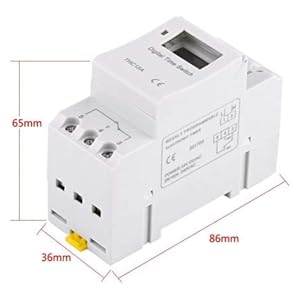
Billede 5: Diagram illustrating the dimensions of the timer switch: 86mm length, 36mm width, and 65mm height.
7. Vedligeholdelse
- Hold timeren ren og fri for støv. Brug en tør, blød klud til rengøring.
- Brug ikke slibende rengøringsmidler eller opløsningsmidler.
- Kontroller jævnligt ledningsforbindelserne for at sikre, at de er sikre.
- The internal battery is designed for long life and typically does not require replacement. If the timer loses settings frequently after power outages, the battery may need servicing by a qualified technician.
8. Fejlfinding
| Problem | Mulig årsag | Løsning |
|---|---|---|
| Displayet er tomt. | No power supply or internal battery discharged. | Check power connections. Allow the timer to charge for a few minutes after connecting to power. |
| Timeren tænder/slukker ikke som programmeret. | Timer is not in "AUTO" mode, programs are incorrect, or key lock is active. | Press "MANUAL" until "AUTO" is displayed. Review and correct programs. Unlock keys if necessary. |
| Knapperne reagerer ikke. | Key lock function is active. | Press and hold "C/R" for 4 seconds to unlock the keys. |
| Tiden er unøjagtig. | Minor drift (within specifications) or internal battery issue. | Reset and re-set the time. If inaccuracy persists or settings are lost frequently, contact support. |
9. Garanti og support
Walfront strives to provide high-quality products. If you encounter any issues with your product, please contact us for prompt assistance. We offer return and refund services for product defects.
For support, please refer to the contact information provided with your purchase or visit the Walfront store on Amazon: Walfront Amazon Store.