
Yaheetech YA-00097936
Yaheetech Multistore 2002 Computerbord Brugermanual
Model: YA-00097936 | Mærke: Yaheetech
Indledning
Tak, fordi du har valgt Yaheetech Multistore 2002 computerbordet. Denne manual indeholder detaljerede instruktioner til montering, betjening, vedligeholdelse og fejlfinding for at sikre sikker og effektiv brug af dit nye skrivebord. Læs venligst denne manual grundigt, inden du begynder montering eller brug, og gem den til senere brug.
Sikkerhedsoplysninger
- Opbevar alle dele og emballagematerialer utilgængeligt for børn.
- Saml skrivebordet på en blød, ren overflade for at forhindre ridser.
- Sørg for, at alle skruer og fastgørelseselementer er forsvarligt fastspændt før brug. Kontroller regelmæssigt og efterspænd efter behov.
- Overbelast ikke skrivebordet. Se afsnittet "Specifikationer" for vægtkapacitet.
- Undgå at placere varme genstande direkte på skrivebordets overflade.
- Vær forsigtig, når du flytter bordet, især på ujævne overflader. Sørg for, at hjulene er låst op, hvis du flytter det.
Reservedelsliste
Før montering skal du kontrollere, at alle nedenstående komponenter er til stede og ubeskadigede. Hvis der mangler eller er beskadigede dele, bedes du kontakte kundesupport.

Figur 1: eksploderede view af skrivebordet, der viser hovedkomponenterne og deres navne. Dette billede fremhæver de tunge MDF-plader, den fortykkede ramme, den glatte stålkugleskuffe, den åbne midterste hylde, den åbne bundhylde og de låsbare hjul.
- A: Topbræt (1 stk.)
- B: Midterste hylde (1 stk.)
- C: Nederste hylde (1 stk.)
- D: Siderammer (2 stk.)
- E: Skuffefront (1 stk.)
- F: Skuffesider (2 stk.)
- G: Skuffebagstykke (1 stk.)
- H: Skuffebund (1 stk.)
- I: Skuffeskinner (2 sæt)
- J: Hjul (4 stk., 2 låsbare)
- K: Hardwarepakke (skruer, bolte, unbrakonøgle)
Monteringsvejledning
Følg disse trin omhyggeligt for korrekt montering. Det anbefales at være to personer til monteringen.
- Trin 1: Fastgør hjul til siderammer.
Fastgør forsigtigt de fire hjul (J) til bunden af de to siderammer (D). Sørg for, at de to låsbare hjul er placeret på forsiden for nem adgang. Spænd dem forsvarligt med den medfølgende skruenøgle.

Figur 2: Detalje af et drejehjul fastgjort til skrivebordets metalramme. Dette viser det robuste forbindelsespunkt og hjulets design.
- Trin 2: Saml hovedrammen.
Fastgør den nederste hylde (C) og den midterste hylde (B) til siderammerne (D) med de passende skruer fra beslagpakken (K). Spænd ikke skruerne helt, før alle dele er justeret.
- Trin 3: Saml skuffen.
Saml skuffekomponenterne (E, F, G, H) med de medfølgende skruer. Sørg for, at skuffebunden (H) glider korrekt ind i rillerne. Fastgør skuffeskinnerne (I) på siderne af den samlede skuffe.

Figur 3: Skrivebordets udtræksskuffe, vist delvist åben, afslører dets indvendige rum. Dette billede demonstrerer skuffens funktionalitet og kapacitet.
- Trin 4: Monter skuffeskinner på skrivebordsstellet.
Fastgør den anden del af skuffeskinnerne (I) til de angivne punkter på skrivebordets hovedramme, lige under hvor den øverste bræt skal sidde. Sørg for, at de er i vater og justeret.

Figur 4: En detaljeret view af den glatte stålkugleskuffemekanisme. Dette fremhæver kvaliteten af skuffens glidekomponenter.
- Trin 5: Fastgør toppladen.
Placer topbrættet (A) på den samlede ramme og fastgør det med skruer. Sørg for, at alle forborede huller flugter.
- Trin 6: Indsæt skuffen.
Skub forsigtigt den samlede skuffe ind i de installerede skuffeskinner, indtil den klikker på plads.
- Trin 7: Endelig tilspænding.
Når alle komponenter er på plads og justeret, skal alle skruer og fastgørelseselementer strammes helt. Spænd ikke for hårdt.
Betjeningsvejledning
Yaheetech Multistore 2002 computerbordet er designet til alsidig brug i forskellige omgivelser, herunder hjemmekontorer, stuer eller soveværelser.

Figur 5: Computerbordet er placeret ved siden af en sofa i en stue, hvilket viser dets kompakte størrelse og egnethed til små rum. En bærbar computer er placeret på overfladen.
- Placering: Placer skrivebordet på en flad, stabil overflade. Hvis det bruges på et tæppe, skal du sørge for, at hjulene kan bevæge sig frit.
- Mobilitet: For at flytte skrivebordet skal du låse de to låsbare hjul op ved at vippe deres håndtag. Skub eller træk forsigtigt skrivebordet til dets ønskede placering. Når det er på plads, skal du låse hjulene for at forhindre utilsigtet bevægelse.
- Opbevaring:
- Den øverste overflade er egnet til bærbare computere, skærme eller skrivning.
- Den udtrækkelige skuffe giver lukket opbevaring til små genstande som kuglepenne, notesbøger eller eksterne harddiske.
- Den åbne midterste hylde er ideel til bøger, dokumenter eller små elektroniske enheder.
- Den åbne bundhylde kan rumme større genstande såsom en CPU-tower, printer eller opbevaringskasser.
- Vægt kapacitet: Overhold den maksimale vægtkapacitet, der er angivet i afsnittet "Specifikationer", for at forhindre skader.
Opretholdelse
Regelmæssig vedligeholdelse vil forlænge levetiden og udseendet af dit Yaheetech Multistore 2002 computerbord.
- Rensning: Tør overflader af med en blød, damp klud. Undgå at bruge skrappe kemikalier, slibende rengøringsmidler eller polermidler, der kan beskadige finishen.
- Spild: Tør spild op med det samme for at forhindre pletter eller beskadigelse af MDF-pladerne.
- Fastgørelsesmidler: Kontrollér regelmæssigt alle skruer og fastgørelseselementer for at sikre, at de forbliver stramme. Spænd efter behov for at opretholde stabiliteten.
- Hjul: Hold hjulene fri for snavs (hår, støv osv.) for at sikre en jævn bevægelse.
- Sollys/varme: Undgå langvarig udsættelse for direkte sollys eller ekstrem varme, da dette kan forårsage falmning eller vridning.
Fejlfinding
Hvis du støder på problemer med dit skrivebord, kan du se følgende almindelige problemer og løsninger:
| Problem | Mulig årsag | Løsning |
|---|---|---|
| Skrivebordet er vakkelvornt. | Løse fastgørelseselementer; ujævnt gulv. | Sørg for, at alle skruer er helt spændt. Flyt skrivebordet til en plan overflade, eller brug om nødvendigt afstandsskiver. |
| Skuffen glider ikke jævnt. | Skuffeudtræk er forkert justeret; snavs i skinnerne. | Kontroller, at skuffeskinner er korrekt installeret og justeret. Rengør skinnerne for støv og snavs. |
| Hjulene ruller ikke frit. | Hjul låst; snavs i hjulene. | Lås hjulene op, hvis de er i indgreb. Fjern hår eller snavs fra hjulene. |
| Manglende dele efter udpakning. | Emballagefejl. | Kontakt Yaheetechs kundesupport med dine købsoplysninger og de specifikke manglende dele. |
Specifikationer
Detaljerede dimensioner og materialeinformation for Yaheetech Multistore 2002 computerbordet.
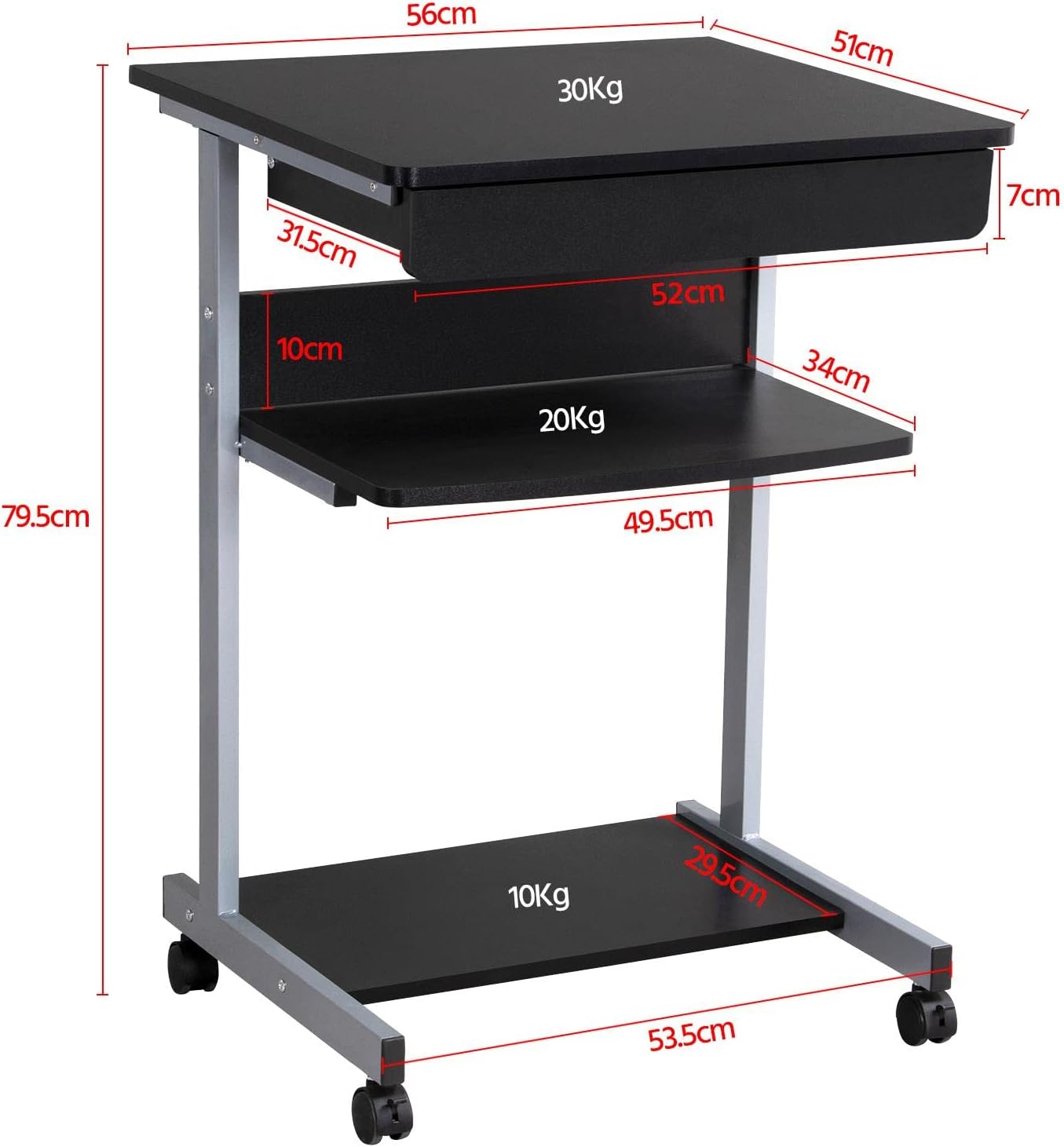
Figur 6: Detaljeret måltegning af skrivebordet, inklusive mål for samlet højde, bredde, dybde og individuelle hylde- og skuffemål. Viser også vægtkapaciteter for hver overflade.
| Feature | Detalje |
|---|---|
| Modelnummer | YA-00097936 |
| Overordnede mål (L x B x H) | 56 x 51 x 79.5 cm (22 x 20.1 x 31.3 tommer) |
| Øverste bræts dimensioner | 56 x 51 cm (22 x 20.1 tommer) |
| Skuffemål (indre) | 45 x 30 x 6 cm (17.7 x 11.8 x 2.4 tommer) |
| Mål på midterste hylde | 50 x 34 cm (19.7 x 13.4 tommer) |
| Mål på den nederste hylde | 50 x 30.5 cm (19.7 x 12 tommer) |
| Materiale | MDF (mediumdensitetsfiberplade) med metalramme |
| Farve | Sort |
| Nettovægt | Ca. 10.9 kg (24 lbs) |
| Maks. lasteevne (topbræt) | 30 kg (66 lbs) |
| Maks. lasteevne (midterste hylde) | 20 kg (44 lbs) |
| Maks. lasteevne (nederste hylde) | 10 kg (22 lbs) |
| Hjul | 4 (2 med låsemekanisme) |
Garanti og support
Yaheetech-produkter er fremstillet efter høje kvalitetsstandarder. For specifikke garantioplysninger henvises til garantikortet, der følger med dit produkt, eller besøg den officielle Yaheetech-side. webHvis du har spørgsmål, har brug for hjælp til montering eller har brug for at rapportere manglende/beskadigede dele, bedes du kontakte vores kundesupportteam:
- Webwebsted: www.yaheetech.com (Se venligst for regionale webwebsteder)
- E-mail: Se din købsdokumentation for kundeservice-e-mailadresse.
- Telefon: Se din købsdokumentation for kundeservices telefonnummer.
Når du kontakter support, bedes du have dit modelnummer (YA-00097936) og købsdatoen klar.
Ask a question about this manual
Ask about setup, troubleshooting, compatibility, parts, safety, or missing instructions. Manuals+ will review the question and use this page’s manual context to help answer it.