
1. Introduktion
Tak for købetasing the Yenkee YKB 3200 Gaming Keyboard. This manual provides essential information for the proper setup, operation, and maintenance of your new keyboard. Please read this manual thoroughly before using the product to ensure optimal performance and longevity.
2. Sikkerhedsoplysninger
- Hold tastaturet væk fra væsker og overdreven fugt.
- Udsæt ikke tastaturet for ekstreme temperaturer.
- Undgå at tabe tastaturet eller udsætte det for hårde stød.
- Do not attempt to disassemble or repair the keyboard yourself. Refer all servicing to qualified personnel.
- Brug kun en tør, blød klud til rengøring.
3. Pakkens indhold
Kontroller venligst pakkens indhold ved udpakning. Hvis der mangler eller er beskadigede dele, skal du kontakte din forhandler.
- Yenkee YKB 3200 Gaming Keyboard with integrated smartphone holder
- USB-kabel (medfølger)
4. Produktet er slutview
The Yenkee YKB 3200 is a robust gaming keyboard designed for an enhanced gaming experience. It features a durable metal construction, responsive rubber dome keys, and dynamic rainbow backlighting.
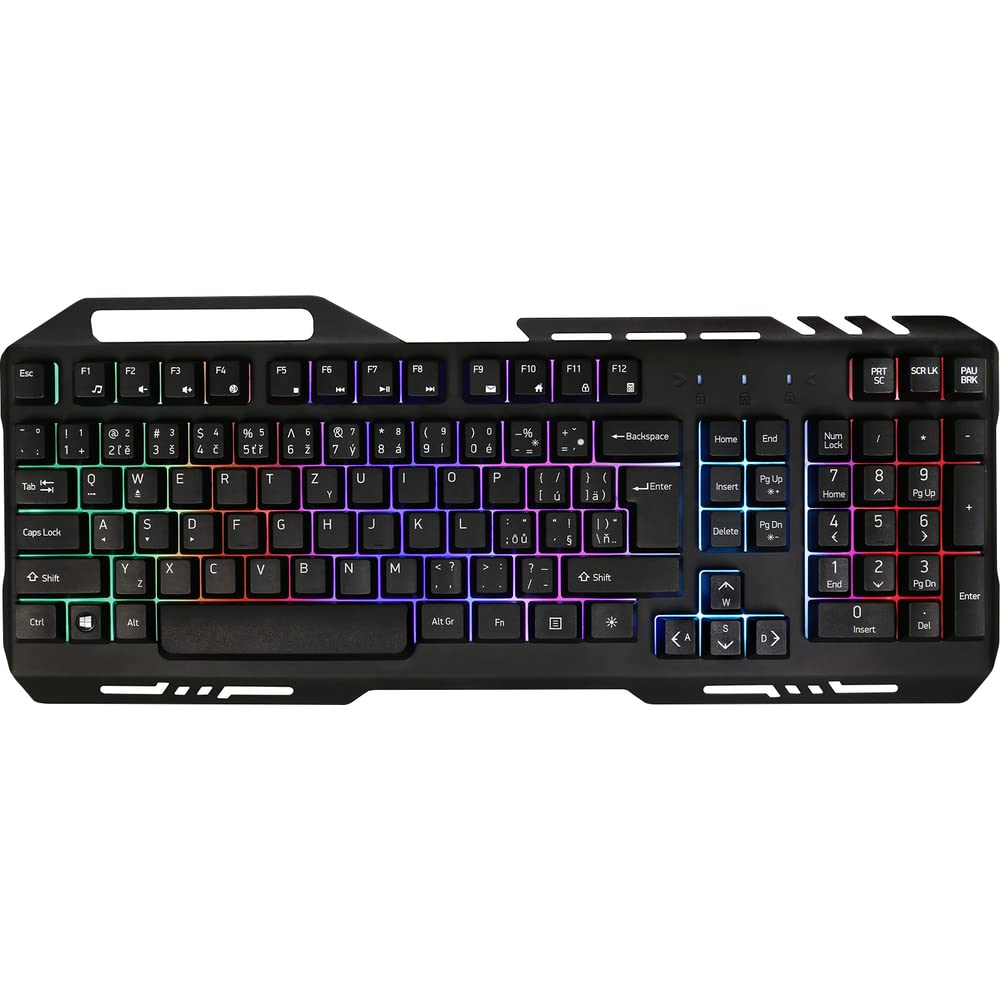
Image 1: Yenkee YKB 3200 Gaming Keyboard. This image displays the full keyboard with its metal frame and illuminated keys, highlighting the integrated smartphone holder at the top.
Nøglefunktioner:
- Metal Keyboard Design: Provides enhanced durability and a premium feel.
- Integrated Smartphone Holder: Conveniently located at the top of the keyboard for easy access to your mobile device.
- Durable Rubber Dome Keys: Offers a comfortable and responsive typing experience.
- Nine Rainbow Backlight Modes: Customizable lighting effects to suit your preference and gaming atmosphere.
- USB-forbindelse: Simple plug-and-play connection to your computer.
- 1.5m Cable Length: Giver amprækkevidde til forskellige opsætninger.
5. Opsætning
- Pak tastaturet ud: Tag forsigtigt tastaturet ud af emballagen.
- Tilslut til computer: Locate an available USB port on your computer (PC or laptop). Insert the USB connector of the keyboard into the USB port.
- Driver installation: The keyboard is plug-and-play and typically does not require additional driver installation. Your operating system should automatically detect and install the necessary drivers.
- Placering: Place the keyboard on a stable, flat surface. You can use the integrated smartphone holder to position your mobile device.
- Test funktionalitet: Open a text editor or browser to test if the keys are responding correctly.
6. Betjeningsvejledning
Baggrundslys kontrol:
The Yenkee YKB 3200 features nine distinct rainbow backlight modes. These modes can typically be cycled through using a dedicated function key combination.
- Ændring af tilstande: Look for a key labeled 'FN' (Function) and a key with a light bulb icon or 'Scroll Lock' / 'Pause Break'. Pressing FN + Light Bulb / Scroll Lock / Pause Break (depending on keyboard layout) will cycle through the available backlight modes.
- Justering af lysstyrke: Some keyboards allow brightness adjustment using FN + Up/Down Arrow keys. Refer to your specific keyboard layout for exact key combinations.
- Tænd/sluk baggrundsbelysning: A long press of the backlight control key or a specific FN combination might turn the backlight on or off.
Multimedie- og funktionstaster:
The keyboard may include additional function keys (F1-F12) that, when combined with the 'FN' key, provide multimedia control or quick access to applications. Common functions include:
- FN + F1-F12: Volume control, media playback, email, web browser, etc. (Specific functions vary by model).
7. Vedligeholdelse
Rensning:
- Generel rengøring: Brug en blød, tør og fnugfri klud til at tørre tastaturets overflade af.
- Fjernelse af støv: Brug trykluft til at fjerne støv og snavs mellem tasterne.
- Genstridige pletter: Ved genstridige pletter, let dampen the cloth with water or a mild, non-abrasive cleaning solution. Ensure no liquid enters the keyboard.
Opbevaring:
Når tastaturet ikke er i brug i længere perioder, skal det opbevares køligt og tørt, væk fra direkte sollys og ekstreme temperaturer.
8. Fejlfinding
| Problem | Mulig årsag | Løsning |
|---|---|---|
| Tastaturet reagerer ikke | Løs USB-forbindelse, defekt USB-port, driverproblem. | Ensure USB cable is securely connected. Try a different USB port. Restart your computer. |
| Baggrundslys virker ikke | Baggrundsbelysning slukket, lav lysstyrkeindstilling. | Press the backlight control key combination (e.g., FN + Scroll Lock) to cycle modes or adjust brightness. |
| Tasterne er klæbrige eller reagerer ikke | Dirt or debris under keys. | Clean the keyboard using compressed air and a soft cloth. |
9. Specifikationer
| Feature | Specifikation |
|---|---|
| Mærke | Yenkee |
| Modelnummer | YKB 3200 |
| Forbindelsesteknologi | USB |
| Kabellængde | 1.5 meter |
| Tastaturbeskrivelse | Spil |
| Backlight Theme | Rainbow (9 modes) |
| Kompatible enheder | Laptop, PC |
| Produktdimensioner | 45.2 x 20 x 3.5 cm |
| Produktets vægt | 841 g |
| Inkluderede komponenter | USB cable (attached) |
10. Garanti og support
Yenkee products are designed and manufactured to the highest quality standards. For information regarding warranty terms and conditions, please refer to the warranty card included with your purchase or visit the official Yenkee website. For technical support or service inquiries, please contact your local retailer or the Yenkee customer support team.