
Rowkin Ascent Charge+
Rowkin Ascent Charge+ True Wireless Earbuds User Manual
Model: Ascent Charge+ (NAAT10AA)
1. Introduktion
Welcome to the user manual for your Rowkin Ascent Charge+ True Wireless Earbuds. This guide provides comprehensive instructions for setting up, operating, maintaining, and troubleshooting your new earbuds. Please read this manual thoroughly to ensure optimal performance and longevity of your device.
Hvad er der i æsken
- 2 Bluetooth-øretelefoner
- 1 bærbar opladningsetui
- 1 Dual-Function Portable Charger (integrated with case)
- 1 USB-C ladekabel
- 3 Sets of Ear Tips (Small, Medium, Large)
- 1 Qi trådløs opladningsplade
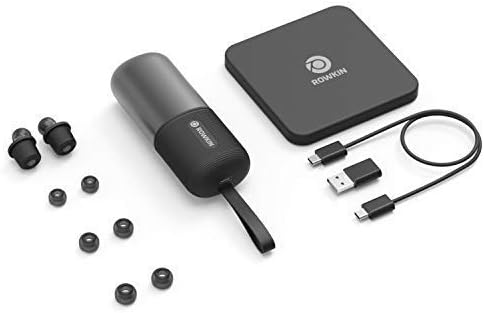
Sørg for, at alle elementer er til stede, før du fortsætter med opsætningen.
2. Produktet er slutview
The Rowkin Ascent Charge+ system consists of two true wireless earbuds and a versatile charging case that also functions as a power bank and supports Qi wireless charging.

Nøglekomponenter
- høretelefoner Each earbud features a dynamic driver for premium sound, a microphone for calls, and capacitive touch controls.
- Opladningsetui: Stores and charges the earbuds. It supports both USB-C and Qi wireless charging. The case also functions as a power bank for other mobile devices.
- Qi trådløs opladningsplade: Provided for convenient wireless charging of the case.
3. Opsætning
3.1 Indledende opladning
Before first use, fully charge the portable charging case and the earbuds.
- Place the earbuds into their respective slots in the charging case. Ensure they are seated correctly to initiate charging.
- Sådan oplades sagen:
- Via USB-C: Tilslut det medfølgende USB-C-kabel til opladningsporten på etuiet og til en USB-strømkilde.
- Via Qi trådløs opladning: Place the charging case on the included Qi wireless charging pad. Ensure the case is centered on the pad for efficient charging.

The charging case provides over 50 hours of music/play time for the earbuds, allowing for approximately 15 full charges of the earbuds.
3.2 Bluetooth -parring
The Ascent Charge+ earbuds feature easy auto-on pairing.
- Sørg for, at øretelefonerne er opladet.
- Fjern begge ørepropper fra opladningsetuiet. De tændes automatisk og går i parringstilstand.
- Gå til Bluetooth-indstillingerne på din enhed (smartphone, tablet osv.).
- Select "Rowkin Ascent Charge+" from the list of available devices.
- Når der er oprettet forbindelse, hører du en hørbar bekræftelse, og indikatorlamperne på ørepropperne skifter.

Ørepropperne genopretter automatisk forbindelse til den sidst parrede enhed, når de tages ud af etuiet, hvis Bluetooth er aktiveret på enheden.
3.3 Achieving the Best Fit
Proper fit is crucial for sound quality and comfort. The Ascent Charge+ comes with three sizes of ear tips (Small, Medium, Large).
- Experiment with different ear tip sizes to find the one that creates a comfortable seal in your ear canal. A good seal enhances bass response and noise isolation.
- Gently insert the earbud into your ear and twist slightly to secure it. The secure retention wheel helps keep the earbud in place.

4. Betjening
4.1 Capacitive Touch Controls
The Ascent Charge+ earbuds feature intuitive touch controls for managing audio playback and calls.
- Afspil/pause: Et enkelt tryk på begge øretelefoner.
- Næste nummer: Dobbelttryk på den højre øreprop.
- Forrige nummer: Dobbelttryk på den venstre øreprop.
- Besvar/afslut opkald: Enkelt tryk på begge øretelefoner under et indgående opkald.
- Afvis opkald: Tryk og hold nede på en af øretelefonerne under et indgående opkald.
- Aktivér stemmeassistent (Siri/Google Assistant): Tryk tre gange på en af øretelefonerne.
4.2 Rowkin App Features
Enhance your experience with the accompanying Rowkin app, available for iOS and Android devices.

- Batteri Percentage: View the current battery level of each earbud.
- Lyd-equalizer: Customize your audio experience with various sound profileeller lav din egen.
- "Find My Earbuds": Use the in-app locator to help find misplaced earbuds. The app records the last known location where the earbuds were connected.
5. Vedligeholdelse
To ensure the longevity and optimal performance of your Ascent Charge+ earbuds, follow these maintenance guidelines:
- Rensning: Regularly clean the earbuds and charging case with a soft, dry, lint-free cloth. Do not use abrasive cleaners or solvents. For ear tips, remove them and clean with mild soap and water, then dry thoroughly before reattaching.
- Vandtæthed: The earbuds are IPX5 water resistant, meaning they can withstand splashes and sweat. They are not designed for submersion in water. Do not expose them to running water or wear them while swimming. Ensure earbuds are dry before placing them back in the charging case.
- Opbevaring: When not in use, store the earbuds in their charging case to protect them and keep them charged. Store the case and earbuds in a cool, dry place away from extreme temperatures.
- Batteripleje: For best battery health, avoid fully discharging the case or earbuds frequently. Charge them regularly.
6. Fejlfinding
If you encounter issues with your Ascent Charge+ earbuds, refer to the following common solutions:
| Problem | Mulig årsag | Løsning |
|---|---|---|
| Øretelefoner parrer ikke med enheden | Øretelefoner er ikke i parringstilstand; Bluetooth slukket på enheden; tidligere parrede enheder forstyrrer. | Ensure earbuds are removed from case. Turn Bluetooth off and on again on your device. Forget "Rowkin Ascent Charge+" from your device's Bluetooth list and re-pair. |
| Kun én øreprop afspiller lyd | One earbud not connected; low battery on one earbud. | Place both earbuds back in the charging case for a few seconds, then remove them. Ensure both are charged. |
| Øretelefoner oplader ikke i tilfælde af | Poor contact; case battery low. | Ensure earbuds are correctly seated in the case. Clean charging contacts on earbuds and case. Charge the case. |
| Poor sound quality / low bass | Improper ear tip fit; ear tips dirty. | Try different ear tip sizes to achieve a better seal. Clean ear tips and earbud nozzles. |
| Berøringskontroller reagerer ikke | Earbuds need reset; dirty touch surface. | Place earbuds in case, close lid, wait 10 seconds, then remove. Clean the touch surface. |
For further assistance, please refer to the Rowkin app or visit the official Rowkin support webwebsted.
7. Specifikationer
Detailed technical specifications for the Rowkin Ascent Charge+ True Wireless Earbuds:
| Feature | Specifikation |
|---|---|
| Modelnavn | Ascent Charge+ |
| Varemodelnummer | NAAT10AA |
| Forbindelsesteknologi | Trådløs |
| Trådløs kommunikationsteknologi | Bluetooth 5.0 |
| Frekvensrespons | 20Hz - 20kHz |
| Batterilevetid (ørepropper) | Op til 3.5 timer (enkelt opladning) |
| Samlet spilletid med opladningsetui | 50+ timer |
| Opladningsgrænseflade | USB-C, Qi trådløs opladning |
| Vandmodstandsniveau | IPX5 (vandtæt) |
| Kontroltype | Kapacitiv berøring |
| Mikrofon | Inkluderet |
| Materiale | Mylar |
| Varens vægt | 4.9 g (samlet pakke) |
| Produktdimensioner | 4.45 x 1.71 x 1.28 tommer |
8. Garanti og support
Rowkin products are designed for durability and performance. For information regarding warranty coverage and terms, please refer to the warranty card included with your product or visit the official Rowkin webwebsted.
For teknisk support, ofte stillede spørgsmål eller for at kontakte kundeservice, besøg venligst Rowkin Store on Amazon eller producentens officielle supportkanaler.