1. Introduktion
This manual provides essential information for the safe and efficient operation of your Zerone 10.8V-12V Lithium Battery Charger. This charger is designed for use with 10.8V to 12V Lithium-Ion batteries, offering quick and reliable charging. Please read this manual thoroughly before first use and retain it for future reference.

Image 1: The Zerone 10.8V-12V Lithium Battery Charger, showing its compact design and universal compatibility label.
2. Sikkerhedsinstruktioner
Always observe the following safety precautions to reduce the risk of electric shock, fire, or serious injury:
- Læs alle instruktioner: Før du bruger opladeren, skal du læse alle instruktioner og advarselsmærker på opladeren, batteriet og produktet, der bruger batteriet.
- Kun indendørs brug: Udsæt ikke opladeren for regn eller våde forhold.
- Korrekt bindtage: Sørg for, at strømforsyningen voltage matcher voltagsom angivet på opladerens typeplade.
- Undgå skader: Brug ikke opladeren, hvis den har fået et hårdt slag, er blevet tabt eller på anden måde er beskadiget. Tag den med til en kvalificeret servicetekniker.
- Ventilation: Do not block any ventilation openings. Ensure adequate airflow around the charger during operation.
- Tag stikket ud, når det ikke er i brug: Always unplug the charger from the power outlet before attempting any maintenance or cleaning, and when not in use.
- Use specified batteries: Only charge batteries specifically designed for this charger. Charging other battery types may cause them to burst, leading to personal injury and damage.
- Kortslut ikke: Kortslut aldrig batteripolerne.
- Holdes væk fra børn: Dette apparat er ikke beregnet til brug af personer (inklusive børn) med nedsatte fysiske, sensoriske eller mentale evner, eller mangel på erfaring og viden, medmindre de har fået opsyn eller instruktion i brugen af apparatet af en person, der er ansvarlig for deres sikkerhed.
3. Pakkens indhold
Kontroller, at alle varer er til stede og i god stand:
- 1 x Zerone 10.8V-12V Lithium Battery Charger
- 1 x brugermanual
4. Produktfunktioner
The Zerone 10.8V-12V Lithium Battery Charger offers the following key features:
- Universal kompatibilitet: Specifically designed for 10.8V to 12V Lithium-Ion batteries.
- LED-indikator: Built-in LED display provides intuitive monitoring of battery status.
- Smart Charging Management: Utilizes a 'first in, first charged' system and protects against overload.
- Hurtig opladning: Capable of charging a 12V Lithium-Ion 1.5Ah battery in approximately 50 minutes.
- Wide Model Compatibility: Compatible with models such as DC10WD, DC10SB, DC10WC, BL1015, BL1016, BL1021B, and BL1041B.

Image 2: The charger displaying its compatibility with various battery models, including DC10WD, DC10SB, DC10WC, BL1015, BL1016, BL1021B, and BL1041B.
5. Opsætning
Følg disse trin for at konfigurere din batterioplader:
- Pak opladeren ud: Carefully remove the charger and all components from the packaging.
- Tilslut til strøm: Plug the charger's power cord into a standard 100V-260V AC electrical outlet. The charger's LED indicator will flash green once to confirm power connection.
- Forbered batteri: Ensure the battery to be charged is clean and free from debris.
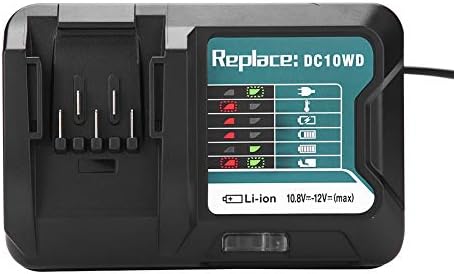
Image 3: The Zerone charger with its integrated power cord, ready for connection to an electrical outlet.
6. Betjeningsvejledning
Sådan oplader du et batteri:
- Indsæt batteri: Juster batteriet med opladerens stik, og skub det ind, indtil det klikker sikkert på plads.
- Skærmopladning: The LED indicator will show the charging status. Refer to the "LED Indicator Guide" section for detailed explanations of the light patterns.
- Opladning fuldført: Once the battery is fully charged, the LED indicator will show a solid green light.
- Fjern batteri: Press the release button on the battery (if applicable) and slide it out of the charger.
- Tag opladeren ud af stikkontakten: Tag opladeren ud af stikkontakten, når den ikke er i brug.

Image 4: The Zerone charger with a compatible lithium-ion battery inserted, ready for charging.
7. LED-indikatorguide
The charger features an LED display to communicate the battery's status:
| Indikatorlys | Status |
|---|---|
| Grøn blinker | Opladeren er tilsluttet og klar. |
| Rød Blinker | Battery is in cooling mode. Charging will begin once the battery temperature is within the optimal range. |
| Red Sustained Light | Battery is currently charging (0-100%). |
| Green Sustained Light | Charging is completed. The battery is fully charged. |
| Red and Green Flashing | Indicates a defective battery pack or charger. |

Billede 5: Et nærbillede view of the charger's LED indicator panel, detailing the meaning of each light pattern for battery status.
8. Vedligeholdelse
Proper maintenance ensures the longevity and performance of your charger:
- Rensning: Frakobl opladeren fra strømforsyningen før rengøring. Tør opladerens yderside af med en tør, blød klud. Brug ikke vand eller kemiske rengøringsmidler.
- Opbevaring: Store the charger in a dry, cool place, away from direct sunlight and moisture.
- Inspicer regelmæssigt: Periodically inspect the charger and its cord for any signs of damage. If damage is found, discontinue use and seek professional repair.
9. Fejlfinding
Hvis du støder på problemer med din oplader, kan du se følgende almindelige problemer og løsninger:
- Opladeren tænder ikke:
- Sørg for, at netledningen er korrekt tilsluttet både opladeren og en fungerende stikkontakt.
- Kontroller stikkontakten med en anden enhed for at bekræfte, at den fungerer.
- Battery not charging (Red Flashing LED):
- The battery may be too hot or too cold. Allow the battery to reach room temperature before attempting to charge again. Charging will automatically resume once the temperature is optimal.
- Battery not charging (Red and Green Flashing LED):
- This indicates a defective battery or charger. Try charging a different, known-good battery. If the issue persists, the charger may be faulty. If only the original battery causes this, the battery is likely defective.
- Langsom opladning:
- Sørg for, at batteriet er helt isat i opladeren.
- Verify that the battery is compatible with this charger.
Hvis disse trin ikke løser problemet, bedes du kontakte kundesupport.
10. Specifikationer
| Specifikation | Detalje |
|---|---|
| Modelnummer | Zeronegfvetp6dn8-01 |
| Input bindtage | 100V-260V AC, 50-60Hz |
| Udgang Voltage | 10.8V-12V (jævnstrøm) |
| Produktdimensioner | 4.72 x 1.97 x 5.91 tommer |
| Varens vægt | 11.6 ounce (0.33 kilo) |
| Fabrikant | Nul |
| Kompatible batterityper | 10.8V-12V Lithium-Ion (e.g., BL1015, BL1016, BL1021B, BL1041B) |
| Kompatible opladermodeller | DC10WD, DC10SB, DC10WC |

Image 6: The bottom view of the Zerone charger, showing its input/output specifications and model number.
11. Garanti og support
For warranty information or technical support, please refer to the documentation provided with your purchase or contact Zerone customer service through the retailer where the product was purchased. Keep your purchase receipt as proof of purchase.