
1. Introduktion
This manual provides detailed instructions for the proper setup, operation, and maintenance of your SUNLUX XL5500 CCD USB Barcode Reader. Please read this manual thoroughly before using the device to ensure optimal performance and longevity.
2. Sikkerhedsoplysninger
Overhold følgende sikkerhedsforanstaltninger for at forhindre skader på enheden eller personskade:
- Udsæt ikke enheden for ekstreme temperaturer, fugt eller direkte sollys.
- Undgå at tabe enheden eller udsætte den for kraftige stød.
- Do not attempt to disassemble or modify the barcode reader. This will void the warranty.
- Hold scanningsvinduet rent for at sikre nøjagtig stregkodeaflæsning.
- Brug kun det medfølgende USB-kabel til tilslutning.
3. Pakkens indhold
Bekræft at alle varer er til stede i pakken:
- SUNLUX XL5500 CCD USB Barcode Reader
- USB -tilslutningskabel
- Brugervejledning (dette dokument)
4. Produktet er slutview
The SUNLUX XL5500 is a handheld CCD barcode reader designed for efficient and reliable scanning of various 1D barcodes. Its ergonomic design ensures comfortable use during extended periods.
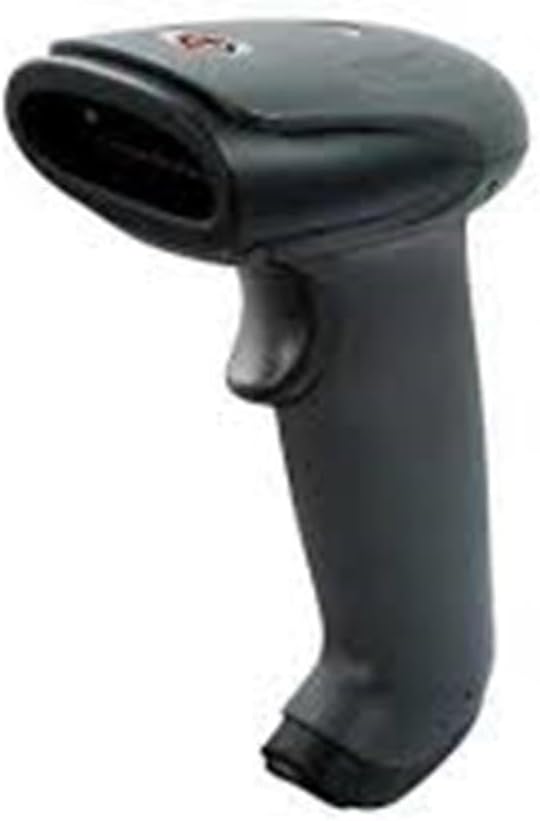
An image showing the SUNLUX XL5500 handheld barcode reader. It features a dark gray ergonomic handle, a trigger button on the top, and a scanning window at the front.
5. Opsætning
Follow these steps to set up your barcode reader:
- Tilslut USB-kablet: Insert the smaller end of the USB cable into the port at the base of the barcode reader.
- Tilslut til computer: Sæt den større ende af USB-kablet i en ledig USB-port på din computer.
- Driver installation: The barcode reader is typically plug-and-play. Your operating system should automatically detect and install the necessary drivers. Wait for the installation to complete (usually indicated by a notification).
- Test forbindelse: Open a text editor (e.g., Notepad, Word) or any application that accepts keyboard input. The device is ready for use when it is recognized by the system.
6. Betjeningsvejledning
To operate the SUNLUX XL5500 barcode reader:
- Tænd: The device powers on automatically when connected to a USB port.
- Sigt og scan: Point the scanning window of the reader at the barcode you wish to scan. Ensure the entire barcode is within the scanning area.
- Tryk på udløseren: Press the trigger button located on the handle. A red scanning line will emit from the window.
- Bekræftelse: A successful scan is typically indicated by an audible beep and/or a visual LED indicator. The scanned data will appear in the active application on your computer.
Supported Barcode Types:
- EAN-8, EAN-13, UPC-A, UPC-E
- Kode 39, kode 93, kode 128
- Codabar, Interleaved 2 of 5, Industrial 2 of 5
- Matrix 2 of 5, MSI, China Post
7. Vedligeholdelse
Proper maintenance ensures the longevity and performance of your barcode reader:
- Rengøring af scanningsvinduet: Brug en blød, fnugfri klud, let drænetampened with water or a mild, non-abrasive cleaner, to gently wipe the scanning window. Do not use harsh chemicals or abrasive materials.
- Rengøring af ydersiden: Tør enhedens yderside af med en blød, tør klud.
- Opbevaring: When not in use, store the barcode reader in a clean, dry environment, away from direct sunlight and extreme temperatures.
8. Fejlfinding
If you encounter issues with your barcode reader, refer to the following table:
| Problem | Mulig årsag | Løsning |
|---|---|---|
| Læseren tænder ikke. | USB-kablet er ikke korrekt tilsluttet, eller USB-porten er defekt. | Ensure the USB cable is securely connected to both the reader and the computer. Try a different USB port. |
| Stregkoden scannes ikke. | Barcode damaged, scanning window dirty, or incorrect aiming. | Clean the scanning window. Ensure the barcode is not damaged. Aim the scanning line directly across the entire barcode. |
| Scannede data vises forkert. | Keyboard language settings mismatch or corrupted data. | Verify your computer's keyboard language settings. Rescan the barcode. |
| No beep sound after scanning. | Beeper disabled or faulty. | Refer to advanced configuration options (if available) to enable the beeper. If not, the scan may still be successful if data appears. |
9. Tekniske specifikationer
| Feature | Specifikation |
|---|---|
| Model | XL5500 |
| Kategori | CCD Reader |
| Mærke | Sunlux |
| Forbindelsesteknologi | USB kabel |
| Strømkilde | Kablet elektrisk |
| Produktdimensioner | 20 x 15 x 10 cm |
| Vægt | 500 gram |
| Varenummer | 2053871 |
10. Garanti og support
Garantioplysninger:
The SUNLUX XL5500 CCD USB Barcode Reader comes with a standard manufacturer's warranty. Please refer to your purchase documentation or contact your retailer for specific warranty terms and conditions.
Kundesupport:
For technical assistance, troubleshooting beyond this manual, or warranty claims, please contact your point of purchase or the official SUNLUX customer support channels. Have your product model and serial number ready when contacting support.