
BoxWave bw-1173-16092-8831
BoxWave SlimKeys Bluetooth Keyboard User Manual
Model: bw-1173-16092-8831
Indledning
The BoxWave SlimKeys Bluetooth Keyboard is a portable, ultra-thin keyboard designed for seamless connectivity with your Bluetooth-enabled devices, including the Samsung Galaxy A6 (2018). Its chiclet-style keys provide a comfortable typing experience, making it ideal for productivity on the go. This manual provides detailed instructions for setting up, operating, maintaining, and troubleshooting your SlimKeys Bluetooth Keyboard.
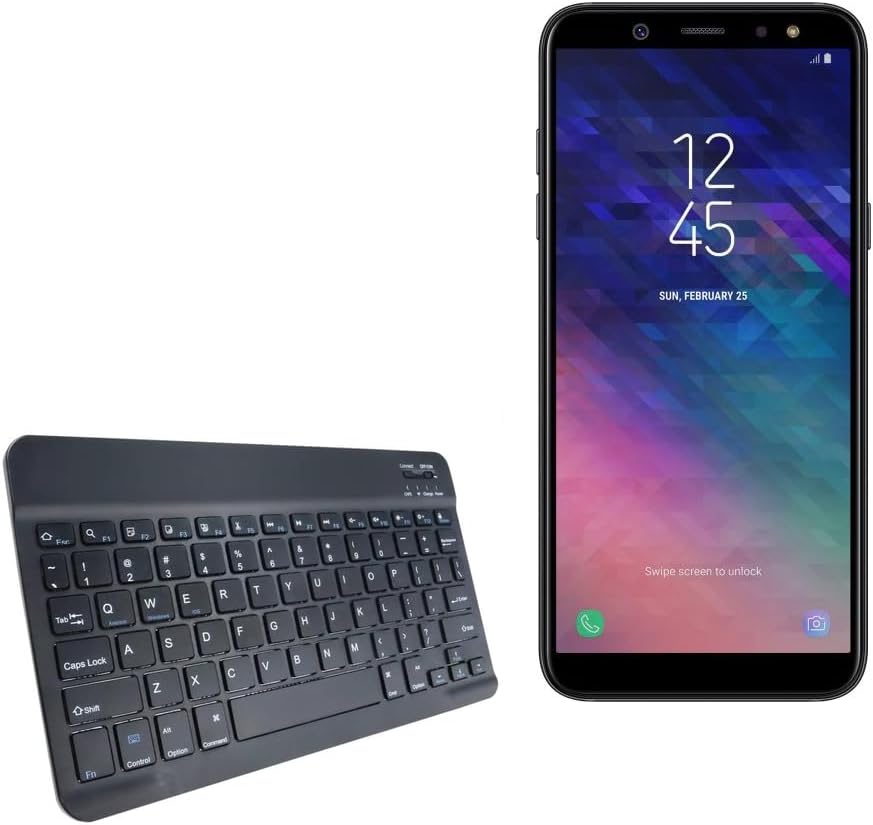
Image: The SlimKeys Bluetooth Keyboard shown alongside a compatible Samsung Galaxy A6 (2018) device, highlighting its compact size.
Opsætning
Opladning af tastaturet
Before initial use, ensure your SlimKeys Bluetooth Keyboard is fully charged. Use the included charging cable to connect the keyboard to a USB power source (e.g., computer USB port, USB wall adapter). The charging indicator light will illuminate during charging and turn off when fully charged.

Billede: En detaljeret view of the keyboard's charging port, demonstrating how to connect the charging cable for its long-lasting battery.
Bluetooth-parring
- Tænd: Locate the ON/OFF switch on the keyboard (usually on the top right) and slide it to the 'ON' position. The power indicator light will briefly illuminate.
- Gå ind i parringstilstand: Press the 'Connect' button (often located near the ON/OFF switch or as a dedicated key). The Bluetooth indicator light will start blinking, indicating the keyboard is in pairing mode.
- Aktivér Bluetooth på din enhed: On your Samsung Galaxy A6 (2018) or other compatible device, go to 'Settings' > 'Connections' > 'Bluetooth' and turn Bluetooth ON.
- Vælg tastatur: Your device will scan for available Bluetooth devices. Select 'BoxWave SlimKeys Keyboard' (or similar name) from the list.
- Bekræft parring: Follow any on-screen prompts to complete the pairing process. You may be asked to enter a code displayed on your device using the keyboard and then press Enter. Once paired, the Bluetooth indicator light on the keyboard will stop blinking.
The keyboard supports Bluetooth 3.0 for quick and reliable pairing across Android, Windows, and iOS platforms.
Betjeningsvejledning
Grundlæggende brug
Once paired, the SlimKeys Bluetooth Keyboard functions like a standard keyboard. Simply open any application that requires text input (e.g., messaging app, word processor) and begin typing. The chiclet-style keys are designed for quiet and comfortable typing.

Image: A user's hands demonstrating comfortable and efficient typing on the SlimKeys keyboard.
Specialiserede funktionstaster
The SlimKeys Bluetooth Keyboard includes specialized function keys (F1-F12) that provide quick access to common commands. These functions are typically accessed by pressing the Fn tasten samtidig med den ønskede funktionstast.
| Nøglekombination | Fungere |
|---|---|
| Fn + Esc (F1) | Hjem |
| Fn + F2 | Søg |
| Fn + F3 | Vælg alle |
| Fn + F4 | Kopi |
| Fn + F5 | Skære |
| Fn + F6 | Spring tilbage |
| Fn + F7 | Afspil / pause |
| Fn + F8 | Spring fremad |
| Fn + F9 | Lydstyrke ned |
| Fn + F10 | Lydstyrke op |
| Fn + F11 | Lysstyrke ned |
| Fn + F12 | Lysstyrke op |
| Fn + Slet | Låse |

Image: A visual guide to the specialized function keys available on the SlimKeys keyboard for quick access to various commands.
Opretholdelse
Rensning
For at rengøre dit tastatur skal du forsigtigt tørre overfladen af med en blød, fnugfri klud. Ved genstridigt snavs eller skidt skal du forsigtigt tørre den af.ampRengør kluden med vand eller en mild, ikke-slibende rengøringsopløsning. Undgå for meget fugt, og sprøjt ikke rengøringsmidler direkte på tastaturet.
Opbevaring
When not in use, store the keyboard in a cool, dry place away from direct sunlight and extreme temperatures. Its ultra-thin design allows for easy storage in bags or cases, making it ideal for travel.

Image: The SlimKeys keyboard being stored in a bag, emphasizing its convenience for travel and compact design.
Fejlfinding
- Tastatur opretter ikke forbindelse/parrer ikke:
- Sørg for, at tastaturet er opladet og tændt.
- Sørg for, at Bluetooth er aktiveret på din enhed.
- Ensure the keyboard is in pairing mode (Bluetooth indicator blinking).
- Glem enheden i din telefons Bluetooth-indstillinger, og prøv at parre igen.
- Restart both the keyboard (turn off/on) and your device.
- Taster reagerer ikke:
- Check if the keyboard is still connected via Bluetooth.
- Sørg for, at tastaturet har tilstrækkelig batteriopladning.
- Prøv at parre tastaturet med din enhed igen.
- Lag eller forsinket input:
- Ensure there are no strong interferences (e.g., other Bluetooth devices, Wi-Fi routers) nearby.
- Flyt tættere på din enhed.
- Genoplad tastaturet.
Specifikationer
- Modelnummer: bw-1173-16092-8831
- Forbindelse teknologi: Bluetooth 3.0
- Tastaturbeskrivelse: Wireless, Chiclet-Style Keys
- Farve: Jet Black
- Varens vægt: 7.7 ounce
- Pakkedimensioner: 11.06 x 6.81 x 0.55 tommer
- Speciel funktion: Lightweight, Ultra-Thin Design (3/16 inch thick)
- Batterier: 1 produktspecifikt batteri (inkluderet)
- Fabrikant: BoxWave
- Oprindelsesland: Kina

Image: A diagram illustrating the precise dimensions of the SlimKeys keyboard, emphasizing its compact and lightweight form factor.
Garanti og support
For warranty information or technical support, please contact BoxWave Corporation directly. Refer to the product packaging or the official BoxWave webwebstedet for de seneste kontaktoplysninger og garantivilkår.
BoxWave Corporation
Webwebsted: www.boxwave.com
Ask a question about this manual
Ask about setup, troubleshooting, compatibility, parts, safety, or missing instructions. Manuals+ will review the question and use this page’s manual context to help answer it.