
1. Introduktion
Thank you for choosing the Bagotte SH020 3MP 1296P FHD Wireless IP Camera. This manual provides detailed instructions for setting up, operating, and maintaining your camera to ensure optimal performance and security. Please read this manual carefully before use and keep it for future reference.
2. Pakkens indhold
Sørg for at alle varer er til stede i pakken:
- 1 x Bagotte SH020 IP Camera
- 1 x strømadapter
- 1 x USB-kabel
- 1 x monteringsbeslag
- 2 x skruer
- 1 x brugermanual
3. Produktet er slutview
The Bagotte SH020 is a 3MP 1296P Full HD wireless IP camera designed for indoor surveillance. It features pan and tilt functionality, infrared night vision, two-way audio, motion detection, and local storage via a MicroSD card.

Billede 1: Forside view of the Bagotte SH020 3MP 1296P FHD Wireless IP Camera.

Image 2: Diagram illustrating the components of the Bagotte SH020 camera, including the IR sensor, lens, MicroSD card slot, antenna, network interface, power input, and reset button.
4. Opsætning
4.1. Tænder
- Tilslut USB-kablet til kameraets strømindgang.
- Sæt strømadapteren i en almindelig stikkontakt.
- The camera will power on and initiate its startup sequence. Wait for the indicator light to flash, indicating it's ready for setup.
4.2. App Installation
Download the recommended mobile application (e.g., SriHome or MIPC, as mentioned in product reviews) from your device's app store (Google Play Store for Android or Apple App Store for iOS). Søg efter 'SriHome' or 'MIPC' and install the application.
4.3. Tilslutning til Wi-Fi
- Open the installed application and create an account or log in.
- Follow the in-app instructions to add a new device. This usually involves scanning a QR code located on the camera or manually entering the device ID.
- Sørg for, at din mobilenhed er forbundet til et 2.4 GHz Wi-Fi-netværk. Kameraet understøtter ikke 5 GHz Wi-Fi.
- Indtast din Wi-Fi-netværksadgangskode, når appen beder dig om det.
- The camera will attempt to connect to your Wi-Fi network. Once connected, the indicator light will typically turn solid blue or green, and the app will confirm successful pairing.
4.4. Montering af kameraet
The camera can be placed on a flat surface or mounted to a wall or ceiling using the provided bracket and screws.
- Vælg en passende placering for optimal overvågningsdækning.
- Attach the mounting bracket to the desired surface using the screws.
- Securely attach the camera to the mounting bracket. Ensure it is firmly in place.
5. Betjening af kameraet
5.1. Lev View og kontrol
Access the live video feed through the mobile application. You can remotely control the camera's pan (355°) and tilt (90°) movements to adjust the viewing angle. The app also supports 4x digital zoom.
Video 1: Seller's operation video demonstrating the camera's pan, tilt, auto-tracking, mobile phone view, two-way audio, MicroSD card slot, and infrared night vision features.
5.2. Tovejslyd
The camera features a built-in microphone and speaker, enabling two-way audio communication. Use the microphone icon in the app to speak through the camera and listen to audio from the camera's location.
5.3. Nattesyn
Equipped with 10 IR LEDs, the camera provides clear infrared night vision up to 10 meters, ensuring surveillance even in complete darkness. The IR-Cut filter automatically switches between day and night modes.
5.4. Bevægelsesdetektion og alarmer
The camera supports motion detection with adjustable sensitivity. When motion is detected, the camera can trigger an alarm, send push notifications to your phone, and initiate recording. Advanced AI features include auto motion tracking and humanoid detection.
5.5. Optagelse og lagring
The camera supports MicroSD cards up to 128GB for local storage of recordings. Recording modes include motion-activated, timed, and manual recording. You can playback recorded footagdirekte fra appen.
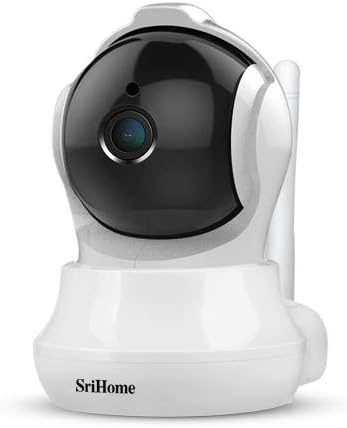
Image 3: The Bagotte SH020 camera positioned in a room, demonstrating its discreet design and wide viewvinkel.
6. Vedligeholdelse
- Rensning: Use a soft, dry cloth to clean the camera lens and body. Avoid harsh chemicals or abrasive materials.
- Firmwareopdateringer: Regularly check the mobile application for available firmware updates to ensure your camera has the latest features and security enhancements.
- MicroSD-kort: If using a MicroSD card, periodically check its status and ensure sufficient storage space. Back up important recordings as needed.
7. Fejlfinding
- Kameraet opretter ikke forbindelse til Wi-Fi: Ensure your Wi-Fi network is 2.4GHz. Verify the Wi-Fi password is correct. Move the camera closer to the router. Reset the camera using the reset button and try again.
- Dårlig videokvalitet: Check your internet connection speed. Ensure the camera lens is clean. Adjust video resolution settings in the app.
- Bevægelsesdetektion virker ikke: Verify motion detection is enabled in the app settings. Adjust sensitivity levels and detection zones.
- Ingen lyd: Check volume settings in the app. Ensure the microphone and speaker are not obstructed.
8. Specifikationer
| Feature | Specifikation |
|---|---|
| Video opløsning | 3MP, 1296P (2304*1296), H.264 |
| Pan/tilt rækkevidde | Panorering: 355°, Tilt: 90° |
| Linse | 3.6 mm |
| Night Vision Range | Op til 10 meter (10 IR-LED'er) |
| Lyd | To-vejs lyd (indbygget mikrofon og højttaler) |
| Opbevaring | MicroSD-kort (op til 128 GB) |
| Trådløs forbindelse | Wi-Fi (kun 2.4 GHz) |
| Bevægelsesdetektion | Yes, with AI Auto Motion Tracking and AI Humanoid Detection |
| Strømforsyning | DC 5V, 1A |
| Dimensioner | 7.3 x 7.6 x 10 cm |
| Vægt | 380 g |
9. Garanti og support
For warranty information and technical support, please refer to the documentation included with your product or visit the official Bagotte webwebsted. Behold din købskvittering som købsbevis i tilfælde af garantikrav.