
Canyon CND-GPW5
Canyon Gaming Gamepad CND-GPW5 Trådløs med Touchpad Brugermanual
Model: CND-GPW5
Indledning
Denne manual indeholder omfattende instruktioner til Canyon Gaming Gamepad CND-GPW5, en trådløs controller designet til PlayStation 4 med en integreret touchpad. Læs venligst denne manual omhyggeligt, inden du bruger produktet, for at sikre korrekt betjening og for at maksimere din spiloplevelse.

Billede: Forside view af Canyon Gaming Gamepad CND-GPW5, vistasing dens ergonomiske design, dobbelte analoge pinde, retningspad, handlingsknapper og centrale touchpad.
Pakkens indhold
- Canyon Gaming Gamepad CND-GPW5
- USB opladningskabel
- Brugervejledning (dette dokument)

Billede: Canyon Gaming Gamepad CND-GPW5 vist i sin detailemballage med fremhævelse af vigtige funktioner som trådløs forbindelse, touchpad og vibrationsfeedback.
Opsætning
1. Opladning af gamepad'en
- Tilslut den lille ende af USB-opladerkablet til opladningsporten på gamepad'en.
- Tilslut den større ende af USB-opladerkablet til en USB-port på din PlayStation 4-konsol eller en kompatibel USB-vægadapter.
- Indikatorlampen på gamepad'en lyser for at vise, at den oplader. Den slukker eller skifter farve, når den er fuldt opladet.
2. Parring med PlayStation 4
- Sørg for, at din PlayStation 4-konsol er tændt.
- For den første parring skal du tilslutte gamepad'en til PS4-konsollen ved hjælp af USB-opladerkablet.
- Tryk på PS-knap (placeret i midten af gamepad'en). Gamepad'en tændes og parres automatisk med konsollen.
- Når den er parret, kan du frakoble USB-kablet for trådløs afspilning.
- For at parre trådløst efter den første opsætning skal du blot trykke på PS-knap på gamepad'en. Den vil forsøge at oprette forbindelse til den sidst parrede konsol.
Betjeningsvejledning
Gamepad-layout og -funktioner

Billede: Bagside view af Canyon Gaming Gamepad CND-GPW5, der viser de programmerbare knapper M1, M2, M3 og M4 sammen med lovgivningsmæssige oplysninger.
- Analoge pinde: Bruges til præcis bevægelse og kamerakontrol.
- Retningstastatur (D-pad): Til menu navigation og specifikke handlinger i spillet.
- Handlingsknapper (Trekant, Cirkel, Kryds, Firkant): Udfør forskellige handlinger i spillet.
- Skulderknapper (L1, R1) og aftrækkere (L2, R2): Til sigte, affyring og andre kontekstuelle handlinger.
- PS-knap: Tænder gamepad'en, åbner PS4-startmenuen og skifter bruger.
- DEL-knap: Deler skærmbilleder og videoklip.
- INDSTILLINGER-knap: Giver adgang til menuer og muligheder i spillet.
- Touchpad: Fungerer som en klikbar overflade til navigation og specifikke spilinteraktioner.
- M1, M2, M3, M4 knapper: Disse er ekstra programmerbare knapper, der er placeret på bagsiden af gamepad'en. Se dit spils indstillinger eller PS4-systemindstillingerne for at se tilpasningsmuligheder.
Feedback om vibrationer
Gamepad'en har vibrationsfeedback for at forbedre fordybelsen under spillet. Denne funktion aktiveres automatisk, når den understøttes af spillet.
Opretholdelse
Rensning
- Tør gamepad'en af med en blød, tør klud.
- Brug ikke flydende rengøringsmidler, opløsningsmidler eller slibende materialer, da disse kan beskadige overfladen og de indvendige komponenter.
Opbevaring
- Opbevar gamepad'en et køligt, tørt sted væk fra direkte sollys og ekstreme temperaturer.
- Undgå at placere tunge genstande på gamepad'en.
Batteripleje
- For at forlænge batteriets levetid bør du undgå at aflade gamepad'en helt ofte.
- Hvis gamepad'en opbevares i længere tid, skal den oplades til cirka 50% før opbevaring.
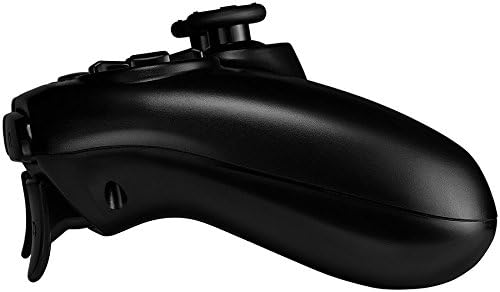
Billede: Side profile af Canyon Gaming Gamepad CND-GPW5, der illustrerer dens konturerede greb og placering af triggerknappen.
Fejlfinding
- Gamepad'en forbinder ikke:
- Sørg for, at gamepad'en er opladet.
- Tilslut gamepad'en til PS4-konsollen med USB-kablet, og tryk på PS-knappen for at genoprette forbindelsen.
- Kontroller for interferens fra andre trådløse enheder.
- Knapper eller analoge pinde reagerer ikke:
- Genstart gamepad'en ved at holde PS-knappen nede i 10 sekunder, og tryk derefter på den igen for at tænde.
- Sørg for, at gamepadens firmware er opdateret (tjek Canyons officielle webwebsted for opdateringer, hvis tilgængelige).
- Opladningsproblemer:
- Prøv et andet USB-kabel eller en anden USB-port på konsollen/adapteren.
- Sørg for, at opladningsporten på gamepad'en er ren og fri for snavs.
Hvis problemerne fortsætter, bedes du se supportsektionen eller kontakte Canyon kundeservice.
Specifikationer
| Feature | Detalje |
|---|---|
| Modelnummer | CND-GPW5 (Varemodelnummer: 9598241) |
| Forbindelse | Trådløs |
| Kompatibilitet | PlayStation 4 |
| Funktioner | Touchpad, vibrationsfeedback |
| Batteri | 1 litium-ion-batteri (påkrævet) |
| Produktmål (L x B x H) | 50 x 50 x 28 cm |
| Vægt | 224 gram |
| ASIN | B07G37JCMC |
| Udgivelsesdato | 1. juli 2020 |
Garanti og support
For information om garantidækning henvises til garantikortet, der følger med dit produkt, eller besøg den officielle Canyon-side. webwebsted. For teknisk support eller yderligere assistance, kontakt venligst Canyon kundeservice via deres officielle supportkanaler.
Officiel kløft Webwebsted: https://canyon.eu/
Relaterede dokumenterCND-GPW5


Ask a question about this manual
Ask about setup, troubleshooting, compatibility, parts, safety, or missing instructions. Manuals+ will review the question and use this page’s manual context to help answer it.