
1. Introduktion
Thank you for choosing the Facmogu S800 Mini Stereo AmpDenne enhed er designet til at levere lyd i høj kvalitet amplification for both home and car audio systems, featuring Bluetooth connectivity, AUX input, and USB sound card functionality. This manual provides detailed instructions for the proper setup, operation, and maintenance of your amplifier for at sikre optimal ydeevne og lang levetid.
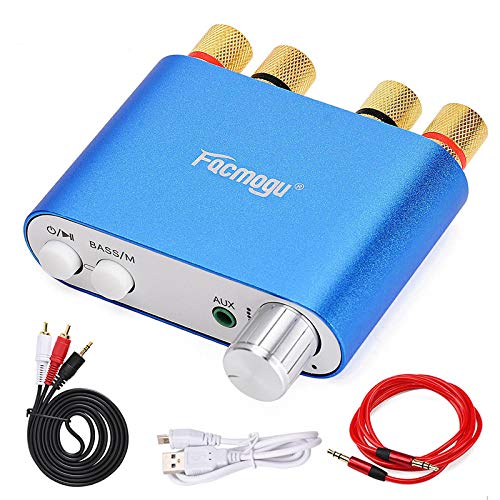
Figure 1: Facmogu S800 Mini Stereo Amplivligere
2. Produktet er slutview
2.1 Nøglefunktioner
- Dual-Channel Output: Provides 50W x 2 stereo amplifikation.
- Flere lydindgange: Supports Bluetooth 4.0 + EDR, 3.5mm AUX, and USB sound card input.
- Enhanced Bass Function: Adjustable bass settings available in Bluetooth mode.
- EMI Troubleshooting Design: Built-in design to reduce interference from other electronic devices.
- Kompakt og bærbar: Mini size (80 × 53 × 22mm) and lightweight (105g) for versatile use.
- Nem tilstandsskift: Dedicated 'M' button to switch between Bluetooth and AUX functions.
2.2 Pakkens indhold
Tjek venligst pakken for følgende varer:
- 1 × Facmogu S800 Bluetooth Amplivligere
- 1 × Audio Signal Cable (1.2m length)
- 1 × AV Audio Signal Cable (1.5m length)
- 1 × USB-kabel

Figur 2: Pakkens indhold
3. Opsætning
3.1 Tilslutning af højttalere
- Identify the left (L) and right (R) channel speaker terminals on the rear of the amplivligere.
- Connect your passive speakers to the corresponding terminals. Ensure correct polarity (positive to positive, negative to negative) for optimal sound quality.
3.2 Strømtilslutning
- Locate the DC9V-24V IN power input port on the rear of the amplivligere.
- Connect a compatible DC power adapter (not included in all packages, ensure it meets 9-24V, minimum 3A, and at least 50W output) to this port.
- Sæt strømadapteren i en stikkontakt.
3.3 Lydindgangsmuligheder
S800 amplifier supports three audio input methods:
- Bluetooth: For wireless connection from your smartphone, tablet, or other Bluetooth-enabled devices.
- AUX (3.5 mm): For wired connection from devices with a 3.5mm audio output.
- USB lydkort: Connect to a computer via the USB port for high-fidelity audio playback without drivers.

Figure 3: Rear Panel Connections (Power Input, USB Sound, Right/Left Channels)
4. Betjeningsvejledning

Figure 4: Front Panel Controls (Power, Mode, AUX, Volume)
4.1 Tænd/sluk
- For at tænde for ampløfter, langt tryk the power button (O/II) for 2 seconds. The working indicator will illuminate.
- For at slukke, langt tryk the power button again for 2 seconds.
4.2 Afspilningskontrol
- While playing audio, kort tryk the power button (O/II) to pause playback.
- Kort tryk it again to resume playback.
4.3 Modeskift
- The 'M' button (BASS/M) is used to switch between Bluetooth mode and AUX audio input mode.
- Press the 'M' button to cycle through available input modes.
4.4 Lydstyrkejustering
- Drej lydstyrkeknappen med uret for at øge lydstyrken.
- Drej lydstyrkeknappen mod uret for at sænke lydstyrken.
4.5 Bass Function
- The bass function is only active in Bluetooth mode.
- To adjust bass sound effects, langt tryk the 'M' button (BASS/M) for 2 seconds, then langt tryk it again for 2 seconds to cycle through different sound effects.
- Note: The sound effect setting will not be saved after the device is powered off and will need to be reset upon next use.
4.6 Bluetooth -parring
- Sørg for amplifier is powered on and in Bluetooth mode (indicated by the working indicator).
- Aktiver Bluetooth på din enhed (smartphone, tablet) og søg efter tilgængelige enheder.
- Select "S800" from the list of devices to pair.
- Når den er parret, streames lyden trådløst til amplivligere.
5. Vedligeholdelse
- Behold amplifier clean by wiping it with a soft, dry cloth. Avoid using liquid cleaners or solvents.
- Sørg for tilstrækkelig ventilation omkring enheden for at forhindre overophedning. Bloker ikke ventilationsåbninger.
- Opbevar amplifier in a cool, dry place away from direct sunlight, extreme temperatures, and humidity when not in use for extended periods.
- Undgå at tabe enheden eller udsætte den for kraftige stød.
6. Fejlfinding
- Ingen strøm: Ensure the power adapter is correctly connected and provides the specified voltage (DC 9-24V) and sufficient current (minimum 3A). Check the power outlet.
- Power Cuts Off During Use: This indicates the power supply is insufficient. Replace with a power supply of higher wattage (e.g., 12V 5A for 60W) or reduce the volume to decrease power consumption.
- Ingen lydoutput:
- Kontroller højttalertilslutningerne for korrekt polaritet og sikker montering.
- Verify the correct input mode (Bluetooth, AUX, USB) is selected using the 'M' button.
- Sørg for, at lydstyrken er skruet op på begge amplifer og kildeenheden.
- Test med en anden lydkilde eller et andet kabel.
- Problemer med Bluetooth-forbindelse:
- Sørg for ampLifieren er i Bluetooth-tilstand.
- Make sure the source device is within the 30-foot wireless range.
- Turn off and on Bluetooth on your source device, then try pairing again.
- Clear previous Bluetooth pairings on your source device if necessary.
- Interference/Whining Noise: De amplifier may be susceptible to electromagnetic interference from other electronics (e.g., alternators in vehicles, cellular amplifiers). Try relocating the amplifier or the interfering device, or ensure proper grounding.
7. Specifikationer
| Feature | Specifikation |
|---|---|
| Model | S800 (A18042) |
| Bluetooth standard | Bluetooth 4.0 + EDR |
| Bluetooth rækkevidde | Op til 10 meter (30 fod) i åbent rum |
| Kanaler | 2 (stereo) |
| Nominel udgangseffekt | 50 W × 2 |
| input interface | Bluetooth, USB Sound Card, AUX (3.5mm) |
| Driftstilstand | Knap kontrol |
| Input bindtage | DC 9V-24V |
| Indgangsstrøm | 3A (minimum) |
| Dimensioner (B×D×H) | 80 × 53 × 22 mm (3.15 × 2.09 × 0.87 tommer) |
| Vægt | 105 gram (0.231 pund) |
| Overholdelse | FCC, RoHS |
8. Garanti og support
Facmogu products are designed for reliability and performance. For specific warranty information, please refer to the warranty card included with your purchase or contact your retailer. If you encounter any issues or have questions not covered in this manual, please contact the seller or manufacturer's customer support for assistance.