
Andoer HDV-Z82
Andoer HDV-Z82 Digital Video Camera Camcorder User Manual
Model: HDV-Z82
1. Introduktion
This manual provides comprehensive instructions for the operation and maintenance of your Andoer HDV-Z82 Digital Video Camera Camcorder. The HDV-Z82 is a versatile device capable of capturing 1080P Full HD video and 24MP still images, featuring a 0.45X wide-angle lens, 3-inch LCD touchscreen, and support for external accessories.

The Andoer HDV-Z82 camcorder, shown with its included remote control, highlighting its compact design and primary lens.

The Andoer HDV-Z82 camcorder is designed to capture vivid and bright moments with its 24MP High Definition CMOS Sensor.
2. Pakkens indhold
Kontroller venligst, at alle nedenstående varer er inkluderet i din pakke:
- 1 x Andoer HDV-Z82 Digital Camera with Battery (NP-40B 3.7V 1250mAh)
- 1 x Remote Control with Battery (CR2025 3V)
- 1 x 0.45X Wide Angle Lens with 2 Covers
- 1 x linseclips
- 1 x Lens Bag
- 1 x USB-kabel
- 1 x HD-kabel
- 1 x objektivdæksel
- 1 x Camera Bag with Shoulder Strap
- 1 x Lens User Manual (English)
- 1 x Camera User Manual (English/Chinese)
3. Identifikation af dele
Familiarize yourself with the various parts of your camcorder:
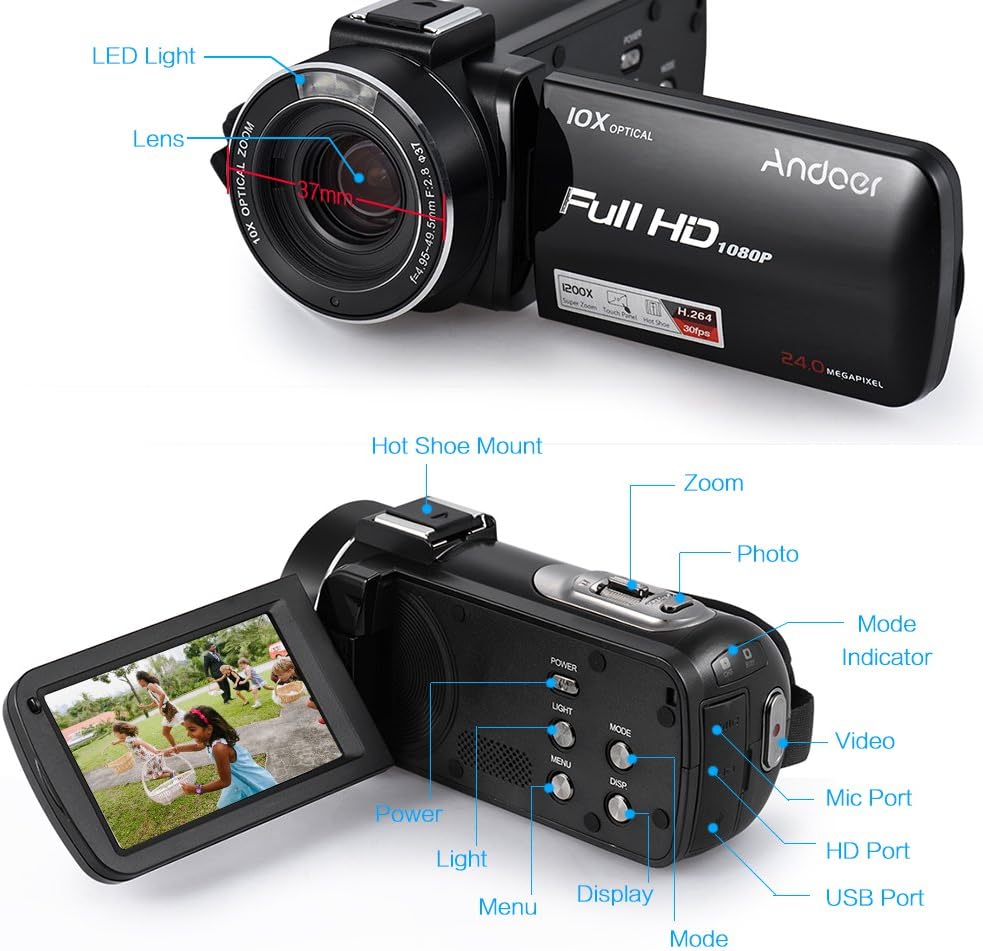
This diagram illustrates the various components of the HDV-Z82 camcorder, including the LED Light, Lens, Hot Shoe Mount, Zoom control, Photo button, Mode selector, Video button, Mic Port, HD Port, USB Port, Power button, Light button, Menu button, Display button, and Mode indicator.
- LED lys: Provides supplementary illumination in low-light conditions.
- Linse: Den primære optiske komponent til optagelse af billeder og videoer.
- Hot Shoe-beslag: For attaching external accessories like microphones or additional LED lights.
- Zoom kontrol: Adjusts the optical and digital zoom levels.
- Fotoknap: Press to capture still images.
- Tilstandsvælger: Skifter mellem video-, foto- og afspilningstilstande.
- Videoknap: Starter og stopper videooptagelse.
- Mic Port: Til tilslutning af ekstern mikrofon.
- HD-port: For connecting the camcorder to an HD display.
- USB-port: For connecting to a computer for data transfer or charging.
- Power knap: Turns the camcorder on or off.
- Lys knap: Aktiverer eller deaktiverer det indbyggede LED-lys.
- Menu-knap: Accesses the camcorder's settings menu.
- Display knap: Toggles display information on the LCD screen.
- Tilstandsindikator: Viser den aktuelle driftstilstand.
4. Opsætning
4.1. Batteriinstallation
- Åbn batterirummets dæksel.
- Insert the NP-40B battery, ensuring the correct polarity.
- Luk batterirummets dæksel forsvarligt.
- Note: The camera and remote control batteries are insulated for secure delivery. Please remove the insulation paste before first use.
4.2. Indsættelse af hukommelseskort
The camcorder supports up to a 64GB memory card (not included). A Class 10 or above memory card is highly recommended for optimal performance.
- Find hukommelseskortåbningen.
- Insert the SD/SDHC memory card with the metal contacts facing the correct direction until it clicks into place.
- For at fjerne det skal du forsigtigt trykke på kortet, indtil det springer ud.
4.3. Attaching the Wide Angle Lens
The included 0.45X wide-angle lens can be attached to expand your field of view.

This image demonstrates the expanded field of view achieved with the 0.39X Wide Angle + Macro Lens compared to a standard 27mm lens, allowing for capture of wider scenery.

This diagram illustrates the assembly of the Macro Lens and the 0.39X Wide Angle Lens, which can be combined for super wide vision or used separately for macro photography.
- Remove the lens cap from the camcorder's main lens.
- Screw the wide-angle lens onto the camcorder's lens thread until secure.
- Ensure the lens is firmly attached to prevent accidental detachment.
4.4. Fjernbetjeningsbatteri
The remote control uses one CR2025 3V battery, which is included. Remove the insulation tab before first use.
5. Betjeningsvejledning
5.1. Tænd/sluk
Tryk på MAGT button to turn the camcorder on or off. The LCD screen will illuminate upon power-on.
5.2. Valg af tilstand
Brug MODE button to switch between Video Recording Mode, Photo Shooting Mode, and Playback Mode.
5.3. Optagelse af video
- Skift til videooptagelsestilstand.
- Tryk på VIDEO button to start recording. A red indicator will typically appear on the screen.
- Tryk på VIDEO knappen igen for at stoppe optagelsen.
5.4. Tage billeder
- Switch to Photo Shooting Mode.
- Komponer dit billede ved hjælp af LCD-skærmen.
- Tryk på FOTO knappen for at optage et stillbillede.
5.5. Zoomfunktion
Brug ZOOM controls (T for Telephoto, W for Wide) to adjust the 10X optical zoom and up to 120X digital zoom.
5.6. Using the 3-inch LCD Touchscreen
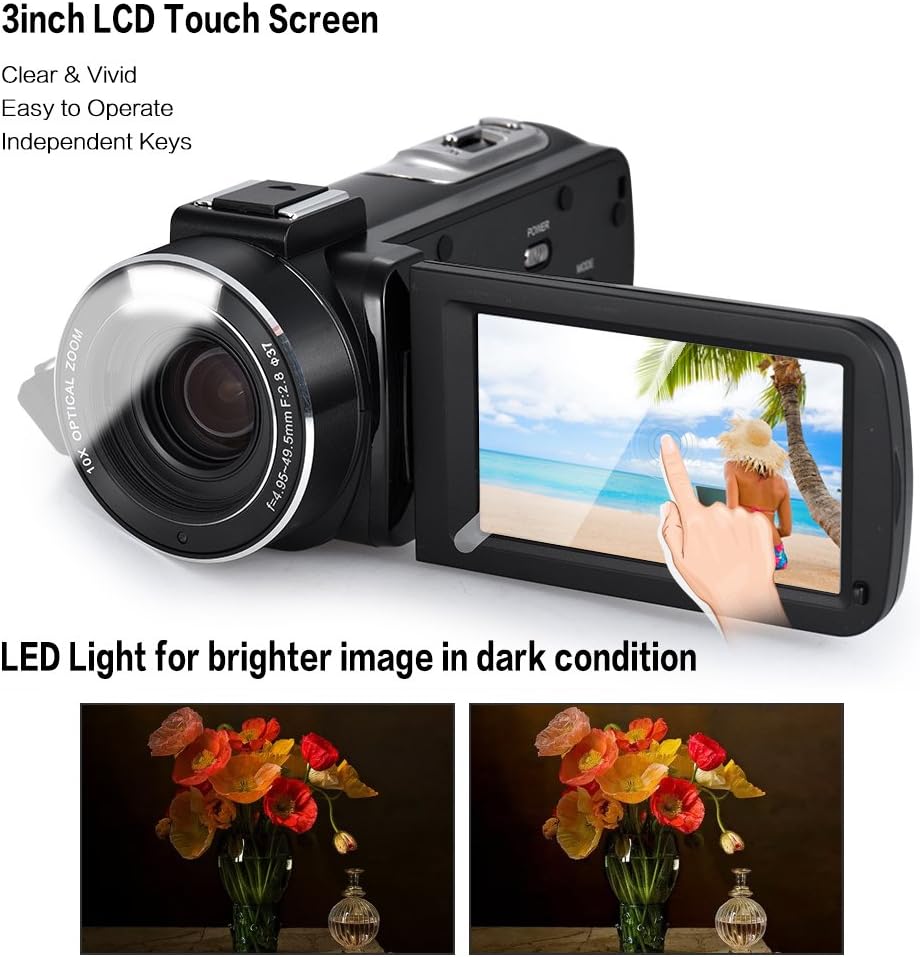
The camcorder features a 3-inch rotary LCD touchscreen for clear and vivid viewing. The built-in LED light enhances image brightness in low-light conditions, as shown in the comparison.
The rotary LCD touchscreen allows for easy navigation of menus and settings. Simply touch the desired option on the screen to select it.
5.7. Avancerede funktioner
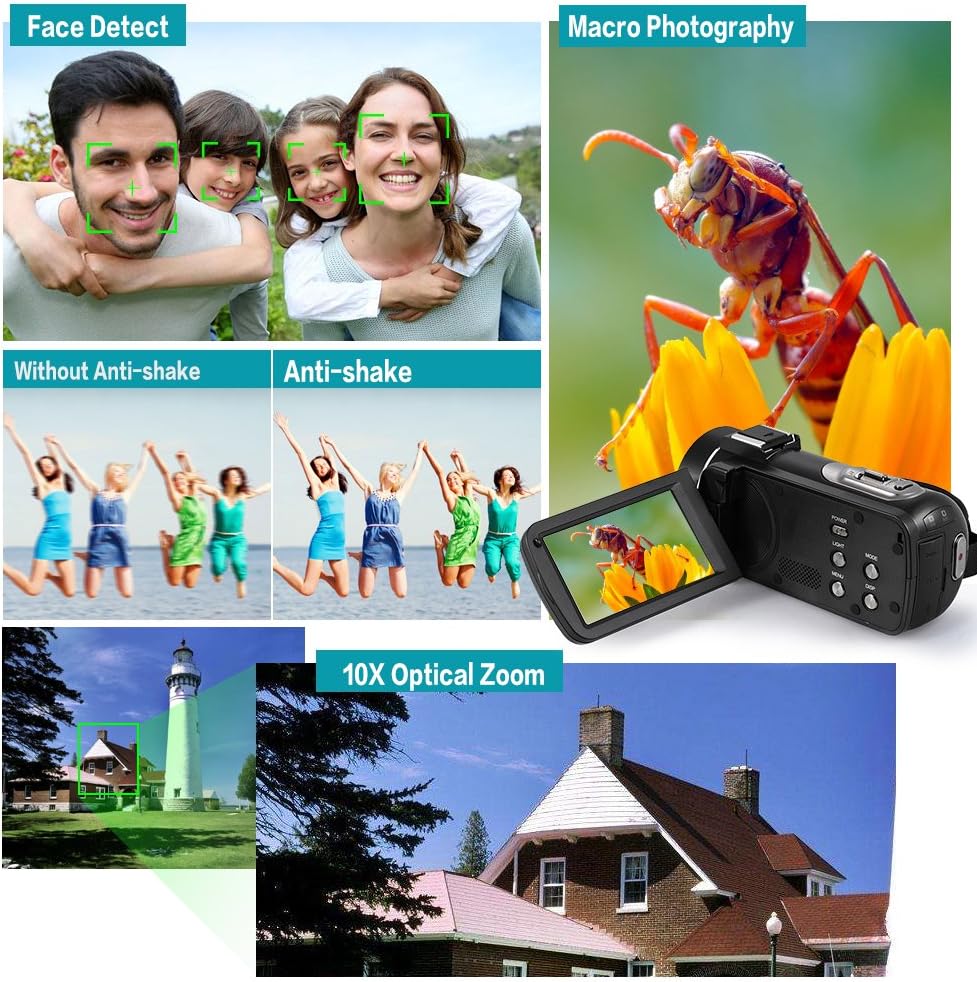
This composite image showcases key functionalities: Face Detect for automatic facial recognition, Anti-shake technology for stable footage, Macro Photography for detailed close-ups, and the powerful 10X Optical Zoom for distant subjects.
- Face Detect: Automatically detects and optimizes focus and exposure for faces in the frame.
- Anti-shake: Reduces blur caused by camera movement, ensuring clearer footage.
- Makrofotografering: Allows for close-up shots of small subjects with fine detail.
- Fortsæt skud: Enables continuous shooting for a series of rapid photos.
- Selvudløser: Set a delay (2/5/10s) before a photo is taken.
- Stum: Toggles audio recording on/off.
- Auto FRA: Configures the camcorder to automatically power off after a period of inactivity.
- Tid St.amp: Adds date and time information to your recordings/photos.
5.8. Using the Hot Shoe Mount

The unique hot shoe mount on the camcorder allows for the attachment of external accessories such as microphones and LED lights, enhancing audio quality and illumination for various shooting scenarios.
The hot shoe mount allows you to attach compatible external accessories like microphones for improved audio or additional LED lights for enhanced illumination. Simply slide the accessory onto the mount until it locks into place.
5.9. Connecting to TV/Computer
Use the provided HD Cable to connect the camcorder to an HD television for playback. Use the USB Cable to connect to a computer (Windows XP/Vista/7/8 or above) for transferring files.
6. Vedligeholdelse
- Rengøring af linsen: Brug en blød, fnugfri klud, der er specielt designet til kameralinser. Brug ikke skrappe kemikalier.
- Rengøring af kroppen: Wipe the camcorder body with a soft, dry cloth. Avoid using water or cleaning solutions directly on the device.
- Opbevaring: Opbevar videokameraet et køligt og tørt sted, væk fra direkte sollys og ekstreme temperaturer. Fjern batteriet, hvis det opbevares i længere perioder.
- Batteripleje: Recharge the battery regularly, even if not in use, to maintain its lifespan.
7. Fejlfinding
| Problem | Mulig årsag | Løsning |
|---|---|---|
| Videokameraet tænder ikke. | Battery is dead or not inserted correctly. Insulation tab not removed. | Charge the battery. Reinsert the battery correctly. Remove the insulation tab from the battery. |
| Kan ikke optage video/tage billeder. | Memory card is full, not inserted, or incompatible. Incorrect mode selected. | Insert a compatible memory card. Delete unnecessary files or use a new card. Switch to the correct mode (Video/Photo). |
| Billeder/videoer er slørede. | Lens is dirty. Anti-shake feature off. Insufficient lighting. | Clean the lens. Ensure Anti-shake is enabled in settings. Use the LED light or shoot in brighter conditions. |
| Fjernbetjening virker ikke. | Battery is dead or insulation tab not removed. Obstruction between remote and camcorder. | Replace the CR2025 battery. Remove the insulation tab. Ensure clear line of sight to the camcorder's IR receiver. |
8. Specifikationer
| Model | HDV-Z82 |
| Video opløsning | 1080P 30fps, 720P 60/30fps, VGA 30fps |
| Foto opløsning | 24M (5600 * 4200), 20M, 16M, 12M, 10M, 7MHD, 5M, 3M, 2MHD, VGA |
| Optisk zoom | 10x |
| Digital Zoom | 120x |
| Skærmstørrelse | 3 Inches (Rotary LCD Touchscreen) |
| Fotosensorteknologi | CMOS |
| Lagermedier | Supports up to 64GB Memory Card (Class 10 or above recommended) |
| Batteri | NP-40B 3.7V 1250mAh (Camera), CR2025 3V (Remote Control) |
| Interface | HD Out, USB 2.0 |
| Operativsystemsupport | Windows XP/Vista/7/8 or above |
| Særlige funktioner | Face Detect, Anti-shake, Macro Photography, Continue Shot, Self-timer, Mute, Auto OFF, Time Stamp, Built-in LED Light, Hot Shoe Mount |
| Dimensioner | 19.5 x 16.2 x 10 cm |
| Vægt | 801 g |
9. Garanti og support
For product support, technical assistance, or warranty inquiries, please contact Andoer customer service through the retailer where the product was purchased or visit the official Andoer webwebsted for kontaktoplysninger.
Gem venligst din købsbevis i tilfælde af garantikrav.
Ask a question about this manual
Ask about setup, troubleshooting, compatibility, parts, safety, or missing instructions. Manuals+ will review the question and use this page’s manual context to help answer it.