
Indledning
This manual provides instructions for the HyperGear HYG-14590 Wireless Fast Charging Car Dash Mount. This device is designed to securely hold and wirelessly charge Qi-enabled smartphones in your vehicle, offering hands-free navigation and communication.
Pakkens indhold
Bekræft at alle varer er til stede i pakken:
- Telescopic Mount
- Fast Charge Car Adapter
- Micro USB kabel
- Brugervejledning (dette dokument)
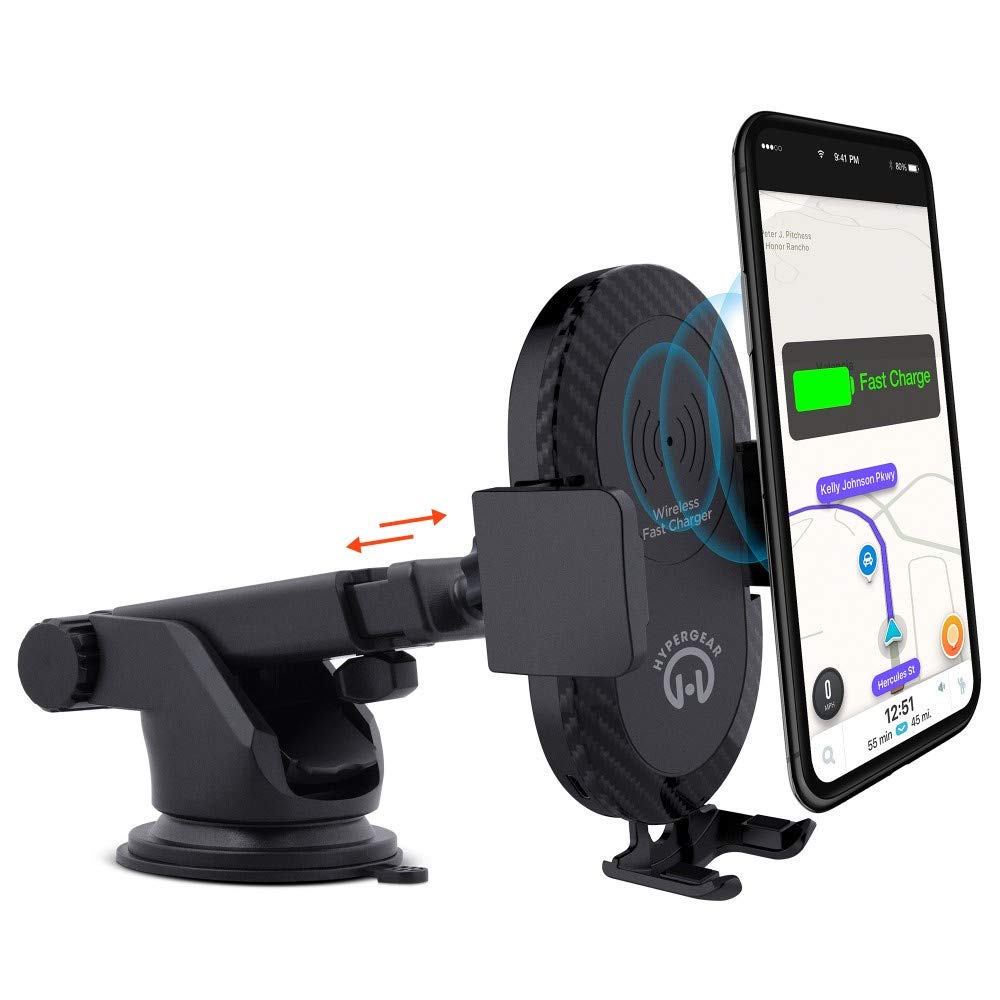
Opsætningsinstruktioner
- Vælg monteringssted: Select a clean, flat surface on your dashboard or windshield. Ensure the location does not obstruct your view eller forstyrre køretøjets kontroller.
- Fastgør beslaget:
- Clean the chosen surface thoroughly.
- Remove the protective film from the sticky gel suction cup.
- Tryk sugekoppen godt fast mod overfladen.
- Engage the 2-step locking lever to secure the mount in place.
- Tilslut strøm:
- Insert the Micro USB cable into the charging port on the mount.
- Plug the other end of the Micro USB cable into the Fast Charge Car Adapter.
- Insert the Fast Charge Car Adapter into your vehicle's 12V power outlet (cigarette lighter socket).
- Adjust the Mount:
- Extend the telescopic arm up to 8 inches as needed.
- Pivot the arm up to 230° to achieve the desired angle.
- Rotate the cradle head 360° to switch between portrait and landscape orientation.
Betjeningsvejledning
- Placering af din enhed: Gently open the adjustable padded cradle grips and place your Qi-enabled smartphone into the mount. The grips will automatically secure the device.
- Trådløs opladning: Once your device is placed in the mount and the mount is powered, wireless charging will begin automatically. Ensure your device is centered on the charging pad for optimal performance.
- Fjernelse af din enhed: To remove your device, gently open the cradle grips and lift your smartphone out.
- Håndfri brug: The mount allows for hands-free use of navigation, calls, and other applications while driving. Always ensure your device is positioned safely and does not obstruct your view af vejen.
Opretholdelse
- Rensning: Use a soft, dry cloth to clean the mount. Do not use abrasive cleaners or solvents.
- Sugekoppleje: If the sticky gel suction cup loses adhesion, rinse it with warm water and let it air dry. This can help restore its stickiness.
- Opbevaring: Når den ikke er i brug i længere perioder, skal den opbevares køligt og tørt, væk fra direkte sollys.
Fejlfinding
- Enheden oplader ikke trådløst:
- Ensure your smartphone is Qi-enabled or has a Qi-enabled receiver.
- Verify the Micro USB cable is securely connected to both the mount and the car adapter.
- Check that the car adapter is firmly seated in the vehicle's 12V power outlet.
- Ensure your phone is centered on the charging pad of the mount.
- Fjern alle tykke telefoncovers, der kan forstyrre trådløs opladning.
- Mount not sticking to surface:
- Clean the dashboard or windshield surface thoroughly before attachment.
- Ensure the 2-step locking lever is fully engaged.
- Rinse the sticky gel suction cup with warm water and air dry to restore adhesion.
- Avoid mounting on textured or porous surfaces.
- Phone not held securely:
- Ensure the adjustable padded cradle grips are properly closed around your device.
- Verify that your phone's size is compatible with the mount's adjustable range.
Specifikationer
| Modelnummer | HYG-14590 |
| Mærke | HyperGear |
| Forbindelsesteknologi | Trådløs |
| Connector Type | USB, trådløs |
| Kompatible enheder | Cellular Phones (Qi-enabled) |
| Kompatible telefonmodeller | iPhone X/8/8 Plus, Samsung Galaxy S9/S9+, S8/S8+, Note 8, and other Qi-enabled devices |
| Speciel funktion | Hurtig opladning, trådløs opladning |
| Wattage | 10 watt |
| Strømkilde | Vehicle 12V Power Outlet |
| Type hovedstrømstik | USB Type C (for car adapter) |
| Varens vægt | 11.84 ounce |
| Indkapslingsmateriale | Gel (suction cup) |
| Farve | Sort |
| UPC | 633755145902 |
Garantioplysninger
This HyperGear product comes with a 30 dages garanti from the date of purchase. This warranty covers manufacturing defects. Please retain your proof of purchase for warranty claims. For further details or to initiate a claim, please refer to the HyperGear official webwebsted eller kontakt deres kundesupport.
Kundesupport
For technical assistance, product inquiries, or warranty support, please visit the official HyperGear webwebstedet eller kontakt deres kundeserviceafdeling. Kontaktoplysninger kan typisk findes på produktemballagen eller mærkets officielle online tilstedeværelse.