
Brennan B22TB2018
Brennan B2 HiFi-system brugermanual
Model: B22TB2018
Mærke: Brennan
Indledning
Brennan B2 er et alsidigt HiFi-system designet til at rippe, gemme og afspille din musiksamling. Det har en indbygget CD-ripper, en stor harddisk til lagring og en stereo-strømforsyning. ampB2 understøtter forskellige lydformater, herunder WAV, Lossless (FLAC) og MP3, og tilbyder tilslutningsmuligheder som Sonos, Bluetooth, Spotify, YouTube og internetradio.
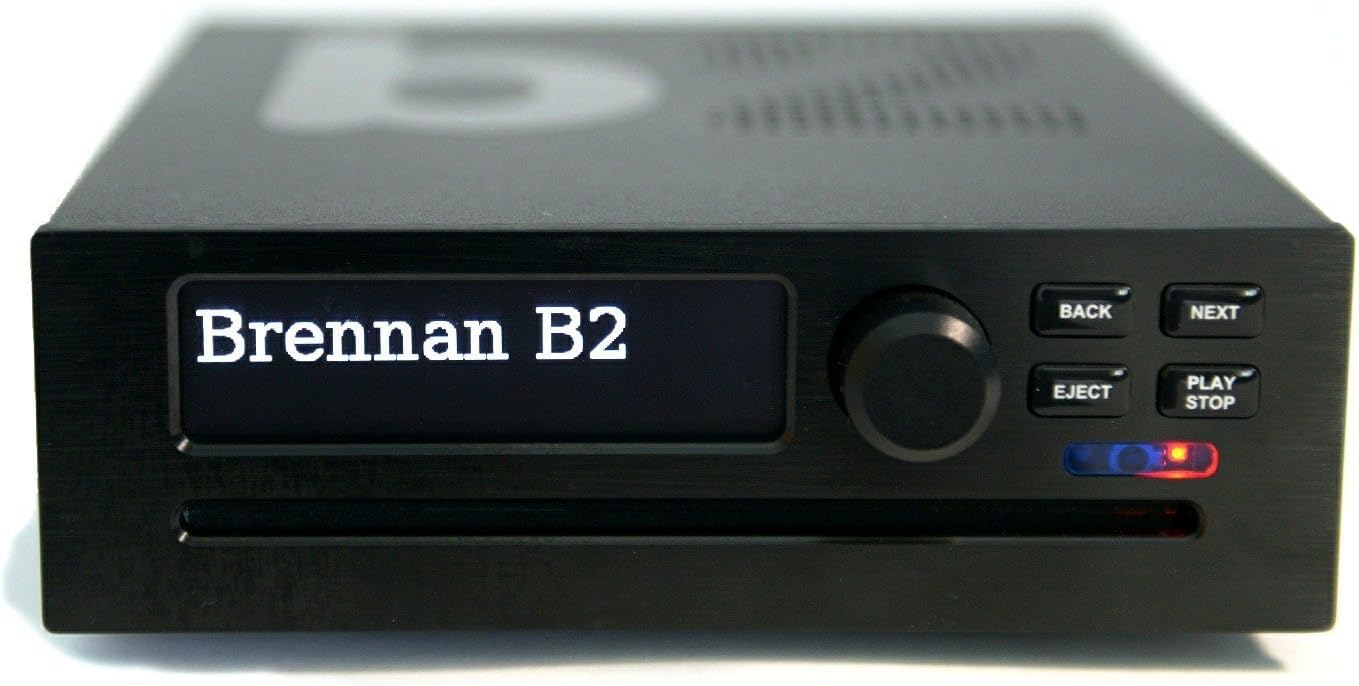
Billede: Forside view af Brennan B2, der viser displayet, kontrolknappen og knapperne.
Opsætningsvejledning
1. Udpakning og pakkeindhold
Pak forsigtigt dit Brennan B2-system ud. Sørg for, at alle komponenter er til stede:
- Brennan B2-enhed (med integreret cd-afspiller og harddisk)
- Strømledning
- Brugervejledning (dette dokument)
- Wi-Fi USB-dongle (typisk forudinstalleret eller inkluderet)
2. Fysiske forbindelser
Før du tænder for strømmen, skal du tilslutte de nødvendige kabler til bagpanelet på B2. Se diagrammet nedenfor for portidentifikation.

Billede: Bagpanelet på Brennan B2 med detaljer om tænd/sluk-knappen, 24V DC-indgangen, Micro USB, USB A, HDMI, højre/venstre lydudgange, USB C, Line Out + SPDIF, AUX In og Ethernet-kabelporten.
- Strømtilslutning: Tilslut det medfølgende netkabel til 24V DC-indgangsporten. Sørg for, at tænd/sluk-knappen er i 'Off'-positionen, før du tilslutter.
- Lydudgang:
- Analog lyd (RCA): Tilslut højre (rød) og venstre (hvide) RCA-udgange til din amplifier eller aktive højttalere.
- Digital lyd (SPDIF/optisk): Brug 'Line Out + SPDIF'-porten til digital lydudgang til en kompatibel receiver eller DAC.
- USB-porte (USB A og USB C): Disse porte kan bruges til ekstern lagring, Wi-Fi-dongler eller andet USB-tilbehør. Wi-Fi-donglen er typisk tilsluttet en af disse.
- HDMI: Til tilslutning til et display for visuel grænseflade (valgfrit).
- Ethernet: For en kablet netværksforbindelse, som kan give en mere stabil forbindelse end Wi-Fi.
- AUX ind: Til tilslutning af eksterne lydkilder til B2.
3. Første opstart og netværksopsætning
Efter at have foretaget alle fysiske forbindelser:
- Sæt 'Tænd/sluk'-knappen på bagpanelet på 'Til'.
- B2-skærmen tændes. Følg instruktionerne på skærmen for den indledende opsætning.
- Wi-Fi-forbindelse: Hvis du bruger Wi-Fi, skal du gå til netværksindstillingerne. B2's Wi-Fi-dongle understøtter primært 2.4 GHz-netværk. Hvis du støder på problemer med "INTET NETVÆRK", skal du midlertidigt deaktivere 5.0 GHz-båndet på din router under den indledende tilslutningsproces og derefter genaktivere det, når B2 er tilsluttet.
- Når B2 er tilsluttet netværket, viser den sin IP-adresse. Denne IP-adresse er afgørende for at få adgang til web brugergrænseflade fra en computer eller mobilenhed.
Betjeningsvejledning
1. Grundlæggende kontroller
Frontpanelet har et display, en drejeknap og adskillige knapper:
- Drejeknap: Bruges til at navigere i menuer og justere lydstyrken.
- TILBAGE -knap: Vender tilbage til den forrige menu eller skærm.
- NÆSTE knap: Går videre til næste element eller bekræfter valg.
- EJECT-knap: Skubber en cd ud af drevet.
- PLAY/STOP knap: Starter eller stopper afspilning.
2. CD-ripping
B2 giver dig mulighed for at rippe din CD-samling direkte til den interne harddisk.

Billede: Brennan B2 med en cd ovenpå, der illustrerer cd-rippingsfunktionen.
- Sæt en cd i slot-loading-drevet.
- B2 vil forsøge at identificere cd'en ved hjælp af sin interne database.
- Du vil blive bedt om at vælge rippemuligheder (f.eks. FLAC, MP3 eller begge). FLAC tilbyder tabsfri kvalitet, mens MP3 giver mindre file størrelser.
- Ripningsprocessen starter automatisk. Når den er færdig, skubbes cd'en ud.
- For cd'er, der ikke findes i databasen, vil B2 tildele et numerisk ID. Du kan senere redigere metadata (kunstner, album, spornavne) via web interface.
Bemærk: Det er muligt at rippe flere cd'er efter hinanden, men komprimering (især MP3) kan tage tid. B2 sætter komprimeringen på pause under afspilning og genoptager den, når den er inaktiv.
3. Musikafspilning og navigation
Du kan gennemse og afspille musik, der er gemt på B2's harddisk eller fra tilsluttede USB-enheder.

Billede: Brennan B2-skærmen, der viser menuen "Gennemse albummer", som angiver navigation i musikbiblioteket.
- Brug drejeknappen til at rulle gennem kunstnere, albummer eller numre på B2's display.
- Tryk på drejeknappen eller NÆSTE-knappen for at vælge et element.
- Tryk på PLAY/STOP for at starte afspilningen.
- B2 understøtter oprettelse af playlister til tilpassede lytteoplevelser.
4. Internetradio og streamingtjenester
B2 giver adgang til et bredt udvalg af internetradiostationer og integrerer med populære streamingtjenester.

Billede: Brennan B2 viser "BBC Radio Two", hvilket indikerer aktiv afspilning af internetradio.
- Naviger til menuen 'Internetradio' for at søge efter og vælge stationer.
- B2 understøtter integration med tjenester som Spotify og YouTube for udvidet musik- og videoindhold.
- Sonos-integration: B2 kan streame sit gemte musikbibliotek til Sonos-højttalere, så du kan nyde dine rippede cd'er i hele dit Sonos-system.
5. Bluetooth-forbindelse
Tilslut Bluetooth-aktiverede enheder til B2 for trådløs lydafspilning.
- Aktiver Bluetooth på din eksterne enhed (f.eks. smartphone, tablet).
- På B2 skal du navigere til Bluetooth-indstillingerne og starte parringen.
- Vælg B2 fra din enheds Bluetooth-liste for at oprette en forbindelse.
6. Brug af Web Brugerflade og mobilapp
For omfattende kontrol og biblioteksadministration, få adgang til B2 via dens web grænseflade eller dedikeret mobilapp.
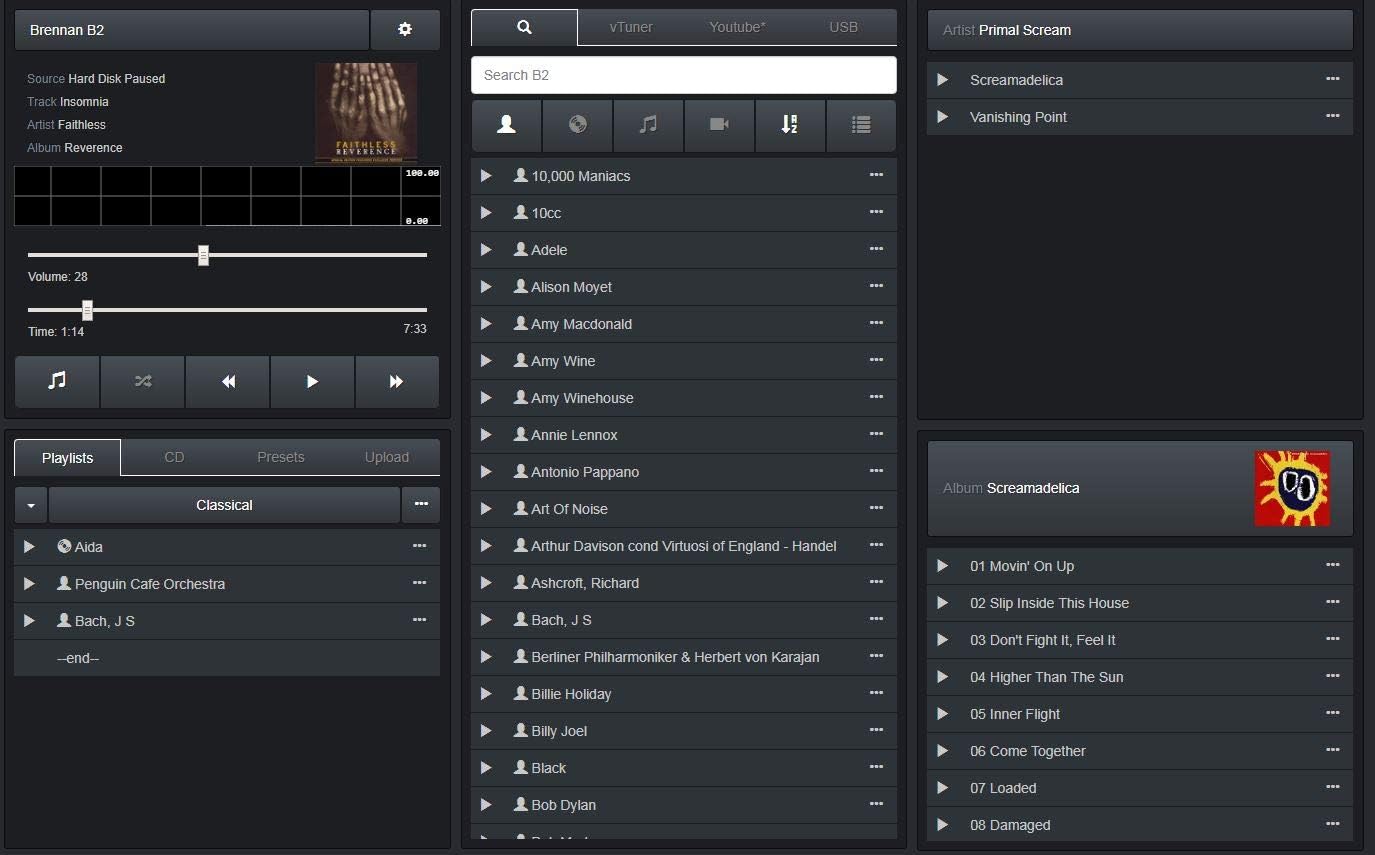
Billede: Skærmbillede af Brennan B2 web brugergrænseflade, der viser musikbibliotek, afspilningslister og afspilningsknapper.
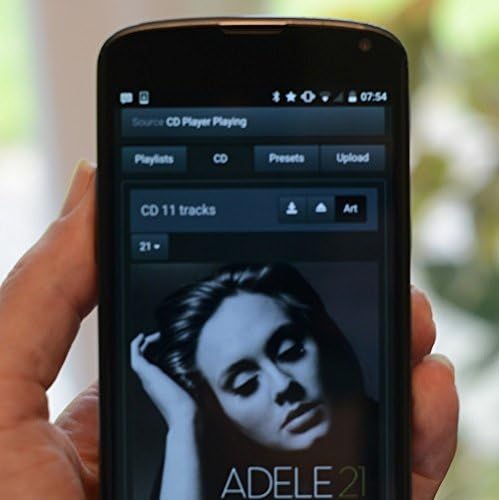
Billede: En smartphone, der viser Brennan B2-mobilapplikationen, som bruges til fjernbetjening og musikvalg.
- Web Interface: Åbn a web browseren på en computer eller tablet, og indtast B2'ens IP-adresse (vises på B2'ens skærm efter netværksforbindelse). Denne brugerflade giver fuld kontrol, herunder redigering af metadata for rippede cd'er, administration af afspilningslister og adgang til avancerede indstillinger.
- Mobil app: Download den officielle Brennan-app fra din enheds appbutik. Appen giver praktisk fjernbetjening og browsingfunktioner. Hvis appens direkte albumvalg er klodset, kan du prøve at bruge "Web "UI"-muligheden i appen for en mere ensartet oplevelse.
Opretholdelse
1. Softwareopdateringer
Brennan udgiver regelmæssigt softwareopdateringer for at forbedre funktionaliteten og tilføje nye funktioner. Det anbefales at holde din B2's software opdateret.
- Få adgang til opdateringsfunktionen via B2'ens menu eller web interface.
- Sørg for en stabil internetforbindelse under opdateringsprocessen.
2. Databackup
Sikkerhedskopier regelmæssigt dit musikbibliotek til en ekstern harddisk for at forhindre datatab.
- Tilslut en ekstern USB-harddisk til en af B2'ens USB-porte.
- Naviger til backup-indstillingerne i B2'ens menu eller web interface.
- Du kan sikkerhedskopiere hele dit FLAC-bibliotek. For MP3-sikkerhedskopier skal du muligvis oprette en afspilningsliste med alle de ønskede MP3'er og derefter eksportere den afspilningsliste til et USB-drev.
3. Rensning
For at bevare udseendet og funktionaliteten af din B2:
- Brug en blød, tør klud til at tørre ydersiden af.
- Undgå at bruge flydende rengøringsmidler eller slibende materialer.
- Sørg for, at enheden er slukket og taget ud af stikket, før den rengøres.
Fejlfinding
| Problem | Mulig årsag | Løsning |
|---|---|---|
| Fejlen "INTET NETVÆRK" under Wi-Fi-opsætning | Routeren sender på 5.0 GHz-båndet, hvilket B2's Wi-Fi-dongle muligvis ikke understøtter under den første forbindelse. | Deaktiver midlertidigt 5.0 GHz-båndet på din router. Tilslut B2 til 2.4 GHz-netværket. Når du er tilsluttet, kan du genaktivere 5.0 GHz-båndet. |
| CD ikke identificeret / Metadata mangler | CD'en findes ikke i B2'ens interne database, eller onlineopslag mislykkedes. | Rip cd'en, og brug derefter web brugerflade til manuelt at redigere album-, kunstner- og nummeroplysninger. |
| Enheden fryser eller reagerer ikke (især ved berøring) | Statisk elektricitetsudladning. | Sørg for korrekt jordforbindelse af dit lydsystem. Jordforbind dig selv, før du rører ved enheden, især i tørre omgivelser. |
| Langsom file overførsel via Wi-Fi | Begrænsninger ved Wi-Fi-donglen eller netværksbelastning. | Brug en kabelbaseret Ethernet-forbindelse til hurtigere og mere pålidelig dataoverførsel, især til store sikkerhedskopier eller biblioteksadministration. |
| Problemer med mobilapp / Klodset brugerflade | App-specifikke fejl eller brugerpræferencer. | Prøv at bruge "Web "UI"-muligheden i mobilappen, eller få adgang til B2'erne web brugerfladen direkte fra en browser på din mobilenhed eller computer for en mere robust oplevelse. |
Specifikationer
| Modelnavn | B2 |
| Varemodelnummer | B22TB2018 |
| Mærke | Brennan |
| Farve | Sort |
| Forbindelsesteknologi | Bluetooth, Wi-Fi, Ethernet |
| Lagerkapacitet | 2TB harddisk |
| Understøttede lydformater | WAV, tabsfri (FLAC), MP3 |
| Inkluderede komponenter | CD-afspiller, netledning, brugermanual |
| Varens vægt | 4.6 pund |
| Pakkedimensioner | 10.79 x 8.7 x 7.24 tommer |
| Dato først tilgængelig | 31. maj 2018 |
Garanti og support
For garantioplysninger, teknisk support eller yderligere assistance henvises til den officielle Brennan-forhandler. webwebstedet eller kontakt Brennans kundeservice direkte. Detaljer om specifikke garantiperioder og serviceprocedurer findes typisk i din købsdokumentation eller på producentens webwebsted.
Du kan ofte finde yderligere ressourcer, ofte stillede spørgsmål og fællesskabsfora på Brennan webwebsted for at hjælpe med almindelige spørgsmål og avanceret brug.
Bemærk: Den medfølgende manual kan indeholde specifikke kontaktoplysninger.
Ask a question about this manual
Ask about setup, troubleshooting, compatibility, parts, safety, or missing instructions. Manuals+ will review the question and use this page’s manual context to help answer it.