
1. Introduktion og overview
The MYSWEETY YL600 Variable Frequency Drive (VFD) is designed to convert single-phase 220V AC power into three-phase 220V AC power, enabling precise speed control for various three-phase motors. This manual provides essential information for safe installation, operation, and maintenance of your VFD.
This VFD is suitable for applications such as spindle motors, drill presses, CNC machines, HVAC systems, lathes, milling machines, pumps, conveyors, and compressors.

2. Sikkerhedsoplysninger
WARNING: Improper installation or operation can lead to electric shock, fire, or equipment damage. Always ensure power is disconnected before performing any wiring or maintenance.
- Sørg for, at input voltage matches the VFD's specifications (Single Phase AC 220V +/-15%).
- Korrekt jording er afgørende for sikkerheden.
- Do not connect the VFD output (U, V, W) directly to single-phase power.
- If your motor is under heavy load, consider choosing a higher horsepower VFD or consult a professional for model selection.
- If your motor operates at 50Hz/60Hz, ensure the VFD's Hertz parameter is set consistently with the motor.
- No external resistor is supported unless customized by notifying the seller before purchase.
3. Produktfunktioner og komponenter
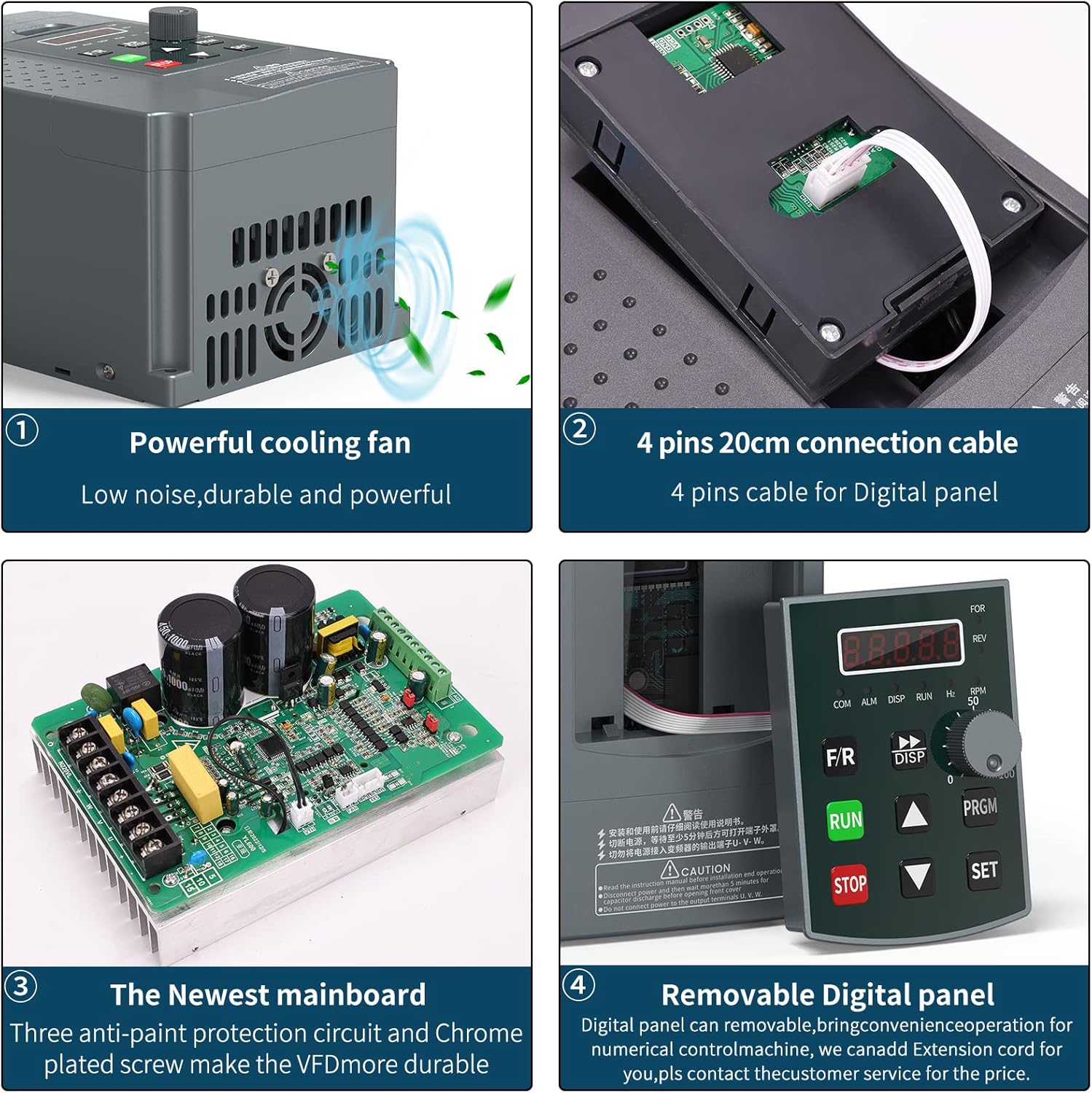
The MYSWEETY YL600 VFD features a user-friendly design with a removable operation panel and robust internal components for stable and reliable performance.



4. Opsætning og installation
4.1 Wiring the VFD to the Motor
Proper wiring is crucial for safe and effective operation. Ensure all connections are secure and follow local electrical codes.
4.2 Indledende parameterindstillinger
After wiring, configure the VFD parameters according to your motor's specifications. The following videos demonstrate common parameter settings:
5. Betjening
5.1 Basic Control Panel Operation
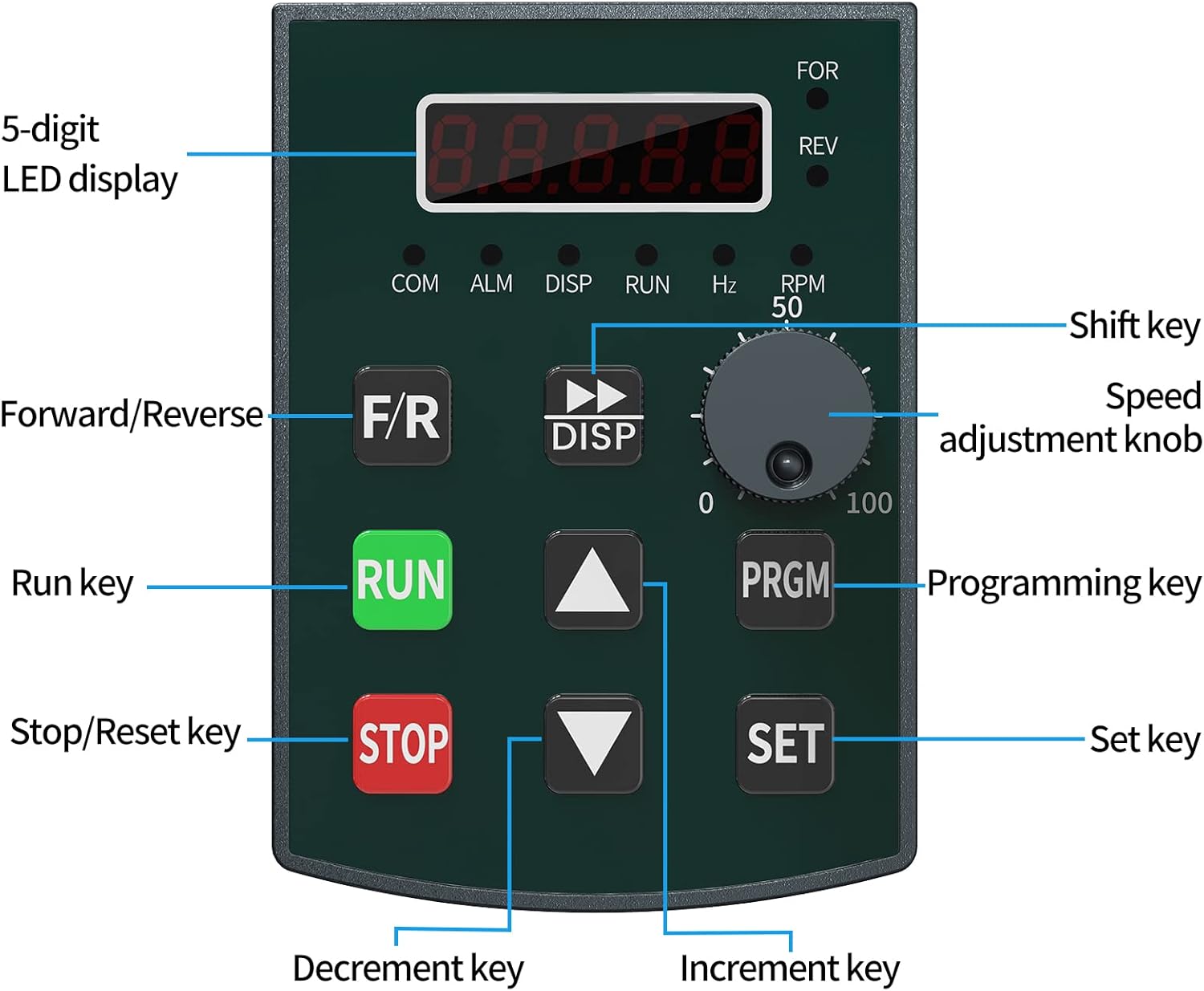
Use the control panel keys to start, stop, and adjust the motor speed.
- LØB: Starter motoren.
- STOP/RST: Stops the motor or resets errors.
- F / R: Toggles forward/reverse direction.
- Hastighedsjusteringsknap: Adjusts the output frequency (motor speed).
- PRGM: Går ind i programmeringstilstand.
- SÆT: Bekræfter parameterindstillinger.
5.2 Ekstern kontrol
The VFD supports external control methods, such as external switches, potentiometers, and RS485 communication, for integrated system control.
6. Fejlfinding
If the VFD encounters an issue, an error code may be displayed on the screen. Refer to the following common error and troubleshooting steps:
- ER04 (Short Circuit/IPM Alarm): This indicates a short circuit or an issue with the internal power component module. Check if the motor is short-circuited, if the machine load is too large, or if the input voltage fluctuates. Improper settings of DC injection brake parameters or VF parameters can also cause this.
- Other Error Codes: For other specific error codes, consult the detailed troubleshooting section in the full user manual or contact MYSWEETY customer service.
7. Specifikationer
- Produktdimensioner: 9.84 x 5.91 x 7.28 tommer
- Varens vægt: 3.04 pund
- Modelnavn: YL600
- Strømkilde: 220V (Single Phase Input)
- Wattage: 2.2 KW
- Udgangsfrekvens: 0-3200Hz
- Vurderet strøm: 10A
- Fabrikant: MIN SKAT
8. Vedligeholdelse
Regular maintenance ensures the longevity and optimal performance of your MYSWEETY YL600 VFD.
- Hold VFD'en ren og fri for støv og snavs.
- Ensure adequate ventilation around the unit to prevent overheating. The VFD is equipped with a powerful cooling fan for this purpose.
- Kontrollér regelmæssigt alle ledningsforbindelser for tæthed og tegn på slid eller beskadigelse.
- Avoid operating the VFD in environments with excessive moisture or corrosive substances.
9. Garanti og support
MYSWEETY is committed to providing quality products and customer satisfaction. For any concerns or technical assistance, please contact MYSWEETY customer service.
The product typically includes a 1-year warranty and lifelong technical support. For specific warranty details and to address any issues, please reach out to our support team.