
Dilwe 9450S
Dilwe 9450S Drone Propeller Blades Instruction Manual
Model: 9450S | Brand: Dilwe
Indledning
Thank you for choosing Dilwe 9450S Propeller Blades. These high-quality propeller blades are designed to provide reliable and stable flight performance for your DJI Phantom 4 or Phantom 4 Pro drone. This manual provides essential information for proper installation, operation, and maintenance to ensure optimal performance and longevity of your propellers.

Image: Two pairs of white 9450S propeller blades, ready for installation.
Sikkerhedsoplysninger
- Always ensure propellers are securely attached before flight. Loose propellers can cause loss of control and damage.
- Inspect propellers for any cracks, bends, or damage before each flight. Do not use damaged propellers.
- Hold hænder og ansigt væk fra roterende propeller.
- Replace propellers in pairs (clockwise and counter-clockwise) to maintain balance and flight stability.
- Store propellers in a safe place to prevent damage.
Kompatibilitet
These Dilwe 9450S Propeller Blades are specifically designed for and compatible with the following DJI drone models:
- DJI Phantom 4
- DJI Phantom 4 Pro
Using these propellers with incompatible drone models may result in poor performance or damage.
Pakkens indhold
Pakken indeholder typisk:
- 2 x Pairs of 9450S Propeller Blades (Total 4 blades: 2 clockwise, 2 counter-clockwise)
Opsætning og installation
Follow these steps to properly install the propeller blades on your DJI Phantom 4/4 Pro drone:
- Identify Propeller Types: The 9450S propellers are quick-release and come in two types: those with a silver ring and those with a black ring. These correspond to the silver and black propeller mounts on your drone's motors. Ensure you match the correct propeller type to the correct motor mount.
- Align and Press Down: Place the propeller onto the corresponding motor shaft. Align the propeller's base with the motor mount. Press down firmly on the propeller.
- Drej for at låse: While pressing down, rotate the propeller in the direction indicated by the lock icon on the motor mount (usually clockwise for silver, counter-clockwise for black) until it clicks into place. This quick-release design ensures easy and secure attachment.
- Bekræft sikkerhed: Gently pull up on the propeller to ensure it is securely locked and cannot be easily removed. Repeat for all four propellers.

Image: Illustrates the quick-release attachment of a propeller to a DJI Phantom 4 motor.

Image: A DJI Phantom 4 drone with propellers attached, demonstrating the overall appearance after installation.
Driftsmæssige overvejelser
The 9450S propellers are designed with an aerodynamic shape for high performance and maximum lifting force, contributing to enhanced reliability and stability during flight.

Billede: Et nærbillede view of the propeller's aerodynamic design, engineered for efficient lift.
Ensure all propellers are clean and free from debris before and after each flight. Any foreign material can affect balance and performance.
Opretholdelse
- Rensning: Wipe the propeller blades with a soft, damp cloth to remove dust, dirt, or any residue. Avoid using harsh chemicals.
- Inspektion: Regularly inspect the blades for any signs of wear, cracks, chips, or deformation. Even minor damage can compromise flight safety and performance.
- Opbevaring: Store propellers in a cool, dry place, away from direct sunlight and extreme temperatures. Keep them in their original packaging or a protective case to prevent bending or scratching.
- Udskiftning: Replace propellers immediately if any damage is detected. It is recommended to replace all four propellers if one is significantly damaged to maintain optimal balance.
Fejlfinding
| Problem | Mulig årsag | Løsning |
|---|---|---|
| Dronen vibrerer overdrevent under flyvning. | Damaged, bent, or unbalanced propellers. | Inspect all propellers for damage. Replace any damaged or bent blades. Ensure all propellers are securely installed and matched correctly (silver/black rings). |
| Propeller detaches during flight. | Propeller not securely locked onto the motor mount. | Ensure the propeller is pressed down and rotated until it clicks firmly into place. Verify by gently pulling on the propeller. |
| Reduced flight time or performance. | Propellers are worn, dirty, or slightly damaged. | Clean propellers. Inspect for subtle damage. Consider replacing old propellers with new ones for optimal efficiency. |
Specifikationer
| Feature | Detalje |
|---|---|
| Model | 9450S |
| Kompatibilitet | DJI Phantom 4 / Phantom 4 Pro |
| Materiale | High-quality composite material |
| Design | Quick-release, Aerodynamic |
| Farve | Hvid |
| Varens vægt | 1.44 ounce (til sættet) |
| Fabrikant | Dilwe |
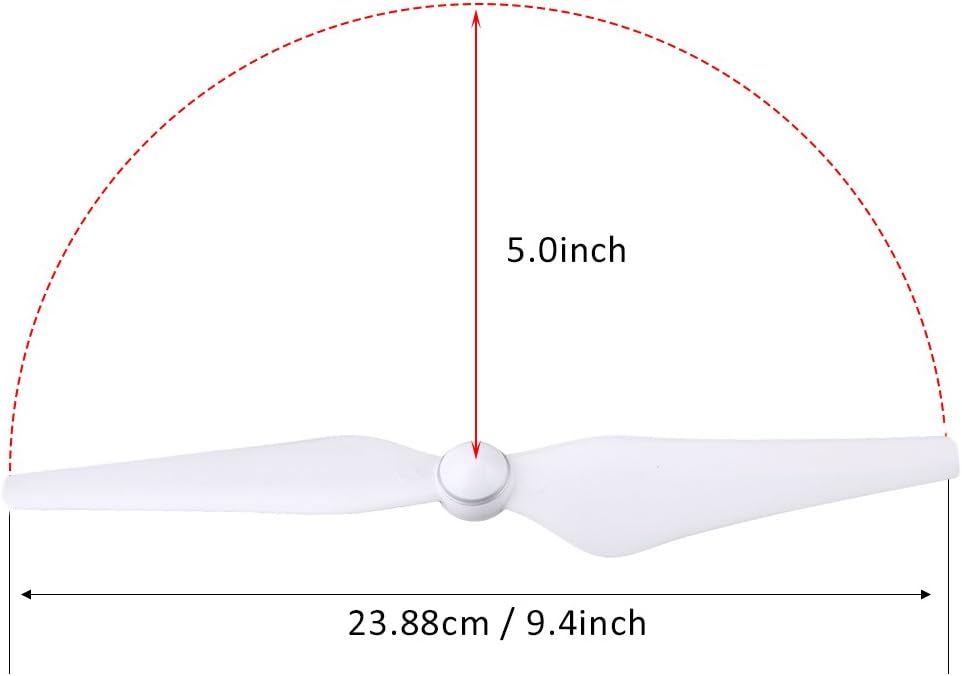
Image: Dimensional diagram of the 9450S propeller, showing its length.
Garanti og support
Dilwe products come with a 180-day warranty. If you encounter any issues or have questions regarding your 9450S Propeller Blades, please contact Dilwe customer support. We are committed to assisting you with any problems you may experience.
For support, please refer to the contact information provided with your purchase or visit the official Dilwe store on Amazon: Dilwe Store.
Ask a question about this manual
Ask about setup, troubleshooting, compatibility, parts, safety, or missing instructions. Manuals+ will review the question and use this page’s manual context to help answer it.