
Indledning
This manual provides detailed instructions for the safe and proper installation, operation, and maintenance of your SANUS Simplicity Full Motion TV Mount, Model SMF421-B3. Please read all instructions carefully before beginning installation to ensure correct assembly and to prevent injury or damage.
This mount is designed to securely hold televisions ranging from 26 inches to 55 inches in size, with a maximum weight capacity of 55 lbs (25 kg). It offers full motion capabilities, including tilt, swivel, and extension, allowing for optimal viewing vinkler.
Sikkerhedsoplysninger
ADVARSEL: Failure to read and follow all instructions can result in personal injury, property damage, or voiding of warranty. Do not install this product if you do not understand these instructions or have doubts about the safety of the installation.
- Verify that the mounting surface can safely support the combined weight of the mount and the television.
- Overskrid ikke den maksimale vægtkapacitet på 25 kg.
- Dette produkt er kun beregnet til indendørs brug.
- Use only the hardware provided by SANUS.
- If mounting to wood studs, ensure the studs are solid and located accurately.
- If mounting to concrete or concrete block, ensure the wall is solid and use appropriate anchors (not always included).
- Always use a qualified installer if you are unsure about your ability to install this product safely.
Pakkens indhold
Before installation, ensure all parts are present and undamaged. If any parts are missing or defective, contact SANUS customer service.

Image: All components of the SANUS Simplicity Full Motion TV Mount, including the wall plate, TV brackets, and various hardware, are laid out for inspection.
Typisk pakkeindhold inkluderer:
- Vægplademontering
- TV-beslagarme (2)
- Mounting Hardware Kit (screws, washers, spacers for various TV types and wall types)
- Instruktionsmanual
Opsætning og installation
Nødvendige værktøjer (ikke inkluderet):
- Stud Finder
- Bor med passende bor (træ eller murværk)
- Niveau
- Phillips hovedskruetrækker
- Stiknøgle
- Blyant
- Målebånd
Trin 1: Fastgør tv-beslag til tv'et
- Placer forsigtigt dit tv med forsiden nedad på en blød, ren overflade for at forhindre, at skærmen beskadiges.
- Identificer VESA-monteringshullerne på bagsiden af dit tv.
- Select the correct diameter and length screws from the hardware kit that fit your TV's mounting holes. Use washers and spacers if necessary to ensure a snug fit without overtightening.
- Attach the two TV bracket arms to the back of your TV using the selected screws. Ensure the arms are level and securely fastened. Do not overtighten.
Trin 2: Monter vægpladen på væggen
- Determine the desired height for your TV. Mark the center of the desired TV location on the wall.
- Til montering af træstolper: Use a stud finder to locate the center of two adjacent wood studs. Position the wall plate so that its mounting holes align with the center of the studs. Use a level to ensure the wall plate is perfectly horizontal. Mark the drill points. Drill pilot holes (refer to manual for specific drill bit size). Secure the wall plate to the studs using the provided lag bolts and washers.
- For Concrete/Concrete Block Installation: Position the wall plate at the desired height and use a level to ensure it is horizontal. Mark the drill points. Drill pilot holes (refer to manual for specific drill bit size and depth). Insert concrete anchors (if provided or purchased separately) into the pilot holes. Secure the wall plate to the wall using the provided lag bolts and washers.
- Ensure the wall plate is firmly and securely attached to the wall before proceeding.
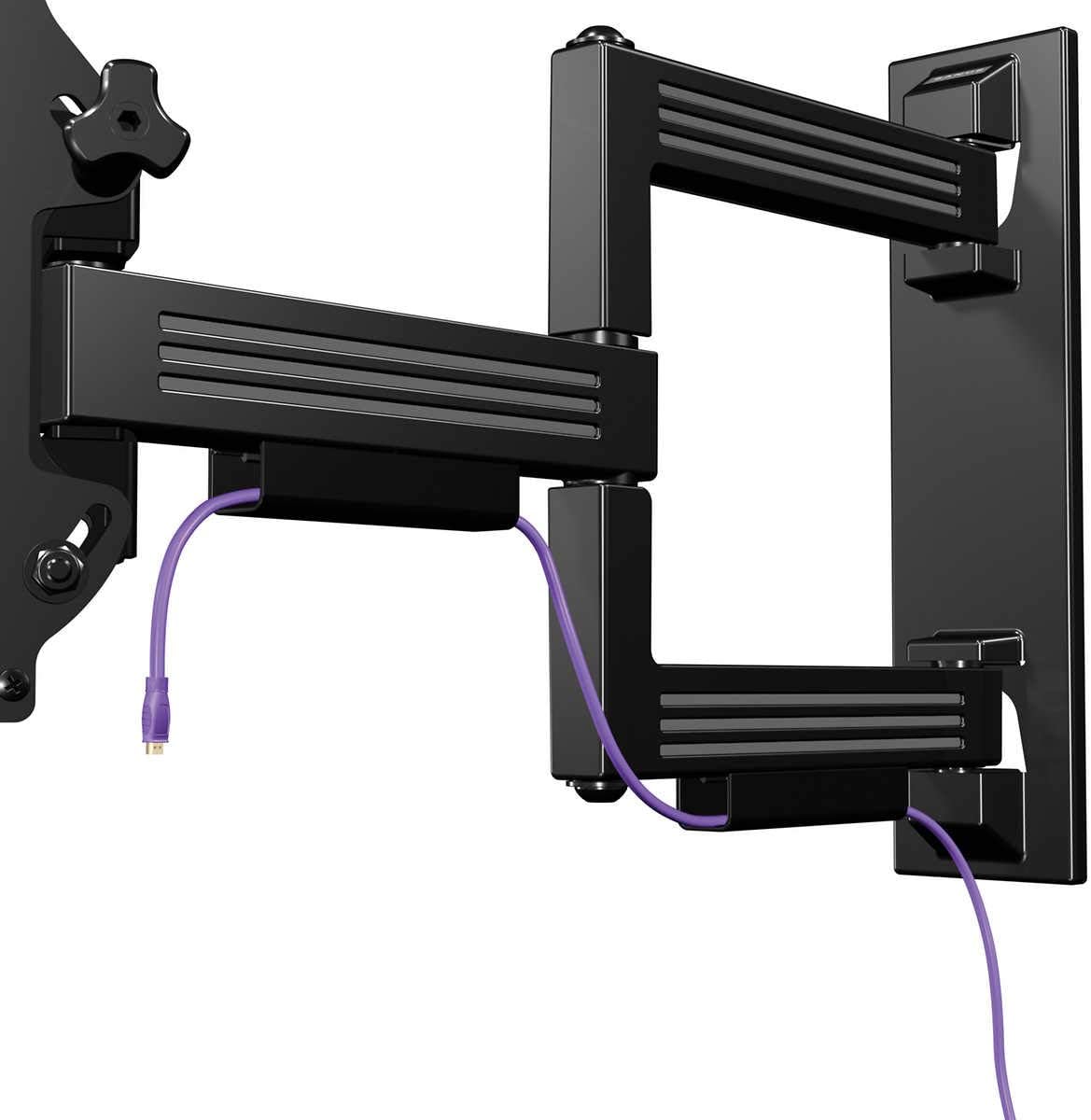
Image: The SANUS Simplicity Full Motion TV Mount is shown installed on a wall, extended, with a purple cable neatly routed through its integrated cable management channels.
Trin 3: Hæng tv'et på vægpladen
- With assistance, carefully lift the TV with the attached brackets and hook the brackets onto the wall plate.
- Sørg for, at tv'et er sikkert monteret på vægpladen.
- Engage any safety locking mechanisms on the TV brackets to prevent accidental dislodgement. Refer to the specific instructions for your mount model for details on locking mechanisms.
Betjeningsvejledning
Your SANUS Simplicity Full Motion TV Mount allows for flexible positioning of your television.
- Udvidelse: Træk forsigtigt tv'et væk fra væggen for at forlænge armen.
- Drejelig: Carefully pivot the TV left or right to achieve your desired viewvinkel.
- Vip: Loosen the tilt adjustment knobs (if applicable, refer to your specific model's design), adjust the TV to the desired vertical angle, and then retighten the knobs to secure the position. The mount supports up to 60 degrees of tilt.
- Kabelstyring: Utilize the integrated cable channels on the mount arm to route and conceal cables for a tidy appearance.
Always move the TV smoothly and avoid sudden, forceful movements. Do not hang or apply excessive weight to the TV or mount arm.
Opretholdelse
Regelmæssig vedligeholdelse sikrer dit TV-beslags levetid og sikker drift.
- Periodisk eftersyn: Every 6-12 months, inspect all mounting hardware and connections to ensure they are secure. Tighten any loose screws or bolts.
- Rensning: Clean the mount with a soft, dry cloth. Do not use abrasive cleaners or solvents, as these may damage the finish.
- Smøring: The moving parts of the mount are designed for smooth operation and generally do not require lubrication. If movement becomes stiff, consult SANUS customer support.
Fejlfinding
| Problem | Mulig årsag | Løsning |
|---|---|---|
| TV'et er ikke i vater efter installation. | Vægpladen var ikke installeret i vater. | Remove TV, adjust wall plate to be level, and re-mount TV. Some mounts have post-installation leveling adjustments; refer to your specific model's features. |
| Beslaget føles løst eller vakkelvornt. | Mounting hardware is not fully tightened or wall support is inadequate. | Immediately remove TV. Re-check all wall plate fasteners and ensure they are securely tightened into solid studs or concrete. If the wall is damaged, consult a professional. |
| Difficulty moving the TV (swivel/tilt/extend). | Friction points may be too tight or mechanism needs adjustment. | Check for any adjustment screws or knobs on the mount that control tension. Loosen slightly if movement is too stiff. Do not over-loosen. |
Specifikationer
- Model: SMF421-B3
- Mærke: SANUS
- Monteringstype: Vægmontering
- Bevægelsestype: Drej, vip, udtræk
- Materiale: Plast
- Farve: Sort
- Kompatible tv-størrelser: 26" - 55"
- Maksimal vægtkapacitet: 55 lbs (25 kg)
- Forlængelse fra væg: Op til 21"
- Lav-profile Design: 2.1" from wall when retracted
- Maksimal hældningsvinkel: 60 grader
- UPC: 793795532121
Garanti og support
Garanti: This SANUS product is covered by a 2-Year Manufacturer's Warranty. Please retain your proof of purchase for warranty claims. The warranty covers defects in materials and workmanship under normal use.
Kundesupport: For technical assistance, missing parts, or warranty inquiries, please contact SANUS customer service. Visit the official SANUS webwebsted for kontaktoplysninger og yderligere ressourcer.
Online ressourcer: For further information, installation videos, and FAQs, please visit the Sanus-butikken på Amazon or the official SANUS webwebsted.