
1. Produktet er slutview
The iBall Sound Clock is a multi-functional device designed to serve as a portable Bluetooth speaker, a digital clock, and an alarm. It offers various playback options and a built-in microphone for hands-free calling.
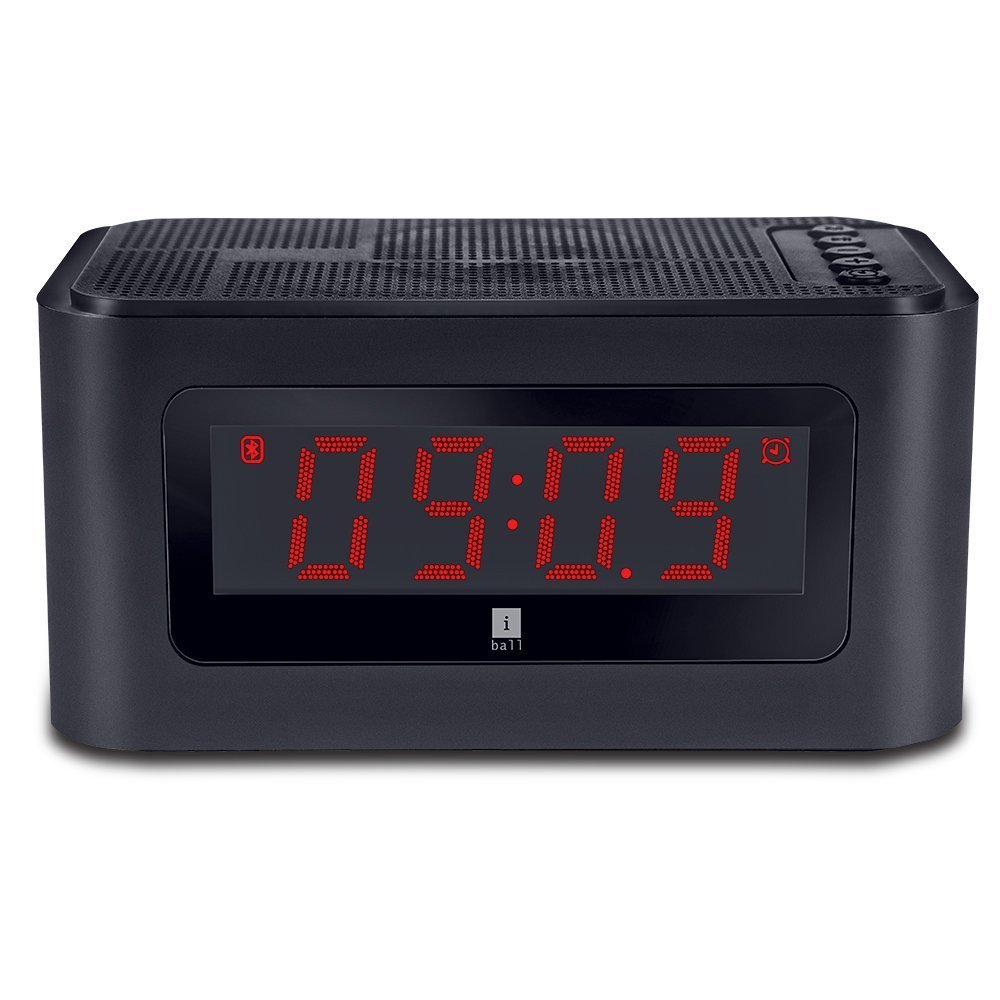
Figur 1: Forside view of the iBall Sound Clock, displaying the digital clock and accessible control buttons on top.
Nøglefunktioner:
- Bærbar Bluetooth højttaler
- Digital Clock with Alarm Function
- Multiple Playback Options: Bluetooth (BT), USB, Micro SD, FM Radio, AUX
- Indbygget mikrofon til håndfri opkald
- Large LED Screen for time, track, and volume display
2. Pakkens indhold
Markér venligst feltet for følgende elementer:
- iBall Sound Clock Speaker
- Audio / Charging Cable
- Brugermanual
3. Enhedslayout og kontroller
Familiarize yourself with the various parts and controls of your iBall Sound Clock.

Figure 2: Side panel of the iBall Sound Clock, detailing the connectivity ports and power switch.
Øverste panelkontroller:
- Mode knap: Press to switch between Bluetooth, FM Radio, USB, Micro SD, and AUX modes.
- Afspil/pause knap: Tryk for at afspille eller sætte lyd på pause. I Bluetooth-tilstand skal du trykke for at besvare/afslutte opkald.
- Knap til lydstyrke ned / forrige nummer: Tryk kort for at gå til forrige nummer. Tryk og hold nede for at sænke lydstyrken.
- Knap til lydstyrke op / Næste nummer: Tryk kort for næste nummer. Tryk og hold nede for at øge lydstyrken.
- Knap til indstilling af alarm: Press to enter alarm setting mode.
Side Panel Ports and Switch:
- Micro USB-opladningsport: Til opladning af enheden.
- USB-port: Til afspilning af lyd fra et USB-flashdrev.
- Micro SD -kortplads: Til afspilning af lyd fra et Micro SD-kort.
- AUX-indgang: Til tilslutning af eksterne lydenheder via et 3.5 mm lydkabel.
- TÆND/SLUK -kontakt: Til at tænde eller slukke for enheden.
Forreste display:
- LED digitalt display: Shows current time, selected mode (BT, FM, AUX, TF, USB), track number, and volume level.
4. Opsætningsvejledning
4.1. Opladning af enheden
Before first use, fully charge the iBall Sound Clock. Connect the supplied audio/charging cable to the Micro USB charging port on the device and the other end to a USB power adapter (not included) or a computer's USB port.
- The LED display may indicate charging status.
- En fuld opladning tager typisk et par timer.
- Note: The device uses a Lithium Polymer battery.
4.2. Tænd/sluk
Find ON/OFF switch on the side panel. Slide the switch to the 'ON' position to power on the device. Slide it to the 'OFF' position to power off.
4.3. Indstilling af uret
- Sørg for, at enheden er tændt.
- Tryk på Mode button repeatedly until the clock display is active (if not already).
- Tryk og hold på Alarmsæt knappen for at gå ind i tidsindstillingstilstanden. Timecifrene blinker.
- Brug Lydstyrke op / næste spor og Lydstyrke ned / forrige nummer knapper for at justere timen.
- Tryk på Alarmsæt Tryk på knappen igen for at bekræfte timeindstillingen og gå videre til minutindstillingen. Minuttifrene blinker.
- Brug Lydstyrke op / næste spor og Lydstyrke ned / forrige nummer knapper for at justere minutterne.
- Tryk på Alarmsæt button once more to save the time and exit setting mode.
5. Betjeningsvejledning
5.1. Bluetooth-tilstand
- Power on the iBall Sound Clock. It will automatically enter Bluetooth pairing mode, indicated by a flashing 'BT' icon on the display.
- Aktiver Bluetooth på din mobilenhed, og søg efter tilgængelige enheder.
- Select "iBall Sound Clock" from the list of devices.
- Once paired, the 'BT' icon will stop flashing, and you will hear a confirmation tone.
- You can now play audio from your mobile device through the speaker.
- Tryk på for at besvare et indgående opkald Afspil/pause button. Press again to end the call.
5.2. FM-radiotilstand
- Tryk på Mode knappen gentagne gange, indtil 'FM' vises på displayet.
- Tryk og hold på Afspil/pause button to automatically scan and save available FM radio stations. The speaker will cycle through frequencies and store stations with strong signals.
- Når scanningen er færdig, skal du bruge Lydstyrke op / næste spor og Lydstyrke ned / forrige nummer knapper til at navigere mellem gemte stationer.
5.3. USB / Micro SD Card Mode
- Indsæt et USB-flashdrev i USB-porten eller et Micro SD-kort i Micro SD-kortstikket.
- The device will automatically detect the storage and switch to USB or Micro SD mode, indicated by 'USB' or 'TF' (for Micro SD) on the display.
- Audio playback will begin automatically. Use the Afspil/pause, Lydstyrke op / næste spor, og Lydstyrke ned / forrige nummer knapper til at styre afspilning.

Figure 3: The iBall Sound Clock demonstrating its multiple playback options, including USB and Micro SD card inputs.
5.4. AUX-tilstand
- Connect one end of the supplied audio cable to the AUX input port on the iBall Sound Clock and the other end to the audio output jack of your external device (e.g., smartphone, MP3 player).
- Tryk på Mode knappen gentagne gange, indtil 'AUX' vises på displayet.
- Control audio playback from your external device. The speaker's volume controls will still function.
5.5. Indstilling af alarmen
- Sørg for, at enheden er tændt.
- Tryk på Alarmsæt knappen for at gå ind i alarmindstillingstilstand. Alarmtimecifrene blinker.
- Brug Lydstyrke op / næste spor og Lydstyrke ned / forrige nummer knapper for at justere alarmtiden.
- Tryk på Alarmsæt Tryk på knappen igen for at bekræfte timeindstillingen og gå videre til minutindstillingen. Alarmminutcifrene blinker.
- Brug Lydstyrke op / næste spor og Lydstyrke ned / forrige nummer knapper til at justere alarmens minutter.
- Tryk på Alarmsæt button once more to save the alarm time. An alarm icon will appear on the display, indicating the alarm is active.
- For at deaktivere alarmen skal du trykke på Alarmsæt button again until the alarm icon disappears.
- When the alarm sounds, press any button to snooze or turn off the alarm.
6. Vedligeholdelse
- Rensning: Brug en blød, tør klud til at rengøre enhedens overflade. Brug ikke flydende rengøringsmidler eller slibende materialer.
- Opbevaring: Når enheden ikke er i brug i længere perioder, skal den opbevares køligt og tørt, væk fra direkte sollys og ekstreme temperaturer.
- Batteripleje: For at forlænge batteriets levetid bør du undgå at aflade batteriet helt ofte. Oplad enheden regelmæssigt, selvom den ikke er i aktiv brug.
- Vandeksponering: Denne enhed er ikke vandtæt. Undgå udsættelse for vand eller høj luftfugtighed.
7. Fejlfinding
| Problem | Mulig årsag | Løsning |
|---|---|---|
| Enheden tænder ikke. | Batteriet er afladet. | Tilslut enheden til en strømkilde ved hjælp af opladningskablet, og lad den oplade. |
| Ingen lyd fra højttaleren. | Lydstyrken er for lav eller slået fra. Forkert tilstand valgt. | Increase the volume. Ensure the correct playback mode (BT, FM, USB, SD, AUX) is selected. Check source device volume. |
| Bluetooth-parring mislykkes. | Device is not in pairing mode. Source device Bluetooth is off. Too far from source device. | Ensure the speaker is in Bluetooth mode and flashing 'BT'. Turn Bluetooth off and on again on your source device. Move the devices closer. |
| FM-radiomodtagelsen er dårlig. | Svagt signal. | Move the speaker to a location with better reception. Re-scan for stations. |
| Alarmen lyder ikke. | Alarm is not set or is disabled. Volume is too low. | Verify the alarm time is set and the alarm icon is visible on the display. Increase the volume. |
8. Specifikationer
| Mærke | iBall |
| Model | sound clock |
| Forbindelsesteknologi | AUX, Bluetooth, USB, wireless |
| Særlige funktioner | Built-in Microphone, Radio, SD Card |
| Strømkilde | Batteridrevet |
| Batteritype | Lithium Polymer (1 inkluderet) |
| Display Type | Digital LED |
| Varens vægt | 34 g |
| Materiale | Plast |
| Farve | Sort |
9. Garanti og support
For warranty information and technical support, please refer to the warranty card included in your package or contact iBall customer service directly. Keep your purchase receipt for warranty claims.
Manufacturer: iBall