
1. Introduktion
Thank you for choosing the TecTake Corner Computer Desk, Model 402405. This L-shaped workstation is designed to provide a practical and spacious area for your computer and work essentials. Its modern design, featuring a refined tabletop and stable steel construction, ensures durability and a timeless aesthetic. This manual provides essential information for the safe assembly, operation, and maintenance of your new desk.
Læs venligst denne manual grundigt inden montering og brug, og gem den til senere brug.
2. Sikkerhedsinstruktioner
For at sikre sikker brug og forhindre skader, bedes du overholde følgende sikkerhedsretningslinjer:
- Forsamling: Assemble the desk on a soft, clean surface to prevent scratches. Ensure all components are correctly aligned and securely fastened according to the provided assembly instructions.
- Stabilitet: Do not overload the desk. The maximum load capacity is 100 kg (220 lbs). Distribute weight evenly across the surface.
- Placering: Place the desk on a level and stable floor. Avoid placing it near heat sources, direct sunlight, or in excessively humid environments.
- Børn: Hold små dele og emballagematerialer væk fra børn for at forhindre kvælningsfare.
- Opretholdelse: Regularly check all screws and connections to ensure they remain tight. Tighten if necessary.
- Flytning: Når du flytter skrivebordet, skal du løfte det i stedet for at trække det for at undgå at beskadige ben og gulv.
3. Pakkens indhold
Before beginning assembly, please verify that all parts are present and undamaged. The package should contain:
- 1x Corner Desk (comprising main tabletop sections and frame components)
- 1x Computer Tower Holder
- 1x Illustrated Assembly Instructions
- All necessary screws, fittings, and tools for assembly (as specified in the assembly instructions)

Figure 1: Assembled TecTake Corner Computer Desk (Dark Wood Finish). This image shows the overall L-shaped design, the spacious work surface, and the integrated keyboard tray.
4. Opsætning og montering
The TecTake Corner Computer Desk requires assembly. Please follow the detailed, illustrated instructions provided in your package. It is recommended to have two people for assembly to ensure ease and safety.
- Pakker ud: Pak forsigtigt alle komponenter ud, og læg dem på en ren, blød overflade for at forhindre skader.
- Identificer dele: Se delelisten i samlemanualen for at identificere hver komponent.
- Følg trinene: Proceed step-by-step according to the illustrated assembly guide. Ensure all screws and connectors are tightened securely but do not overtighten.
- Tastaturbakke: Install the sliding keyboard tray as indicated in the instructions. Ensure it slides smoothly.
- Computer Tower Holder: Position the included computer tower holder as desired.
- Endelig kontrol: Once assembled, gently test the desk's stability and ensure all parts are firmly connected.

Figur 2: Top-down view of the TecTake Corner Computer Desk (White Finish). This perspective highlights the L-shape and the ample surface area for multiple monitors or work items.
5. Betjeningsvejledning
Your TecTake Corner Computer Desk is designed for efficient and comfortable use. Here are some operational aspects:
- Arbejdsflade: Utilize the large L-shaped surface for your monitor(s), laptop, documents, and other office supplies. The design provides ampplads til multitasking.
- Tastaturbakke: The integrated sliding keyboard tray allows you to store your keyboard and mouse neatly under the desk when not in use, freeing up valuable desktop space. Gently pull it out for use and push it back in for storage.
- Computer Tower Holder: The included holder is designed to keep your computer tower off the floor, protecting it from dust and allowing for better airflow. It accommodates towers with a maximum width of 25 cm.
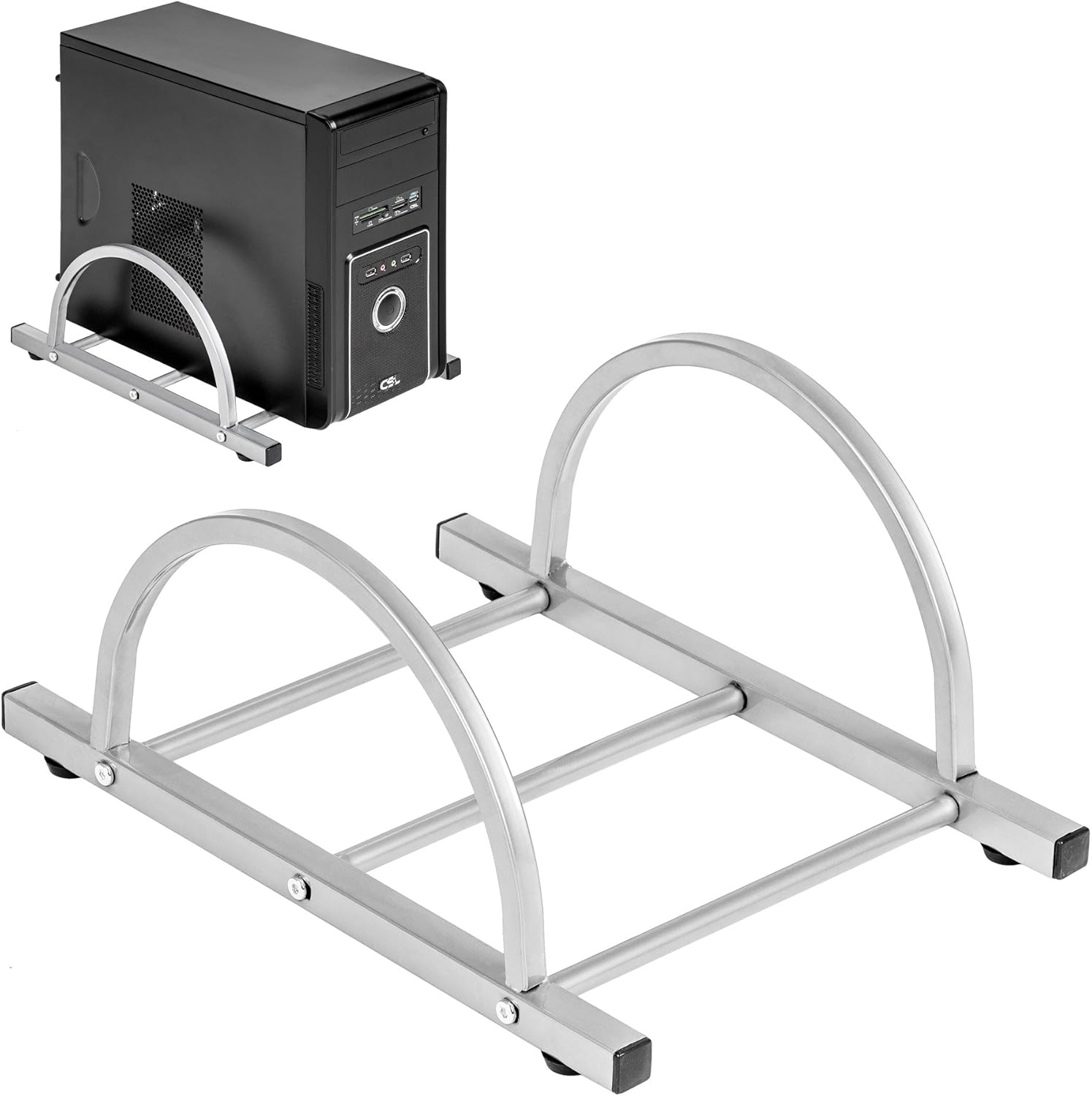
Figure 3: TecTake Computer Tower Holder. This image displays the separate holder designed to keep your PC tower elevated and secure.
6. Vedligeholdelse
Proper care will extend the life and appearance of your desk:
- Rensning: Tør overflader af med en blød, damp klud. Brug en mild sæbeopløsning til genstridige pletter, og tør straks efter med en ren klud. Undgå slibende rengøringsmidler eller barske kemikalier.
- Spild: Clean up spills immediately to prevent staining or damage to the MDF surface.
- Hardware: Periodically check all screws and fittings for tightness. Re-tighten as necessary to maintain stability.
- Beskyttelse: Use coasters for drinks and protective pads under hot items to prevent damage to the tabletop.
7. Fejlfinding
Hvis du støder på problemer med dit skrivebord, kan du overveje følgende almindelige løsninger:
- Skrivebordet er vaklende:
- Sørg for, at skrivebordet står på en plan overflade.
- Kontrollér alle monteringsskruer og -bolte. Spænd eventuelle løse forbindelser.
- Verify that all leg caps are properly installed and making full contact with the floor.
- Tastaturbakken glider ikke jævnt:
- Kontroller for eventuelle blokeringer i glidemekanismen.
- Ensure the rails are correctly installed and aligned.
- Clean the rails if dust or debris is present.
- Manglende dele: If you find any parts missing upon unpacking, please refer to the "Warranty and Support" section to contact customer service.
8. Specifikationer
| Feature | Detalje |
|---|---|
| Mærke | TecTake |
| Modelnummer | 402405 |
| Overordnede mål (L x B x H) | 170 x 135 x 75 cm (66.9 x 53.1 x 29.5 tommer) |
| Worktop Height | 75 cm (29.5 tommer) |
| Large Tabletop Section (L x W) | 115 x 55 cm (45.3 x 21.7 tommer) |
| Small Tabletop Section (L x W) | 80 x 55 cm (31.5 x 21.7 tommer) |
| Rounded Corner Section (L x W) | 55 x 55 cm (21.7 x 21.7 tommer) |
| Bordpladetykkelse | 1.5 cm (0.6 tommer) |
| Sliding Keyboard Tray (L x W) | 56.5 x 35 cm (22.2 x 13.8 tommer) |
| Steel Tube Dimensions | 3x2 cm; 2x2 cm; 1.5x1.5 cm |
| Computer Tower Holder Width (Max) | 25 cm (9.8 tommer) |
| Maksimal belastningskapacitet | 100 kg (220 lbs) |
| Materiale | Veneered MDF surface, powder-coated steel tube frame, plastic feet and end caps |
| Color (as per model) | Hvid |
9. Garanti og support
TecTake products are manufactured with quality and durability in mind. For information regarding warranty coverage, please refer to the warranty card included with your product or visit the official TecTake webwebsted.
If you have any questions, require assistance with assembly, or need to report missing/damaged parts, please contact TecTake customer service. Contact details can typically be found on the product packaging, the included assembly instructions, or the official TecTake webwebsted.
Online support: www.tectake.de (Tjek venligst din regionale website for specific contact information).