
1. Introduktion
Thank you for choosing the NeeGo Portable Boombox B07CLH45SL. This versatile audio system combines a CD player, cassette player, AM/FM radio, and includes a NeeGo Bluetooth receiver for wireless audio streaming. This manual provides detailed instructions for setup, operation, maintenance, and troubleshooting to ensure you get the best experience from your device.
2. Sikkerhedsoplysninger
- Læs alle instruktioner før betjening af enheden.
- Hold enheden væk fra vand, fugt og direkte sollys.
- Bloker ikke ventilationsåbninger.
- Use only the power sources specified in this manual.
- Forsøg ikke at reparere enheden selv. Overlad al service til kvalificeret personale.
- Bortskaf batterier ansvarligt i henhold til lokale regler.
3. Pakkens indhold
Kontroller venligst, at alle nedenstående varer er inkluderet i din pakke:
- NeeGo Portable Boombox (Main Unit)
- NeeGo Bluetooth Receiver
- AC strømledning
- 3.5mm Audio Cable (for Bluetooth receiver connection)
- USB Charging Cable for Bluetooth Receiver

Figure 3.1: Contents of the NeeGo Portable Boombox bundle, including the main unit, Bluetooth receiver, and necessary cables.
4. Produktet er slutview
4.1. Main Boombox Unit
The main unit features controls for CD, cassette, and radio functions, along with volume and input selection. Key features include:
- AM/FM-radiotuner
- CD Player (supports standard and MP3 CDs)
- Kassetteafspiller/optager
- Headphone Output (3.5mm stereo mini)
- Aux-indgang (3.5 mm)
- Automatic Shut-off Sleep Timer

Figure 4.1: Front panel and key features of the NeeGo Portable Boombox.
4.2. NeeGo Bluetooth Receiver
The included NeeGo Bluetooth receiver allows you to stream audio wirelessly to your boombox. It is compact and connects via the 3.5mm auxiliary port.
- Universal 3.5mm Stereo Port
- Micro Charge Port (for charging the receiver)
- Built-in Microphone (for hands-free calls, if supported by your device)

Figur 4.2: Detaljeret view of the NeeGo Bluetooth Receiver ports.
5. Opsætning
5.1. Powering the Boombox
Ghettoblasteren kan drives af enten vekselstrøm eller batterier.
AC strømtilslutning:
- Ensure the boombox is turned off.
- Connect the supplied AC power cord to the AC IN jack on the back of the boombox.
- Sæt den anden ende af netledningen i en almindelig stikkontakt.
Batteri installation:
For portable use, the boombox requires 6 'C' size batteries (not included).
- Åbn batterirummets dæksel i bunden af enheden.
- Isæt 6 batterier af størrelse 'C', og sørg for at polerne (+/-) vender korrekt som angivet i batterirummet.
- Luk batterirummets dæksel forsvarligt.
5.2. Connecting and Charging the Bluetooth Receiver
The NeeGo Bluetooth receiver allows your boombox to receive wireless audio signals.
Opladning af Bluetooth-modtageren:
Before first use, fully charge the Bluetooth receiver.
- Connect the micro USB charging cable to the micro charge port on the Bluetooth receiver.
- Tilslut den anden ende af USB-kablet til en USB-strømkilde (f.eks. en computers USB-port eller en USB-vægadapter).
- The indicator light on the receiver will show charging status (e.g., red while charging, off when fully charged). A full charge provides approximately 6 hours of operation.
Connecting to the Boombox:
- Plug the 3.5mm audio cable into the universal 3.5mm stereo port on the Bluetooth receiver.
- Plug the other end of the 3.5mm audio cable into the AUX IN jack on the boombox.
- Set the boombox's function selector to 'AUX' or 'AUDIO IN'.

Figure 5.1: The NeeGo Bluetooth Receiver connected to the boombox for wireless audio.
6. Betjeningsvejledning
6.1. Grundlæggende betjening
- Tænd/sluk: Tryk på POWER-knappen for at tænde eller slukke for enheden.
- Lydstyrkekontrol: Drej VOLUME-knappen for at justere lydniveauet.
- Funktionsvalg: Use the FUNCTION selector (e.g., CD, TAPE, RADIO, AUX) to choose your desired audio source.
6.2. Betjening af cd-afspilleren
- Set the FUNCTION selector to 'CD'.
- Open the CD compartment cover by pressing the 'OPEN/CLOSE' button or lifting the cover.
- Placer en CD med etiketsiden opad på spindlen.
- Luk låget til CD-skuffen. Displayet viser det samlede antal numre.
- Press the PLAY/PAUSE button (►/❚❚) to start playback.
- Tryk på STOP-knappen (■) for at stoppe afspilningen.
- Use the SKIP buttons (◀◀ / ►►) to skip tracks or fast forward/rewind within a track.
- The unit may feature a 'REPEAT' or 'PROGRAM' function for customized playback. Refer to the on-unit labels for specific controls.
6.3. Betjening af kassettebåndoptageren
- Set the FUNCTION selector to 'TAPE'.
- Press the STOP/EJECT button (■/▲) to open the cassette compartment.
- Isæt et kassettebånd med den åbne kant opad.
- Luk kassetterummet.
- Press the PLAY button (►) to start playback.
- Press the FAST FORWARD (FF) or REWIND (REW) buttons to advance or reverse the tape. Note that the unit may not have an auto-stop feature for FF/REW, so manually press STOP when desired.
- Press the STOP/EJECT button (■/▲) to stop playback and eject the tape.
6.4. AM/FM-radiobetjening
- Set the FUNCTION selector to 'RADIO'.
- Select 'AM' or 'FM' band using the band selector switch.
- Rotate the TUNING knob to find your desired station.
- Extend and adjust the telescopic antenna for optimal FM reception. For AM reception, rotate the unit for best signal.
6.5. Bluetooth Connectivity (via NeeGo Receiver)
- Ensure the NeeGo Bluetooth receiver is charged and connected to the boombox's AUX IN port (as described in Section 5.2).
- Set the boombox's FUNCTION selector to 'AUX' or 'AUDIO IN'.
- Turn on the NeeGo Bluetooth receiver. It will automatically enter pairing mode (indicated by a flashing LED).
- Gå til din Bluetooth-aktiverede enhed (smartphone, tablet osv.) til dens Bluetooth-indstillinger og søg efter tilgængelige enheder.
- Select 'NeeGo BT' or a similar name from the list to pair.
- Once paired, the receiver's LED will stop flashing and remain solid. You can now play audio from your device, and it will be heard through the boombox speakers.
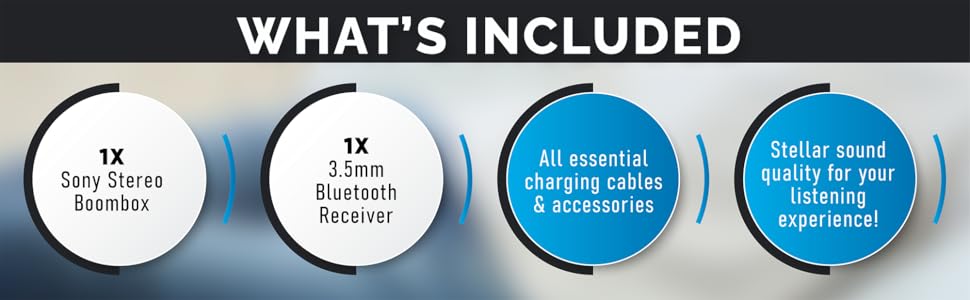
Figure 6.1: The boombox's classic stereo functions enhanced by the NeeGo Bluetooth receiver.
6.6. Hjælpeindgang
To play audio from an external device directly:
- Connect a 3.5mm audio cable from the headphone jack or line-out of your external device to the AUX IN jack on the boombox.
- Set the boombox's FUNCTION selector to 'AUX' or 'AUDIO IN'.
- Start afspilning på din eksterne enhed.
6.7. Hovedtelefonudgang
For private listening, plug any standard 3.5mm stereo headphones into the HEADPHONE jack on the boombox. The speakers will automatically mute when headphones are connected.
6.8. Automatic Shut-off / Sleep Timer
This feature allows the unit to automatically turn off after a set period. Consult the specific buttons or menu options on your unit for activating and setting the sleep timer, typically labeled 'SLEEP' or 'TIMER'.
7. Vedligeholdelse
7.1. Rengøring af enheden
- Tør enhedens yderside af med en blød, tør klud.
- Brug ikke slibende rengøringsmidler, voks eller opløsningsmidler, da de kan beskadige finishen.
- Brug en specialiseret CD-linserenser til CD-linsen.
- For the cassette head, use a cassette head cleaning kit periodically to ensure optimal sound quality.
7.2. Udskiftning af batteri
When the unit's performance degrades or the battery indicator (if present) shows low power, replace all 6 'C' batteries with new ones. Do not mix old and new batteries, or different types of batteries.
8. Fejlfinding
If you encounter issues with your NeeGo Portable Boombox, refer to the following common problems and solutions:
| Problem | Mulig årsag | Løsning |
|---|---|---|
| Enheden tænder ikke. | AC cord not properly connected; Batteries are dead or incorrectly inserted. | Kontroller netledningens tilslutning; udskift batterierne, eller sørg for korrekt polaritet. |
| Ingen lyd fra højttalere. | Lydstyrken er for lav; Hovedtelefoner er tilsluttet; Forkert funktion er valgt. | Increase volume; Disconnect headphones; Select correct function (CD, TAPE, RADIO, AUX). |
| CD not playing or skipping. | CD'en er snavset, ridset eller isat forkert; CD-linsen er snavset. | Clean or replace CD; Reinsert CD correctly; Clean CD lens with a specialized cleaner. |
| Cassette tape not playing or poor sound. | Tape is damaged; Cassette head is dirty or demagnetized. | Try a different tape; Clean cassette head with a cleaning kit. |
| Dårlig radiomodtagelse (statisk). | Antennen er ikke trukket ud eller justeret; Svagt signal. | Extend and adjust the telescopic antenna; Try repositioning the unit for AM. |
| Bluetooth receiver not pairing. | Receiver not in pairing mode; Receiver battery low; Device too far. | Ensure receiver is on and flashing; Charge receiver; Move device closer (within 10 meters). |
Sound quality is
Ask a question about this manualAsk about setup, troubleshooting, compatibility, parts, safety, or missing instructions. Manuals+ will review the question and use this page’s manual context to help answer it. |