
1. Vigtige sikkerhedsinstruktioner
This manual paper cutter is designed for precision and efficiency. To ensure safe operation and prevent injury, please read and understand all safety instructions before use. Failure to follow these instructions may result in serious injury.
- Tohåndsbetjening: The Sysform 310M requires two-handed operation to activate the cutting mechanism. This is a critical safety feature designed to keep hands away from the blade during cutting. Always use both hands as instructed.
- Blade Safety Lock: Ensure the blade safety lock is engaged when the cutter is not in use or when performing maintenance. Never attempt to bypass or disable this safety feature.
- Hold hænderne klare: Always keep hands, fingers, and any loose clothing or jewelry clear of the blade path, especially during operation.
- Stabil overflade: Always operate the paper cutter on a stable, flat, and level surface to prevent tipping or movement during use.
- Children and Unauthorized Users: Keep the paper cutter out of reach of children and unauthorized personnel. This is not a toy.
- Korrekt ventilation: Ensure adequate ventilation if working with materials that may produce dust or fumes.
- Skarp klinge: The blade is extremely sharp. Handle with extreme care during cleaning or replacement. Always wear appropriate protective gloves.

Billede: Vinklet view of the Sysform 310M paper cutter, showing the safety warning labels prominently displayed on the machine's body, indicating areas to keep hands clear.

Billede: Forside view of the Sysform 310M paper cutter, detailing the blade housing and additional warning labels for safe operation.
2. Produktet er slutview
The Sysform 310M Desktop Manual Paper Cutter is a robust and precise tool designed for cutting various paper stocks. It features a durable construction, an optical cutting line for accuracy, and a side lay with a measuring scale for consistent results. Its safety features, including a blade lever safety lock and two-handed operation, ensure user protection.
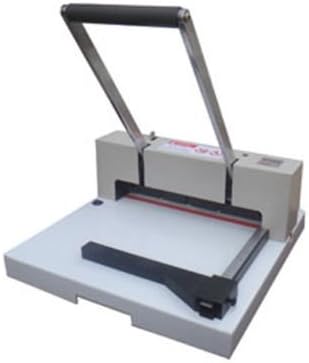
Billede: En general view of the Sysform 310M Desktop Manual Paper Cutter, showcasing dens kompakte design og hovedkomponenter.
Nøglefunktioner:
- Safety lock for blade lever
- Tohåndsbetjening er nødvendig for sikkerheden
- Equipped with optical cutting line
- Side lay with measuring scale in mm/inch
- Easy cutting stick change design
- Manual backgauge for precise paper positioning
- High quality cutting blade
3. Opsætning og montering
The Sysform 310M Desktop Manual Paper Cutter comes largely pre-assembled. Follow these steps for initial setup:
- Udpakning: Carefully remove the paper cutter from its packaging. Retain packaging materials for future transport or storage.
- Placering: Place the cutter on a sturdy, level, and clean work surface capable of supporting its weight (approximately 44 pounds). Ensure there is sufficient space around the unit for safe operation and material handling.
- Undersøg for skader: Before first use, visually inspect the cutter for any signs of shipping damage. Do not operate if damage is observed. Contact customer support if necessary.
- Bliv fortrolig med kontroller: Identify the blade lever, safety lock, side lay, and measuring scale.
4. Betjening
Follow these steps for safe and effective operation of your Sysform 310M paper cutter:
4.1. Ilægning af papir
- Ensure the blade lever is in the fully raised and locked position.
- Place the stack of paper onto the cutting bed, aligning the edge to be cut with the desired measurement on the side lay.
- Adjust the manual backgauge to firmly hold the paper stack in place, ensuring it is square to the blade for an accurate cut.
4.2. Using the Side Lay and Measuring Scale
The side lay features a measuring scale in both millimeters and inches, allowing for precise alignment of your paper. Adjust the paper stack against the side lay to achieve the desired cutting dimension.

Billede: Side view of the Sysform 310M paper cutter, showing the adjustable side lay with clear measurement markings in both inches and millimeters.
4.3. Utilizing the Optical Cutting Line
The optical cutting line projects a visible line onto the paper, indicating the exact path of the blade. Use this feature to fine-tune your paper alignment for highly accurate cuts.
4.4. Performing a Cut
- With the paper properly aligned and secured, ensure both hands are free to operate the cutter.
- Simultaneously disengage the blade safety lock (if applicable) and firmly pull down the blade lever with both hands.
- Apply steady, even pressure throughout the cutting stroke until the blade has passed completely through the paper stack.
- Slowly release the blade lever, allowing it to return to its fully raised and locked position.
- Remove the cut paper.
4.5. Cutting Capacity
- Maksimal skærebredde: 12.2" (310 mm)
- Skæredybde: 10" (254 mm)
- Maksimal skærehøjde: 0.59" (15 mm)
- Narrow Cut: 1.57" (40 mm)
5. Vedligeholdelse
Regular maintenance ensures the longevity and optimal performance of your Sysform 310M paper cutter.
5.1. Knivpleje
- The blade is designed for durability, but it will dull over time with extensive use. A dull blade can lead to ragged cuts or difficulty cutting.
- Blade sharpening or replacement should only be performed by qualified personnel or a certified service center. Do not attempt to sharpen the blade yourself.
5.2. Replacing the Cutting Stick
The cutting stick (or cutting mat) is a consumable part located beneath the blade. It provides a surface for the blade to cut into, protecting the blade edge. The Sysform 310M features an easy cutting stick change design.
- Ensure the blade lever is in the fully raised and locked position.
- Locate the cutting stick slot.
- Carefully slide out the old cutting stick.
- Insert a new, compatible cutting stick, ensuring it sits flush within its groove.
5.3. Rensning
- Regularly wipe down the cutting bed and exterior surfaces with a soft, dry cloth to remove paper dust and debris.
- Do not use abrasive cleaners or solvents, as they may damage the finish or markings.
- Keep the blade area free of obstructions.
6. Fejlfinding
This section addresses common issues you might encounter with your paper cutter.
| Problem | Mulig årsag | Løsning |
|---|---|---|
| Uneven or Ragged Cuts | Dull blade; Paper not aligned squarely; Too much paper in stack; Worn cutting stick. | Inspect blade for sharpness (contact service if dull); Realign paper using side lay and backgauge; Reduce paper stack height; Replace cutting stick. |
| Blade not cutting completely through paper | Dull blade; Insufficient downward pressure; Worn cutting stick. | Inspect blade for sharpness; Apply firm, even pressure throughout the cut; Replace cutting stick. |
| Blade lever stuck or difficult to move | Safety lock engaged; Obstruction in blade path; Mechanism needs lubrication. | Ensure safety lock is disengaged; Check for and remove any debris; Contact service for lubrication or repair. |
7. Specifikationer
| Attribut | Værdi |
|---|---|
| Mærke | Sysform |
| Modelnavn | 310M |
| Varemodelnummer | ENE030310M |
| Produktdimensioner | 21 x 21 x 11 tommer |
| Varens vægt | 44 pund |
| Maksimal skærebredde | 12.2" (310 mm) |
| Skæredybde | 10" (254 mm) |
| Maksimal klippehøjde | 0.59" (15 mm) |
| Smal snit | 1.57" (40 mm) |
| UPC | 742833334319 |
| Fabrikant | Sysform |
| Dato først tilgængelig | 15. december 2016 |
8. Garanti og support
For warranty information, technical support, or to inquire about replacement parts, please contact the manufacturer, Sysform, or your authorized dealer. Please have your model number (310M or ENE030310M) and UPC (742833334319) available when contacting support.