
Indledning
This manual provides detailed instructions for the proper use and care of your Vivitar DVR917HD 4K Action Camera. Please read this manual thoroughly before operating the device to ensure safe and effective use. The Vivitar DVR917HD is designed to capture high-quality video and photos in various environments, including underwater, thanks to its durable waterproof casing and versatile mounting options.
Produktegenskaber
- 2-tommer farve-LCD-skærm: For precise image capture, video playback, and photo viewing.
- 4K videooptagelse: Capture stunning video at 4640 x 3480 resolution, along with 1080p and 720p options.
- 16 megapixel CMOS-sensor: For high-resolution still photographs.
- Vandtæt etui: Enables use in wet conditions and underwater adventures.
- Indbygget Wi-Fi: Allows direct streaming of content to compatible smartphones or tablets.
- Vidvinkelobjektiv: Designed for capturing expansive scenes.
- Flere grænseflader: Supports microSD, microSDHC, HDMI, and USB 2.0.
- Kompakt design: Dimensions of 2.6 inches x 2.5 inches x 1.5 inches and a weight of 0.5 pounds.
Pakkens indhold
Bekræft, at alle nedenstående varer er inkluderet i din pakke:
- Vivitar DVR917HD 4K Action Camera
- Vandtæt hus
- Trådløs fjernbetjening
- AC strømadapter
- USB kabel
- HDMI kabel
- Helmet Mounting Kit
- Cykelholder

Image: The Vivitar DVR917HD camera shown with its full set of accessories, including the waterproof case, remote, various mounts, and cables.
Opsætning
1. Indsættelse af et MicroSD-kort
- Find microSD-kortstikket på siden af kameraet.
- Gently insert a compatible microSD or microSDHC card (Class 4 or higher recommended) into the slot until it clicks into place. Ensure the card is oriented correctly.
2. Opladning af batteriet
- Connect the camera to the AC power adapter using the provided USB cable.
- Sæt strømadapteren i en stikkontakt.
- The charging indicator light will illuminate. Charging is complete when the light changes color or turns off.
3. Brug af det vandtætte hus
- Open the latch on the waterproof housing.
- Placer forsigtigt kameraet inde i huset, og sørg for, at det sidder godt fast.
- Close the latch securely. Before first use in water, perform a leak test without the camera inside.
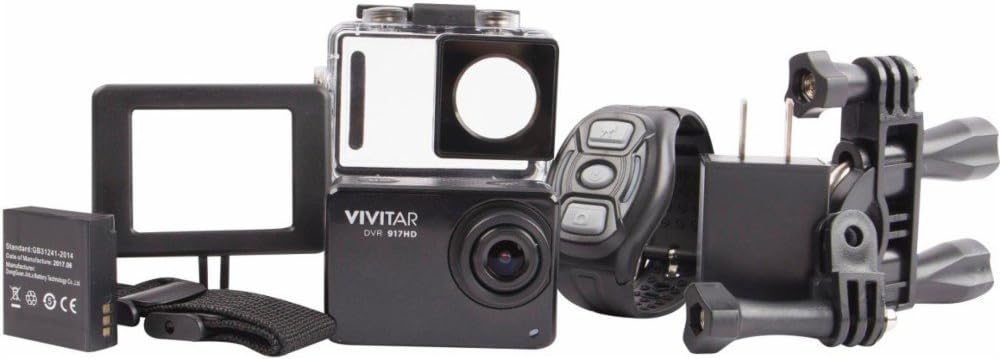
Image: The Vivitar DVR917HD camera positioned within its clear waterproof housing, with the back cover open.
4. Montering af beslag
The camera comes with a helmet mounting kit and a bicycle mount. Follow the instructions provided with each mount to securely attach the camera for your desired activity.

Image: The Vivitar DVR917HD camera enclosed in its waterproof case, securely attached to a mounting accessory.

Image: A person wearing a ski helmet with the Vivitar DVR917HD action camera visibly mounted on the top, against a snowy mountain backdrop.
Betjeningsvejledning
1. Tænd/sluk
- To power on, press and hold the Power/Mode button (usually labeled 'MODE') until the screen illuminates.
- To power off, press and hold the Power/Mode button again until the screen turns off.

Billede: Et nærbillede view of the Vivitar DVR917HD action camera, highlighting its front lens and top control buttons.
2. Optagelse af video
- Ensure the camera is in video recording mode. Use the Mode button to cycle through modes if necessary.
- Press the 'OK' button to start recording. A red indicator light or on-screen icon will typically show recording is active.
- Press the 'OK' button again to stop recording.
3. Tage billeder
- Switch the camera to photo mode using the Mode button.
- Komponer dit billede ved hjælp af den 2-tommer LCD-skærm.
- Tryk på knappen 'OK' for at tage et billede.

Image: The Vivitar DVR917HD camera's rear screen displaying a live view from a first-person perspective of someone riding a bicycle.
4. Wi-Fi-forbindelse
- Aktiver Wi-Fi på kameraet via indstillingsmenuen.
- On your smartphone or tablet, search for the camera's Wi-Fi network and connect to it.
- Open the Vivitar app (if available) or a compatible action camera app to stream content or control the camera remotely.
5. Brug af den trådløse fjernbetjening
The included wireless remote control allows for convenient operation of the camera from a distance. Refer to the remote control's specific instructions for pairing and function details.
Opretholdelse
Cleaning the Camera and Housing
- Use a soft, lint-free cloth to clean the camera body and lens. Avoid abrasive materials.
- For the waterproof housing, rinse with fresh water after use in saltwater and allow to air dry. Ensure the O-ring seal is free of debris.
Batteripleje
- Oplad batteriet helt før hver brug.
- Udsæt ikke batteriet for ekstreme temperaturer.
- Hvis kameraet opbevares i længere tid, skal batteriet fjernes.
Opbevaring
Store the camera in a cool, dry place away from direct sunlight and excessive humidity. Keep it protected from dust and impacts.
Fejlfinding
- Kameraet tænder ikke: Sørg for, at batteriet er opladet og isat korrekt.
- Problemer med optagelse: Check if a microSD card is inserted and has sufficient free space. Ensure the card is not corrupted.
- Dårlig lydkvalitet: The waterproof housing can significantly muffle sound. For better audio, use the camera outside the housing in dry conditions.
- Problemer med Wi-Fi-forbindelse: Ensure Wi-Fi is enabled on the camera and your smart device. Try restarting both devices.
- Kamera fryser: Fjern og sæt batteriet i igen for at nulstille kameraet.
Specifikationer
| Feature | Specifikation |
|---|---|
| Modelnavn | DVR917HD |
| Varemodelnummer | 3216565590 |
| Effektiv stillopløsning | 16 MP |
| Videooptagelsesopløsning | 4K, 1080p, 720p |
| Videooptagelsesformat | MP4 |
| Fotosensorteknologi | CMOS |
| Skærmstørrelse | 2 tommer |
| Forbindelsesteknologi | Wi-Fi |
| Flash-hukommelsestype | Micro SD |
| Speciel funktion | Vandtæt |
| Linsetype | Vidvinkel |
| Fokus Type | Autofokus |
| Eksponeringskontrol | Automatisk |
| Varens vægt | 717 g |
| Dimensioner | 2.6 x 2.5 x 1.5 tommer (ca.) |
Garantioplysninger
For detailed warranty information regarding your Vivitar DVR917HD 4K Action Camera, please refer to the warranty card included in your product packaging or visit the official Vivitar webGarantibetingelserne kan variere afhængigt af region og købsdato.
Kundesupport
If you require further assistance, have questions not covered in this manual, or need technical support, please contact Vivitar customer service. Contact details can typically be found on the Vivitar official webwebstedet eller på din produktemballage.