
1. Introduktion
The Edifier M3600D is a high-performance 2.1 active speaker system designed for multimedia use. Featuring THX certification and a total RMS output of 200 Watts, this system delivers powerful and clear audio. It includes a robust subwoofer and two satellite speakers, offering versatile connectivity options for various audio sources.
2. Hvad er der i æsken
- 1 x subwoofer
- 2 x satellithøjttalere
- 1 x strømkabel
- Connecting Cables (for satellites and audio input)
- 1 x brugermanual
3. Opsætning
Follow these steps to set up your Edifier M3600D speaker system:
- Placering: Position the subwoofer on the floor, ideally near a wall for enhanced bass. Place the satellite speakers on either side of your listening area, ensuring they are equidistant from you for optimal stereo imaging.
- Tilslut satellithøjttalere: Connect the right and left satellite speakers to the corresponding output ports on the rear of the subwoofer using the provided cables. The right satellite speaker typically features the volume control and input selection.
- Tilslut lydkilde: Choose your preferred audio input method (Optical, Coaxial, Line In, or AUX) and connect the appropriate cable from your audio source (e.g., computer, TV, smartphone) to the subwoofer's input ports.
- Strømtilslutning: Plug the power cable into the subwoofer's power input, then connect it to a wall outlet.
- Tænd: Turn on the power switch located on the rear of the subwoofer. The system is now ready for operation.

Figure 3.1: Edifier M3600D Multimedia 2.1 Active Speaker System. This image shows the main subwoofer unit alongside the two satellite speakers, illustrating the complete system setup.
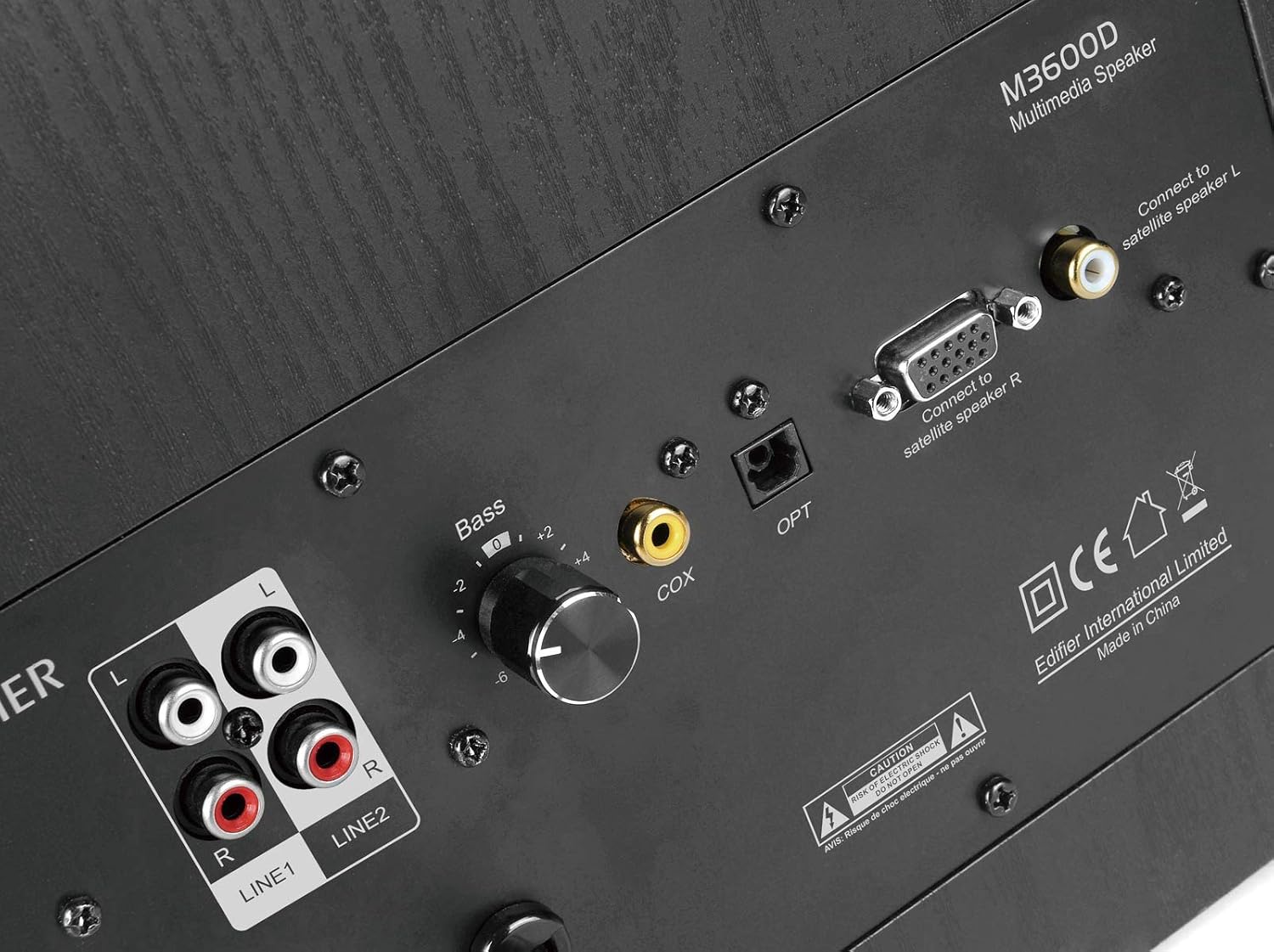
Figure 3.2: Rear panel of the M3600D subwoofer. This image highlights the various input ports (Line In 1, Line In 2, Coaxial, Optical) and the output connections for the satellite speakers, along with the bass control knob and power switch.
4. Betjeningsvejledning
Once the system is set up, follow these instructions for operation:
- Tænd/sluk: Use the main power switch on the rear of the subwoofer to turn the system on or off.
- Lydstyrkekontrol: The large rotary dial on the front of the right satellite speaker controls the master volume. Rotate clockwise to increase volume and counter-clockwise to decrease it.
- Valg af input: Press the volume dial on the right satellite speaker to cycle through the available audio inputs (Optical, Coaxial, Line In 1, Line In 2, AUX). An indicator light will show the currently selected input.
- Basjustering: Use the 'Bass' control knob located on the rear panel of the subwoofer to adjust the bass level to your preference.
- Hovedtelefonudgang: A 3.5mm headphone jack is available on the right satellite speaker for private listening. Plugging in headphones will mute the speakers.
5. Forbindelse
The M3600D offers multiple connectivity options:
- Optisk indgang (OPT): For high-quality digital audio connection from devices like TVs, game consoles, or Blu-ray players.
- Coaxial Input (COX): Another digital audio input option, suitable for similar devices as the optical input.
- Line In 1 (RCA): Stereo RCA input for connecting devices with RCA audio outputs.
- Line In 2 (RCA): Additional stereo RCA input for another audio source.
- AUX-indgang (3.5 mm): A standard 3.5mm auxiliary input for connecting smartphones, tablets, laptops, or MP3 players.
Note: This system does not support Bluetooth connectivity. For wireless audio, an external Bluetooth adapter would be required (not included).
6. Specifikationer
| Feature | Specifikation |
|---|---|
| Modelnavn | M3600D |
| Højttaler type | 2.1 Multimedia Speaker System (Subwoofer) |
| Samlet effekt | 200 Watts RMS (Subwoofer: 130W, Satellites: 2 x 35W) |
| THX-certificeret | Ja |
| Materiale | Wood (MDF cabinet with vinyl wood grain laminate) |
| Indgange | Optical, Coaxial, Line In (RCA x2), AUX (3.5mm) |
| Kontrolmetode | Rotary Volume/Input Dial (on satellite), Bass Knob (on subwoofer) |
| Subwoofer diameter | 7 centimeter (wooferdiameter) |
| Audio driver størrelse | 17.78 centimeter |
| Farve | Sort |
| Produktdimensioner | 12 x 16.75 x 11 tommer |
| Varens vægt | 21 pund |
| Kompatible enheder | Smartphone, Tablet, Desktop, Laptop, MP3 Player, Television, Projector |
7. Fejlfinding
If you encounter issues with your M3600D speaker system, please refer to the following common troubleshooting steps:
- Ingen lyd:
- Ensure the power cable is securely connected and the power switch on the subwoofer is ON.
- Verify that the correct input source is selected on the right satellite speaker.
- Check all audio cables for secure connections between the source, satellites, and subwoofer.
- Increase the volume on both the speaker system and your audio source.
- If using headphones, ensure they are unplugged from the satellite speaker.
- Forvrænget lyd:
- Skru ned for lydstyrken på både højttalersystemet og din lydkilde.
- Check if the audio source itself is producing distorted sound. Try a different source.
- Sørg for, at alle kabler er korrekt tilsluttet og ikke er beskadiget.
- Adjust the bass control knob on the subwoofer.
- Intermitterende lyd:
- Tjek for løse kabelforbindelser.
- Ensure there are no strong electromagnetic interferences near the speakers.
- Try a different audio cable or input source to isolate the problem.
If the issue persists after trying these steps, please contact Edifier customer support.
8. Vedligeholdelse
To ensure the longevity and optimal performance of your Edifier M3600D speaker system, follow these maintenance guidelines:
- Rensning: Use a soft, dry cloth to clean the surfaces of the speakers and subwoofer. Avoid using abrasive cleaners, waxes, or solvents.
- Placering: Place the speakers on a stable, level surface to prevent accidental falls. Avoid placing them in direct sunlight, near heat sources, or in areas with high humidity or dust.
- Ventilation: Sørg for tilstrækkelig ventilation omkring subwooferen for at forhindre overophedning. Bloker ikke ventilationsåbninger.
- Kabelstyring: Hold kablerne organiseret og fri for knæk eller overdreven spænding for at forhindre skader.
- Sluk, når den ikke er i brug: For extended periods of inactivity, it is recommended to turn off the system using the main power switch.
9. Garanti og support
The Edifier M3600D Multimedia 2.1 Active Speaker System comes with a 2 års begrænset garanti. This warranty covers manufacturing defects and ensures hassle-free full replacement in the USA and Canada.
For warranty claims, technical assistance, or further inquiries, please contact Edifier USA customer support. Refer to the official Edifier webwebstedet eller kontaktoplysningerne på din produktemballage for at få de mest opdaterede supportoplysninger.