
1. Introduktion
Thank you for choosing the Impex Thunder T2 Plus 80W 2.0 Channel Multimedia Speaker. This speaker system is designed to deliver a rich and powerful audio experience for your home entertainment needs. It features versatile connectivity options including Bluetooth, USB, SD/TF card, FM Radio, and AUX input, along with a wireless microphone for karaoke. Please read this manual carefully before using the product to ensure proper operation and to maximize its performance.

Figure 1.1: Impex Thunder T2 Plus Speaker System in a home environment.
2. Sikkerhedsoplysninger
For at sikre sikker drift og forhindre skader, bedes du overholde følgende sikkerhedsforanstaltninger:
- Do not expose the speaker to water or moisture. This product is not water-resistant.
- Hold højttaleren væk fra direkte sollys, varmekilder og åben ild.
- Sørg for tilstrækkelig ventilation omkring højttaleren for at forhindre overophedning.
- Brug kun den strømadapter, der følger med enheden.
- Forsøg ikke at åbne eller reparere højttaleren selv. Overlad al service til kvalificeret personale.
- Opbevares utilgængeligt for børn.
- Tag stikket ud af højttaleren under tordenvejr eller når den ikke bruges i længere perioder.
3. Pakkens indhold
Bekræft at alle varer er til stede i pakken:
- 1 x Aktiv højttaler
- 1 x passiv højttaler
- 1 x brugermanual med garantibevis
- 1 x lydkabel
- 1 x fjernbetjening
- 1 x FM-antenne
- 1 x trådløs mikrofon
- 1 x Wireless Microphone Battery
- Speaker Legs (for assembly)
4. Produktfunktioner
The Impex Thunder T2 Plus offers a range of features for a comprehensive audio experience:
- 2.0 Channel Tower Speaker System
- 80W RMS Output Power
- Bluetooth-forbindelse til trådløs lydstreaming
- USB Input for playing music from flash drives
- SD/MMC Card Slot for playing music from memory cards
- Indbygget FM-radio
- AUX Input for connecting external audio devices (e.g., smartphones, laptops, TVs)
- Wireless Microphone for Karaoke function
- Two Wired Microphone Inputs
- Fuldfunktions fjernbetjening
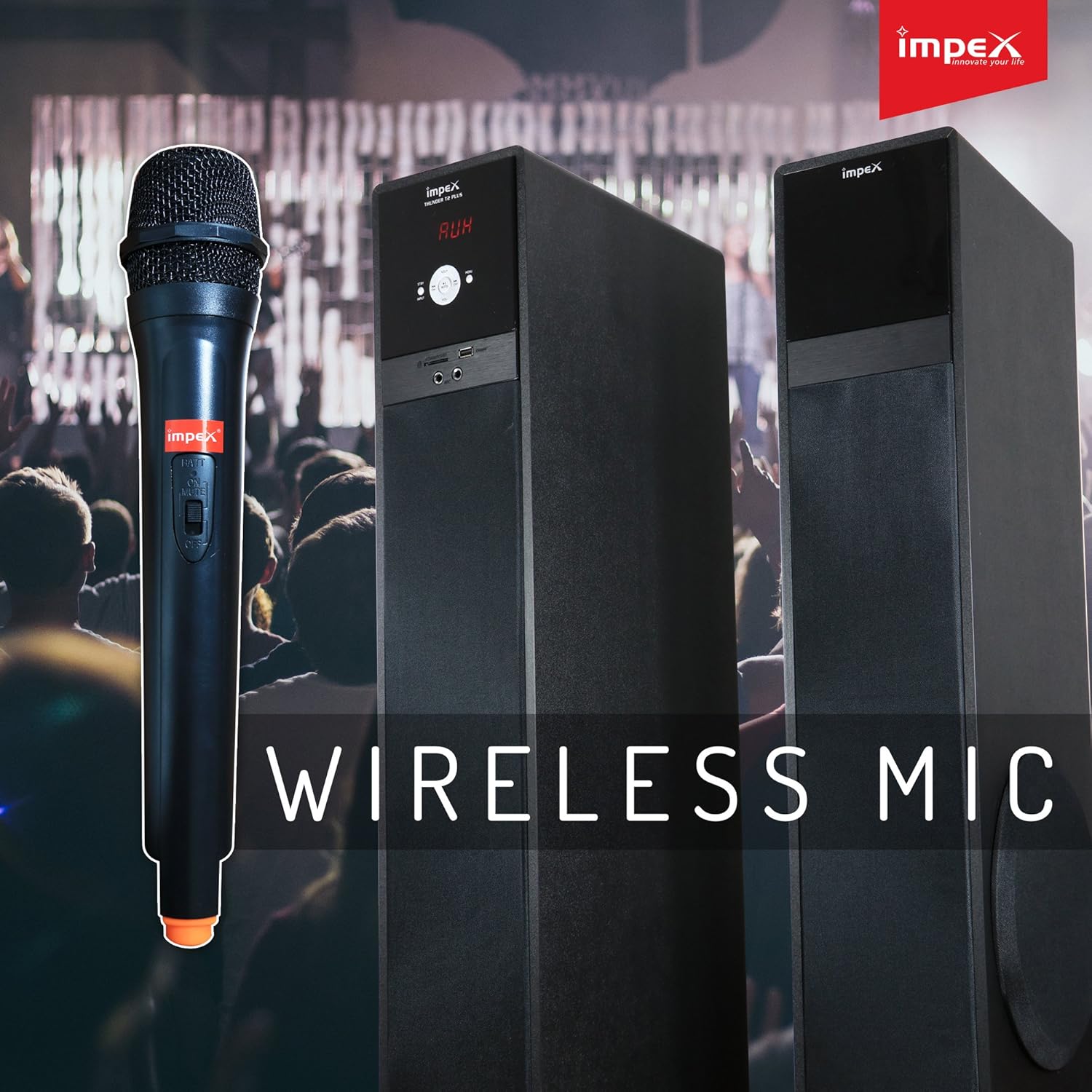
Figure 4.1: Wireless Microphone for Karaoke functionality.
5. Opsætningsvejledning
5.1 Højttalerplacering
Place the active and passive speakers on a flat, stable surface. Ensure they are positioned to provide optimal sound distribution in your listening area. Maintain some distance from walls for better bass response.
5.2 Tilslutning af højttalerne
- Connect the passive speaker to the active speaker using the provided speaker cable. The connection ports are typically located on the rear of each speaker.
- Sørg for, at forbindelserne er sikre.
5.3 Strømtilslutning
- Plug the AC power cord into the power input on the active speaker.
- Insert the other end of the power cord into a standard AC power outlet.
5.4 Tilslutning af lydkilder
The Thunder T2 Plus offers multiple ways to connect your audio devices:
5.4.1 AUX-indgang
- Use the provided audio cable (3.5mm to RCA or 3.5mm to 3.5mm, depending on your device) to connect your external audio source (e.g., TV, laptop, smartphone) to the AUX input port on the speaker.
- Select 'AUX' mode on the speaker.
5.4.2 USB / SD/TF Card
- Insert a USB flash drive or an SD/TF card containing MP3 audio files ind i den respektive plads på højttaleren.
- The speaker should automatically switch to USB/SD mode and begin playback. If not, select 'USB' or 'SD' mode.
5.4.3 FM -antenne
- Connect the FM antenna to the FM antenna port on the rear of the active speaker.
- Forlæng antennen for bedre modtagelse.

Figure 5.1: Input panel with USB, SD/MMC, and Microphone ports.
6. Betjeningsvejledning
6.1 Tænd/sluk
Press the Power button on the front panel of the active speaker or on the remote control to turn the unit ON or OFF.
6.2 Valg af tilstand
Press the 'MODE' button on the front panel or remote control to cycle through available input modes: Bluetooth, USB, SD/TF, FM Radio, and AUX.
6.3 Lydstyrkekontrol
Use the master volume knob on the active speaker or the 'VOL+' / 'VOL-' buttons on the remote control to adjust the overall volume.
6.4 Bluetooth-betjening
- Switch the speaker to Bluetooth mode. The display will show 'BT' and a pairing indicator will flash.
- Aktiver Bluetooth på din smartphone, tablet eller anden enhed.
- Søg efter 'THUNDER T2 PLUS' in the list of available devices and select it to pair.
- Once paired, the speaker will confirm the connection, and you can play audio from your device.
6.5 USB / SD/TF Playback
When a USB drive or SD/TF card is inserted, the speaker will automatically switch to the corresponding mode and begin playing audio files. Use the 'PLAY/PAUSE', 'PREV', and 'NEXT' buttons on the speaker or remote control to manage playback.
6.6 FM-radiofunktion
- Skift højttaleren til FM-tilstand.
- Press the 'SCAN' button on the remote control to automatically scan and save available FM stations.
- Brug knapperne 'FORIGE' og 'NÆSTE' til at navigere gennem de gemte stationer.
6.7 Brug af mikrofon (karaoke)
- For the wireless microphone, ensure a battery is inserted and turn it ON.
- For wired microphones, connect them to the 'MIC' input ports on the speaker.
- Adjust the microphone volume using the dedicated 'MIC VOL' control (if available) or the main volume.
6.8 Fjernbetjeningsfunktioner
The remote control provides convenient access to all speaker functions:
- Magt: Turn the speaker ON/OFF.
- Mode: Switch between input sources (Bluetooth, USB, SD, FM, AUX).
- Volumen +/-: Juster masterlydstyrken.
- Afspil/pause: Styr medieafspilning.
- Forrige næste: Skip tracks or FM stations.
- EQ: Select equalizer presets (if available).
- Stum: Slå lyden fra eller til.
- Gentage: Gentag det aktuelle nummer eller den aktuelle afspilningsliste.
- Numeriske taster: Direct track selection (USB/SD mode) or FM station input.

Figure 6.1: Full-function Remote Control.
7. Vedligeholdelse
Korrekt vedligeholdelse sikrer dit højttalersystems levetid og ydeevne:
- Rensning: Brug en blød, tør klud til at rengøre højttalerens yderside. Brug ikke flydende rengøringsmidler eller slibende materialer.
- Opbevaring: If storing the speaker for an extended period, unplug it from the power outlet and store it in a cool, dry place, away from dust and extreme temperatures.
- Ventilation: Sørg for, at højttalerens ventilationsåbninger ikke er blokerede for at forhindre overophedning.
8. Fejlfinding
If you encounter issues with your Impex Thunder T2 Plus speaker, refer to the following common problems and solutions:
| Problem | Mulig årsag | Løsning |
|---|---|---|
| Ingen strøm | Power cord not connected; Power outlet not working; Speaker is OFF. | Check power cord connection; Try a different outlet; Press the Power button. |
| Ingen lyd | Volume too low; Incorrect input mode; Audio cable loose/damaged; Bluetooth not connected. | Øg lydstyrken; Vælg den korrekte inputtilstand; Tilslut lydkablet igen; Genpar Bluetooth-enheden. |
| Bluetooth-parringsfejl | Speaker not in pairing mode; Device Bluetooth is OFF; Speaker too far from device. | Ensure speaker is in BT mode; Turn on device Bluetooth; Move device closer to speaker (within 10m). |
| USB/SD-kort afspiller ikke | Ukorrekt file formatering; Kort/drev ikke isat korrekt; Beskadiget files. | Sikre files are MP3; Reinsert card/drive; Try a different card/drive. |
| Dårlig FM -modtagelse | Antenna not connected/extended; Weak signal. | Connect and extend FM antenna; Reposition antenna or speaker. |
| Fjernbetjening virker ikke | Batteries drained/incorrectly inserted; Obstruction between remote and speaker; Remote too far. | Replace batteries; Ensure clear line of sight; Move closer to speaker. |
Hvis problemet fortsætter efter at have prøvet disse løsninger, bedes du kontakte kundesupport.
9. Specifikationer
Detailed technical specifications for the Impex Thunder T2 Plus speaker system:
| Feature | Specifikation |
|---|---|
| Modelnavn | Multimediehøjttaler 2.0 |
| Modelnummer | THUNDER T2 PLUS |
| Mærke | Impex |
| Højttaler type | Bashøjttaler |
| Forbindelsesteknologi | Kablet, trådløs (Bluetooth) |
| Lydudgangstilstand | Omgive |
| Surround Sound Kanalkonfiguration | 2.0 |
| Maksimal højttalerudgangseffekt | 80 watt |
| Strømkilde | AC |
| Kontrolmetode | Fjern |
| Kompatible enheder | Smartphone, Tablet, Laptop, TV, Desktop, MP3 Player |
| Monteringstype | Floor Standing |
| Materiale | PC |
| Farve | Sort |
| Varens vægt | 19.9 kilo |
| Produktdimensioner | 41 x 38 x 90 cm |
| Vandtæt | Ingen |
| Særlige funktioner | Automatic Speaker Setup, Auto EQ, Dolby TrueHD, Multi-room |
| Anbefalede anvendelser | Hjemmebiograf |
10. Garanti og support
Impex products are designed for quality and reliability. This product comes with a warranty as specified in the included warranty card. Please retain your purchase receipt for warranty claims.
Kundesupport:
For technical assistance, service, or warranty inquiries, please contact the Impex service helpline:
- Warranty Helpline: 1800 425 9444
- Webwebsted: www.impextechnologies.in
Impex offers hassle-free doorstep service for your convenience.

Figure 10.1: Impex Warranty and Service Information.