
1. Introduktion
Thank you for choosing the Hanwha Techwin Wisenet QND-6020R 2 Megapixel Network Camera. This manual provides essential information for the safe and efficient installation, operation, and maintenance of your new surveillance camera. Please read this manual thoroughly before using the product and retain it for future reference.
2. Sikkerhedsoplysninger
Overhold følgende sikkerhedsforanstaltninger for at forhindre personskade eller beskadigelse af produktet:
- Strømkilde: Use only the specified power adapter (AC/DC) for this device. Incorrect voltage kan forårsage brand eller elektrisk stød.
- Installation: Ensure the camera is securely mounted to prevent it from falling. Wall mounting is recommended.
- Vand og fugt: This camera has an IP65 waterproof rating, meaning it is protected against dust and low-pressure water jets. However, avoid submerging the camera in water or exposing it to high-pressure water.
- Rensning: Afbryd strømmen før rengøring. Brug en blød, tør klud. Brug ikke flydende rengøringsmidler eller aerosolrengøringsmidler.
- Driftstemperatur: Do not operate the camera outside its specified temperature range.
- Service: Forsøg ikke selv at servicere dette produkt. Overlad al service til kvalificeret servicepersonale.
3. Pakkens indhold
Bekræft at alle varer er til stede i pakken:
- Hanwha Techwin Wisenet QND-6020R Network Camera
- Monteringsskruer og ankre
- Installationsvejledning
- Strømadapter (AC/DC)
4. Produktet er slutview
The Hanwha Techwin Wisenet QND-6020R is a 2-megapixel network dome camera designed for reliable surveillance. It features advanced video compression (H.264, H.265, Motion JPEG), 1080p video capture, and a 3.60 mm lens. Key features include night vision up to 65.62 ft and motion detection capabilities.
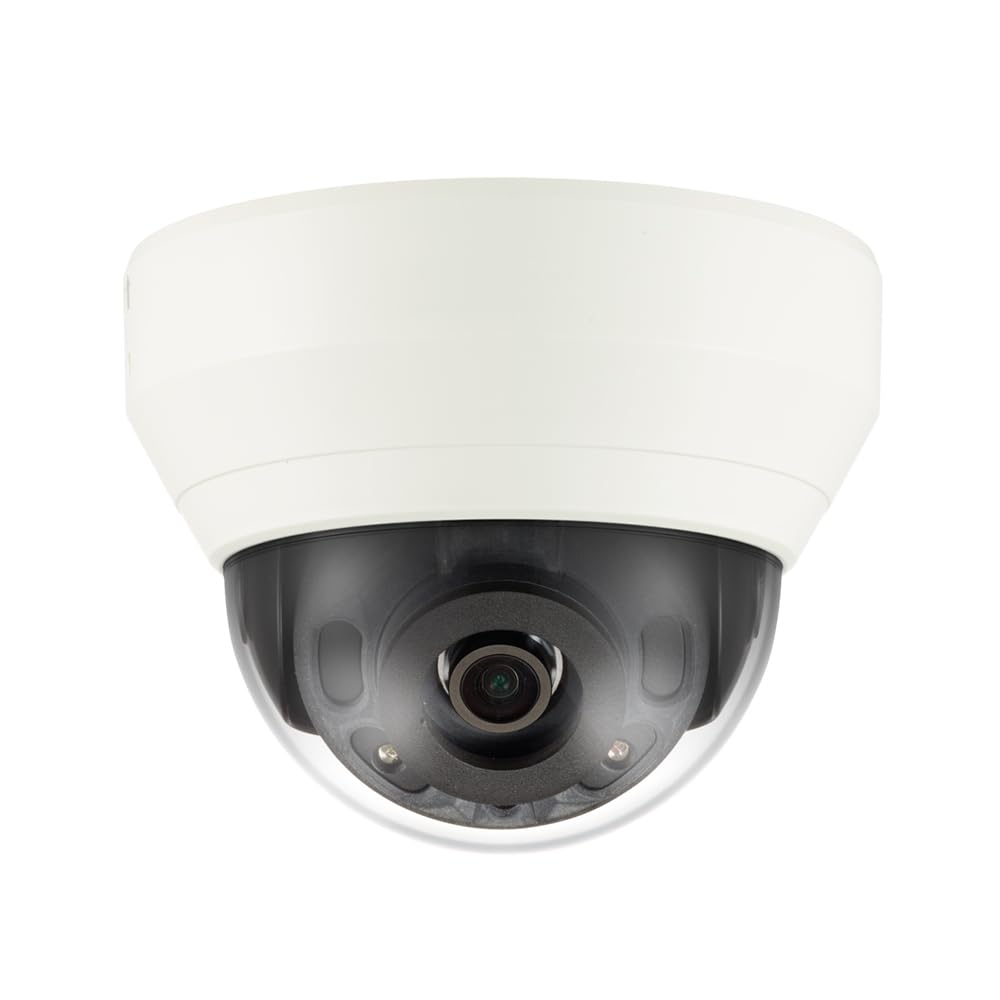
Figur 4.1: Front view of the Hanwha Techwin Wisenet QND-6020R 2 Megapixel Network Dome Camera. This image shows the compact dome design, suitable for discreet surveillance installations. The camera features a dark housing and a clear dome covering the lens, indicating its robust construction for various environments.
5. Opsætning
5.1 Montering af kameraet
- Vælg en placering: Choose a suitable wall location for optimal surveillance coverage. Ensure the surface is strong enough to support the camera.
- Bore huller: Use the provided mounting template (if applicable) to mark and drill pilot holes for the mounting screws.
- Fastgør monteringen: Attach the camera's mounting base to the wall using the screws and anchors.
- Juster vinkel: Når kameraet er monteret, skal du justere det viewvinkel efter behov.
5.2 Strøm- og netværksforbindelse
- Strømtilslutning: Connect the supplied AC/DC power adapter to the camera's power input port and then to a power outlet.
- Netværksforbindelse (kablet): For a wired connection, connect an Ethernet cable from the camera's network port to your network router or switch.
- Netværksforbindelse (Wi-Fi): For Wi-Fi connectivity, refer to the camera's initial setup wizard or the dedicated network configuration section in the full digital manual for pairing instructions. The camera supports Wi-Fi connectivity.
5.3 Indledende konfiguration
After connecting power and network, the camera will boot up. Access the camera's web interface via a browser using its IP address (refer to your network's DHCP client list or use the manufacturer's discovery tool). Follow the on-screen prompts to set up administrator credentials, network settings, and initial video configurations.
6. Betjeningsvejledning
6.1 Live View og optagelse
Få adgang til kameraets liveoptagelser view gennem dens web interface or a compatible network video recorder (NVR) / surveillance software. Configure recording schedules, motion-triggered recording, and continuous recording settings as desired. Video is captured at 1080p resolution in MP4 format.
6.2 Bevægelsesdetektion
The camera features a motion sensor. Configure motion detection zones and sensitivity settings within the camera's web interface. You can set up alerts (e.g., email notifications) to be triggered upon motion detection.
6.3 Nattesyn
The QND-6020R is equipped with night vision capabilities, providing clear images in low-light conditions up to 65.62 ft. The camera automatically switches between day and night modes based on ambient light levels. Night vision is in color.
7. Vedligeholdelse
7.1 Rengøring
Regularly clean the camera's lens and housing with a soft, dry cloth to ensure optimal image quality. Avoid using harsh chemicals or abrasive materials.
7.2 firmwareopdateringer
Kontroller Hanwha Techwin med jævne mellemrum website for firmware updates. Keeping your camera's firmware up-to-date ensures optimal performance, security, and access to new features.
8. Fejlfinding
- Ingen strøm: Sørg for, at strømadapteren er korrekt tilsluttet både kameraet og en fungerende stikkontakt. Bekræft, at stikkontakten har strøm.
- Ingen video/Offline: Check network cable connections (if wired) or Wi-Fi signal strength (if wireless). Verify the camera's IP address and network settings. Restart the camera and your network router.
- Dårlig billedkvalitet: Rengør kameralinsen. Sørg for, at der ikke er nogen forhindringer i kameraets synsfelt. view. Check lighting conditions.
- Bevægelsesdetektion virker ikke: Review motion detection zone settings and sensitivity in the camera's web interface. Ensure the feature is enabled.
- Kan ikke få adgang Web Interface: Verify the camera's IP address. Ensure your computer is on the same network segment as the camera. Try a different web browser.
9. Specifikationer
| Feature | Beskrivelse |
|---|---|
| Modelnummer | QND-6020R |
| Mærke | HANWHA |
| Anbefalede anvendelser | Overvågning |
| Særlige funktioner | Bevægelsessensor, Nattesyn |
| Strømkilde | AC/DC |
| Forbindelsesprotokol | Wi-Fi |
| Controller type | H.264 |
| Monteringstype | Vægmontering |
| Alert Type | Kun bevægelse |
| Vandtæt vurdering | IP65 |
| Trådløs teknologi | Wi-Fi |
| Fotosensorteknologi | CMOS |
| Videooptagelsesopløsning | 1080p |
| Videooptagelsesformat | MP4 |
| Nattesyn | Nat farve |
| Fabrikant | Hanwha Group |
10. Garanti og support
This Hanwha Techwin product is covered by a manufacturer's warranty provided by Hanwha Group. For detailed warranty terms and conditions, please refer to the warranty card included with your product or visit the official Hanwha Techwin website. For technical support, troubleshooting assistance, or service inquiries, please contact Hanwha Techwin customer support through their official channels.


