
Edifier XM2BT
Edifier XM2BT Bluetooth 2.1 Multimedia Speaker System User Manual
Model: XM2BT
1. Introduktion
Tak for købetasing the Edifier XM2BT Bluetooth 2.1 Multimedia Speaker System. This manual provides essential information for the safe and efficient use of your new speaker system. Please read it thoroughly before operation and retain it for future reference.
2. Vigtige sikkerhedsinstruktioner
- Læs disse instruktioner omhyggeligt.
- Gem disse instruktioner til fremtidig reference.
- Overhold alle advarsler.
- Følg alle instruktioner.
- Brug ikke dette apparat i nærheden af vand.
- Rengør kun med en tør klud.
- Bloker ikke ventilationsåbninger. Installer i overensstemmelse med producentens anvisninger.
- Må ikke installeres i nærheden af varmekilder såsom radiatorer, varmeapparater, komfurer eller andre apparater (inklusive ampløftere), der producerer varme.
- Beskyt netledningen mod at blive trådt på eller klemt, især ved stik, stikkontakter og det sted, hvor de kommer ud af apparatet.
- Brug kun tilbehør/tilbehør specificeret af producenten.
- Træk stikket ud af dette apparat under tordenvejr, eller når det ikke skal bruges i længere perioder.
- Overlad al service til kvalificeret servicepersonale. Service er påkrævet, når apparatet er blevet beskadiget på nogen måde, såsom strømforsyningsledning eller stik er beskadiget, væske er blevet spildt, eller genstande er faldet ind i apparatet, apparatet har været udsat for regn eller fugt, ikke fungerer normalt , eller er blevet droppet.
3. Pakkens indhold
Sørg venligst for, at alle varer er til stede i pakken:
- Subwoofer enhed
- Satellithøjttalere (2 enheder)
- Audio input cable (3.5mm to 3.5mm AUX)
- Fjernbetjening
- Brugermanual
4. Produktet er slutview
The Edifier XM2BT system consists of a subwoofer and two satellite speakers, designed to deliver a balanced audio experience. The subwoofer houses the main controls and connectivity ports.

Figur 4.1: Bag view of the Edifier XM2BT subwoofer, showing input ports, power switch, and control knobs.
- 1. Bass Control Knob: Justerer basniveauet.
- 2. Speaker Out (L/R): Connects to the satellite speakers.
- 3. AUX-indgang: 3.5 mm stereoindgang til eksterne lydenheder.
- 4. USB-port: Til afspilning fra USB-flashdrev.
- 5. SD Card Slot: Til afspilning af SD-kort.
- 6. Strømafbryder: Tænder eller slukker for systemet.
- 7. Strømledning: Connects to AC power outlet.
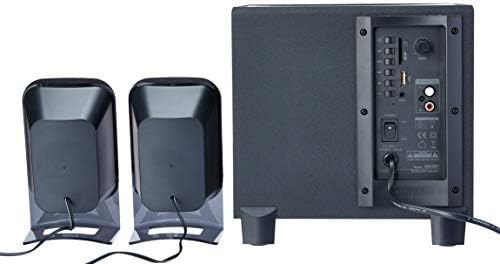
Figur 4.2: Complete Edifier XM2BT 2.1 speaker system from the rear, illustrating connections between subwoofer and satellite speakers.
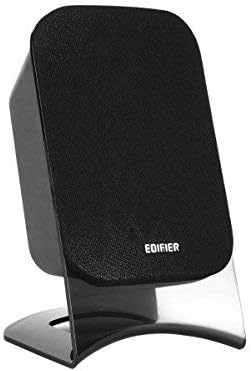
Figur 4.3: Close-up of a single Edifier XM2BT satellite speaker.
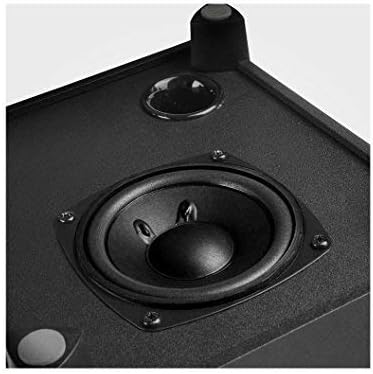
Figur 4.4: Nærbillede view of the subwoofer driver, located on the side of the main unit.
5. Opsætningsvejledning
- Placering af højttalere: Place the subwoofer on a stable surface, preferably on the floor for optimal bass. Position the satellite speakers on either side of your listening area, facing towards you.
- Tilslut satellithøjttalere: Connect the cables from the two satellite speakers to the "Speaker Out" (L/R) ports on the rear panel of the subwoofer. Ensure correct polarity if applicable (usually indicated by color or markings).
- Tilslut lydkilde:
- AUX-indgang: Use the provided 3.5mm audio cable to connect your audio device (e.g., smartphone, computer) to the "AUX" input port on the subwoofer.
- USB/SD-kort: Indsæt et USB-flashdrev eller SD-kort, der indeholder lyd files into the respective port/slot. The system will automatically switch to USB/SD mode if detected.
- Bluetooth: For Bluetooth connection, proceed to the "Operating Instructions" section for pairing details.
- Tilslut strøm: Plug the power cord into a standard AC power outlet.
- Tænd: Flip the "Power" switch on the rear panel of the subwoofer to the "ON" position. The system is now ready for operation.
6. Betjeningsvejledning
6.1 Tænd/sluk
To power on the system, switch the power button on the rear panel to the "ON" position. To power off, switch it to "OFF".
6.2 Valg af tilstand
The XM2BT supports multiple input modes. Use the "MODE" button on the remote control or the main unit to cycle through the available inputs: Bluetooth, AUX, USB, and SD card.
6.3 Volume and Bass Control
- Bind: Adjust the master volume using the main volume knob on the subwoofer or the volume buttons on the remote control.
- Bas: Adjust the bass level using the "BASS" control knob on the rear panel of the subwoofer.
6.4 Bluetooth -parring
- Switch the speaker system to Bluetooth mode. The indicator light will flash, indicating it is in pairing mode.
- On your audio device (e.g., smartphone, tablet), enable Bluetooth and search for available devices.
- Select "EDIFIER XM2BT" from the list of found devices.
- Once paired, the indicator light on the speaker system will become solid, and you will hear a confirmation tone.
- You can now play audio from your device through the XM2BT speakers.
6.5 USB/SD-kortafspilning
- Insert a USB flash drive or SD card into the corresponding slot on the subwoofer.
- The system will automatically detect the media and begin playback. If not, switch to USB or SD mode using the "MODE" button.
- Use the playback controls (Play/Pause, Next/Previous Track) on the remote control or main unit to manage your music.
7. Vedligeholdelse
- Rensning: Use a soft, dry cloth to clean the surfaces of the speakers. Do not use liquid cleaners, aerosols, or abrasive materials.
- Opbevaring: Hvis systemet opbevares i længere tid, skal det tages ud af stikkontakten og opbevares et køligt, tørt sted væk fra direkte sollys og ekstreme temperaturer.
- Ventilation: Sørg for, at ventilationsåbningerne på subwooferen ikke er blokerede for at forhindre overophedning.
8. Fejlfinding
| Problem | Mulig årsag | Løsning |
|---|---|---|
| Ingen lyd |
|
|
| Problemer med Bluetooth-forbindelse |
|
|
| USB/SD-kort afspiller ikke |
|
|
9. Specifikationer
| Feature | Detalje |
|---|---|
| Mærke | Edifier |
| Modelnummer | XM2BT |
| Højttaler type | 2.1 Multimediehøjttalersystem |
| Forbindelsesteknologi | Kablet, Bluetooth |
| Speciel funktion | Bluetooth, USB, SD-kort, AUX-indgang |
| Strømkilde | Elektrisk med ledning |
| Maksimal højttalerudgangseffekt | 21 watt |
| Produktdimensioner | 32.3 x 31 x 27.7 cm (ca. 12.7 x 12.2 x 10.9 tommer) |
| Varens vægt | 3.55 kg (ca. 7.8 lbs) |
| Kompatible enheder | Tablet, bærbar computer, smartphone |
| Farve | Sort |
10. Garanti og support
Edifier products are designed with quality and reliability in mind. For detailed warranty information, please refer to the warranty card included with your product or visit the official Edifier website. For technical support, product inquiries, or service, please contact Edifier customer service or visit the Edifier Brand Store.
Ask a question about this manual
Ask about setup, troubleshooting, compatibility, parts, safety, or missing instructions. Manuals+ will review the question and use this page’s manual context to help answer it.