
1. Produktet er slutview
The BTMETER BT-7200B is a True RMS 6000 counts digital clamp multimeter designed for accurate and reliable electrical measurements. It offers a wide range of functions suitable for both professional and DIY applications.
Nøglefunktioner omfatter:
- AC/DC Clamp Ampalder: Measures AC/DC current up to 400A without breaking the circuit.
- AC/DC Voltage: Foranstaltninger voltage op til 600V.
- Resistance, Capacitance, and Frequency: Comprehensive testing capabilities for various electrical components.
- Non-Contact Voltage (NCV) Detektion: Enhances safety by detecting live wires without physical contact.
- Kontinuitets- og diodetest: Essentiel for kredsløbsdiagnostik.
- Temperaturmåling: Supports temperature readings in Celsius and Fahrenheit using the included thermocouple probe.
- Stort baggrundsbelyst LCD-display: Sikrer klar læsbarhed under forskellige lysforhold.
- Datalogning: Records measurements for later analysis, including maximum, minimum, and average values.
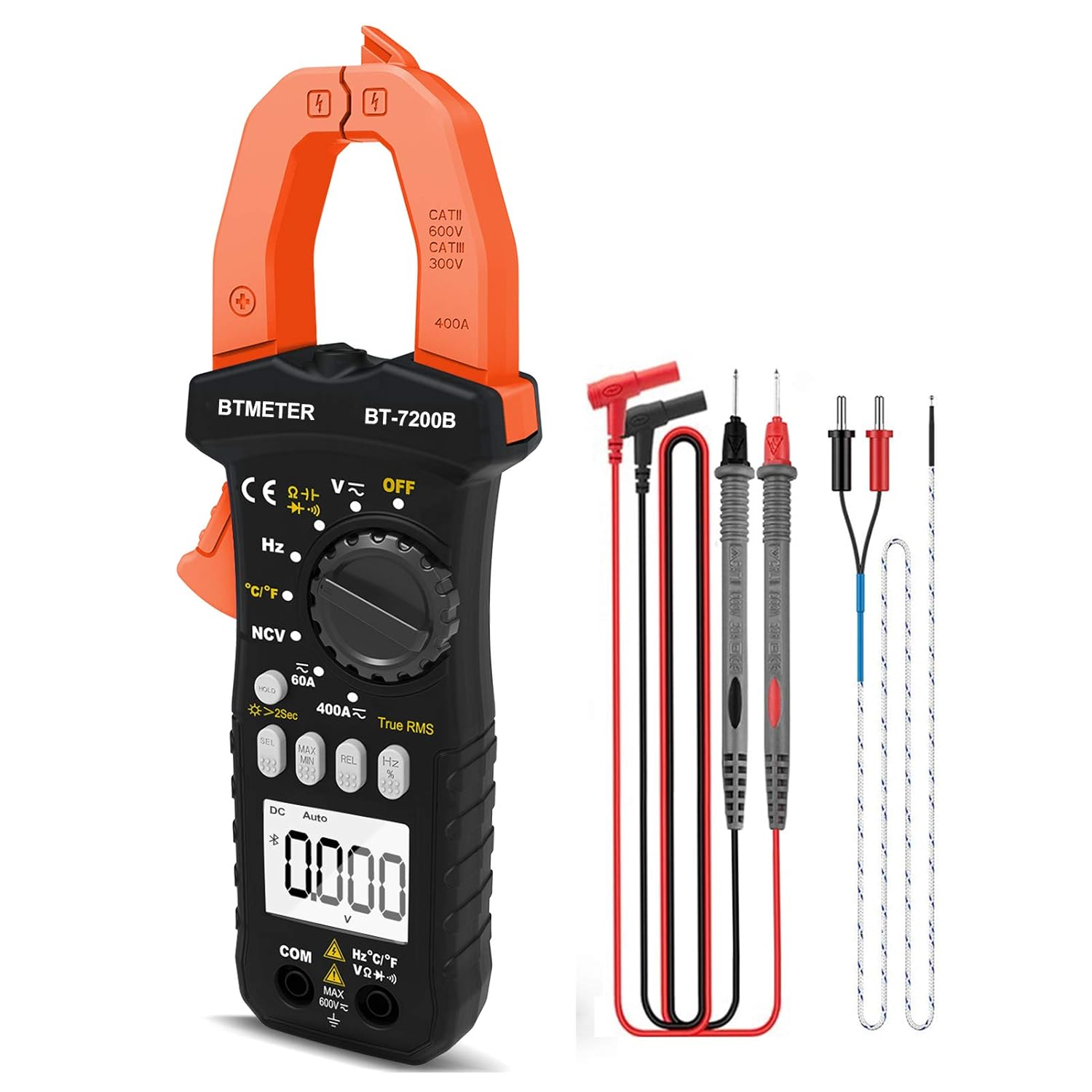
Figure 1.1: BTMETER BT-7200B Clamp Multimeter og medfølgende tilbehør.

Figur 1.2: Overview of the BTMETER BT-7200B's main features.
2. Opsætning
2.1 Pakkens indhold
Before first use, verify all items are present in the package:
- BTMETER BT-7200B Clamp Multimeter
- Testledninger (røde og sorte)
- Thermocouple Temperature Probe
- Skruetrækker
- 1.5V AAA Batteries (x2)
- Bæretaske
- User Manual (PDF - external document)
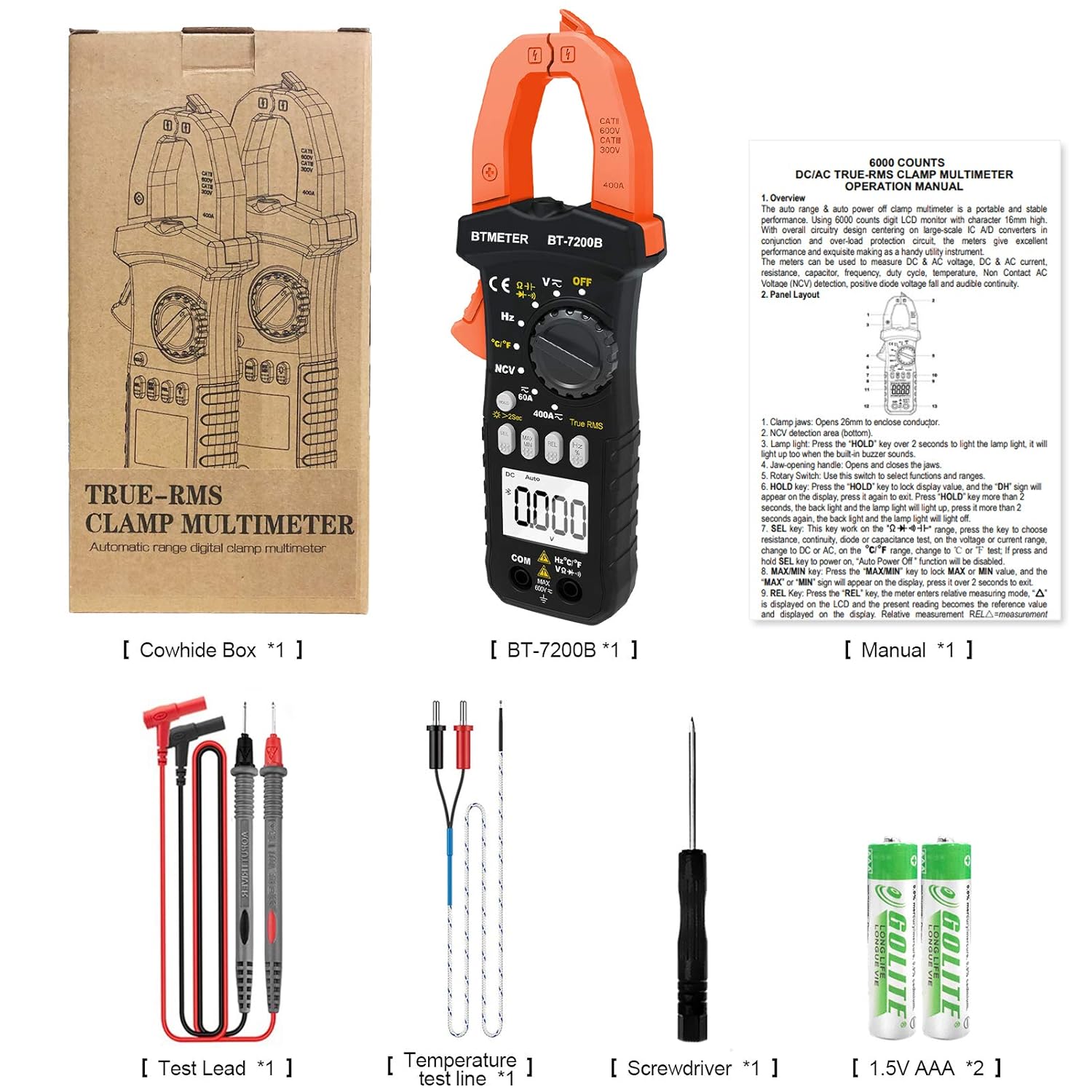
Figure 2.1: All items included in the BTMETER BT-7200B package.
2.2 Batteriinstallation
The BT-7200B requires two AAA batteries for operation. To install or replace batteries:
- Find batterirummet på bagsiden af multimeteret.
- Brug den medfølgende skruetrækker til at løsne skruen, der fastgør batteridækslet.
- Fjern batteridækslet.
- Isæt to AAA-batterier, og sørg for at polariteten (+/-) vender korrekt.
- Sæt batteridækslet på igen, og stram skruen.
2.3 Tilslutning af testledninger og prober
For most measurements, connect the test leads to the appropriate input jacks:
- Tilslut sort testledning til KOM (fælles) stik.
- Tilslut rød testledning til VΩHzCapTemp stik til lydstyrketage, resistance, frequency, capacitance, and temperature measurements.
For temperature measurements, plug the thermocouple probe into the VΩHzCapTemp and COM jacks, observing polarity if applicable.
3. Betjeningsvejledning
3.1 Tænd/sluk og valg af tilstand
Turn the rotary dial to the desired measurement function to power on the multimeter. Select 'OFF' to power off the device. The multimeter features an auto shut-down function to conserve battery life.
3.2 Grundlæggende målinger
The BT-7200B offers various measurement modes:
- AC/DC Voltage & Nuværende: Vælg den relevante voltage (V) or current (A) range on the rotary dial. Use the 'SEL' button to switch between AC and DC modes if necessary.
- Modstand: Select the Ohm (Ω) symbol on the dial.
- Kontinuitetssummer: Select the continuity symbol (speaker icon) on the dial. An audible beep indicates continuity.
- Diode test: Vælg diodesymbolet på drejeknappen.
- Kapacitans: Select the capacitance (Cap) symbol on the dial.
- Frekvens/arbejdscyklus: Select the Hz symbol on the dial.
- Temperatur: Select the °C/°F symbol on the dial and connect the thermocouple probe.

Figure 3.1: Visual guide to common measurement types.
3.3 Clamp-på Amperage Measurement
To measure AC/DC current using the clamp:
- Vælg 60A or 400A range on the rotary dial.
- Press the 'SEL' button to choose between AC or DC current measurement.
- Press the 'REL' button to zero the display before clamping, especially for DC current measurements, to ensure accuracy.
- Vigtig: For accurate current measurement, clamp omkring only one live wire (e.g., the hot wire). Clamping around both hot and neutral wires will result in a zero reading as the currents cancel each other out. An AC Line Splitter can be used for convenience without stripping wires.

Figure 3.2: Correct method for clamp-on live wire measurement.

Figur 3.3: Clamp multimeter in action on an electrical panel.
3.4 Non-Contact Voltage (NCV) Detektion
NCV-funktionen muliggør sikker detektion af AC-volumentage uden direkte kontakt:
- Vælg NCV mode on the rotary dial.
- Placer toppen af clamp jaw near the wire or outlet you wish to test.
- The multimeter will beep and the NCV indicator light will illuminate if AC voltage er opdaget.
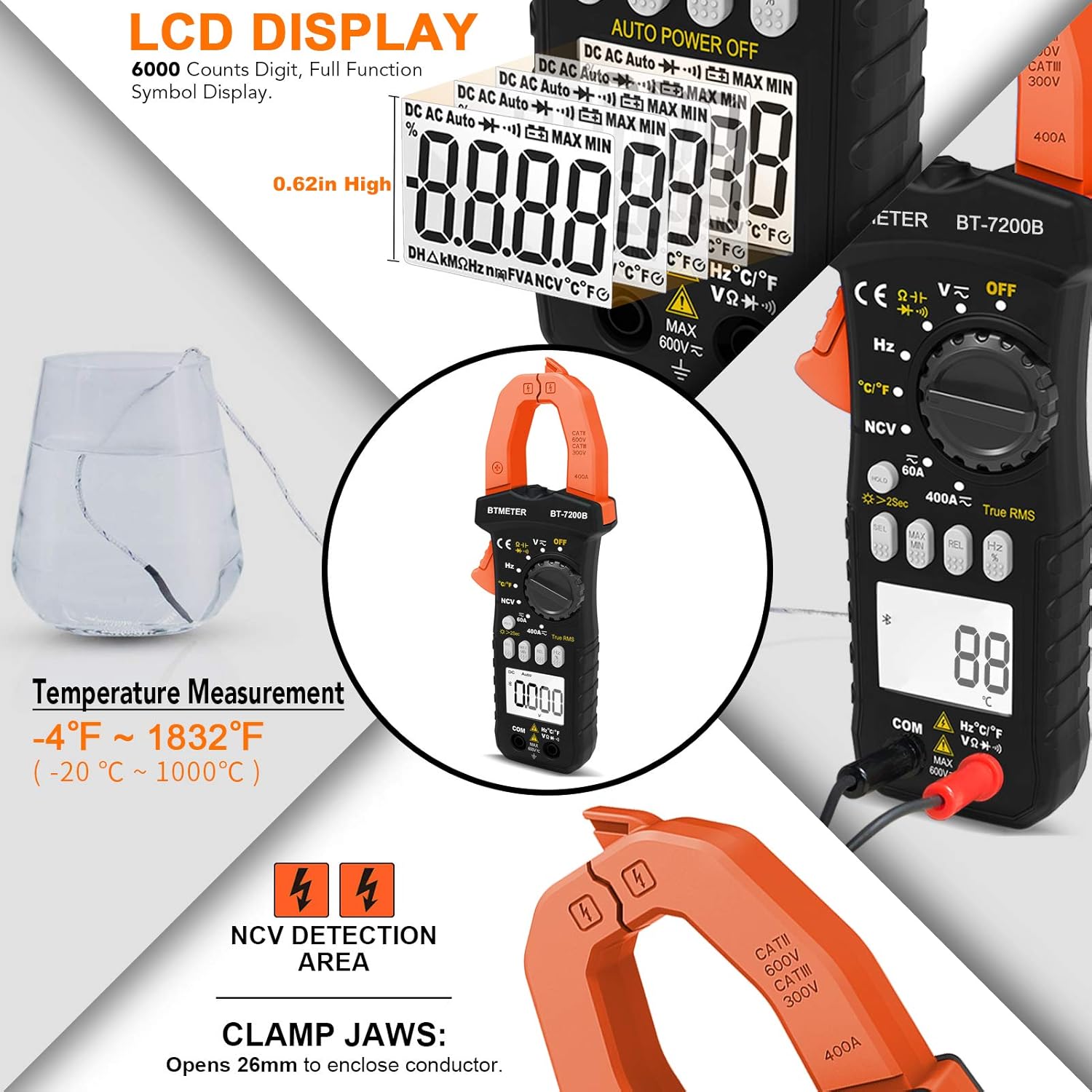
Figur 3.4: Ikke-kontaktvolumentage detection feature.

Figure 3.5: NCV detection on an electrical outlet.
3.5 Display og baggrundsbelysning
The BT-7200B features a large 6000 counts digital display with a backlight for visibility in dimly lit areas. To activate the backlight, press and hold the 'HOLD' button for 2 seconds. A quick press of the 'HOLD' button will freeze the current reading on the display.

Figur 3.6: Detaljeret view of the LCD display and its features.

Figure 3.7: Multimeter display with backlight activated.
4. Vedligeholdelse
4.1 Rengøring
Regularly clean the multimeter with a dry, soft cloth. For the temperature probe, especially after use in corrosive environments like saltwater, ensure to wash off any residue to prevent damage.
4.2 Udskiftning af batteri
When the battery indicator appears on the display, replace the two AAA batteries as described in Section 2.2. The auto power-off feature helps extend battery life, but regular checks are recommended.
5. Fejlfinding
Dette afsnit omhandler almindelige problemer og giver løsninger.
- Nul Amp Læsning: If measuring current with the clamp and the reading is zero, ensure you are clamping around only one live wire. Clamping around both hot and neutral wires will result in cancellation and a zero reading. Use the 'REL' button to zero the meter before measurement.
- Inaccurate Frequency Measurement: Some users have reported that the frequency measurement may be less precise compared to other functions. For critical frequency measurements, consider cross-referencing with a dedicated frequency meter.
- Intermitterende læsninger: If you suspect intermittent electrical issues, utilize the data logging feature of the multimeter. The companion app (if applicable to your model) can record data over time, allowing you to review charts and identify fluctuations or drops in readings.
- Skærm lyser ikke op: If the display backlight is not working, ensure batteries are properly installed and have sufficient charge. Press and hold the 'HOLD' button for 2 seconds to toggle the backlight.
6. Specifikationer
The following table outlines the technical specifications of the BTMETER BT-7200B Clamp Multimeter:
| Parameter | Værdi |
|---|---|
| Modelnummer | BT-7200B |
| Produktdimensioner | 7.6 x 3.4 x 1.5 tommer |
| Varens vægt | 13.51 ounce |
| Strømkilde | Batteridrevet (2 x AAA) |
| Vis tæller | 6000 tæller |
| AC/DC strømområde | Op til 400A |
| AC/DC VoltagRækkevidde | Op til 600V |
| Temperaturområde | -4 til 1832°F (-20 til 1000°C) |
| Jaw Caliber Size | 1.77 tommer (45 mm) |
| Ægte RMS | Ja |
| NCV-detektion | Ja |
| Automatisk nedlukning | Ja |

Figure 6.1: BTMETER BT-7200B in an electrical measurement scenario.
7. Garanti og support
For detailed warranty information and customer support, please refer to the documentation included with your product packaging or visit the official BTMETER webwebsted. Yderligere beskyttelsesplaner kan muligvis købes separat.
En omfattende brugermanual i PDF-format kan downloades: Brugervejledning (PDF)