
Indledning
The Sony XBR49X900F is a 49-inch 4K Ultra HD Smart LED Android TV designed to deliver a high-quality viewing experience. It features the X1 Extreme Processor for enhanced picture processing, X-tended Dynamic Range PRO 6X for superior contrast, and a TRILUMINOS display for vibrant colors. With X-Motion Clarity technology, fast-moving scenes are rendered smoothly and clearly. This television integrates smart features through the Android TV operating system, offering voice control compatibility with Google Assistant and Alexa for convenient navigation and control.
Hvad er der i æsken
- Sony XBR49X900F 4K Ultra HD Smart LED Android TV
- Stemmefjernbetjening
- 2 x AA-batterier (til fjernbetjening)
- AC Power Cord (US, 2-pin, flat blades, Polarity)
- IR Blaster
- Betjeningsvejledning
- Hurtig installationsvejledning / Supplement CUE
- Table Top Stand (Assembly required)
Opsætning
1. Udpakning og montering af stativet
Carefully remove the TV and all components from the packaging. Assemble the table top stand according to the instructions provided in the Quick Setup Guide. Ensure the stand is securely attached to the TV and placed on a stable, level surface.

Billede: Nærbillede view of the TV's table top stand, showing its design and how it supports the screen.
2. Tilslutning af eksterne enheder
Connect your external devices such as gaming consoles, Blu-ray players, or sound systems to the TV's input ports. The TV features 4 HDMI ports, 2 USB 2.0 ports, 1 USB 3.0 port, and 1 Composite port.
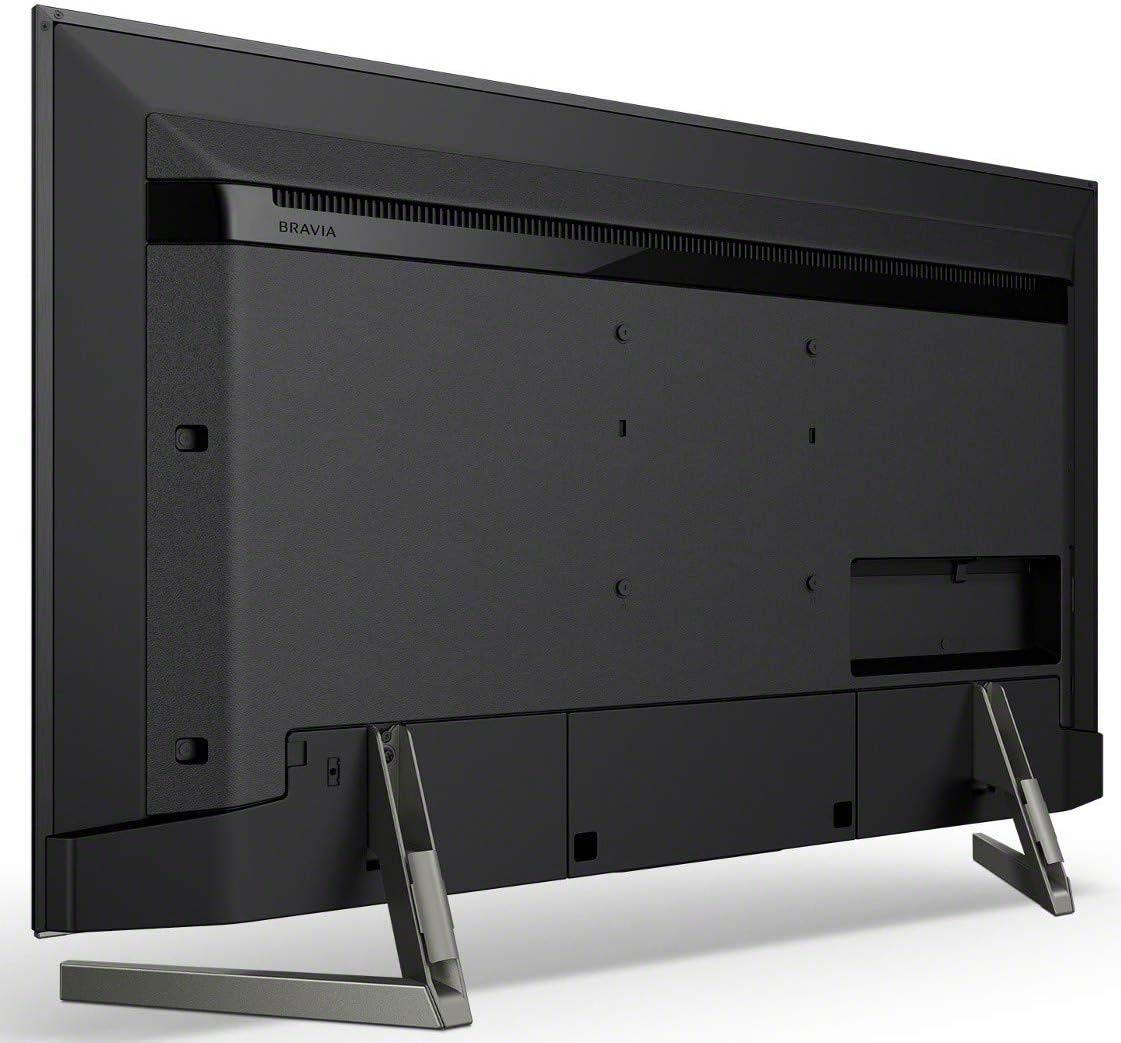
Billede: Bagside view of the Sony XBR49X900F television, highlighting the various input and output ports for connecting external devices.
3. Tænd og indledende opsætning
Plug the AC power cord into the TV and a wall outlet. Press the power button on the remote control or the TV. Follow the on-screen instructions to complete the initial setup, including connecting to your Wi-Fi network and configuring Android TV settings.
Video: An official seller video demonstrating the features of the Sony XBR75X900F, which shares many functionalities with the XBR49X900F model, including smart features and picture quality enhancements.
Betjeningsvejledning
1. Grundlæggende tv-funktioner
Use the provided Voice Remote Control to power the TV on/off, adjust volume, change channels, and navigate menus. The remote also features dedicated buttons for popular streaming services.

Image: The Sony Voice Remote Control, featuring a prominent Google Assistant button for voice commands.
2. Forbedringer af billedkvalitet
- X1 Extreme Processor: This processor enhances picture quality through 4K X-Reality PRO, which upscales images to near 4K resolution, and X-tended Dynamic Range PRO 6X, which provides superior brightness and contrast.
- TRILUMINOS-skærm: Experience a wider, brighter, and more vivid color palette for a lifelike viewoplevelse.
- X-Motion Clarity: This technology ensures smooth and clear on-screen action by controlling blurriness, ideal for fast-paced content.
- HDR-understøttelse: The TV supports HDR10, HLG, and Dolby Vision formats, delivering enhanced contrast and color detail in compatible content.
3. Smart TV-funktioner (Android TV)
The TV runs on the Android TV operating system, providing access to a wide range of apps and services. Use the intuitive interface to browse content, stream videos, and manage settings.
- Stemmestyring: The TV is compatible with Google Assistant and Alexa. Use your voice remote to search for content, control playback, adjust settings, and even manage smart home devices.
- Internet Applications: Access popular apps like YouTube directly from your TV.
Image: The Sony Voice Remote Control, featuring a prominent Google Assistant button for voice commands.
4. Forbindelse
TV'et tilbyder forskellige tilslutningsmuligheder:
- Wi-Fi: Built-in Wi-Fi for wireless internet connection.
- Bluetooth: Til tilslutning af kompatibelt trådløst tilbehør.
- HDMI: 4 porte til high-definition lyd- og videoindgang.
- USB: 2 USB 2.0 ports and 1 USB 3.0 port for media playback and device connection.
- Sammensat: 1 port for older video devices.
Opretholdelse
To ensure the longevity and optimal performance of your Sony TV, follow these maintenance guidelines:
- Rengøring af skærmen: Tør forsigtigt skærmen af med en blød, tør og fnugfri klud. Tør forsigtigt genstridige pletter af.ampRengør kluden med vand eller en skærmrengøringsopløsning, der er specielt designet til elektronik. Undgå skrappe kemikalier eller slibende materialer.
- Rengøring af rammen: Brug en blød, tør klud til at tørre tv-rammen af.
- Ventilation: Sørg for ordentlig ventilation omkring tv'et. Bloker ikke ventilationsåbningerne på bagsiden eller siderne af tv'et.
- Strømledning: Kontrollér regelmæssigt netledningen for skader. Hvis den er beskadiget, skal du ophøre med at bruge den og kontakte kundesupport.
- Undgå direkte sollys: Do not expose the TV to direct sunlight or excessive heat, as this can affect performance and lifespan.
Fejlfinding
Hvis du støder på problemer med dit tv, kan du se følgende almindelige fejlfindingstrin:
- Ingen strøm: Sørg for, at netledningen er korrekt tilsluttet både tv'et og en fungerende stikkontakt. Prøv at tilslutte en anden enhed til den samme stikkontakt for at bekræfte, at der er strøm.
- Intet billede/lyd: Verify that the correct input source is selected. Check all cable connections (HDMI, Composite) to ensure they are secure. If using an external receiver, ensure it is powered on and configured correctly.
- Dårlig billedkvalitet: Adjust picture settings (brightness, contrast, color) in the TV menu. Ensure your content source is of high quality. If using an antenna, check its connection and position.
- Fjernbetjeningen virker ikke: Udskift batterierne i fjernbetjeningen. Sørg for, at der ikke er nogen forhindringer mellem fjernbetjeningen og tv'ets IR-sensor.
- Smart Features/Apps Not Working: Check your internet connection. Restart the TV by unplugging it from the power outlet for a few minutes, then plugging it back in. Update the TV's software if an update is available.
- TV Not Responding (e.g., Flashing Lights): If the TV exhibits unusual behavior like indicator lights flashing repeatedly, unplug the TV from the power outlet for several minutes, then plug it back in. If the issue persists, consult the full operating manual or contact Sony support.
Specifikationer
| Feature | Specifikation |
|---|---|
| Skærmstørrelse | 49 tommer |
| Mærke | Sony |
| Displayteknologi | LED-LCD |
| Opløsning | 4K |
| Opdateringshastighed | 120 Hz |
| Speciel funktion | Flad |
| Forbindelsesteknologi | Built-in Wi-Fi, HDMI, USB, Bluetooth |
| Aspektforhold | 16:9 |
| Produktmål (D x B x H) | 10.63" D x 43.13" B x 27.38" H |
| Kontrastforhold | Høj |
| HDR-format understøttet | Dolby Vision, HDR10, HLG |
| Motion Enhancement Technology | X Motion Clarity |
| Billedkvalitetsforbedringsteknologi | 4K X-Reality PRO, X-tended Dynamic Range PRO 6X, Full-array local dimming, TRILUMINOS display |
| Display Backlight Technology | LED |
| Varens vægt | 32 pund |
| Internet Applications | YouTube |
| Total Number of HDMI Ports | 4 |
| Hardware-interface | HDMI, USB 2.0, USB 3.0 |
| Samlede USB 3.0-porte | 1 |
| Samlet USB-porte | 3 |
| Operativsystem | Android |
| Kontrolmetode | Stemme |
| Controller type | Fjernbetjening |
| Model årgang | 2018 |
| VESA-monteringsstandard | 400 x 200 mm |
| Farve | Sort |
| Kompatible enheder | Laptop, Gaming Console, Desktop, Cellphone, Speaker, Tablet |
| Tuner type | ATSC |
Garanti
This Sony XBR49X900F television comes with a 1 års begrænset garanti. For detailed terms and conditions, please refer to the warranty documentation included with your product or visit the official Sony support webwebsted.
Støtte
For further assistance, product registration, or to access additional resources, please visit the official Sony Store or contact Sony customer support.