
1. Produktet er slutview
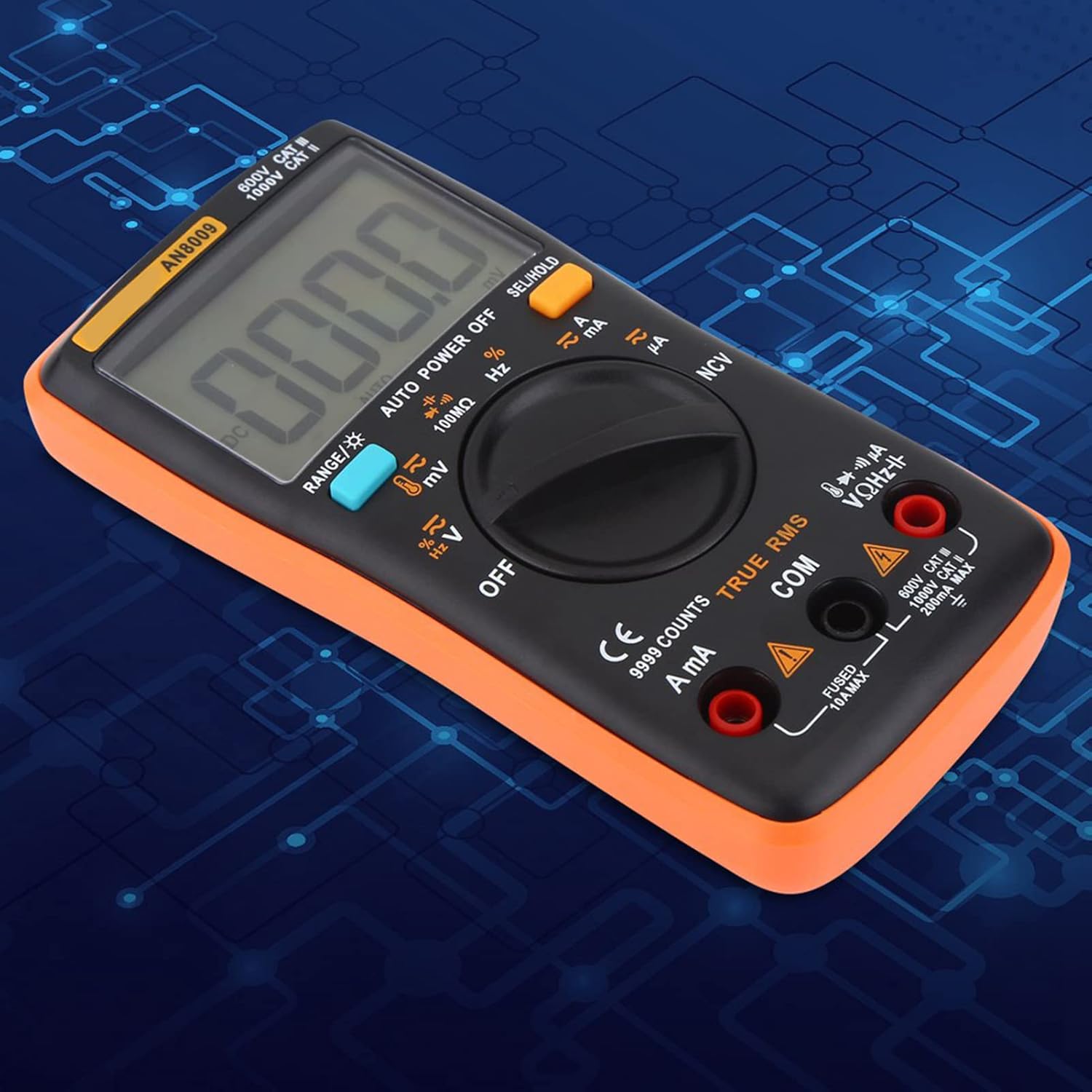
The Walfront AN8009 Autoranging Digital Multimeter is a high-precision, 9999-count, auto-range instrument designed for various electrical measurements. Its compact and ergonomic design makes it highly portable, suitable for both professional and hobbyist use. The large, backlit LCD ensures clear visibility of readings in diverse lighting conditions.
- Baggrundsbelyst LCD: Large overview backlit LCD, digits show clearly and backlight supported.
- Transportabel: Compact ergonomic design and portable. Multimeter size: 130 x 65 x 30mm / 5.12 x 2.56 x 1.18inch.
- Multimeter sæt: AN8009 is one of the first 9999 count, auto-range digital multimeters. It can measure AC / DC voltage, DC Current, Resistance, Continuity, Diodes, Transistor hFE and so on.

2. Pakkens indhold
Upon opening your AN8009 Digital Multimeter kit, please verify that all the following components are included:
- AN8009 Digital Multimeter
- 16-in-1 Multifunctional Test Line Set
- Temperature Sensor (Thermocouple)
- Brugermanual
- Opbevaringspose

Video 2.1: En overview of the AN8009 Digital Multimeter kit contents, demonstrating the various accessories included for comprehensive testing.
3. Opsætning
Before using your AN8009 Digital Multimeter, follow these steps for initial setup:
- Batteri installation: The multimeter is powered by 2 x 1.5V AAA batteries (Not Included). Locate the battery compartment on the back of the unit, open it, insert the batteries according to the polarity markings, and close the compartment securely.
- Tilslutning af testledninger: Insert the red test lead into the 'VΩHz' or 'A/mA' input jack (depending on the measurement function) and the black test lead into the 'COM' (common) input jack. Ensure a firm connection.
- Montering af tilbehør: For specific measurements, attach the appropriate accessories (e.g., temperature sensor, alligator clips) to the test leads as required.
4. Betjeningsvejledning
The AN8009 Multimeter offers a wide range of measurement functions. Always ensure the correct function is selected and test leads are connected to the appropriate input jacks before taking any measurements.
4.1 Grundlæggende betjening
- Tænd/sluk: Rotate the central dial to any measurement function to turn the multimeter on. Rotate to 'OFF' to power it off.
- Funktionsvalg: Brug den centrale drejeknap til at vælge den ønskede målefunktion (f.eks. V~ for AC Voltage, V- for DC Voltage, Ω for modstand).
- Valg af rækkevidde: The multimeter is auto-ranging, meaning it automatically selects the appropriate measurement range. For manual range selection, press the 'RANGE' button.
- Baggrundsbelysning: Press the backlight button (often indicated by a light bulb icon) to illuminate the LCD.
4.2 Common Measurements
Refer to the specific sections below for detailed instructions on common measurement types:
- AC/DC Voltage Måling: Vælg den relevante voltage range (V~ for AC, V- for DC). Connect the test leads in parallel to the circuit or component being measured.
- DC-strømmåling: Select the appropriate current range (A, mA, or µA). Connect the multimeter in series with the circuit. Ensure the correct input jack is used for the expected current level (10A MAX or 200mA MAX).
- Modstandsmåling: Select the Ω function. Connect the test leads across the component. Ensure the circuit is de-energized before measuring resistance.
- Kontinuitetstest: Select the continuity function (often indicated by a speaker icon). The multimeter will beep if there is a continuous path (low resistance).
- Diode test: Vælg diodefunktionen. Tilslut den røde ledning til anoden og den sorte ledning til katoden på dioden. Displayet viser den fremadrettede lydstyrke.tage drop.
- Transistor hFE-test: Use the dedicated hFE socket on the multimeter for testing transistor gain.


5. Vedligeholdelse
Proper maintenance ensures the longevity and accuracy of your AN8009 Digital Multimeter.
- Rensning: Tør multimeteret af med en tør, blød klud. Brug ikke slibende rengøringsmidler eller opløsningsmidler.
- Opbevaring: Store the multimeter in its provided storage bag in a cool, dry place away from direct sunlight and extreme temperatures. Remove batteries if storing for extended periods to prevent leakage.
- Udskiftning af batteri: When the low battery indicator appears on the display, replace the 2 x 1.5V AAA batteries promptly to maintain accurate readings.
- Auto-Power-Off Feature: The multimeter has an auto-power-off feature to conserve battery life. To temporarily disable this feature, hold down the 'SEL/HOLD' button while powering on the meter. Note that this setting is not permanent and must be re-applied each time the meter is turned on.
6. Fejlfinding
If you encounter issues with your AN8009 Digital Multimeter, consider the following common troubleshooting steps:
- Intet display/svagt display: Check battery installation and replace batteries if necessary. Ensure the multimeter is turned on.
- Upræcise læsninger: Verify that the correct measurement function is selected and test leads are connected to the appropriate input jacks. Ensure good contact between probes and the circuit. If issues persist, consider professional calibration.
- Continuity Test Issues: If the continuity test is inconsistent or unreliable, inspect the test leads for damage. Poor quality or damaged leads can lead to erratic readings. Consider replacing the test leads if they are worn or faulty.
- Ingen reaktion: If the multimeter does not respond to inputs, try turning it off and on again. If the problem persists, remove and reinsert the batteries.
7. Specifikationer
| Specifikation | Værdi |
|---|---|
| Modelnummer | AN8009 |
| Mærke | Walfront |
| Visningstælling | 9999 tæller |
| Dimensioner (L x B x H) | 130 x 65 x 30 mm / 5.12 x 2.56 x 1.18 tommer |
| Varens vægt | 0.35 kilo |
| Strømkilde | 2 x 1.5V AAA-batterier (medfølger ikke) |
| Farve | Orange |
| Oprindelsesland | Kina |

8. Garanti og support
For warranty information and technical support, please refer to the documentation provided with your purchase or contact Walfront customer service directly. Additional protection plans may be available for extended coverage:
- 3-årig beskyttelsesplan
- 4-årig beskyttelsesplan
- Complete Protect (månedlig plan, der dækker berettigede tidligere og fremtidige køb)
For specific inquiries or assistance, please reach out to the seller, Luoyuu, through the Amazon platform.