

Indledning
This manual provides comprehensive instructions for the setup, operation, and maintenance of your MASTER & DYNAMIC MH40 Over-Ear Headphones. Please read this guide thoroughly to ensure optimal performance and longevity of your device.
Pakkens indhold
Bekræft at alle varer er til stede i din pakke:
- MASTER & DYNAMIC MH40 Over-Ear Headphones
- Audio Cable with In-line Microphone
- USB-C Charging Cable (for Bluetooth functionality)
- Canvas Carrying Case
- Brugervejledning (dette dokument)
Produkt overview
The MH40 headphones are designed with premium materials for durability and comfort. Key components include:
- Forged Aluminum Body: Provides a robust and lightweight structure.
- Lambskin Ear Pads: Offer comfort for extended listening sessions.
- Custom Neodymium Drivers: Engineered for superior sound reproduction.
- Justerbart pandebånd: Sikrer en sikker og behagelig pasform.
- Aftagelige kabler: For both audio and charging.

Figure 1: MASTER & DYNAMIC MH40 Over-Ear Headphones, showcasing black metal and camo leather design.
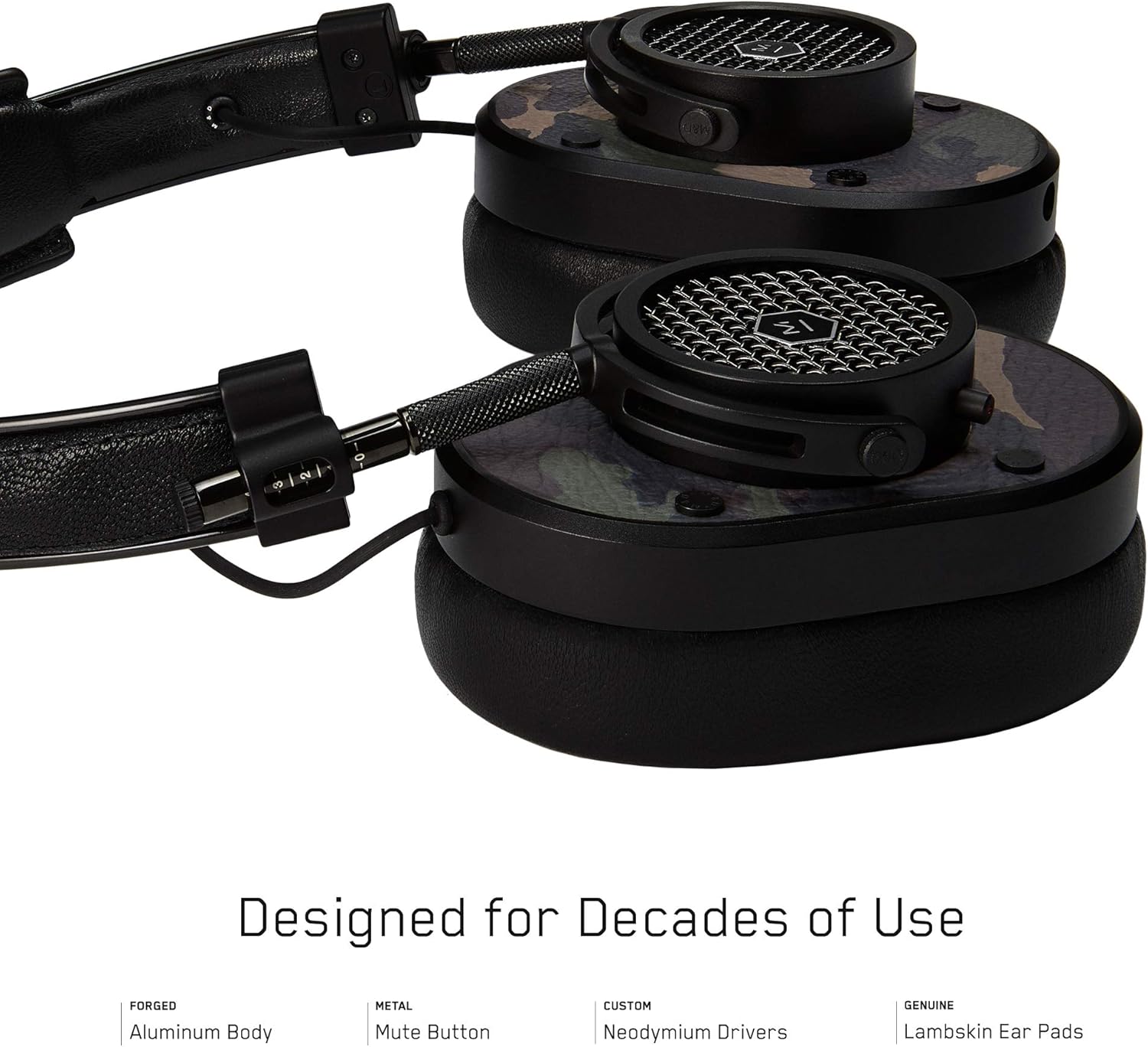
Figur 2: Detaljeret view of the MH40 headphone earcups, highlighting the lambskin ear pads, metal grille, and adjustable hinge.
Opsætning
1. Justering af pasformen
- Gently extend or retract the metal arms on each side of the headband to adjust the height.
- Position the earcups so they fully cover your ears, ensuring a comfortable and secure fit.
- The lambskin ear pads are designed to conform to your head shape for optimal sound isolation and comfort.
2. Kablet forbindelse
- Locate the audio input port on the left earcup.
- Insert one end of the provided audio cable into the headphone's audio input.
- Connect the other end of the audio cable to your audio device's 3.5mm jack.
3. Bluetooth-parring (trådløs forbindelse)
The MH40 headphones support Bluetooth connectivity for wireless audio. Ensure the headphones are charged before pairing.
- Tænd: Press and hold the power button (usually located on one of the earcups) until the indicator light flashes.
- Parringstilstand: Continue holding the power button or press a dedicated Bluetooth pairing button (if available) until the indicator light flashes rapidly, indicating pairing mode.
- Enhedsforbindelse: On your audio device (smartphone, tablet, computer), navigate to Bluetooth settings and select "MH40" from the list of available devices.
- Bekræftelse: The indicator light on the headphones will turn solid blue or green once successfully paired.
Note: The Bluetooth range is approximately 10 meters (33 feet).
Betjeningsvejledning
Lydafspilning
- Afspil/pause: Press the multi-function button (often on the in-line microphone or earcup) once.
- Næste nummer: Tryk to gange hurtigt på multifunktionsknappen.
- Forrige nummer: Tryk tre gange hurtigt på multifunktionsknappen.
- Lydstyrkekontrol: Use the volume up/down buttons on the in-line microphone or dedicated earcup controls.
Opkaldsstyring
- Besvar/afslut opkald: Tryk én gang på multifunktionsknappen.
- Afvis opkald: Tryk og hold multifunktionsknappen nede i cirka 2 sekunder.
- Slå mikrofon fra: The MH40 features a dedicated mute button, typically located on the earcup or in-line control. Press to mute/unmute during a call.
Opretholdelse
- Rensning: Use a soft, dry cloth to wipe the headphones. For leather parts, use a specialized leather cleaner if necessary. Avoid harsh chemicals or abrasive materials.
- Opbevaring: When not in use, store the headphones in the provided canvas carrying case to protect them from dust and scratches.
- Kabelpleje: Handle cables gently. Avoid sharp bends or excessive pulling to prevent damage. The retractable cable feature helps manage cable length.
- Ørepuder: The magnetic ear pads are removable for cleaning or replacement. Gently pull them off and reattach by aligning the magnets.
Fejlfinding
Ingen lyd
- wired: Ensure the audio cable is securely connected to both the headphones and the audio source. Check the volume level on both the headphones and the source device.
- Bluetooth: Verify that the headphones are powered on and successfully paired with your device. Check the volume levels. Try re-pairing the headphones.
Kan ikke parres via Bluetooth
- Sørg for, at hovedtelefonerne er i parringstilstand (indikatorlampen blinker hurtigt).
- Sørg for, at Bluetooth er aktiveret på din kildeenhed.
- Flyt hovedtelefonerne tættere på din enhed (inden for 10 meter).
- Sluk og tænd både hovedtelefonerne og din enhed, og prøv derefter at parre igen.
- If previously paired, try "forgetting" the device on your source and re-pairing.
Mikrofon virker ikke
- Check if the microphone mute button is engaged.
- Ensure the audio cable with the in-line microphone is fully inserted.
- Bekræft mikrofonindgangsindstillingerne på din tilsluttede enhed.
Specifikationer
| Modelnavn | MH40 |
| Forbindelsesteknologi | Kablet, Bluetooth |
| Trådløs kommunikationsteknologi | Bluetooth |
| Materiale | Copper (components), Lambskin (ear pads), Canvas (carrying case) |
| Kontroltype | Opkaldskontrol, berøring |
| Kabelfunktion | Udtrækkelig |
| Varens vægt | 0.36 kilo (12.7 ounce) |
| Audio driver type | Dynamisk Driver |
| Bluetooth rækkevidde | 10 meter |
| Ørestykke form | Over-øre |
| Særlige funktioner | Carrying case included, Lightweight, Microphone Included, Noise Isolation, Wireless |
| Produktdimensioner | 7.48 x 6.3 x 2.76 tommer |
| Fabrikant | MASTER & DYNAMIC |
| Farve | Black Metal / Camo Leather |
| Øreplacering | Over Ear |
| Støjkontrol | Lydisolering |
| UPC | 858901007099 |
Garanti og support
For detailed warranty information and customer support, please refer to the official MASTER & DYNAMIC webwebstedet eller kontakt deres kundeservice direkte. Gem din købsbevis til garantikrav.
Online support: www.masterdynamic.com/support (Examplinket, det faktiske link kan variere)