
Indledning
This manual provides detailed instructions for the setup, operation, and maintenance of your Digoo DG-C3 Wireless Weather Station. This device integrates a hygrometer, thermometer, weather forecast station, and alarm clock functions, offering comprehensive environmental monitoring and timekeeping capabilities. Please read this manual thoroughly before using the product to ensure correct operation and to maximize its features.
Pakkens indhold
- Digoo DG-C3 Wireless Weather Station Unit
- USB strømkabel
- Brugervejledning (dette dokument)
Note: Batteries (3x AAA) are not included and must be purchased separately.
Produkt overview
Familiarize yourself with the various components of your Digoo DG-C3 weather station.
Display foran
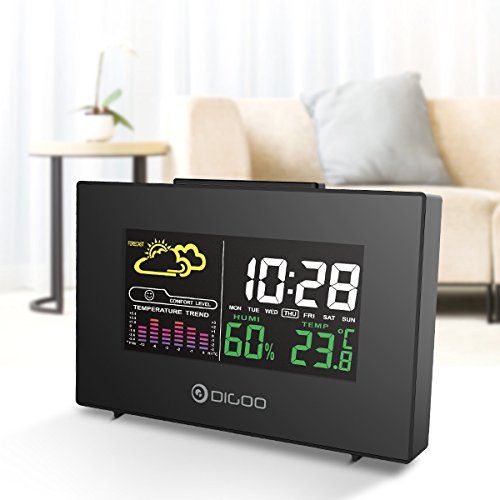
The front display features a color backlit screen showing the current time, day of the week, indoor humidity, indoor temperature, and a weather forecast icon. It also includes a comfort level indicator and a temperature trend graph.
- Tid og dato: Digital display of current time and day.
- Vejrudsigt: Ikoner, der angiver forudsagte vejrforhold (f.eks. solrigt, overskyet, regnfuldt).
- Komfortniveau: Indicates indoor comfort based on temperature and humidity.
- Temperaturtendens: Bar graph showing recent temperature changes.
- Fugtighed: Procenttage display of indoor humidity.
- Temperatur: Digital display of indoor temperature (Celsius or Fahrenheit).
Bagpanel
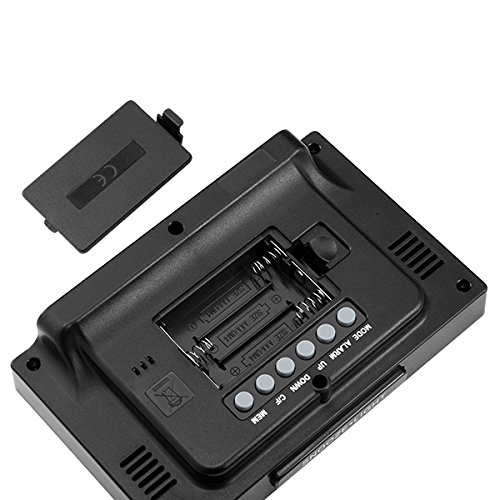
The back of the unit houses the battery compartment and various control buttons for setting the device.
- Batterirum: Holds 3x AAA batteries for power backup.
- MODE knap: Bruges til at skifte mellem visningstilstande og gå ind i indstillingstilstand.
- ALARM knap: Used to set and activate/deactivate the alarm.
- UP -knap: Used to increase values during settings or view maximum records.
- NED -knap: Used to decrease values during settings or view minimum records.
- °C/°F knap: Skifter mellem temperaturenheder i Celsius og Fahrenheit.
- MEM knap: Vant til view memory records for temperature and humidity.
Toppanel
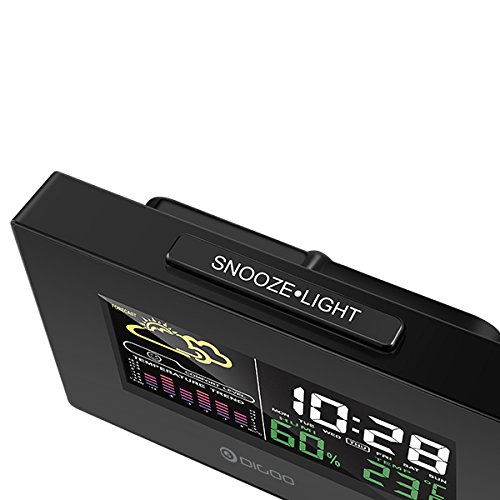
The top of the unit features a single button for snooze and backlight functions.
- SNOOZE·LIGHT Button: Press to activate the backlight or snooze the alarm.
Opsætning
1. Tænder
- Batteri installation: Open the battery compartment cover on the back of the unit. Insert 3x AAA batteries, ensuring correct polarity (+/-). Close the cover. Batteries provide backup power and allow for portability.
- USB-strømtilslutning: For continuous power and backlight, connect the provided USB cable to the USB port on the unit and to a compatible USB power adapter (not included) or a computer USB port.
- The display will light up and show default settings.
2. Initial Settings (Time, Date, Unit)
- Tidsindstilling:
- Tryk og hold på MODE button for approximately 3 seconds to enter time setting mode. The hour digit will flash.
- Brug UP or NED knapper for at justere timen.
- Trykke MODE again to confirm the hour and move to minute setting. The minute digit will flash.
- Brug UP or NED knapper for at justere minutter.
- Trykke MODE again to confirm and move to 12/24 hour format selection.
- Brug UP or NED buttons to select 12-hour or 24-hour format.
- Trykke MODE for at bekræfte og afslutte tidsindstillingen.
- Datoindstilling:
- Når du har indstillet tiden, skal du trykke på MODE again to enter date setting mode. The year will flash.
- Brug UP or NED knapper for at justere året.
- Trykke MODE to confirm and move to month setting.
- Brug UP or NED knapper for at justere måneden.
- Trykke MODE to confirm and move to day setting.
- Brug UP or NED knapper for at justere dagen.
- Trykke MODE to confirm and exit date setting.
- Valg af temperaturenhed:
- Tryk på ° C / ° F button on the back of the unit to switch between Celsius (°C) and Fahrenheit (°F) temperature display.
Betjeningsvejledning
1. Vækkeurfunktion
- Indstilling af alarm:
- Tryk på ALARM knappen én gang for at vise det aktuelle alarmtidspunkt.
- Tryk og hold på ALARM button for approximately 3 seconds. The hour digit will flash.
- Brug UP or NED knapper for at justere alarmtiden.
- Trykke ALARM again to confirm the hour and move to minute setting. The minute digit will flash.
- Brug UP or NED knapper for at justere alarmminut.
- Trykke ALARM for at bekræfte og afslutte alarmindstillingen.
- Aktivering/deaktivering af alarmen:
- I normal tidsvisningstilstand skal du trykke på ALARM button repeatedly to toggle the alarm ON or OFF. An alarm icon will appear on the display when the alarm is active.
- Snooze-funktion:
- Når alarmen lyder, skal du trykke på SNOOZE·LYS button on the top of the unit to activate the snooze function. The alarm will temporarily stop and sound again after a few minutes (typically 5-10 minutes).
- To stop the alarm completely, press any other button on the back panel.
2. Vejrudsigt
The weather station provides a weather forecast based on internal atmospheric pressure changes. The forecast icons (e.g., sunny, cloudy, rainy) are predictions for the next 12-24 hours and may not always match local weather services, which use more comprehensive data.
- The forecast icon is displayed on the upper left of the screen.
- The device requires a period of stable operation (typically 24 hours) to calibrate and provide accurate forecasts.
3. Temperatur- og fugtighedsvisning
- The current indoor temperature and humidity are continuously displayed on the screen.
- Viewing Min/Max Records:
- Tryk på MEM button once to display the maximum recorded temperature and humidity.
- Trykke MEM again to display the minimum recorded temperature and humidity.
- Trykke MEM a third time to return to current readings.
- To clear the min/max records, press and hold the MEM knappen i 3 sekunder mens viewi optegnelserne.
4. Baggrundslysstyring
- When powered by USB, the backlight will remain on.
- When powered by batteries only, press the SNOOZE·LYS button to temporarily activate the backlight for a few seconds.
Opretholdelse
- Rensning: Wipe the unit with a soft, dry cloth. Do not use abrasive cleaners or solvents. Avoid getting moisture into the unit.
- Udskiftning af batteri: When the display becomes dim or functions irregularly, replace the 3x AAA batteries in the back compartment. Ensure correct polarity.
- Opbevaring: If not using the device for an extended period, remove the batteries to prevent leakage. Store in a cool, dry place.
Fejlfinding
| Problem | Mulig årsag | Løsning |
|---|---|---|
| Skærmen er tom eller svag. | Lave batterier eller ingen strømforbindelse. | Replace batteries or connect the USB power cable. |
| Forkert tidspunkt/dato. | Tid/dato er ikke indstillet korrekt efter strømafbrydelse eller første opsætning. | Follow the "Initial Settings" section to reset time and date. |
| Vejrudsigten virker upræcis. | Device needs calibration time; local conditions may differ from pressure-based forecast. | Allow 24 hours for calibration. Understand that the forecast is based on internal pressure changes. |
| Alarmen lyder ikke. | Alarm is not activated or volume is too low (if adjustable). | Sørg for, at alarmikonet vises. Kontroller alarmindstillingerne. |
Specifikationer
| Model: | DG-C3 |
| Forbindelse: | USB (til strøm) |
| Strømkilde: | 3x AAA Batteries (not included) or USB Power |
| Særlige funktioner: | Hygrometer, Thermometer, Weather Forecast, Alarm Clock, Color Backlight, Portable |
| Vise: | Color Backlit LCD |
| Temperaturenhed: | °C / °F valgbar |
Garanti og support
For garantioplysninger eller teknisk support henvises til den dokumentation, der blev leveret ved køb, eller kontakt din forhandler. Gem din købskvittering som købsbevis.