
1. Introduktion
Thank you for choosing the Generic Rolton T50 Portable World Band Radio and MP3 Player. This device combines a multi-band radio (FM/MW/SW) with an MP3 player, supporting SD/TF cards for versatile audio entertainment. Its compact design and battery power make it ideal for portable use. Please read this manual carefully to ensure proper operation and to maximize your listening experience.
2. Sikkerhedsoplysninger
- Udsæt ikke enheden for regn, fugt eller ekstreme temperaturer.
- Undgå at tabe eller udsætte enheden for kraftige stød.
- Adskil ikke enheden eller forsøg at reparere den selv. Overlad al service til kvalificeret personale.
- Hold enheden væk fra stærke magnetiske felter.
- Bortskaf batterier korrekt i henhold til lokale regler.
- Rengør enheden med en blød, tør klud. Brug ikke flydende rengøringsmidler.
3. Pakkens indhold
Tjek venligst pakken for følgende varer:
- Rolton T50 Portable Radio and MP3 Player
- USB opladningskabel
- Brugermanual
Bemærk: Specifikt tilbehør kan variere.
4. Produktet er slutview
Familiarize yourself with the various parts and controls of your Rolton T50 device.
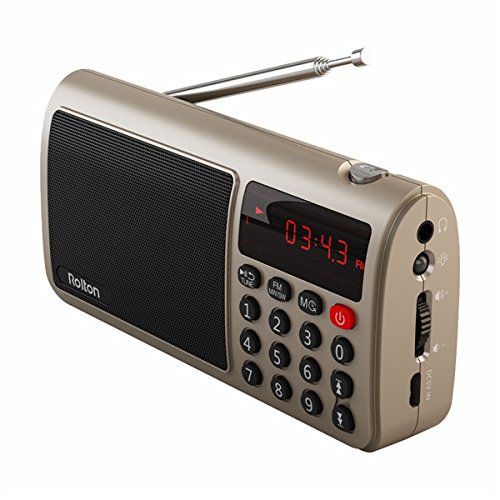
Figur 1: Forside view of the Rolton T50 Portable Radio (Red variant). This image displays the main speaker grille, the digital time/frequency display, the numeric keypad for direct tuning, and the power button. The telescopic antenna is extended from the top right side.
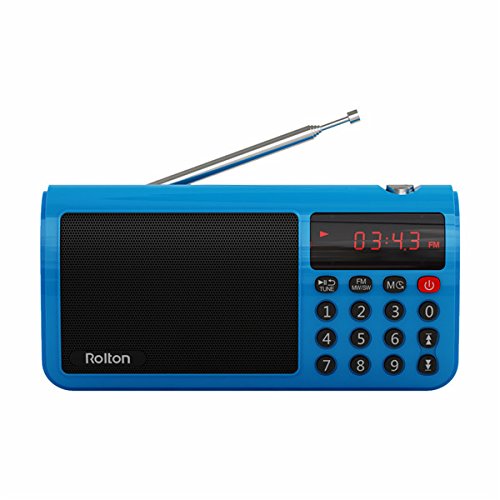
Figur 2: Forside view of the Rolton T50 Portable Radio (Blue variant). Similar to the red model, this image highlights the speaker, digital display, and control buttons, including the numeric keypad and power button. The telescopic antenna is also visible.
Nøglekomponenter:
- Højttalergitter: Til lydudgang.
- Digital skærm: Shows time, frequency, and mode information.
- Numerisk tastatur (0-9): Til direkte frekvensindgang eller sporvalg.
- Power knap: Tænder/slukker enheden.
- Mode Button (FM/MW/SW/MS): Switches between radio bands and MP3 mode.
- Tune/Scan Buttons: For manual tuning or automatic station scanning.
- Lydstyrkekontrol: Justerer lydudgangsniveauet.
- Hovedtelefonstik (3.5 mm): Til privat lytning.
- DC 5V indgang: Til opladning af det interne batteri.
- SD/TF-kortplads: For inserting memory cards with MP3 files.
- Teleskopantenne: For forbedret radiomodtagelse.
5. Opsætning
5.1. Opladning af batteriet
- Connect the small end of the provided USB charging cable to the DC 5V input port on the side of the radio.
- Tilslut den større ende af USB-kablet til en standard USB-strømadapter (medfølger ikke) eller en computers USB-port.
- The charging indicator light (if present) will illuminate, typically red, during charging and turn off or change color when fully charged.
- En fuld opladning tager typisk 2-3 timer.
5.2. Inserting an SD/TF Card
- Locate the SD/TF card slot on the side of the device.
- Insert a compatible SD or TF (MicroSD) card with the metal contacts facing downwards, gently pushing until it clicks into place.
- To remove the card, gently push it in again until it springs out.
6. Betjeningsvejledning
6.1. Tænd/sluk
- For at tænde radioen skal du trykke på og holde Magt knap.
- For at slukke for radioen skal du trykke på og holde nede Magt knappen igen.
6.2. Justering af lydstyrke
- Brug Volume Dial/Buttons on the side of the device to increase or decrease the audio level.
6.3. Radio Mode (FM/MW/SW)
- Vælg bånd: Tryk på Mode button repeatedly to cycle through FM, MW (AM), and SW (Shortwave) bands. The selected band will be displayed on the screen.
- Forlæng antenne: For optimal FM and SW reception, fully extend the telescopic antenna. For MW (AM) reception, the internal antenna is typically sufficient, but adjusting the radio's orientation may improve signal.
- Automatisk scanning: I radiotilstand skal du trykke på og holde nede Tune/Scan button (often labeled with arrows or 'SCAN') to automatically scan for and save available stations.
- Manuel indstilling: Tryk kort på Tune/Scan knapperne til at finjustere frekvensen trin for trin.
- Direkte frekvensindgang: Use the numeric keypad to directly enter the desired frequency (e.g., for 98.7 FM, enter 9-8-7). Press the 'Tune' or 'Enter' button (if available) to confirm.
6.4. MP3-afspillertilstand
- Enter MP3 Mode: If an SD/TF card is inserted, press the Mode button until 'MP3' or 'CARD' is displayed. The device will automatically start playing the first track.
- Afspil/pause: Tryk på Afspil/pause button (often combined with the power button or a dedicated button) to pause or resume playback.
- Næste / forrige nummer: Brug Næste/Forrige track buttons (often combined with Tune/Scan buttons) to skip tracks.
- Direkte sporvalg: Use the numeric keypad to enter the track number and press 'Enter' (if available) to jump to that track.
6.5. Brug af hovedtelefoner
- Plug any standard 3.5mm stereo headphones into the headphone jack on the side of the device for private listening. The external speaker will automatically mute.
7. Vedligeholdelse
- Rensning: Wipe the exterior of the radio with a soft, dry, lint-free cloth. Do not use abrasive cleaners, waxes, or solvents.
- Opbevaring: Når radioen ikke er i brug i længere perioder, skal den opbevares køligt og tørt, væk fra direkte sollys og ekstreme temperaturer.
- Batteripleje: For at forlænge batteriets levetid bør du undgå at aflade batteriet helt ofte. Oplad enheden regelmæssigt, selvom den ikke er i brug.
8. Fejlfinding
| Problem | Mulig årsag | Løsning |
|---|---|---|
| Radioen tænder ikke. | Batteriet er afladet. | Oplad batteriet ved hjælp af det medfølgende USB-kabel. |
| Ingen lyd fra højttaleren. | Lydstyrken er for lav eller slået fra. Hovedtelefoner er tilsluttet. | Skru op for lydstyrken. Frakobl hovedtelefonerne. |
| Dårlig radiomodtagelse. | Antenna not extended. Weak signal area. | Træk teleskopantennen helt ud. Prøv at flytte radioen. |
| MP3 filespiller ikke. | SD/TF card not inserted correctly or corrupted. Unsupported file format. | Reinsert the SD/TF card. Ensure files are in MP3 format. Try a different card. |
| Knapperne reagerer ikke. | Enheden er frosset. | Turn off the device and turn it back on. If possible, remove and reinsert the battery. |
9. Specifikationer
- Mærke: Generisk
- Modelnummer: FFC-BG-1130644
- Tuner teknologi: FM, MW (AM), SW
- Frekvensområde: FM (up to 108 MHz), MW, SW (specific ranges may vary by model)
- Strømkilde: Batteridrevet (genopladeligt)
- Hardwaregrænseflade: 3.5mm Audio Jack, USB Charging Port, SD/TF Card Slot
- Speciel funktion: Portable, MP3 Player
- GTIN: 764022219719
- ASIN: B077MHGW3W
10. Garanti og support
This product is covered by a standard manufacturer's warranty. Please refer to the warranty card included in your package for specific terms and conditions. For technical support or service inquiries, please contact your retailer or the manufacturer's customer service department.