
Indledning
Thank you for choosing the Brookstone Big Blue True Wireless Earbuds. These earbuds are designed to provide a seamless audio experience, allowing you to enjoy music and manage calls wirelessly. This manual provides essential information on setting up, operating, maintaining, and troubleshooting your new earbuds.
Nøglefunktioner:
- True wireless design for freedom of movement.
- Rich, full-range audio with deep bass.
- Integrated microphone with Qualcomm cVc noise-cancelling technology for clear calls.
- Bluetooth connectivity for easy pairing with your smartphone or device.

Image: Brookstone Big Blue True Wireless Earbuds in their black charging case.
Opsætning
Hvad er der i æsken
- Brookstone Big Blue True Wireless Earbuds (Left and Right)
- Trådløs opladningsetui
Opladning af øretelefoner og etui
- Placer begge ørepropper i opladningsetuiet. Sørg for, at de sidder korrekt.
- Tilslut opladningsetuiet til en USB-strømkilde ved hjælp af det medfølgende opladningskabel.
- The indicator lights on the case and earbuds will show charging status. Refer to the specific light patterns in your product packaging for details.
- Sørg for tilstrækkelig tid til en fuld opladning inden første brug.
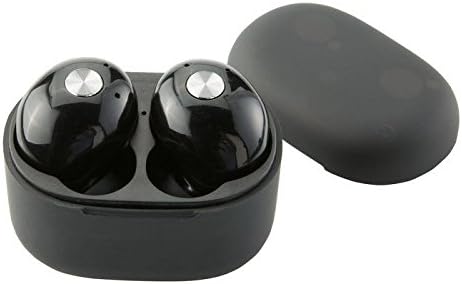
Billede: Nærbillede view of the earbuds within the charging case, illustrating proper placement for charging.
Bluetooth-parring
- Sørg for, at øretelefonerne er opladet.
- Remove both earbuds from the charging case. They will automatically enter pairing mode, indicated by flashing LED lights (refer to your product packaging for specific light patterns).
- Gå til Bluetooth-indstillingerne på din smartphone eller Bluetooth-aktiverede enhed.
- Søg efter new devices and select "BIG BLUE" (or similar name) from the list.
- Once connected, the earbud indicator lights will change, typically turning solid or off.
- Hvis parringen mislykkes, skal du sætte ørepropperne tilbage i etuiet, lukke det og gentage trinnene.
Betjeningsvejledning
Tænd/sluk
- Tænd: Tag ørepropperne ud af opladningsetuiet. De tænder automatisk og forsøger at oprette forbindelse til den sidst parrede enhed.
- Sluk: Sæt ørepropperne tilbage i opladningsetuiet, og luk låget. De slukker automatisk og begynder at oplade.
Musikafspilning og opkaldshåndtering
The earbuds feature integrated controls for media playback and call handling. Specific functions may vary slightly; refer to your product's quick start guide for exact button presses.
- Afspil/pause: Typically a single press on either earbud.
- Næste nummer: Often a double press on the right earbud.
- Forrige nummer: Often a double press on the left earbud.
- Besvar/afslut opkald: A single press on either earbud during an incoming call or active call.
- Afvis opkald: A long press on either earbud during an incoming call.
- Aktiver stemmeassistent: A triple press or long press on an earbud (check specific model instructions).

Image: A man wearing a Brookstone Big Blue True Wireless Earbud, demonstrating typical use.
Opretholdelse
Rensning
- Brug en blød, tør og fnugfri klud til at rengøre ørepropperne og opladningsetuiet.
- Brug ikke slibende rengøringsmidler, opløsningsmidler eller aerosolspray.
- Gently clean ear tips and speaker grilles with a dry cotton swab to remove earwax or debris.
Opbevaring
- Opbevar altid ørepropperne i deres opladningsetui, når de ikke er i brug, for at beskytte dem og holde dem opladede.
- Opbevares køligt og tørt, væk fra ekstreme temperaturer og direkte sollys.
Batteripleje
- For at forlænge batterilevetiden bør du undgå at aflade ørepropperne og etuiet helt ofte.
- Oplad enheden regelmæssigt, selvom den ikke bruges ofte.
Fejlfinding
| Problem | Mulig løsning |
|---|---|
| Øretelefoner parres ikke med enheden. |
|
| Sound skipping or cutting out. |
|
| Den ene øreprop har ingen lyd. |
|
| Øretelefonerne oplader ikke. |
|
Specifikationer
| Feature | Detalje |
|---|---|
| Modelnummer | BIG BLUE |
| Trådløs kommunikationsteknologi | Bluetooth |
| Inkluderede komponenter | Trådløs opladningsetui |
| Materiale | Plast |
| Kontroltype | Mediekontrol |
| Kabelfunktion | Uden kabel |
| Varens vægt | 2.4 ounces (0.15 pund) |
| Produktdimensioner | 3.35 x 1.57 x 5.71 tommer |
| Særlige funktioner | Mikrofon medfølger, Støjreduktion, Trådløs |
| Farve | Sort |
| Formfaktor | In Ear |
| UPC/GTIN | 883594061516 |
Garantioplysninger
Brookstone products are designed with quality and reliability in mind. For specific warranty details regarding your Big Blue True Wireless Earbuds, please refer to the warranty card included in your product packaging or visit the official Brookstone webwebsted. Gem din købsbevis i tilfælde af garantikrav.
Kundesupport
If you encounter any issues not covered in this manual or require further assistance, please contact Brookstone customer support. Contact information can typically be found on the product packaging or the official Brookstone webwebsted.