
Indledning
This manual provides detailed instructions for the safe and efficient installation, operation, and maintenance of your Ergotron MXV Single Monitor Arm. Please read this manual thoroughly before beginning installation to ensure proper setup and to maximize the benefits of your monitor arm. This product is designed to enhance your workspace ergonomics by providing flexible monitor positioning.
Sikkerhedsoplysninger
Always follow these safety guidelines to prevent injury or damage to the product and equipment:
- Ensure the mounting surface (wall stud) is structurally sound and capable of supporting the combined weight of the monitor arm and your monitor.
- Do not exceed the maximum weight capacity of 20 lbs (9.1 kg) for the monitor arm.
- Verify that your monitor is compatible with VESA mounting patterns 75x75mm or 100x100mm.
- Use all provided hardware and tools as instructed. Do not substitute parts.
- Hold børn og kæledyr væk fra installationsområdet.
- Adjust the arm tension carefully to match your monitor's weight. Improper tension can cause the monitor to move unexpectedly.
Pakkens indhold
Før installation skal du kontrollere, at alle komponenter er til stede:
- MXV Single Monitor Arm assembly
- Vægmonteret base
- Mounting hardware kit (screws, washers, anchors)
- Installationsvejledning (dette dokument)
Opsætning og installation
Follow these steps to install your Ergotron MXV Single Monitor Arm:
- Forbered monteringsoverfladen: Identify a sturdy vertical surface, preferably a wood stud, for mounting. Ensure there are no electrical wires or plumbing in the wall at the drilling location.
- Attach Wall Mount Base: Position the wall mount base at the desired height. Mark the drilling locations. Drill pilot holes as specified in the included hardware instructions. Secure the wall mount base to the wall using the provided screws and anchors.
- Install Monitor Arm onto Base: Slide the monitor arm assembly onto the secured wall mount base. Ensure it clicks into place or is fastened according to the specific instructions for your model.
- Attach Monitor to VESA Plate: Carefully attach your monitor to the VESA mounting plate on the arm. Align the VESA holes on the back of your monitor with the holes on the arm's VESA plate. Secure the monitor using the appropriate screws from the hardware kit.
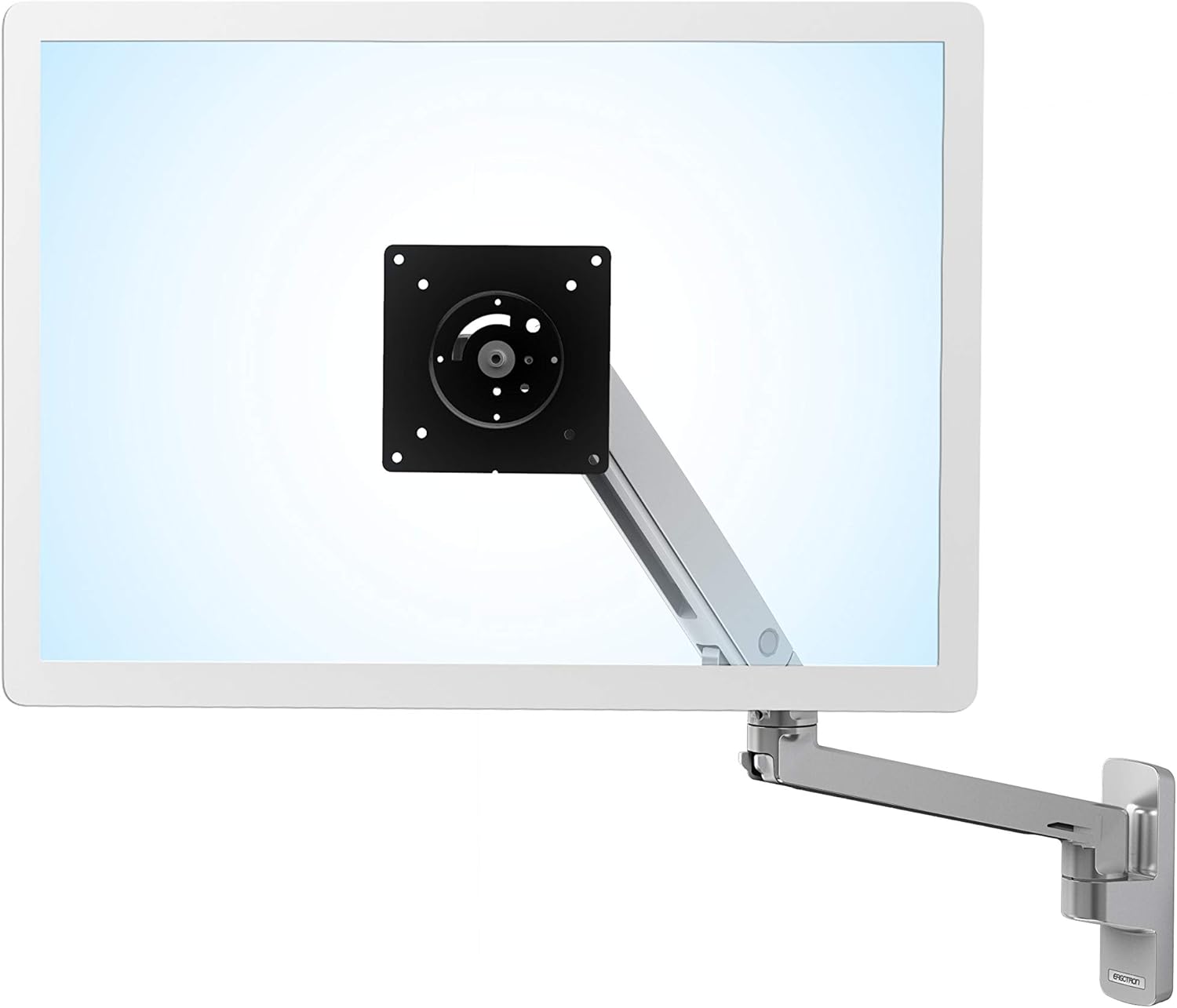
Billede: Bagside view of a monitor with the Ergotron MXV arm's VESA plate attached, illustrating the VESA mounting process.

Image: The Ergotron MXV Single Monitor Arm installed on a wall, supporting a monitor.
- Adjust Arm Tension: The arm's tension may need adjustment to properly support your monitor's weight. Use the provided tool to turn the tension adjustment screw until the monitor stays in place when moved, but can still be adjusted smoothly.
- Kabelstyring: Route monitor cables through the integrated cable management channels on the arm to maintain a tidy workspace.

Image: Integrated cable management on the MXV monitor arm.
Betjeningsvejledning
The Ergotron MXV Single Monitor Arm offers extensive adjustability for optimal viewkomfort:
- Højdejustering: Gently push or pull the monitor up or down to achieve the desired viewing højde.
- Udvidelse og tilbagetrækning: The arm provides 24.6 inches (62.5 cm) of horizontal extension. Pull the monitor forward or push it back to adjust viewing distance. The arm can fold within 4.4 inches (11.2 cm) of the wall to free up space.
- Vip: Tilt the monitor screen up or down by 180 degrees to reduce glare and find the best angle.
- Drejelig: Swivel the monitor left or right by 360 degrees at the arm base and monitor pivot point.
- Rotation: Rotate the monitor from landscape to portrait mode as needed.

Image: The MXV monitor arm extended, showcasing its range of motion.
Opretholdelse
To ensure the longevity and proper function of your monitor arm:
- Rensning: Tør armfladerne af med en blød, tør kludamp klud. Undgå slibende rengøringsmidler eller opløsningsmidler.
- Periodiske kontroller: Periodically check all screws and connections to ensure they are secure. Re-tighten if necessary.
- Spændingsjustering: If the monitor sags or is difficult to move, re-adjust the arm tension as described in the Setup section.
Fejlfinding
If you encounter issues with your monitor arm, refer to the following common problems and solutions:
- Monitor Sags or Drifts: The arm tension is too low for the monitor's weight. Increase the tension using the adjustment screw.
- Monitor is Difficult to Move: The arm tension is too high. Decrease the tension using the adjustment screw.
- Arm Feels Loose on Wall Mount: Ensure the arm is fully seated on the wall mount base and any locking mechanisms are engaged. Check that the wall mount base screws are securely fastened to the wall.
- Monitor Not Level: Adjust the tilt mechanism at the VESA plate to level the screen.
Specifikationer
| Feature | Specifikation |
|---|---|
| Modelnummer | 45-505-026 |
| Kompatibilitet mellem skærmstørrelser | Op til 34 tommer diagonal |
| Vægt kapacitet | 7 til 20 lbs (3.2 til 9.1 kg) |
| VESA-kompatibilitet | 75x75mm, 100x100mm |
| Vandret forlængelse | 24.6 tommer (62.5 cm) |
| Løfteområde | 13 tommer (33 cm) |
| Tilt rækkevidde | 180 grader |
| Rotation | 360 grader |
| Materiale | Aluminium |
| Produktdimensioner | 6.7 x 9.5 x 34.4 tommer (17 x 24.1 x 87.4 cm) |
| Varens vægt | 6.4 pund (2.9 kg) |
Garantioplysninger
Ergotron products are built to last and are backed by extensive quality testing. The Ergotron MXV Single Monitor Arm includes a 10 års garanti, ensuring your display remains stable and secure for years to come. For detailed warranty terms and conditions, please refer to the official Ergotron webwebsted eller kontakt kundesupport.
Kundesupport
For technical assistance, troubleshooting, or warranty claims, please visit the official Ergotron support website or contact their customer service department. You can find contact information and frequently asked questions on the Ergotron webwebsted: www.ergotron.com/support


