
LevelOne FVT-2202
LevelOne FVT-2202 Fast Ethernet-mediekonverter brugermanual
Model: FVT-2202 | Mærke: LevelOne
1. Introduktion
Denne manual indeholder detaljerede instruktioner til installation, drift og vedligeholdelse af LevelOne FVT-2202 Fast Ethernet-mediekonverteren. FVT-2202 er designet til at konvertere 10/100Base-TX Fast Ethernet-signaler til 100Base-FX fiberoptiske signaler, hvilket udvider netværkets rækkevidde over fiberoptisk kabel. Den understøtter både 10 Mbps og 100 Mbps netværkshastigheder, hvilket gør den velegnet til forskellige netværksmiljøer.
Læs venligst denne manual grundigt, inden du bruger enheden, for at sikre korrekt funktion og forhindre skader.
2. Pakkens indhold
Bekræft, at din pakke indeholder følgende varer:
- LevelOne FVT-2202 Fast Ethernet Media Converter
- Strømadapter (5VDC)
- Brugervejledning (dette dokument)
Hvis der mangler eller er beskadigede varer, bedes du straks kontakte din leverandør.
3. Fysisk beskrivelse
LevelOne FVT-2202 er en kompakt mediekonverter designet til pålidelig ydeevne. Den har standard RJ45- og fiberoptiske (SC)-porte samt LED-indikatorer til statusovervågning.
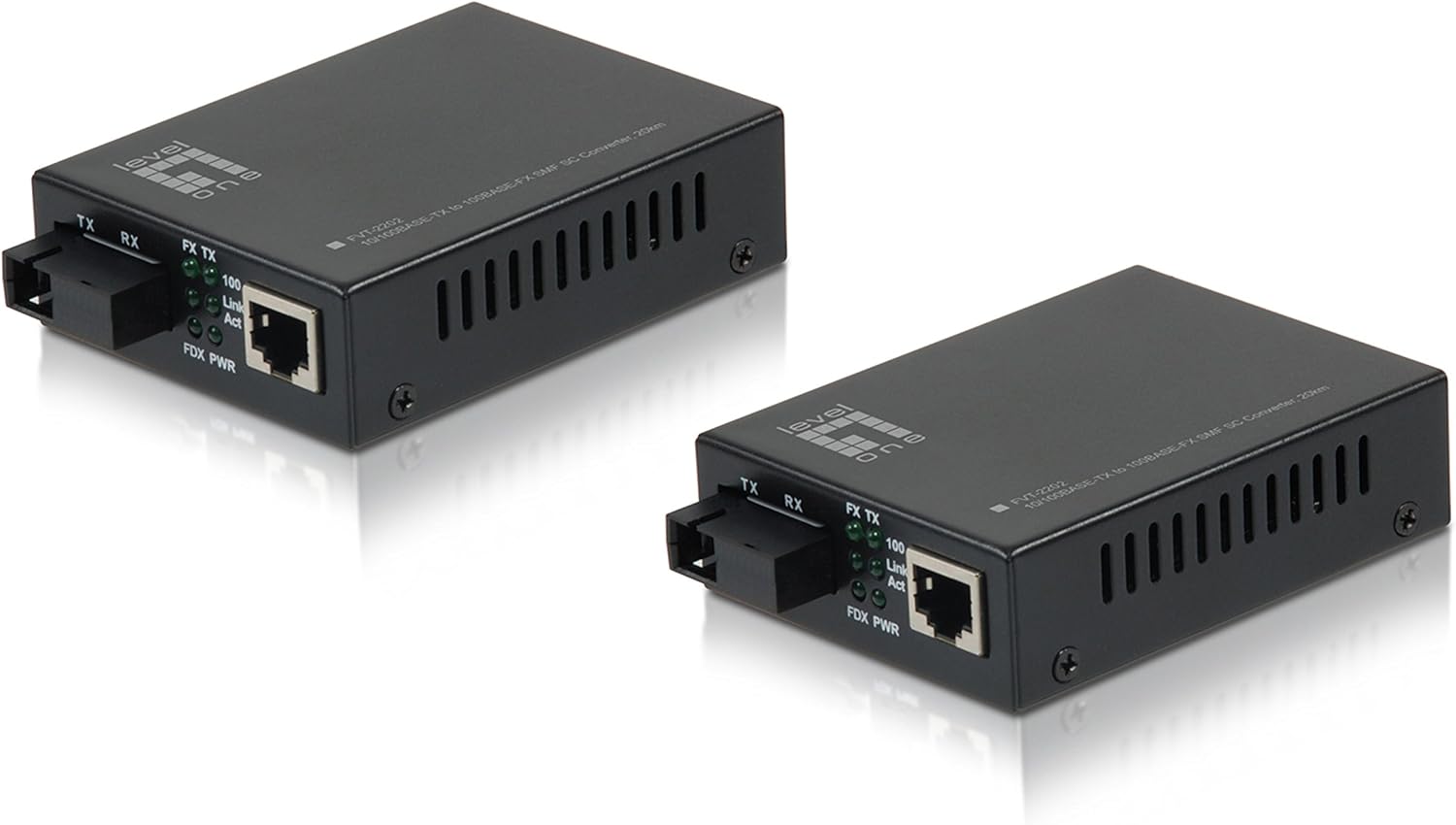
Figur 3.1: Front view af LevelOne FVT-2202 mediekonverteren, der viser RJ45 Ethernet-porten, SC fiberoptisk port og LED-indikatorer for TX, RX, Link/Act og Power.

Figur 3.2: Bag view af LevelOne FVT-2202 mediekonverteren, der fremhæver 5VDC strømindgangen og DIP-switche til konfiguration.
3.1. LED-indikatorer
| LED | Status | Beskrivelse |
|---|---|---|
| PWR | Grøn (Til) | Enheden modtager strøm. |
| FX Link/Act | Grøn (Til) | Fiberoptisk forbindelse er etableret. |
| FX Link/Act | Grøn (blinker) | Data sendes eller modtages via fiberoptisk forbindelse. |
| TX Link/Lov | Grøn (Til) | Ethernet-forbindelsen er etableret. |
| TX Link/Lov | Grøn (blinker) | Data sendes eller modtages via Ethernet-forbindelsen. |
3.2. DIP-switche
FVT-2202 har DIP-switche til avanceret konfiguration. Se markeringerne på enheden for specifikke switchfunktioner, som typisk inkluderer indstillinger for LFP (Link Fault Pass-through), hastighed og duplextilstand.
- Switch 1: LFP (Link Fault Pass-through) Aktivering/Deaktivering
- Switch 2: Aktivering/deaktivering af automatisk forhandling
- Switch 3: Valg af hastighed på 100 Mbps/10 Mbps (når automatisk forhandling er deaktiveret)
- Switch 4: Valg af fuld duplex/halv duplex (når automatisk forhandling er deaktiveret)
Forsigtighed:
Sørg for, at enheden er slukket, før du ændrer DIP-switch-indstillingerne, for at forhindre potentiel skade eller forkert konfiguration.
4. Opsætning og installation
Følg disse trin for at installere og tilslutte din LevelOne FVT-2202 mediekonverter korrekt:
- Forbered miljøet: Sørg for, at installationsstedet er rent, tørt og har tilstrækkelig ventilation. Undgå områder med ekstreme temperaturer eller fugtighed.
- Sluk for enheder: Før du foretager nogen tilslutninger, skal du sørge for, at alle netværksenheder (switche, routere, computere), der skal oprette forbindelse til mediekonverteren, er slukket.
- Konfigurer DIP-switche (hvis nødvendigt): Hvis der kræves specifikke netværksindstillinger (f.eks. fast hastighed/duplex, LFP), skal du justere DIP-switchene på bagsiden af konverteren i henhold til dine netværkskrav. Se afsnit 3.2 for yderligere oplysninger.
- Tilslut fiberoptisk kabel: Tilslut den ene ende af det fiberoptiske kabel (SC-stik) til FX-porten på FVT-2202. Tilslut den anden ende til din fiberoptiske netværksenhed (f.eks. fiberswitch, en anden mediekonverter). Sørg for, at sende- (TX) og modtage- (RX) fibrene er korrekt matchet.
- Tilslut Ethernet-kabel: Tilslut et standard RJ45 Ethernet-kabel fra din kobberbaserede netværksenhed (f.eks. Ethernet-switch, computer) til TX-porten på FVT-2202.
- Tilslut strømadapter: Sæt den medfølgende 5VDC strømadapter i strømindgangsstikket på FVT-2202. Sæt derefter strømadapteren i en passende stikkontakt.
- Tænd enheder: Tænd for FVT-2202. PWR-LED'en skal lyse grønt. Tænd derefter for dine tilsluttede netværksenheder.
- Bekræft forbindelser: Kontrollér Link/Act-LED'erne for både FX- (fiber) og TX- (Ethernet)-portene. Et konstant grønt lys angiver en vellykket forbindelse. Blinkende lys angiver dataaktivitet.
Vigtig:
Håndter altid fiberoptiske kabler med forsigtighed. Undgå at bøje dem skarpt eller udsætte stikkene for støv og snavs, da dette kan forringe ydeevnen.
5. Betjening
Når LevelOne FVT-2202 er korrekt installeret og tændt, fungerer den automatisk som en transparent mediekonverter. Den oversætter Ethernet-signaler mellem kobber- og fiberoptiske medier uden at kræve nogen softwarekonfiguration.
5.1. Grundlæggende funktionalitet
- Konverteren sender transparent Ethernet-frames mellem RJ45 (kobber) og SC (fiber) grænsefladerne.
- Den understøtter både 10 Mbps og 100 Mbps Fast Ethernet-hastigheder.
- Automatisk forhandling er typisk aktiveret som standard på RJ45-porten for automatisk at registrere hastigheden og duplextilstanden for den tilsluttede enhed.
- Fiberoptikporten fungerer med 100 Mbps fuld duplex.
5.2. Overvågningsstatus
LED-indikatorerne giver en hurtig visuel status for konverterens drift:
- PWR LED: Bekræfter, at enheden er tændt.
- FX Link/Act LED: Angiver status for fiberoptisk forbindelse og dataaktivitet.
- TX Link/Act LED: Angiver status for Ethernet-forbindelsen og dataaktiviteten.
Se afsnit 3.1 for en detaljeret forklaring af LED-funktioner.
6. Vedligeholdelse
LevelOne FVT-2202 mediekonverteren er designet til minimal vedligeholdelse. Følgende retningslinjer kan dog hjælpe med at sikre dens levetid og pålidelige ydeevne:
- Rensning: Hold enheden ren og fri for støv. Brug en blød, tør klud til at rengøre ydersiden. Brug ikke flydende rengøringsmidler eller rengøringsmidler på sprayform.
- Fiberoptiske stik: Sørg for, at fiberoptiske stik er rene. Støv eller snavs på fiberens endeflader kan forringe signalkvaliteten betydeligt. Brug passende fiberoptiske rengøringsværktøjer om nødvendigt.
- Ventilation: Sørg for, at ventilationshullerne på enheden ikke er blokerede for at forhindre overophedning.
- Strømforsyning: Brug kun den strømadapter, der følger med enheden. Brug af en forkert strømadapter kan beskadige konverteren.
- Miljøforhold: Brug enheden inden for de angivne miljøforhold (temperatur, fugtighed) for at forhindre funktionsfejl.
7. Fejlfinding
Hvis du støder på problemer med din LevelOne FVT-2202 mediekonverter, skal du se følgende fejlfindingstrin:
| Problem | Mulig årsag | Løsning |
|---|---|---|
| Ingen strøm (PWR-LED slukket) | Strømadapteren er ikke tilsluttet eller defekt. | Kontroller strømadapterens forbindelse til enheden og stikkontakten. Sørg for, at stikkontakten fungerer. Prøv en anden strømadapter, hvis den er tilgængelig og kompatibel. |
| Ingen fiberforbindelse (FX Link/Act LED slukket) | Fiberkabel frakoblet, beskadiget eller forkert TX/RX-forbindelse. | Kontroller fiberkabelforbindelser i begge ender. Sørg for, at TX/RX er korrekt matchet. Undersøg kablet for skader. Rengør fiberstikkene. Kontroller den eksterne fiberenhed. |
| Intet Ethernet-link (TX Link/Act LED slukket) | Ethernet-kabel frakoblet, beskadiget eller forkerte hastigheds-/duplex-indstillinger. | Bekræft Ethernet-kabelforbindelsen. Undersøg kablet for skader. Sørg for, at den tilsluttede enhed er tændt og fungerer. Kontroller DIP-switch-indstillingerne for hastighed/duplex, hvis automatisk forhandling er deaktiveret. |
| Dårlig netværksydelse | Kabelproblemer, duplex-uoverensstemmelse eller overdreven netværkstrafik. | Kontroller kabelkvalitet og -længde. Sørg for, at duplexindstillingerne er ensartede på tværs af tilsluttede enheder (automatisk forhandling anbefales). Overvåg netværkstrafik. |
Hvis problemet fortsætter efter at have prøvet disse løsninger, bedes du kontakte LevelOne teknisk support for yderligere assistance.
8. Specifikationer
| Modelnavn | FVT-2202 |
| Mærke | LevelOne |
| Netværksstandard | 10/100Base-TX, 100Base-FX |
| Dataoverførselshastighed | 100 megabit pr. sekund (10/100 Mbps) |
| Stiktype (kobber) | RJ45 |
| Stiktype (fiber) | SC (Single-Mode Fiber, 20 km rækkevidde) |
| Kabeltype | Ethernet, fiberoptik |
| Speciel funktion | Dataoverførsel, Link Fault Pass-through (LFP) via DIP-switch |
| Farve | Sort |
| Indendørs/Udendørs brug | Udendørs |
| Overholdelse | RoHS, FCC del 15 |
| Varens vægt | 11.3 ounce |
| Produktmål (LxBxH) | 2.8 x 3.7 x 1.02 tommer |
| Strømindgang | 5VDC |
9. Garanti og support
LevelOne-produkter er dækket af en producentgaranti. For specifikke garantivilkår henvises til garantikortet, der følger med dit produkt, eller besøg den officielle LevelOne-side. webwebstedet. Behold din købskvittering som købsbevis.
For teknisk support, produktregistrering eller download af de nyeste drivere og firmware, besøg venligst LevelOne supportportalen eller kontakt deres kundeserviceafdeling. Kontaktoplysninger kan typisk findes på LevelOne. webwebsted: www.level1.com
Ask a question about this manual
Ask about setup, troubleshooting, compatibility, parts, safety, or missing instructions. Manuals+ will review the question and use this page’s manual context to help answer it.