
Indledning
Thank you for choosing the STAPLES Hyken Ergonomic Office Chair. This manual provides essential information for the proper assembly, operation, and maintenance of your new chair. Designed for all-day comfort and support, the Hyken chair features adjustable components and breathable mesh to enhance your workspace experience.
Sikkerhedsoplysninger
- Læs alle instruktioner omhyggeligt før montering og brug.
- Ensure all bolts and screws are securely tightened before using the chair. Periodically check and re-tighten as needed.
- Stå ikke på stolen, og brug den ikke som skammel.
- Brug ikke stolen, hvis der mangler, er beskadiget eller slidt dele. Kontakt kundesupport for at få reservedele.
- Hold børn væk fra bevægelige dele under justering.
- Anbefalet maksimal vægt: 275 pund. Overskrid ikke denne grænse.
Opsætning og montering
The STAPLES Hyken Ergonomic Office Chair requires assembly. All necessary hardware and tools are included. Follow the visual instructions provided in the packaging for a smooth assembly process. It is recommended to have a second person assist with assembly for certain steps.
Billede: Eksploderet view of the STAPLES Hyken Ergonomic Office Chair components, illustrating how parts fit together during assembly. All hardware and tools are included for a quick and easy setup.

Image: A visual guide demonstrating the transition from disassembled chair components to a fully assembled STAPLES Hyken Ergonomic Office Chair, highlighting the ease of assembly.
Betjeningsvejledning og justeringer
The STAPLES Hyken chair offers multiple adjustment options to customize your seating experience for optimal comfort and ergonomic support.
1. Sædehøjdejustering
- Locate the lever on the right side, under the seat.
- Sådan hæver du sædet: Løft håndtaget, mens du aflaster sædet. Sædet hæves automatisk.
- To lower the seat: Lift the lever while seated. The seat will lower under your weight.
- Slip håndtaget for at låse sædet i den ønskede højde.
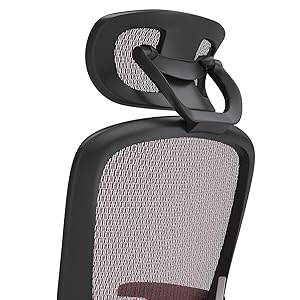
Image: Close-up of the chair's base, showing the lever for seat height adjustment. This allows users to easily modify the seat's elevation for proper desk configuration.
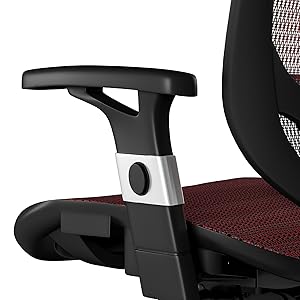
2. Justering af armlæn
- Press the button located on the side of each armrest support.
- While holding the button, move the armrest up or down to your preferred height.
- Release the button to lock the armrest in place.

Billede: En detaljeret view of the adjustable armrests, highlighting the button mechanism for height customization. This feature helps reduce fatigue and ensures a perfect fit for various users.
3. Reclining and Tilt Adjustment
- The chair features a tilt mechanism allowing you to recline.
- Use the tension knob located under the seat to adjust the recline resistance. Turn clockwise for more resistance, counter-clockwise for less.
- A separate lever (often on the left side) can be used to lock the chair in an upright position or allow it to recline freely.
4. Justering af lændestøtte
- The chair includes adjustable lumbar support.
- Gently push or pull the lumbar support mechanism on the backrest to find your preferred position for lower back comfort.

Image: A close-up of the chair's backrest, illustrating the adjustable lumbar support feature. This allows users to customize the support for their lower back, promoting better posture.
5. Justering af hovedstøtte
- The headrest can be adjusted for height and angle.
- Gently push or pull the headrest to adjust its height and tilt to support your neck and head comfortably.

Billede: En detaljeret view of the adjustable headrest, showing its range of motion for height and angle. This ensures optimal neck and head support for various user preferences.
Video: This video demonstrates the various adjustment features of the Staples Hyken Task Chair, including seat height, armrest position, and recline functionality, to help users customize their seating experience.
Opretholdelse
- Produktplejeinstruktioner: Spot Clean.
- Regularly inspect all bolts and screws to ensure they are tight.
- Clean the mesh material with a damp klud og mild sæbe. Undgå skrappe kemikalier.
- Check casters periodically for debris and clean as necessary to ensure smooth rolling.
Fejlfinding
- Stol justerer ikke højden: Ensure the height adjustment lever is fully engaged and the gas lift cylinder is functioning correctly. Check for any obstructions.
- Chair squeaks or wobbles: Check all assembly bolts and screws and tighten them. Apply a small amount of lubricant to moving parts if necessary.
- Hjul ruller ikke jævnt: Inspect casters for hair, dust, or other debris. Clean them thoroughly.
- For further assistance, please contact STAPLES customer support.
Specifikationer
| Mærke | STABLER |
| Modelnavn | Flexfit Un59462 (Staples 2257054) |
| Farve | Rød |
| Materiale | Mesh |
| Produktdimensioner | 27.1" D x 28" B x 49.7" H |
| Maksimal vægtanbefaling | 275 pund |
| Rygstil | Mesh-ryg |
| Speciel funktion | Justerbar |
| Møbelbasebevægelse | Drejelig |
| Vipning | Ja |
| Tilbagelænet Position Tæl | 3 |
| Produktplejevejledning | Spot Clean |

Image: Detailed diagram illustrating the dimensions of the STAPLES Hyken Ergonomic Office Chair, including height, width, and depth measurements.
Garanti og support
For warranty information, replacement parts, or technical support, please contact STAPLES customer service. Refer to your purchase receipt for specific warranty terms and conditions.
You can visit the official STAPLES store for more information: STAPLES Store