
Vocal-Star VS1200
Vocal-Star VS-1200 Karaoke Machine
Model: VS1200 - User Manual
Produkt overview
The Vocal-Star VS-1200 is a versatile multi-format and Bluetooth-enabled karaoke machine designed to bring entertainment to your home. This unit allows you to play various karaoke discs, stream music wirelessly from your smartphone or tablet, and even record your performances. With comprehensive audio controls and multiple microphone inputs, it's perfect for solo singing or group performances.
Pakkens indhold
Upon unpacking your Vocal-Star VS-1200, please ensure all the following items are present:
- Vocal-Star VS-1200 Karaoke Machine
- Fjernbetjening
- RCA Cable (2 meters)
- 2 x Wired Microphones (MP-508)
- 150 Party Songs (on CDG/CD discs)
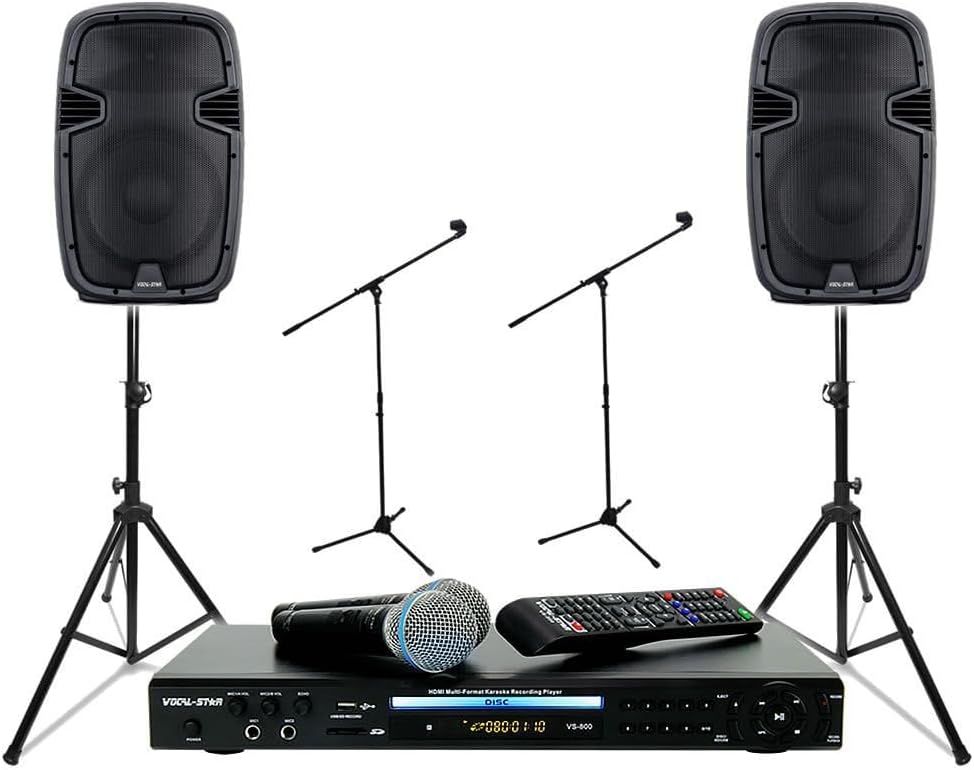
Image: The Vocal-Star VS-1200 karaoke machine, two wired microphones, and the remote control, as typically included in the package.
Nøglefunktioner
- Multi-format afspilning: Supports various karaoke disc formats (CDG/CD).
- Bluetooth-forbindelse: Wirelessly stream music from smartphones, tablets, and other Bluetooth-enabled devices.
- HDMI & RCA Output: Connects easily to your TV or sound system for video and audio output.
- Advanced Audio Controls: Independent Bass and Treble controls for music, plus Echo, Key, Bass, and Treble controls for microphones.
- Flere mikrofonindgange: Four microphone inputs for group performances.
- Hovedtelefonudgang: Dedicated headphone jack with volume control for private monitoring.
- Optagefunktion: Record your singing performances directly to a USB drive.
- Scoring Feature: Evaluate your vocal performance with the built-in scoring system.
- CDG/CD to MP3/MP3G Copying: Convert your karaoke discs to digital formats for USB playback.
- USB-port: For playback of digital media and recording.
Opsætningsvejledning
1. Strømtilslutning
- Ensure the VS-1200 is placed on a stable, flat surface with adequate ventilation.
- Connect the power cord to the "AC IN" port on the rear of the VS-1200.
- Sæt den anden ende af netledningen i en almindelig stikkontakt.
2. Audio/Video Connections
The VS-1200 offers both HDMI and RCA connections for audio and video output to your television or sound system.
Using HDMI (Recommended for best quality)
- Connect one end of an HDMI cable (not supplied) to the "HDMI OUT" port on the rear of the VS-1200.
- Connect the other end of the HDMI cable to an available HDMI input on your TV or AV receiver.
Using RCA (Composite Video & Stereo Audio)
- Connect the supplied RCA cable to the "VIDEO OUT" (yellow), "AUDIO L" (white), and "AUDIO R" (red) ports on the rear of the VS-1200.
- Connect the other end of the RCA cable to the corresponding video and audio input ports on your TV or sound system.

Billede: Detaljeret view of the rear panel connections, including HDMI, RCA, and power input.
3. Mikrofontilslutninger
- Connect the supplied wired microphones to the "MIC1", "MIC2", "MIC3", or "MIC4" input jacks on the front panel of the VS-1200.
- Ensure the microphone cables are securely inserted.

Image: The two wired microphones included with the Vocal-Star VS-1200 system.
4. USB/SD Card Insertion (Optional)
- To play media from a USB drive or SD card, insert the USB drive into the "USB" port or the SD card into the "SD CARD" slot on the front panel.
- Ensure the media is inserted correctly.
Betjeningsvejledning
1. Tænd/sluk
- Tryk på MAGT knappen på frontpanelet eller fjernbetjeningen for at tænde eller slukke enheden.
2. Diskafspilning
- Tryk på UDSTØDE knappen for at åbne diskskuffen.
- Place a karaoke CDG or CD disc gently onto the disc tray with the label facing up.
- Tryk på UDSTØDE knappen igen for at lukke bakken.
- The unit will automatically begin playing the disc. Use the AFSPIL/PAUSE, STOP, FORR, og NÆSTE knapperne på enheden eller fjernbetjeningen til at styre afspilningen.

Image: Front panel of the VS-1200, showing the disc tray, display, and control buttons.
3. Bluetooth-streaming
- Tryk på MODE button on the front panel or remote until "Bluetooth" is displayed on the screen. The unit will enter pairing mode.
- On your smartphone or tablet, navigate to the Bluetooth settings and search for available devices.
- Select "Vocal-Star VS-1200" (or similar name) from the list to pair. Once connected, the display will show "Bluetooth Connected".
- You can now play audio from your device through the VS-1200.

Image: The VS-1200 display indicating a successful Bluetooth connection, with a smartphone showing its Bluetooth settings.
4. Microphone Usage and Controls
- Adjust the individual microphone volume using the MIC VOL knobs (MIC1/2, MIC3/4).
- Brug EKKO knob to add reverberation to your vocals.
- De NØGLE control allows you to adjust the musical key of the song to match your vocal range.
- Fine-tune your microphone sound with the MIC BAS og MIC DISKANT kontroller.
- Adjust the overall music volume using the MUSIK BIND knop.
- Brug BASS og DISKANT knobs under "MUSIC CONTROLS" to adjust the music's tone.
5. Optagelse af din præstation
- Ensure a USB drive is inserted into the USB port.
- Start playing your desired karaoke track.
- Tryk på OPTAGE button on the front panel or remote. The recording indicator will light up.
- Syng ind i mikrofonen.
- Tryk på OPTAGE button again to stop recording. Your performance will be saved as an audio file på USB-drevet.
6. Scoring Your Performance
- While singing along to a karaoke track, the VS-1200 can provide a score based on your pitch accuracy.
- Refer to the on-screen display for real-time feedback and your final score.
7. Copying CDG/CD to MP3/MP3G
- Insert a CDG or CD disc into the disc tray.
- Ensure a USB drive is inserted into the USB port.
- Navigate to the copy function (refer to the remote control or on-screen menu for specific button/menu options, as this may vary).
- Follow the on-screen prompts to select tracks and initiate the copying process. The tracks will be converted and saved to your USB drive.
Opretholdelse
Proper maintenance ensures the longevity and optimal performance of your Vocal-Star VS-1200 Karaoke Machine.
Rensning
- Tag altid stikket ud af stikkontakten før rengøring.
- Brug en blød, tør klud til at aftørre enhedens ydre.
- For genstridige mærker, gnid letampRengør kluden med vand og et mildt rengøringsmiddel, og tør derefter straks efter.
- Brug ikke slibende rengøringsmidler, voks eller opløsningsmidler, da de kan beskadige finishen.
- Keep the disc tray and USB/SD card slots free of dust and debris. Use a soft brush or compressed air if necessary.
Opbevaring
- Når enheden ikke er i brug i længere perioder, skal den opbevares køligt og tørt, væk fra direkte sollys og ekstreme temperaturer.
- Beskyt enheden mod støv ved at dække den til eller opbevare den i dens originale emballage.
- Frakobl alle kabler før opbevaring.
Handling Discs and Microphones
- Handle discs by their edges to avoid fingerprints and scratches. Store them in their cases when not in use.
- Avoid dropping microphones or exposing them to excessive moisture.
- Store microphones in a safe place to prevent damage to the grille or cable.
Fejlfinding
If you encounter any issues with your Vocal-Star VS-1200, please refer to the following common problems and their solutions before contacting customer support.
| Problem | Mulig årsag | Løsning |
|---|---|---|
| Ingen strøm | Power cord not connected; Power outlet faulty; Unit turned off. | Ensure power cord is securely connected to the unit and a working outlet. Press the POWER button. |
| No sound from speakers/TV | Volume too low; Incorrect audio input selected on TV/receiver; Cables loose or incorrect. | Increase music and microphone volumes. Select the correct HDMI or RCA input on your TV/receiver. Check all audio cables are securely connected to the correct ports. |
| Intet billede på tv'et | Incorrect video input selected on TV; Video cable loose or incorrect. | Select the correct HDMI or RCA video input on your TV. Check video cables are securely connected. |
| Mikrofon virker ikke | Microphone volume too low; Microphone not connected properly; Microphone faulty. | Increase MIC VOL. Ensure microphone is fully plugged into the input jack. Test with another microphone if available. |
| Problemer med Bluetooth-forbindelse | Enhed ikke i parringstilstand; Enhed for langt væk; Interferens. | Ensure VS-1200 is in Bluetooth mode. Move device closer to the unit. Avoid obstacles and other wireless devices. Try unpairing and re-pairing. |
| Disc not playing/reading | Disc dirty or scratched; Disc inserted incorrectly; Unsupported disc format. | Clean the disc with a soft cloth. Ensure the disc is inserted correctly. Verify the disc format is supported (CDG/CD). |
| Kan ikke optage til USB | USB drive full; USB drive not formatted correctly; USB drive not inserted. | Check USB drive storage space. Ensure USB drive is formatted to FAT32. Re-insert USB drive securely. |
Specifikationer
| Feature | Detalje |
|---|---|
| Mærke | Vocal-Star |
| Modelnummer | VS1200 |
| Forbindelsesteknologi | Bluetooth, HDMI, USB |
| Særlige funktioner | Bluetooth Connectivity, Recording, Scoring |
| Kompatible enheder | Smartphone, Tablet, TV |
| Indgangsporte | 4 x Microphone Inputs, USB 2.0, SD Card Slot |
| Udgangsporte | HDMI, RCA (Composite Video, Stereo Audio), Headphone Jack |
| Strømkilde | Elektrisk med ledning |
| Anbefalet brug | Hjemmeunderholdning |
| Inkluderede komponenter | VS-1200 Unit, Remote Control, RCA Cable, 2 Wired Microphones, 150 Party Songs (CDG/CD) |
Garanti og support
For information regarding warranty coverage, technical support, or service, please refer to the warranty card included with your product or visit the official Vocal-Star webwebsted. Gem din købskvittering som købsbevis i tilfælde af garantikrav.
Please note: Specific warranty terms and conditions may vary by region and retailer.