
Indledning
This manual provides detailed instructions for the setup, operation, and maintenance of your Zebronics ZEB-BT6860RUCF 5.1 Channel Multimedia Speaker System. Please read this manual thoroughly before using the product to ensure proper functionality and to maximize your audio experience.
Pakkens indhold
Bekræft, at alle nedenstående varer er inkluderet i din pakke:
- 1 x subwoofer-enhed
- 5 x Satellite Speaker Units
- 1 x fjernbetjening
- Audio Cables (AUX, RCA)
- Brugermanual
Produkt overview

Image: The complete Zebronics ZEB-BT6860RUCF 5.1 speaker system, including the subwoofer, five satellite speakers, and the remote control.

Image: Close-up of the subwoofer's front panel, illustrating the 'Input', 'Previous', 'Next', 'Play', 'Volume' controls, along with the SD/MMC card slot and USB port.
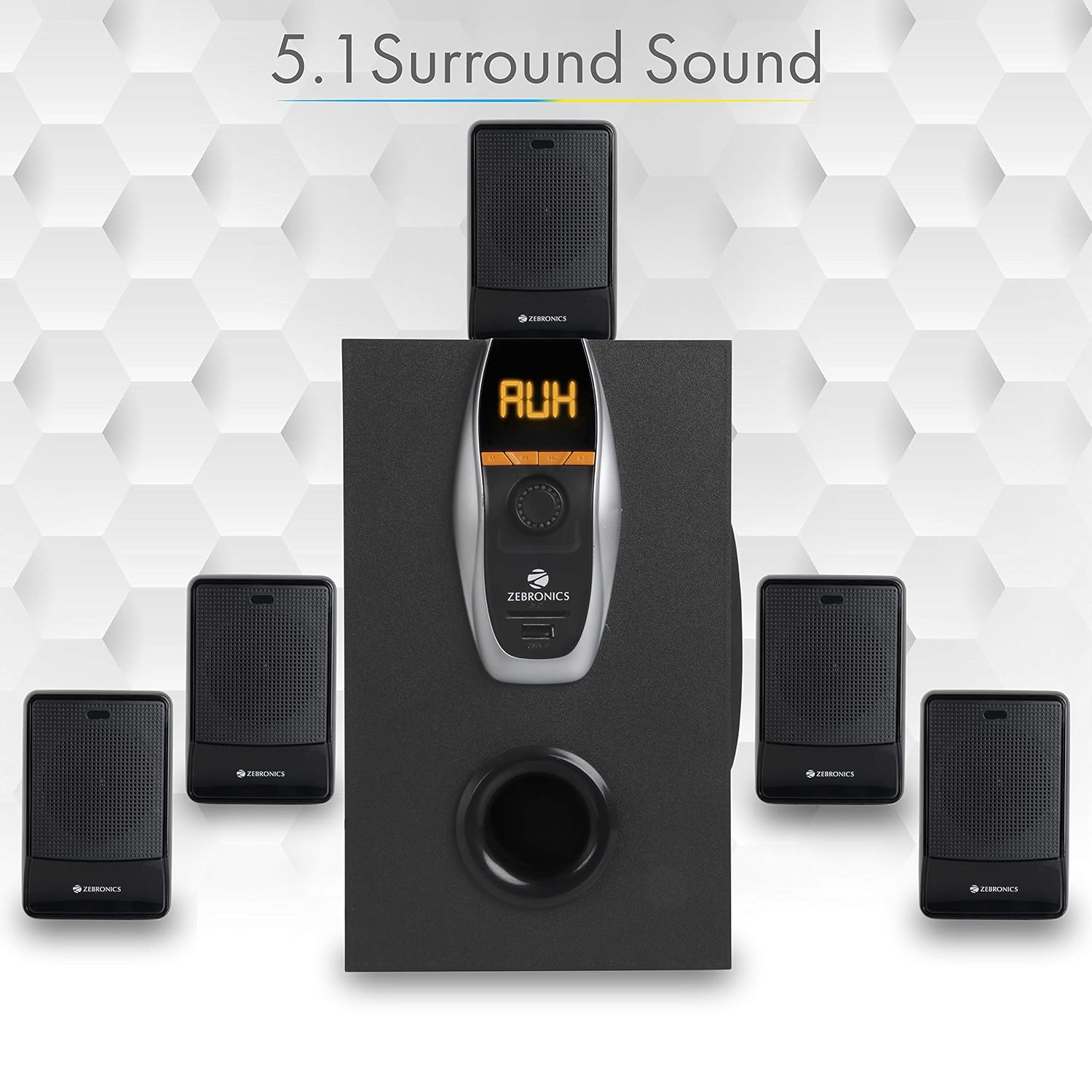
Image: A visual representation of the recommended 5.1 surround sound speaker setup, showing the central subwoofer and the five satellite speakers positioned for optimal audio distribution.

Billede: En detaljeret view of the subwoofer, highlighting its wooden enclosure design, which contributes to sound quality.

Image: The rear panel of the subwoofer, showing the various input and output ports, including Stereo Input, 5.1 Input, Satellite Output terminals, and the main Power Switch.

Image: A diagram illustrating the physical dimensions of the subwoofer unit: 160 mm (Width), 240 mm (Depth), and 277 mm (Height).
Opsætningsinstruktioner
- Højttalerplacering: Position the subwoofer centrally. Place the five satellite speakers around your listening area for optimal 5.1 surround sound. Refer to the 5.1 Surround Sound Speaker Placement image for guidance.
- Tilslut satellithøjttalere: Connect each of the five satellite speakers to the corresponding output terminals on the rear panel of the subwoofer. Ensure correct polarity (positive to positive, negative to negative).
- Strømtilslutning: Connect the power cable to the subwoofer and then plug it into a suitable power outlet.
- Lydkildeforbindelse:
- For 5.1 Input: Use the provided RCA cables to connect your 5.1 channel audio source (e.g., DVD player, compatible TV) to the 5.1 Input ports on the subwoofer's rear panel.
- For Stereo/AUX Input: Use a 3.5mm to RCA cable to connect your stereo audio source (e.g., computer, laptop, MP3 player) to the Stereo Input (AUX) ports on the subwoofer's rear panel.
- Tænd: Flip the power switch on the rear panel of the subwoofer to the 'ON' position. The front display will illuminate.
Betjeningsvejledning
Kontrol på frontpanelet
The subwoofer's front panel features controls for various functions:
- Input: Press to cycle through input modes (Bluetooth, USB, SD, AUX, FM).
- Tidligere: Short press for previous track/station. Long press for fast rewind (USB/SD).
- Næste: Short press for next track/station. Long press for fast forward (USB/SD).
- Afspil/pause: Play or pause audio playback. In FM mode, long press to auto-scan and save stations.
- Lydstyrkeknap: Drej for at justere masterlydstyrken.
- USB-port: Indsæt et USB-flashdrev for at afspille MP3.
- SD/MMC-kortslot: Insert an SD or MMC card for MP3 playback.
Fjernbetjeningsfunktioner
The included remote control provides convenient access to all speaker functions:
- Magt: Turn the speaker system On/Off.
- Mode: Select input source (BT/USB/SD/AUX/FM).
- Volumen +/-: Juster masterlydstyrken.
- Stum: Slå lyden fra eller til.
- Afspil/pause: Styr afspilning.
- Forrige Næste: Navigate tracks or FM stations.
- EQ: Select equalizer presets (if available).
- Numeriske taster: Direkte valg af spor (USB/SD) eller FM-stationsindgang.
Bluetooth-betjening
- Tænd for højttalersystemet.
- Press the 'Input' button on the front panel or 'Mode' button on the remote until 'BT' mode is selected. The display will show 'BT' and a pairing indicator will flash.
- Aktiver Bluetooth på din mobilenhed eller computer, og søg efter tilgængelige enheder.
- Select 'ZEB-BT6860RUCF' from the list of devices.
- Once paired, the speaker will confirm the connection, and you can begin playing audio from your device.
Betjening af USB/SD-kort
- Insert a USB flash drive or SD/MMC card (up to 32GB) containing MP3 audio files ind i den respektive port/slot på frontpanelet.
- The speaker system will automatically switch to USB or SD mode and begin playing the first track. If not, press the 'Input' or 'Mode' button to select the correct source.
- Use the 'Previous', 'Next', and 'Play/Pause' buttons on the front panel or remote control to manage playback.
Betjening af AUX-indgang
- Connect your audio source to the AUX input ports on the rear panel using an appropriate audio cable.
- Press the 'Input' button on the front panel or 'Mode' button on the remote until 'AUX' mode is selected.
- Afspil lyd fra din tilsluttede enhed.
Betjening af FM-radio
- Press the 'Input' button on the front panel or 'Mode' button on the remote until 'FM' mode is selected.
- To auto-scan and save available FM stations, long press the 'Play/Pause' button on the front panel or remote control. The system will scan and store stations automatically.
- Brug knapperne 'Forrige' og 'Næste' til at navigere gennem de gemte FM-stationer.
Opretholdelse
- Rensning: Brug en blød, tør klud til at rengøre højttaleroverfladerne. Brug ikke slibende rengøringsmidler, voks eller opløsningsmidler.
- Ventilation: Ensure the subwoofer and satellite speakers have adequate ventilation. Do not block any ventilation openings.
- Miljø: Avoid exposing the speaker system to direct sunlight, extreme temperatures, high humidity, or dusty environments.
- Sluk: Always power off the system and unplug it from the power outlet before cleaning or if it will be unused for an extended period.
Fejlfinding
| Problem | Mulig årsag | Løsning |
|---|---|---|
| Ingen strøm | Strømkabel ikke tilsluttet; Strømafbryder slukket; Strømstik defekt. | Sørg for, at strømkablet er korrekt tilsluttet. Tænd for strømafbryderen. Test stikkontakten med en anden enhed. |
| Ingen lyd | Volume too low; Incorrect input mode; Audio cables loose/faulty; Mute activated. | Increase volume. Select correct input mode. Check audio cable connections. Deactivate mute function. |
| Bluetooth forbinder ikke | Speaker not in BT mode; Device Bluetooth off; Already connected to another device; Interference. | Ensure speaker is in BT mode. Turn on device Bluetooth. Disconnect from other devices. Move closer to the speaker. |
| Problemer med USB/SD-afspilning | Ukorrekt file format; Beskadiget files; USB/SD card not inserted correctly; Max memory size exceeded. | Sikre files are MP3 format. Check for corrupted files. Reinsert USB/SD card. Use cards up to 32GB. |
| Fjernbetjening virker ikke | Batterier opbrugt; Blokering; Fjernbetjeningssensor blokeret. | Replace remote control batteries. Remove any obstructions between remote and speaker. Ensure remote sensor on subwoofer is clear. |
| Dårlig FM -modtagelse | Svagt signal; Antennen er ikke strakt ud. | Extend the FM antenna fully. Try repositioning the antenna or the speaker system for better signal. |
Specifikationer
| Feature | Specifikation |
|---|---|
| Samlet udgangseffekt (RMS) | 70 watt |
| Subwoofer udgangseffekt | 40 watt |
| Satellitudgangseffekt | 6 Watt x 5 |
| Frekvensrespons | 35Hz - 20KHz |
| Følsomhed | 600mV |
| Bluetooth version | 2.1 + EDR |
| USB/SD Max. Memory Size | 32 GB |
| USB/SD File Formatstøtte | MP3 |
| Tilslutningsmuligheder | Bluetooth, USB, SD/MMC, AUX, FM |
| Kompatible enheder | Desktop, Laptop, MP3 Player, DVD Players, Televisions |
| Subwooferens dimensioner (D x B x H) | 35D x 39W x 45H Centimeters (Product Dimensions) |
| Varens vægt | 5.4 kg |
| Strømforbrug | 45W |
| Kontrolmetode | Fjernbetjening, knapper på enheden |
| Oprindelsesland | Kina |
Garanti og support
Your Zebronics ZEB-BT6860RUCF Multimedia Speaker System comes with a 1-year carry-in warranty to the service center from the date of purchase. Please retain your purchase receipt for warranty claims.
For technical support, service, or warranty inquiries, please contact Zebronics customer service. Refer to the official Zebronics webwebstedet eller din produktemballage for at få de mest aktuelle kontaktoplysninger.
Importør: ZEBRONICS INDIA PVT LTD, NO : 118, POONAMMALE HIGH ROAD , VEPERY