
Edifier DA5100
Edifier DA5100 5.1 Højttalere Brugermanual
Din omfattende guide til opsætning, drift og vedligeholdelse.
Indledning
Tak for købetasing the Edifier DA5100 5.1 multimedia speaker system. This manual provides detailed instructions to help you set up, operate, and maintain your speakers for optimal performance and longevity. Please read this manual thoroughly before using the product.
Pakkens indhold
Før du fortsætter, skal du kontrollere, at alle komponenter er til stede i din pakke:
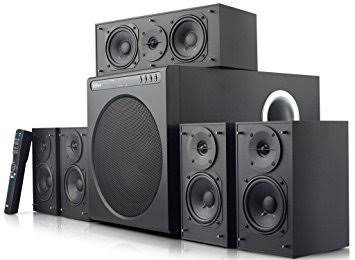
- Subwoofer enhed
- Center højttaler
- Front satellite speakers (2)
- Rear satellite speakers (2)
- Fjernbetjening
- Audio input cables (RCA to RCA, 3.5mm to RCA)
- Speaker connection cables
- Brugervejledning (dette dokument)
Vigtige sikkerhedsforanstaltninger
For at sikre sikker drift og forhindre skader, bedes du overholde følgende:
- Udsæt ikke enheden for regn eller fugt.
- Do not open the speaker enclosures; there are no user-serviceable parts inside.
- Placer enheden på en stabil, plan overflade for at forhindre den i at vælte.
- Ensure adequate ventilation around the speakers and subwoofer.
- Disconnect from power during lightning storms or when unused for long periods.
- Holdes væk fra varmekilder og direkte sollys.
- Use only specified power supply and accessories.
Opsætningsvejledning
1. Højttalerplacering
Proper speaker placement is crucial for optimal 5.1 surround sound experience.
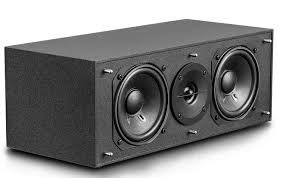
- Center højttaler: Place directly in front of the listening position, typically above or below your display.
- Front Speakers (Left/Right): Position equidistant from the listening position, forming an equilateral triangle with the listener.
- Rear Speakers (Left/Right): Place behind the listening position, slightly to the sides, at ear level or slightly above.
- subwoofer: Can be placed anywhere in the room, but corner placement often enhances bass. Experiment for best results.
2. Tilslutning af højttalerne
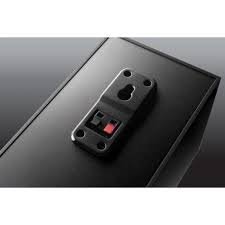
Connect the satellite speakers to the subwoofer unit using the provided speaker cables. Ensure correct polarity (red to red, black to black) for each connection.
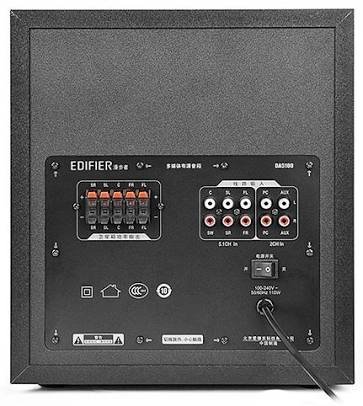
- Identify the speaker output terminals on the rear of the subwoofer. These are typically labeled for Front Left (FL), Front Right (FR), Center (C), Surround Left (SL), and Surround Right (SR).
- Connect each satellite speaker to its corresponding terminal on the subwoofer.
3. Tilslutning af lydkilder
The DA5100 offers multiple input options. Choose the one that best suits your audio source.
- 5.1 kanal input: For true 5.1 surround sound, connect your DVD player, Blu-ray player, or sound card's 5.1 analog outputs to the corresponding 5.1 input jacks on the subwoofer (FL, FR, C, SL, SR, SW).
- PC-indgang: Use the 3.5mm to RCA cable to connect your computer's audio output to the "PC" input jacks.
- AUX-indgang: Use the RCA to RCA cable to connect other stereo audio devices (e.g., TV, game console) to the "AUX" input jacks.
4. Strømtilslutning
After all audio and speaker connections are made, connect the power cord to the subwoofer and then to a wall outlet. Ensure the power switch on the rear of the subwoofer is in the "OFF" position before plugging in.
Betjeningsvejledning
1. Tænd/sluk
Locate the power switch on the rear panel of the subwoofer. Flip it to the "ON" position to power on the system. Flip it to "OFF" to power off.
2. Valg af input
Use the "Input" button on the remote control or the control panel on the subwoofer to cycle through the available audio inputs: 5.1, PC, AUX.
3. Lydstyrkekontrol
Use the "Volume +" and "Volume -" buttons on the remote control or the main volume knob on the subwoofer to adjust the overall system volume.
4. Individual Channel Volume Adjustment
The remote control allows for individual adjustment of the center, surround, and subwoofer volumes to fine-tune your sound experience.
- Press the "Center", "Surround", or "Subwoofer" button on the remote.
- Use the "Volume +" or "Volume -" buttons to adjust the level for that specific channel.
5. Lydløs funktion
Press the "Mute" button on the remote control to temporarily silence the audio. Press it again to restore the sound.
Vedligeholdelse og pleje
To keep your Edifier DA5100 speakers in optimal condition:
- Rensning: Use a soft, dry cloth to wipe down the speaker surfaces. Do not use liquid cleaners or abrasive materials.
- Ventilation: Ensure that the subwoofer's heat sink and ventilation ports are not obstructed.
- Opbevaring: Hvis højttalerne opbevares i en længere periode, skal de afbrydes fra strømmen og opbevares et køligt og tørt sted.
- Kabelstyring: Keep cables tidy and avoid sharp bends or kinks to prevent damage.
Fejlfinding
If you encounter issues with your Edifier DA5100 system, refer to the table below for common problems and solutions.
| Problem | Mulig årsag | Løsning |
|---|---|---|
| Ingen lyd | Power off; incorrect input selected; loose cables; muted. | Check power switch; select correct input; re-connect all cables securely; un-mute. |
| Forvrænget lyd | Volume too high; poor audio source quality; incorrect cable connection. | Reduce volume; try a different audio source; check cable connections and polarity. |
| Fjernbetjening virker ikke | Dead batteries; obstruction between remote and sensor. | Replace batteries; ensure clear line of sight to the subwoofer's IR sensor. |
| Only some speakers producing sound | Incorrect 5.1 setup; loose speaker cables; audio source not 5.1. | Verify 5.1 input connections; check individual speaker cables; ensure audio source is outputting 5.1. |
Hvis problemet fortsætter, bedes du kontakte Edifiers kundesupport.
Specifikationer
The following are the general specifications for the Edifier DA5100 5.1 speaker system. Specifications are subject to change without notice.
- Strømudgang: RMS 8W x 5 + 38W (THD+N=10%)
- Frekvensrespons: R/L/C/SL/SR: 150Hz-20KHz | SW: 20Hz-130Hz
- Input følsomhed: 5.1CH: L/R: 450mV+/-50mV; SW: 150mV+/-50mV | PC: 700mV+/-50mV | AUX: 350mV+/-50mV
- Indgangstype: 5.1 Channel, PC, AUX
- Basenhed: 8 tommer (210 mm)
- Mid-range Unit: 3 tommer (78 mm)
- Diskantenhed: 1 tommer (25 mm)
- Dimensioner (Subwoofer): 270 mm x 300 mm x 435 mm (B x H x D)
- Dimensions (Satellite): 130 mm x 160 mm x 100 mm (B x H x D)
Garantioplysninger
Edifier products come with a limited warranty. Please refer to the warranty card included with your product or visit the official Edifier webwebstedet for detaljerede garantivilkår og -betingelser, der er specifikke for din region. Gem din købskvittering som købsbevis i tilfælde af garantikrav.
Kundesupport
For further assistance, technical support, or service inquiries, please contact Edifier customer support through their official webwebstedet eller kontaktoplysningerne på din produktemballage.
Edifier Officiel Webwebsted: www.edifier.com
Ask a question about this manual
Ask about setup, troubleshooting, compatibility, parts, safety, or missing instructions. Manuals+ will review the question and use this page’s manual context to help answer it.