
1. Introduktion
The GREISINGER GMK100 is a high-frequency moisture meter designed for precise and non-destructive measurement of moisture in various materials. It is capable of measuring both moisture content (u%) and moisture ratio (w%). This device features adjustable measurement depths and a selection of material-specific characteristic curves, making it suitable for applications in woodworking, building material assessment, and concrete curing.
This manual provides essential information for the safe and efficient operation, setup, and maintenance of your GMK100 moisture meter. Please read it thoroughly before using the device.
2. Sikkerhedsoplysninger
- Always operate the device within the specified operating temperature range (-25 to +50°C, non-freezing state).
- Udsæt ikke enheden for ekstreme temperaturer, direkte sollys eller for høj luftfugtighed.
- Ensure the battery is correctly installed according to polarity markings.
- Replace batteries promptly when the low battery indicator appears to ensure accurate measurements.
- Forsøg ikke at åbne eller reparere enheden selv. Overlad al service til kvalificeret personale.
- Keep the device away from strong electromagnetic fields, which may affect measurement accuracy.
- The device has an IP65 protection rating, meaning it is protected against dust ingress and low-pressure water jets from any direction. However, it is not designed for immersion in water.
3. Produktet er slutview
The GMK100 High-Frequency Moisture Meter is a compact and robust device designed for ease of use and reliability. Its non-destructive measurement method allows for quick assessments without damaging the material surface.
Nøglefunktioner:
- Measures moisture content (u%) and moisture ratio (w%).
- Adjustable measurement depth: Switch between 10mm and 25mm.
- 18 selectable material characteristic curves for various applications.
- Clear display showing material mode and measured values.
- Robust design with IP65 protection class.
- Manufactured in Germany.
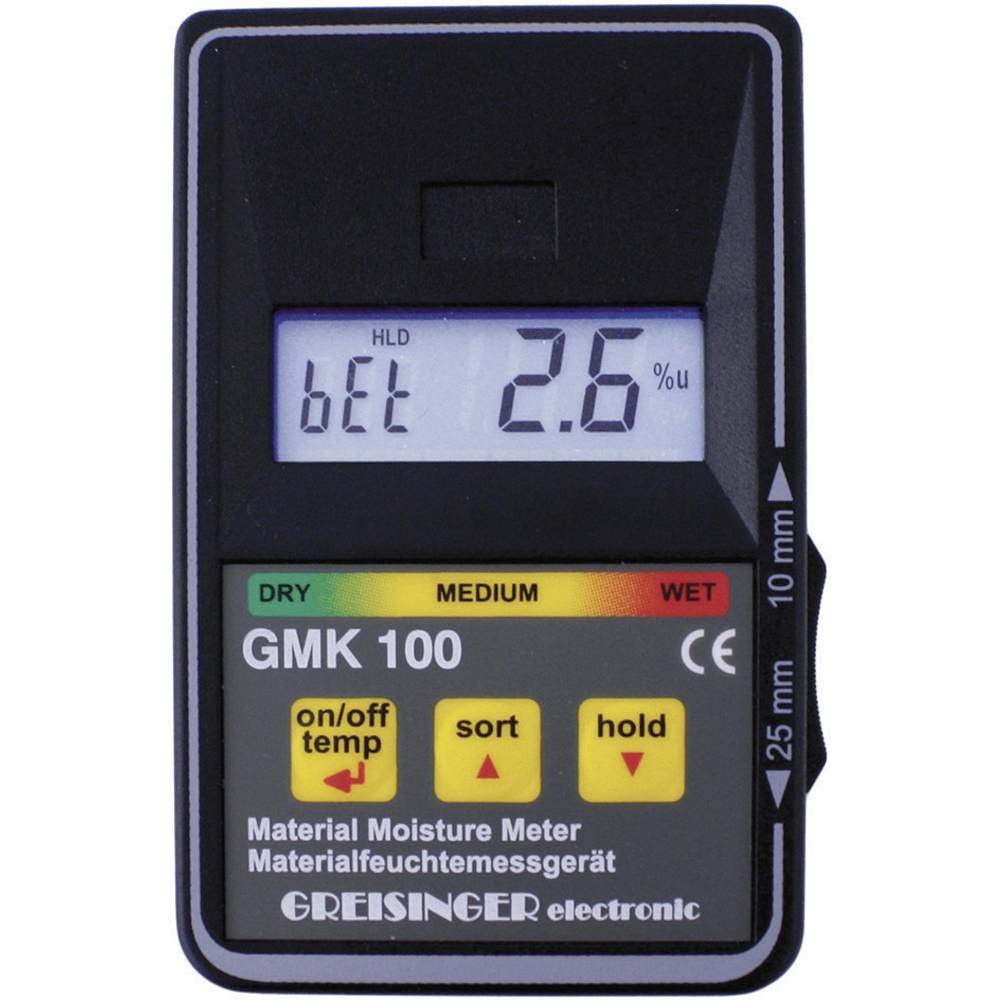
Figur 1: Front view of the GREISINGER GMK100 High-Frequency Moisture Meter. This image shows the device's display and control buttons, highlighting its compact design.
4. Opsætning
4.1 Batteriinstallation
- Find batteridækslet på bagsiden af enheden.
- Open the cover by sliding or unscrewing it (refer to the markings on the device).
- Insert a new 9V dry cell battery, ensuring the correct polarity (+/-) as indicated inside the compartment.
- Luk batterirummets dæksel forsvarligt.
4.2 Indledende tænding
Press the power button to turn on the device. The display will illuminate, showing the selected material mode and a default measurement value. The device is now ready for operation.
5. Betjeningsvejledning
5.1 Selecting Measurement Depth
The GMK100 allows you to switch between two measurement depths: 10mm and 25mm. This feature is crucial for accurately assessing moisture at different depths within a material.
- Press the 'DEPTH' button (or equivalent, refer to device markings) to toggle between 10mm and 25mm.
- The selected depth will be indicated on the display.
5.2 Selecting Material Characteristic Curve
The device includes 18 pre-programmed characteristic curves for various materials. Selecting the correct curve is essential for accurate moisture readings.
- Press the 'MATERIAL' button (or equivalent) to cycle through the available material curves.
- Each curve corresponds to a specific material type (e.g., different types of wood, concrete, plaster). Refer to the device's internal material list or a separate reference guide for details on each curve.
- Once the desired material curve is selected, the device is ready to measure.
5.3 Tage en måling
- Ensure the correct measurement depth and material curve are selected.
- Place the measurement sensor flat against the surface of the material to be tested. Apply gentle, even pressure.
- The moisture reading (u% or w%) will be displayed instantly.
- For consistent results, take multiple readings in different spots on the material.
6. Vedligeholdelse
6.1 Rengøring
- Tør enheden af med en blød, damp klæde. Brug ikke slibende rengøringsmidler eller opløsningsmidler.
- Ensure the sensor surface is clean and free of debris for accurate measurements.
6.2 Opbevaring
- Store the GMK100 in a dry place, away from direct sunlight and extreme temperatures.
- The recommended storage temperature is -25 to +70°C.
- Hvis produktet opbevares i længere perioder, skal batteriet fjernes for at forhindre lækage.
6.3 Udskiftning af batteri
When the low battery indicator appears on the display, replace the 9V dry cell battery as described in Section 4.1.
7. Fejlfinding
| Problem | Mulig årsag | Løsning |
|---|---|---|
| Enheden tænder ikke. | Dødt eller forkert installeret batteri. | Kontroller batteriets polaritet, eller udskift det med et nyt 9V-batteri. |
| Upræcise aflæsninger. | Incorrect material curve selected; sensor surface dirty; device not flat on material; low battery. | Select the correct material curve. Clean the sensor. Ensure full contact with the material. Replace battery. |
| Displayet viser fejlmeddelelse. | Measurement outside range; internal fault. | Ensure material is within measurable range. If error persists, contact customer support. |
8. Specifikationer
| Parameter | Værdi |
|---|---|
| Vise | Material mode and measured value display |
| Måledybde | Switchable between 10mm and 25mm |
| Karakteristiske kurver | 18 types (reference curves for comparison) |
| Driftstemperatur | -25 to +50°C (non-freezing state) |
| Opbevaringstemperatur | -25 til +70°C |
| Batteri | 9V dry cell battery (1 included) |
| Beskyttelsesklasse | IP65 |
| Dimensioner (LxBxH) | 106 x 67 x 30 mm |
| Vægt | Ca. 145 g |
| Oprindelsesland | Tyskland |
9. Garanti og support
For warranty information, technical support, or service inquiries, please refer to the documentation provided with your purchase or contact GREISINGER customer service directly. Keep your purchase receipt as proof of purchase for warranty claims.