
1. Introduktion
Tak for købetasing the Riptunes Portable CD Player with AM/FM Radio, Model CDB204. This device is designed for portable audio playback, offering versatile options including CD playback, AM/FM radio reception, and auxiliary input for external audio sources. Please read this manual thoroughly before operating the unit to ensure proper use and to maximize your listening experience.

Image 1.1: Riptunes Portable CD Player (Model CDB204) with an external device connected.
2. Sikkerhedsoplysninger
- Udsæt ikke enheden for regn eller fugt for at forhindre brand eller elektrisk stød.
- Åbn ikke kabinettet. Overlad kun service til kvalificeret personale.
- Undgå at placere enheden i nærheden af varmekilder såsom radiatorer, varmeregistre, komfurer eller andre apparater, der producerer varme.
- Brug kun tilbehør/tilbehør specificeret af producenten.
- Træk stikket ud af denne enhed under tordenvejr, eller når den ikke skal bruges i længere perioder.
- Bortskaf batterier korrekt i henhold til lokale regler. Udsæt ikke batterier for overdreven varme.
3. Pakkens indhold
Kontroller venligst, at følgende varer er inkluderet i din pakke:
- Riptunes Portable CD Player (Model CDB204)
- AC strømadapter
- Instruktionsmanual
4. Produktet er slutview
Familiarize yourself with the controls and features of your Riptunes Portable CD Player.
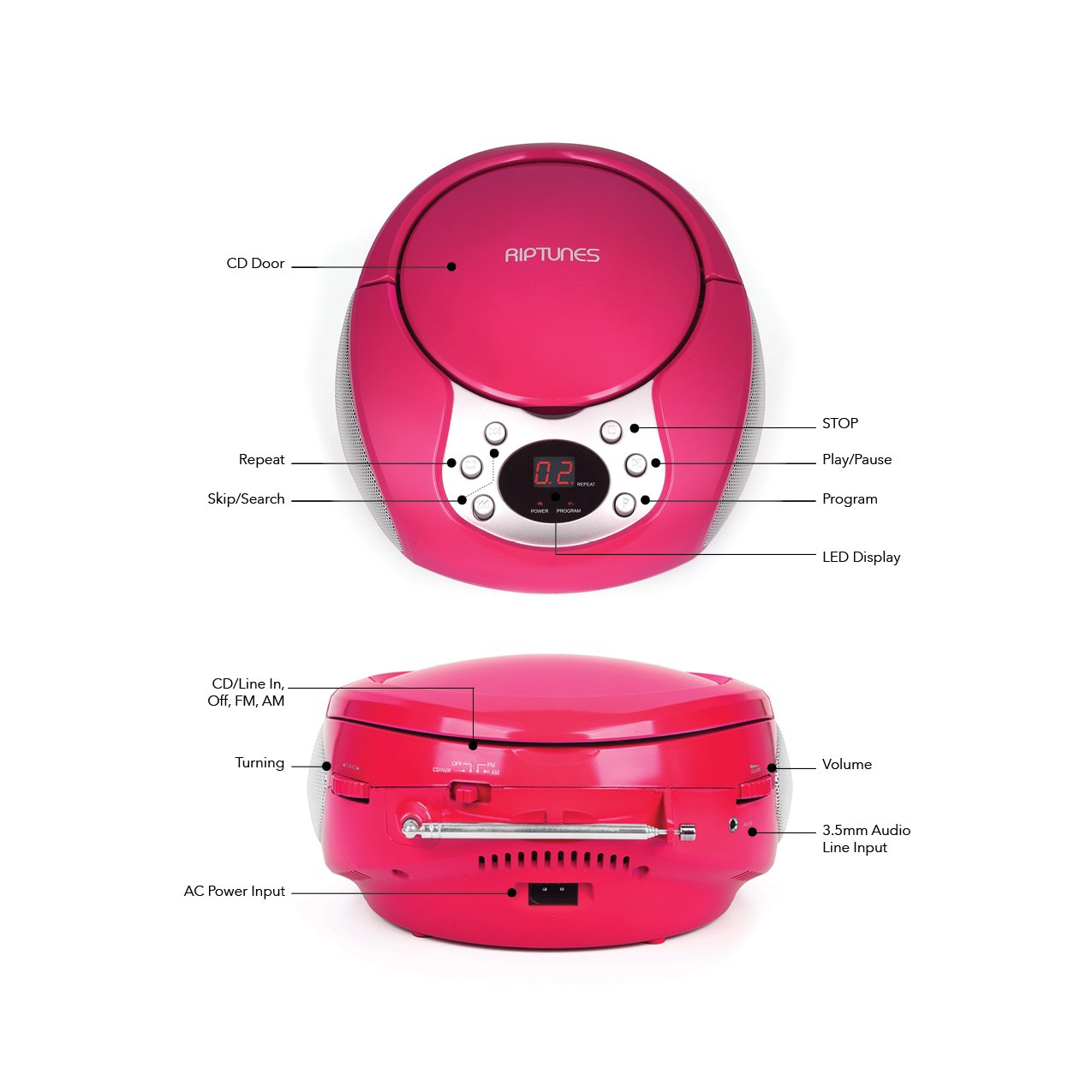
Image 4.1: Front and Side Panel Controls and Ports.
Kontrol på frontpanelet:
- CD Door: Open to insert or remove a CD.
- LED display: Viser spornummer, radiofrekvens eller tilstand.
- POWER/PROGRAM Button: Press to turn the unit on/off. In CD mode, press to program tracks.
- PLAY/PAUSE (►/−−) Button: Press to start or pause CD playback.
- STOP (■) Button: Press to stop CD playback.
- SKIP/SEARCH (◀◀ / ►►) Buttons: Press to skip tracks on a CD. Hold to search within a track. In radio mode, press to tune.
- REPEAT knap: Press to repeat the current track or all tracks on a CD.
Side Panel Controls/Ports:
- FUNCTION Switch (CD/Line In-Off, FM, AM): Selects the operating mode (CD/Aux, FM Radio, AM Radio) and turns the unit off.
- VOLUME-drejeknap: Justerer lydudgangsniveauet.
- TUNING Dial: Adjusts the radio frequency in AM/FM mode.
- AUX IN -stik: Tilslutter eksterne lydenheder med et 3.5 mm lydkabel.
- AC POWER INPUT Jack: Tilslutter den medfølgende strømadapter.
- FM-antenne: Forlæng for optimal FM-radiomodtagelse.
5. Opsætning
5.1 Strømforsyning til enheden
The Riptunes Portable CD Player can be powered by either the included AC adapter or by batteries.
Vekselstrømsdrift:
- Ensure the FUNCTION switch is in the 'OFF' position.
- Insert the small end of the AC adapter into the AC POWER INPUT jack on the side of the unit.
- Plug the other end of the AC adapter into a standard AC wall outlet (120V ~ 60Hz).
Batteridrift:
Til bærbar brug kræver enheden 6 x 'C'-batterier (medfølger ikke).
- Ensure the FUNCTION switch is in the 'OFF' position.
- Find batterirummet i bunden af enheden.
- Open the battery compartment cover by sliding it off.
- Insert 6 'C' size batteries, observing the correct polarity (+/-) as indicated inside the compartment.
- Sæt batterirummets dæksel på igen.

Image 5.1: Battery Compartment on the underside of the unit.
5.2 Justering af antenne
For optimal FM radio reception, fully extend the telescopic FM antenna located on the side of the unit. For AM reception, the unit has a built-in antenna, so no external adjustment is needed, but you may need to reposition the unit for better signal.

Image 5.2: Unit with FM antenna extended.
6. Betjeningsvejledning
6.1 CD-afspilning
- Slide the FUNCTION switch to the 'CD/Line In-Off' position.
- Press the 'OPEN' button on the CD door to open it.
- Place a CD into the compartment with the label side facing up.
- Close the CD door firmly. The LED display will show '00' or the total number of tracks.
- Press the PLAY/PAUSE (►/−−) button to start playback. The track number will appear on the display.
- Adjust the VOLUME dial to your desired listening level.
- To pause playback, press the PLAY/PAUSE (►/−−) button. Press again to resume.
- To stop playback, press the STOP (■) button.
- To skip to the next track, press the SKIP/SEARCH (►►) button.
- To go back to the beginning of the current track, press the SKIP/SEARCH (◀◀) button once. Press twice to go to the previous track.
- To search rapidly forward or backward within a track, hold down the respective SKIP/SEARCH button.
- Gentag funktion: Press the REPEAT button once to repeat the current track. Press again to repeat all tracks. Press a third time to cancel repeat mode.
- Program funktion: While the CD is stopped, press the PROGRAM button. The display will flash. Use the SKIP/SEARCH buttons to select your desired track, then press PROGRAM again to confirm. Repeat for up to 20 tracks. Press PLAY/PAUSE to start programmed playback.
6.2 AM/FM-radiobetjening
- Slide the FUNCTION switch to either 'FM' or 'AM' position.
- For FM reception, extend the telescopic antenna fully.
- Rotate the TUNING dial on the side of the unit to select your desired radio station. The frequency will be displayed on the LED screen.
- Adjust the VOLUME dial to your desired listening level.
- For optimal AM reception, you may need to rotate the entire unit to find the best signal.
6.3 Ekstraindgang (AUX IN)
- Slide the FUNCTION switch to the 'CD/Line In-Off' position.
- Connect one end of a 3.5mm audio cable (not included) to the AUX IN jack on the side of the unit.
- Connect the other end of the audio cable to the headphone jack or line-out jack of your external audio device (e.g., smartphone, MP3 player).
- Turn on your external audio device and start playback.
- Adjust the VOLUME dial on the Riptunes unit and the volume on your external device to achieve the desired sound level.
7. Vedligeholdelse
- Rensning: Tør enheden af med en blød, tør klud. Brug ikke slibende rengøringsmidler eller opløsningsmidler.
- CD-pleje: Håndter cd'er i kanterne. Hold dem rene og fri for ridser. Brug en blød, fnugfri klud til at tørre cd'er af fra midten og udad.
- Opbevaring: When not in use for extended periods, remove batteries and store the unit in a cool, dry place away from direct sunlight and extreme temperatures.
8. Fejlfinding
| Problem | Mulig årsag | Løsning |
|---|---|---|
| Ingen strøm | AC adapter not connected; Batteries depleted or incorrectly inserted; FUNCTION switch in 'OFF' position. | Ensure AC adapter is securely plugged in; Replace batteries or check polarity; Slide FUNCTION switch to 'CD/Line In-Off', 'FM', or 'AM'. |
| CD'en afspiller ikke | CD inserted incorrectly; CD is dirty or scratched; CD door not closed; FUNCTION switch not in 'CD/Line In-Off' mode. | Insert CD with label side up; Clean or replace CD; Close CD door firmly; Set FUNCTION switch to 'CD/Line In-Off'. |
| Dårlig radiomodtagelse | FM antenna not extended; Unit position. | Fully extend FM antenna; Reposition the unit for better signal. |
| Ingen lyd fra AUX IN | Audio cable not connected properly; External device volume too low; FUNCTION switch not in 'CD/Line In-Off' mode. | Check audio cable connections; Increase volume on external device; Set FUNCTION switch to 'CD/Line In-Off'. |
9. Specifikationer
- Model: CDB204
- Strømkilde: AC 120V ~ 60Hz or 6 x 'C' size batteries (DC 9V)
- CD-kompatibilitet: CD, CD-R/RW
- Radiofrekvenser: FM, AM
- Forbindelse: 3.5 mm AUX IN
- Dimensioner (ca.): 12.48 x 11.46 x 7.09 tommer (31.7 x 29.1 x 18 cm)
- Vægt (ca.): 2.68 pund (1.22 kg)
10. Garanti og support
Riptunes products are designed for reliability and performance. For warranty information, technical support, or customer service inquiries, please refer to the contact information provided with your purchase documentation or visit the official Riptunes webwebsted. Gem venligst din købsbevis til garantikrav.