
Produkt overview
The MOTOROLA Talkabout T280 is a rechargeable two-way radio designed for instant communication. It features 22 channels, a maximum talking range of 25 miles under optimal conditions, and weather alert capabilities. The T280 is suitable for various communication needs, including outdoor activities and emergency preparedness.
Nøglefunktioner omfatter:
- 22 FRS channels for communication.
- Rechargeable NiMH battery packs with micro-USB charging.
- Weatherproof design for durability.
- Emergency preparedness features, including weather alerts.

Billede: Bund view of the Motorola T280 radio, featuring the 'Talkabout' branding.
Pakkens indhold
The MOTOROLA Talkabout T280 bundle includes the following items:
- Two (2) T280 Radios
- One (1) Y Cable with Dual Micro-USB Chargers
- Two (2) NiMH Rechargeable Battery Packs
- To (2) bælteclips
- One (1) Red Carry Case
- Emergency Preparedness Checklist
Opsætning
1. Batteriinstallation
- Sørg for, at radioen er slukket.
- Find batteridækslet på bagsiden af radioen.
- Åbn batterirummets dæksel.
- Insert the NiMH rechargeable battery pack, ensuring correct polarity. The radio also supports 4 AAA alkaline batteries (not included) as an alternative.
- Luk batterirummets dæksel forsvarligt.

Billede: Side view of the Motorola T280 radio, illustrating the general area for battery access and the belt clip attachment point.
2. Opladning af batterierne
- Connect the Y cable with dual micro-USB chargers to a compatible USB power source.
- Plug the micro-USB connectors into the charging ports located at the bottom of each radio.
- Batteriindikatoren på radioens display viser opladningsstatus.
- Allow sufficient time for a full charge before first use (typically 8-10 hours).
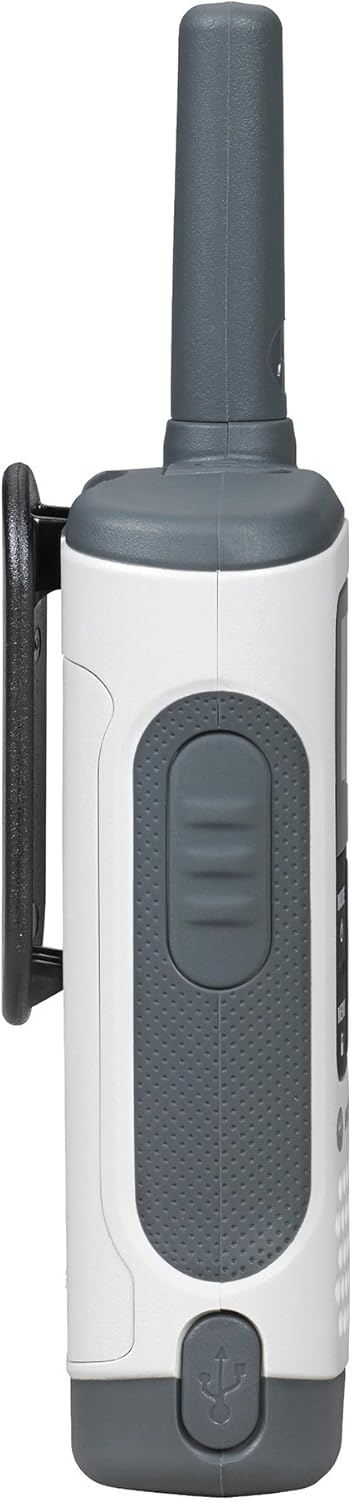
Billede: Bund view of the Motorola T280 radio, highlighting the micro-USB charging port.
3. Montering af bælteclips
- Juster bælteklipsen med rillerne på bagsiden af radioen.
- Skub bælteclipsen nedad, indtil den klikker på plads.
- For at fjerne den skal du trykke på udløsertappen og skubbe klemmen opad.
Betjeningsvejledning
1. Tænd/sluk
- For at tænde: Tryk og hold nede MODE/MENU button until the radio turns on.
- For at slukke: Tryk og hold nede MODE/MENU button until the radio turns off.

Billede: Forside view of two Motorola T280 radios, showing the display, MODE/MENU, plus/minus, and monitor buttons.
2. Justering af lydstyrke
- Brug + (Plus) and - (Minus) buttons to increase or decrease the listening volume.
3. Valg af en kanal
- Med radioen tændt, tryk på MODE/MENU én gang. Kanalnummeret vil blinke.
- Brug + or - knapperne til at vælge den ønskede kanal (1-22).
- Tryk på MODE/MENU knappen igen for at bekræfte kanalvalget.
- For optimal communication, ensure all radios in your group are set to the same channel and privacy code.
4. Setting a Privacy Code
Privacy codes help reduce interference from other users. The T280 supports 121 privacy codes (38 CTCSS codes and 83 DCS codes).
- Når du har valgt en kanal, skal du trykke på MODE/MENU knappen to gange. Privathedskodenummeret vil blinke.
- Brug + or - knapperne for at vælge den ønskede privatlivskode.
- Tryk på MODE/MENU button again to confirm the privacy code.
5. Sending og modtagelse
- For at sende: Tryk og hold nede Tryk og tal (PTT) button located on the side of the radio. Speak clearly into the microphone. Release the PTT button to listen.
- To receive: Ensure the PTT button is not pressed. The radio will automatically receive transmissions on the selected channel and privacy code.
Billede: Side view of the Motorola T280 radio, highlighting the Push-to-Talk (PTT) button.
6. Monitorfunktion
- Tryk på MAN button (often labeled with a 'Z' or 'MON' icon) to temporarily disable the privacy code and listen for activity on the current channel. This is useful for checking for weak signals or if you suspect interference.
7. Weather Alerts
The T280 can receive NOAA weather alerts. Refer to the radio's display for weather channel indicators. In areas with NOAA broadcasts, the radio can alert you to severe weather conditions.
- To activate/deactivate weather alerts, consult the full user manual for specific menu navigation steps.
Opretholdelse
1. Batteripleje
- Always use the provided NiMH rechargeable battery packs or approved AAA alkaline batteries.
- Bland ikke gamle og nye batterier eller forskellige typer batterier.
- Remove batteries if the radio will not be used for extended periods.
- Opbevar batterier på et køligt, tørt sted.
2. Rensning
- Rengør radioen med en blød kludamp klæde.
- Brug ikke slibende rengøringsmidler eller opløsningsmidler.
- Ensure the micro-USB charging port is free of debris.
3. Vandafvisende
The T280 radio is designed to be waterproof. However, ensure all port covers (e.g., micro-USB charging port, accessory port) are securely closed to maintain its water resistance. Avoid submerging the radio for extended periods or exposing it to high-pressure water jets.

Billede: Top view of the Motorola T280 radio, showing the antenna and the covered accessory port.
Fejlfinding
| Problem | Mulig løsning |
|---|---|
| Radioen tænder ikke. |
|
| Kan ikke kommunikere med andre radioer. |
|
| Dårlig lydkvalitet eller statisk støj. |
|
| Begrænset udvalg. |
|
Specifikationer
| Feature | Detalje |
|---|---|
| Modelnummer | T280 |
| Produktdimensioner | 6.42 x 2.13 x 1.24 tommer |
| Varens vægt | 6.4 ounce |
| Antal kanaler | 22 |
| Frekvensområde | 300 MHz - 3 GHz |
| Maksimal talerækkevidde | 25 km (under optimale forhold) |
| Strømkilde | NiMH Rechargeable Battery Packs (included) or 4 AAA batteries (not included) |
| Voltage | 9.6 volt (DC) |
| Vandmodstandsniveau | Vandtæt |
| Særlige funktioner | Rechargeable, Waterproof, Weather Alerts |
Garanti og support
For warranty information, technical support, and additional resources, please visit the official Motorola Solutions webwebsted eller kontakt deres kundeserviceafdeling.
You can find more information and products from Motorola Solutions at their official store: Motorola Solutions Store.