
Indledning
The Enbrighten Z-Wave In-Wall Smart Motion Dimmer integrates home automation with lighting control. When connected to a compatible Z-Wave hub, this hardwired smart dimmer allows for control of ceiling lights, wall fixtures, and other dimmable lighting through individual commands and programmed settings. It supports wireless control and scheduling for both indoor and outdoor fixtures, enhancing home management.
Produktegenskaber
- Stemmekontrolkompatibilitet: Works with Alexa and Google Assistant (requires a Z-Wave certified hub). Compatible hubs include SmartThings, Ring Alarm, Wink, ADT Pulse, ADT Command, Trane, Vivint, Nexia, Honeywell, Home Seer, Harmony Home Hub Extender, and Vera.
- Motion Control Options: Adjusts brightness levels for dimmable LED, CFL, incandescent, and halogen lights (0-100%). Features three motion-detection options: Occupancy (lights ON/OFF automatically), Vacancy (lights ON manually, OFF automatically), and Manual (motion sensor deactivated).
- Adjustable Time-Out: Five time-out duration options ranging from five seconds to 30 minutes.
- Bred detektionsdækning: Up to 180-degree detection coverage.
- 3-Way Ready: Operates independently or integrates into multi-switch setups with required add-on switches (models 12723 or 46199). Supports up to four add-on switches.
- Z-Wave Plus Connectivity: Compatible with all previous Z-Wave generations. Functions as a Z-Wave signal repeater, extending range by up to 150ft.
Installation
This device requires indoor in-wall installation with hardwired connections. A neutral wire is required. The package includes white and light almond cover buttons; a wall plate is not included.
Ledningsdiagram
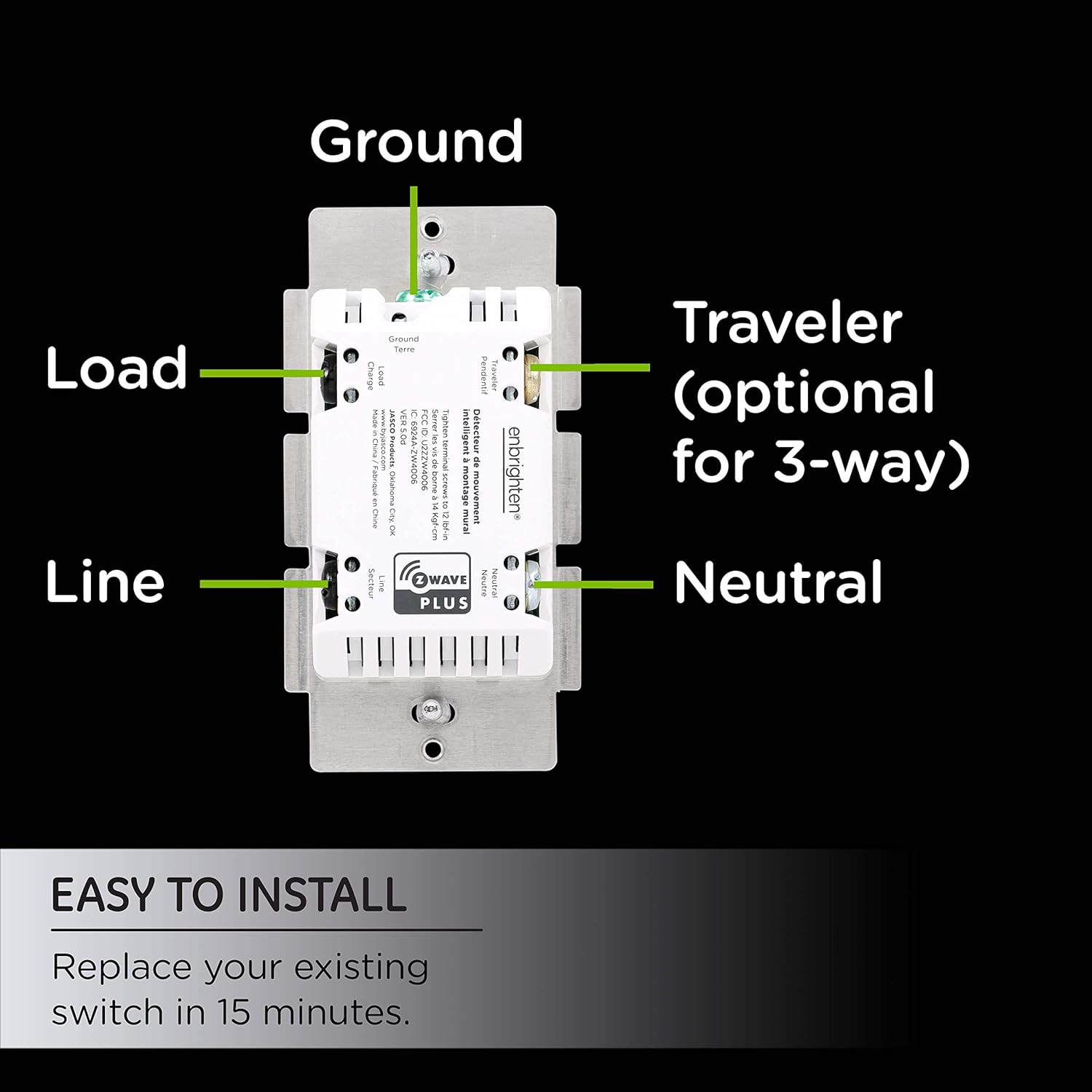
This image illustrates the wiring connections for the Enbrighten Z-Wave Smart Motion Dimmer. It shows terminals for Ground, Load, Line, Traveler (optional for 3-way setups), and Neutral. Ensure all connections are made according to local electrical codes and the provided diagram.
3-Way Wiring Configuration

This diagram demonstrates a 3-way wiring configuration, where two switches control a single light fixture. The Enbrighten Smart Motion Dimmer can be integrated into such setups using compatible add-on switches (models 12723 or 46199).
Operation
Motion Control Modes

The dimmer offers three primary operation modes: Belægning (lights turn ON/OFF automatically), Ledig stilling (lights turn ON manually, OFF automatically), and Manuel (motion sensor is deactivated, and lights are controlled manually). These modes can be configured to suit your preferences and activity levels in the room.
Dæmpningsfunktion

The dimmer provides full-range dimmability, allowing adjustment of light levels from 0% to 100%. This feature is compatible with dimmable LED, CFL, incandescent, and halogen bulbs. Dimming can help reduce energy consumption and extend bulb life.
Z-Wave Connectivity and Voice Control

When paired with a Z-Wave certified hub, the dimmer can be controlled via voice commands using Amazon Alexa or Google Assistant. This enables customized scenes, versatile scheduling, and convenient alerts for enhanced home automation.
Bevægelsesdetekteringszone

The smart motion sensor covers a 180-degree range, effective up to 45 feet. This wide detection zone accommodates various room sizes and activity patterns.
Specifikationer

This image provides the physical dimensions of the dimmer switch, indicating its height, width, and depth for installation planning.
| Specifikation | Værdi |
|---|---|
| Modelnummer | 26933 |
| Operation Voltage | 120VAC |
| Supported Wattage (Incandescent) | 600W |
| Supported Wattage (LED/CFL) | 150W |
| Driftstilstand | TÆND SLUK |
| Kredsløbstype | 3-vejs |
| Driftstemperaturområde | 32-104 degrees Fahrenheit (0-40 degrees Celsius) |
| Forbindelsesprotokol | Z-Wave |
| Varedimensioner (L x B x H) | 1.5 x 1.5 x 3 tommer |
| Varens vægt | 7.4 ounce |
| Farve | Hvid |
Hvad er der i æsken
- 1 In-Wall Sensor (Smart Motion Dimmer)
- White and Light Almond Cover Buttons
Pleje og vedligeholdelse
To maintain the performance and appearance of your smart motion dimmer, ensure it is kept clean and free from dust. Use a soft, dry cloth for cleaning. Avoid using abrasive cleaners or solvents, as these can damage the device's finish or internal components. Ensure the device is powered off before any cleaning or maintenance.
Fejlfinding
If you experience issues with your Enbrighten Z-Wave Plus Smart Motion Light Dimmer, consider the following:
- Lysene dæmpes eller flimrer ikke: Ensure that the connected bulbs are dimmable LED, CFL, incandescent, or halogen types. Verify that the total wattage of the bulbs does not exceed the dimmer's maximum supported wattage (600W incandescent; 150W LED/CFL).
- Bevægelsessensoren reagerer ikke: Check the selected operation mode (Occupancy, Vacancy, Manual). If in Manual mode, the sensor is deactivated. Ensure the detection zone is clear of obstructions. Verify the time-out duration settings.
- Z-Wave connectivity issues: Confirm that your Z-Wave hub is powered on and within range. Attempt to re-pair the device with your Z-Wave hub. Ensure there are no significant physical barriers interfering with the Z-Wave signal.
- Switch not fitting standard wall plate: The dimmer is designed to fit standard wall plates, but some multi-gang plates may require minor adjustments due to the device's size.
- Ingen strøm til kontakten: Verify that the circuit breaker is on and that the neutral wire is correctly connected, as it is required for operation.
Garanti og support
For warranty information or technical support, please refer to the documentation included with your product packaging or visit the official Enbrighten webwebsted. Gem din købskvittering for garantikrav.