
Indledning
The Everest SM-770 Plus USB Gaming Mouse is designed for an enhanced gaming and computing experience. It features a powerful 3200 DPI optical sensor, providing precise and responsive tracking. The ergonomic design with a soft-touch surface ensures comfort during extended use. This manual will guide you through the installation, operation, and maintenance of your new gaming mouse.

Figur 1: Øverst view of the Everest SM-770 Plus USB Gaming Mouse, showcasing its ergonomic design and green lightning pattern.
Pakkens indhold
Bekræft at alle varer er til stede i pakken:
- Everest SM-770 Plus USB Gaming Mouse
- Brugervejledning (dette dokument)
- Garantibevis

Figure 2: Retail packaging of the Everest SM-770 Plus USB Gaming Mouse.
Opsætning
The Everest SM-770 Plus USB Gaming Mouse is a plug-and-play device, requiring no additional driver installation for basic functionality on most operating systems.
- Pak musen ud: Tag forsigtigt musen ud af emballagen.
- Tilslut til computer: Find en ledig USB-port på din computer. Sæt musens USB-stik godt fast i USB-porten.
- Systemgenkendelse: Dit operativsystem burde automatisk registrere og installere de nødvendige drivere. Denne proces kan tage et par øjeblikke.
- Klar til brug: Once the installation is complete, the mouse is ready for immediate use.
Betjeningsvejledning
The Everest SM-770 Plus features multiple buttons for enhanced control and efficiency.
Knap funktioner
- Venstreklikknap: Primær handlingsknap.
- Højreklik-knap: Sekundær handlingsknap, typisk til kontekstmenuer.
- Scrollhjul: Bruges til at scrolle gennem dokumenter og web sider. Kan også fungere som en midterste klikknap.
- DPI Function Button: Justerer musens følsomhed (DPI).
- Frem-knap: Navigerer fremad i web browsere eller file opdagelsesrejsende.
- Baglæns knap: Navigerer baglæns i web browsere eller file opdagelsesrejsende.
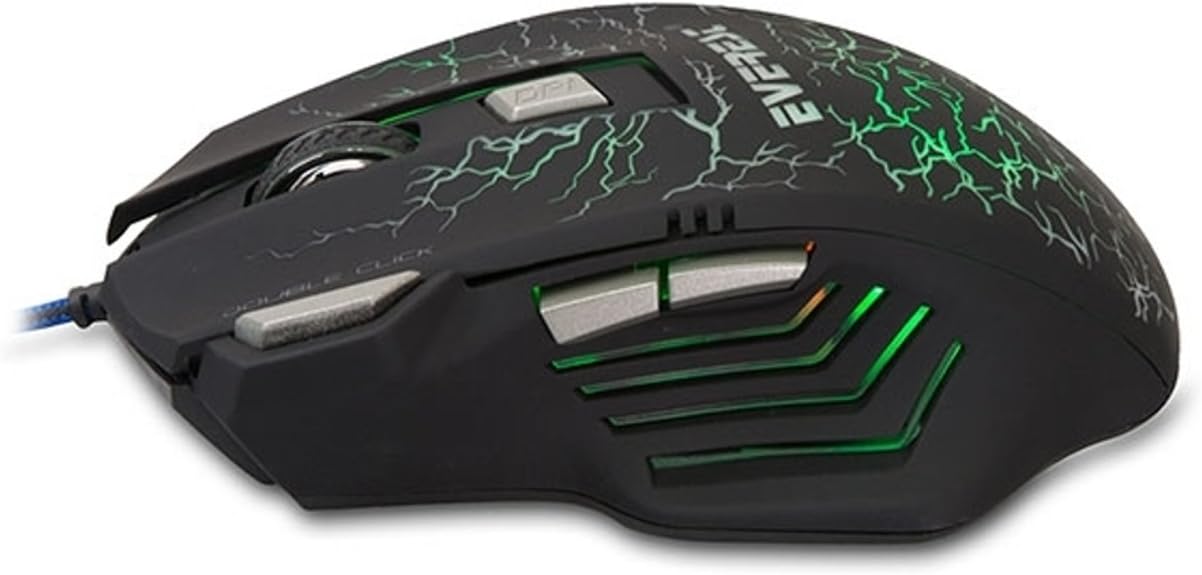
Figur 3: Side view of the mouse, showing the forward and backward buttons.
DPI justering
The DPI (Dots Per Inch) button allows you to change the sensitivity of the mouse cursor. This mouse supports four adjustable DPI levels:
- 1000 DPI
- 1200 DPI
- 1600 DPI
- 3200 DPI
Press the DPI button, located behind the scroll wheel, to cycle through these sensitivity settings. Each press will switch to the next DPI level, allowing you to find the optimal speed for your tasks or games.
Opretholdelse
Korrekt vedligeholdelse sikrer din gamingmus' lange levetid og optimale ydeevne.
- Rensning: Brug en blød, tør klud til at tørre musens overflade af. Ved genstridigt snavs, tør let afampRengør kluden med vand. Undgå at bruge skrappe kemikalier eller slibende materialer.
- Sensorpleje: Hold den optiske sensor på undersiden af musen ren og fri for støv og snavs. Brug en vatpind eller trykluft om nødvendigt.
- Kabelstyring: Undgå skarpe bøjninger eller for meget træk i USB-kablet for at forhindre skader.
- Opbevaring: Når musen ikke er i brug, skal den opbevares et rent, tørt sted væk fra ekstreme temperaturer.
Fejlfinding
If you encounter issues with your Everest SM-770 Plus USB Gaming Mouse, refer to the following common problems and solutions:
| Problem | Løsning |
|---|---|
| Musen svarer ikke. |
|
| Markørbevægelsen er uregelmæssig eller hoppende. |
|
| DPI button is not changing sensitivity. |
|
Specifikationer
| Feature | Detalje |
|---|---|
| Mærke | Everest |
| Modelnummer | SM-770 |
| Forbindelsesteknologi | USB (kablet) |
| Bevægelsesdetekteringsteknologi | Optisk |
| DPI niveauer | 1000 / 1200 / 1600 / 3200 DPI |
| Farve | Sort |
| Produktdimensioner | 16.3 x 22.2 x 5.1 cm |
| Produktets vægt | 260 gram |
| Strømkilde | AC 100-240V, 50/60Hz (via USB) |
| Voltage | 5 volt |
| Operativsystemkompatibilitet | Windows, Mac, Linux (Basic functionality) |
| Oprindelsesland | Kina |
Garanti og support
The Everest SM-770 Plus USB Gaming Mouse comes with a warranty. Please refer to the separate warranty certificate included in your product package for detailed information regarding warranty terms, conditions, and duration.
For technical support or further assistance, please contact your retailer or the official Everest support channels. Contact information can typically be found on the product packaging or the manufacturer's webwebsted.