
1. Introduktion
This manual provides detailed instructions for the installation, operation, and maintenance of your Tiandy TC-NR4008M7-S2 Network Video Recorder (NVR). This NVR is designed for IP surveillance systems, supporting up to 8 channels at 1080P resolution, and features advanced video analysis and smart recording capabilities. It is ONVIF compatible, ensuring broad compatibility with various IP cameras.
Læs venligst denne manual grundigt, inden du bruger produktet, for at sikre korrekt og sikker betjening.
2. Sikkerhedsoplysninger
To prevent electrical hazards and ensure safe operation, observe the following precautions:
- Do not disassemble the equipment yourself. Disassembly and maintenance of the equipment must be carried out by qualified professionals.
- Ensure the NVR is connected to a grounded power source to prevent electric shock.
- Avoid exposing the NVR to moisture, rain, or extreme temperatures.
- Bloker ikke ventilationsåbningerne. Sørg for tilstrækkelig luftgennemstrømning omkring enheden.
- Brug kun den strømadapter, der følger med NVR'en.
Billede 2.1: Rear panel of the NVR showing various ports and a caution label. The label warns against self-disassembly due to electrical hazard and states that maintenance should be performed by professionals.
3. Produktet er slutview
The Tiandy TC-NR4008M7-S2 NVR is a robust solution for managing your IP surveillance cameras. Key features include:
- 8-kanals input: Supports up to 8 IP camera channels.
- 1080P-opløsning: Records video at up to 1080P resolution.
- Opbevaring: Accommodates two 3.5-inch SATA hard drives, each up to 4TB (hard drives not included).
- Videooutput: HDMI and VGA for local display.
- USB-porte: Two USB ports for mouse and data backup.
- Avancerede funktioner: Video Analysis and Smart Recording capabilities.
- Forbindelse: Ethernet-port til netværksforbindelse.
- Lyd og alarm: Supports audio input/output and alarm functions.
- ONVIF-kompatibilitet: Ensures interoperability with ONVIF-compliant IP cameras.
3.1 Frontpanel

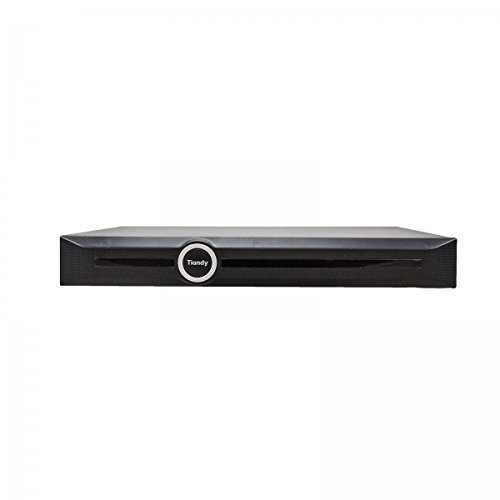
Billede 3.1: Front view of the Tiandy TC-NR4008M7-S2 NVR. The front panel typically includes status indicators and the brand logo.
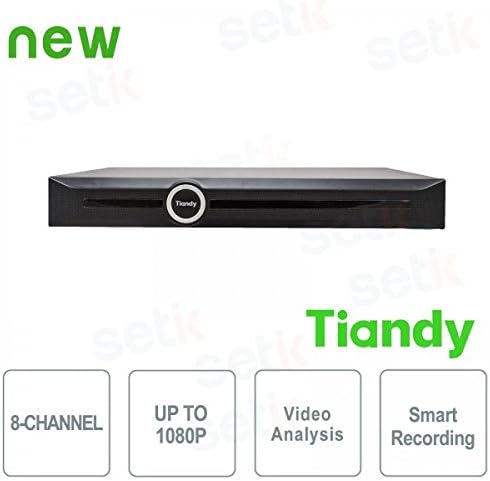
Billede 3.2: Front view of the Tiandy NVR with graphical indicators for 8-Channel support, Up to 1080P resolution, Video Analysis, and Smart Recording.
3.2 Bagpanel
The rear panel provides all necessary connection ports for the NVR:
- Strømindgang: Til tilslutning af strømadapteren.
- Ethernet-port: RJ45 port for network connection to IP cameras and the internet.
- HDMI udgang: Til tilslutning til en HDMI-skærm eller et TV.
- VGA udgang: Til tilslutning til en VGA-skærm.
- USB-porte: Two USB ports for mouse connection and external storage.
- Lyd ind/ud: Til tilslutning af eksterne lydenheder.
- Alarm In/Out: For connecting external alarm devices.
Billede 3.3: Detailed rear panel of the NVR, illustrating the layout of the power input, Ethernet port, HDMI, VGA, USB ports, audio, and alarm connections.
4. Opsætning
4.1 Installation af harddisk
The NVR supports two 3.5-inch SATA hard drives (not included). It is recommended to use surveillance-grade hard drives for optimal performance and reliability. To install:
- Sluk NVR'en, og frakobl alle kabler.
- Remove the NVR's cover by unscrewing the retaining screws.
- Mount the hard drives into the designated bays using the provided screws.
- Connect the SATA data and power cables from the NVR motherboard to the hard drives.
- Sæt dækslet på igen og fastgør det med skruerne.
Note: SSDs may not have dedicated mounting slots and might require alternative securing methods if used.
4.2 Indledende forbindelser
- Tilslut en skærm til NVR'ens HDMI- eller VGA-udgangsport.
- Tilslut den medfølgende USB-mus til en af NVR'ens USB-porte.
- Tilslut NVR'en til dit netværk ved hjælp af et Ethernet-kabel.
- Connect the power adapter to the NVR and then to a power outlet.
- Tænd for NVR.
4.3 Førstegangskonfiguration
Ved første opstart vil NVR'en guide dig gennem en indledende opsætningsguide. Dette inkluderer typisk:
- Setting up administrator password.
- Formatting the installed hard drives.
- Network settings configuration (DHCP or static IP).
- Tids- og datoindstillinger.
- Adding IP cameras (the NVR should be able to recognize and connect to ONVIF-compatible cameras).
5. Betjening
5.1 Live View
After successful setup, you can access the live view of your connected cameras through the NVR's local interface. The live view is designed to be fluid and responsive.
5.2 Optagelseskonfiguration
NVR'en understøtter forskellige optagelsestilstande:
- Kontinuerlig optagelse: Optagelser 24/7.
- Optagelse af bevægelsesdetektering: Optager kun, når kameraerne registrerer bevægelse.
- Planlagt optagelse: Optegnelser i bestemte tidsperioder.
- Alarmoptagelse: Registrerer, når en alarmhændelse udløses.
Access the recording settings through the NVR's menu to configure your preferred recording schedule and modes for each channel.
5.3 Video Analysis and Smart Recording
The NVR includes advanced video analysis features. These can be configured to trigger recordings or alarms based on specific events, such as line crossing, intrusion detection, or object removal. Smart Recording optimizes storage by adjusting recording parameters based on event types.
5.4 Remote Access (Mobile App)
NVR'en understøtter fjernbetjening viewing and management via a mobile application, such as 'Easy Live Plus'. To use the app:
- Download the 'Easy Live Plus' app from your smartphone's app store.
- Registrer en konto og log ind.
- Add your NVR to the app using its serial number or QR code.
Note: While the app provides remote access, some users have reported limitations in its functionality and configuration options compared to the local NVR interface. It is recommended to configure detailed settings directly on the NVR.
6. Vedligeholdelse
6.1 Harddiskstyring
Regularly check the status of your hard drives through the NVR's storage management menu. You may need to:
- Format Hard Drives: If you install new drives or encounter recording issues, formatting can resolve problems. This will erase all data on the drive.
- Replace Hard Drives: If a hard drive fails or reaches its end of life, replace it following the installation steps in Section 4.1.
6.2 Softwareopdateringer
Tjek regelmæssigt Tiandy-embedsmanden website for firmware updates. Firmware updates can improve performance, add new features, and fix bugs. Follow the instructions provided with the firmware update package carefully.
6.3 Rengøring
Keep the NVR clean and free from dust. Use a soft, dry cloth to wipe the exterior. Ensure ventilation openings are not obstructed by dust buildup. Do not use liquid cleaners directly on the unit.
7. Fejlfinding
Dette afsnit omhandler almindelige problemer, du kan støde på med din NVR.
7.1 Ingen videoudgang
- Check if the monitor is properly connected to the HDMI or VGA port.
- Sørg for, at skærmen er tændt og indstillet til den korrekte inputkilde.
- Verify that the NVR is powered on and its status indicators are normal.
7.2 Optagelsesproblemer
- No Recordings: Check if hard drives are installed, formatted, and healthy. Verify recording schedules and motion detection settings.
- Indstillinger gemmes ikke: If settings revert to default, especially after using the mobile app, try configuring settings directly on the NVR's local interface. Ensure the NVR's firmware is up to date.
- Poor Recording Quality: Check camera resolution settings and NVR recording parameters. Ensure sufficient bandwidth for IP cameras.
7.3 Network and Remote Access Problems
- Ensure the Ethernet cable is securely connected to the NVR and your router/switch.
- Verify network settings (IP address, gateway, DNS) on the NVR.
- For remote access, ensure your NVR has internet access and port forwarding (if required by your network setup) is correctly configured on your router.
- If using the mobile app, ensure the app is updated to the latest version.
7.4 NVR Not Powering On
- Check the power cable connection to the NVR and the power outlet.
- Sørg for, at strømadapteren fungerer korrekt.
- Prøv en anden stikkontakt.
8. Specifikationer
| Feature | Specifikation |
|---|---|
| Modelnummer | TC-NR4008M7-S2 |
| Mærke | Tiandy |
| Kanaler | 8 IP-kanaler |
| Max opløsning | 1080P (Fuld HD) |
| HDD-understøttelse | 2 x 3.5" SATA HDD, up to 4TB each (8TB total) |
| Videoudgange | 1 x HDMI, 1 x VGA |
| USB-porte | 2 x USB |
| Network interface | 1 x RJ45 Ethernet |
| Lyd | Audio In/Out support |
| Alarm | Alarm In/Out support |
| Funktioner | Video Analysis, Smart Recording, ONVIF Compatible |
| Varens vægt | 2.8 kg |
| Kompatible enheder | Smartphone (for remote access) |
9. Garanti og support
For warranty information, please refer to the warranty card included with your product or contact your point of purchase. For technical support, please contact Tiandy customer service or your authorized dealer. Ensure you have your product model number (TC-NR4008M7-S2) and purchase details available when seeking support.