
Awei A880BL
Awei A880BL Wireless Sports Headset User Manual
Model: A880BL
Indledning
Thank you for choosing the Awei A880BL Wireless Sports Headset. This manual will guide you through the features, setup, and operation of your new headset. Please read it carefully before use and retain it for future reference.

Image: The Awei A880BL Wireless Sports Headset with a blue connecting cable, designed for in-ear use with ear hooks for secure fit.
Vigtige sikkerhedsoplysninger
- Udsæt ikke headsettet for ekstreme temperaturer eller fugtighed.
- Undgå at tabe headsettet eller udsætte det for kraftige stød.
- Du må ikke skille headsettet ad eller ændre det. Dette vil ugyldiggøre garantien.
- Hold headsettet væk fra børn og kæledyr.
- Brug kun det medfølgende opladningskabel eller et tilsvarende certificeret kabel.
- Længerevarende lytning ved høje lydstyrker kan forårsage høreskader.
Pakkens indhold
Kontroller venligst, at alle varer er til stede i din pakke:
- Awei A880BL Wireless Sports Headset
- USB opladningskabel
- Flere størrelser af ørepropper
- Brugervejledning (dette dokument)

Image: Contents of the Awei A880BL package, showing the black headset with yellow cable, a white USB charging cable, three pairs of gold-colored ear tips, and a small yellow instruction card, all next to the product box.
Produkt overview
The Awei A880BL headset features a secure over-ear hook design, in-ear earbuds, and an integrated control panel for easy access to functions.
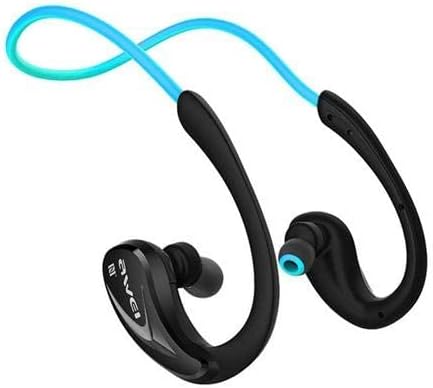
Billede: Et nærbillede view of one side of the Awei A880BL headset, highlighting the in-ear earbud and the ergonomic ear hook design.
Opsætning
1. Opladning af headsettet
Before first use, fully charge the headset. Connect the USB charging cable to the headset's charging port and a power source (e.g., computer USB port or USB wall adapter). The indicator light will show charging status and turn off or change color when fully charged.
2. Bluetooth-parring
- Sørg for, at headsettet er slukket.
- Press and hold the Multi-function button (usually the power button) until the indicator light flashes red and blue alternately, indicating pairing mode.
- Aktiver Bluetooth på din enhed (smartphone, tablet osv.) og søg efter tilgængelige enheder.
- Select "Awei A880BL" from the list of found devices.
- Once paired, the indicator light will flash blue slowly or turn solid blue.
3. NFC Speed Pairing (if supported by your device)
The Awei A880BL supports NFC for quick pairing with compatible devices.
- Ensure NFC is enabled on your device and the headset is in pairing mode or powered on.
- Tap your NFC-enabled device against the NFC area on the headset (refer to product diagram if available for exact location).
- Bekræft parringsanmodningen på din enhed.
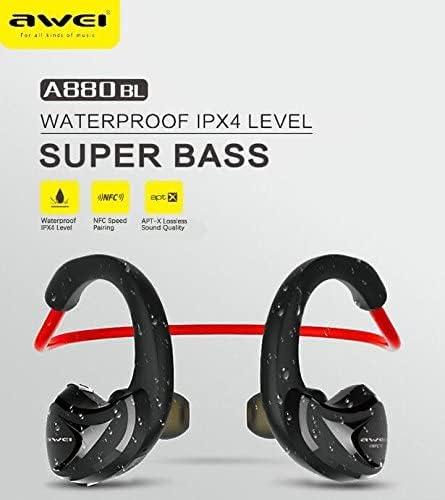
Image: A graphic highlighting key features of the Awei A880BL, including "WATERPROOF IPX4 LEVEL", "NFC Speed Pairing", and "APT-X Lossless Sound Quality".
4. Bære headsettet
For optimal comfort and sound quality, ensure the headset is worn correctly.
- Trin 1: Hold the headset with both hands, with the earbuds facing inwards.
- Trin 2: Gently place the earbuds into your ears, guiding the ear hooks over the top of your ears.
- Trin 3: Adjust the flexible cable behind your neck for a secure and comfortable fit.
- Trin 4: The headset should sit comfortably and securely, even during physical activity.

Image: A four-panel image demonstrating the steps to correctly wear the Awei A880BL headset, showing how to position the earbuds and adjust the neckband.
Betjeningsvejledning
Tænd/sluk
- Tænd: Press and hold the Multi-function button for approximately 3 seconds until you hear a power-on prompt and the indicator light flashes blue.
- Sluk: Press and hold the Multi-function button for approximately 5 seconds until you hear a power-off prompt and the indicator light turns red and then off.
Musikafspilning
- Afspil/pause: Tryk kort på multifunktionsknappen.
- Næste nummer: Tryk længe på knappen Lydstyrke op (+).
- Forrige nummer: Tryk længe på lydstyrke ned-knappen (-).
- Lydstyrke op: Tryk kort på knappen Lydstyrke op (+).
- Skrue ned for lyden: Tryk kort på lydstyrke ned-knappen (-).
Opkaldsstyring
- Besvar opkald: Tryk kort på multifunktionsknappen, når du modtager et opkald.
- Afslut opkald: Tryk kort på multifunktionsknappen under et opkald.
- Afvis opkald: Tryk længe på multifunktionsknappen, når du modtager et opkald.
- Genopkald sidste nummer: Tryk to gange på multifunktionsknappen.
Stemmeassistent
- Aktiver stemmeassistent: Triple-press the Multi-function button (functionality depends on your connected device).
Vedligeholdelse og pleje
- Rensning: Tør headsettet af med en blød, tør klud. Brug ikke slibende rengøringsmidler eller opløsningsmidler.
- Opbevaring: Opbevar headsettet et køligt, tørt sted væk fra direkte sollys og ekstreme temperaturer.
- Batteripleje: To prolong battery life, charge the headset regularly, even if not in frequent use. Avoid fully discharging the battery for extended periods.
- Vandtæthed: The Awei A880BL is rated IPX4 waterproof, meaning it is resistant to splashing water from any direction. It is suitable for sports and light rain but should not be submerged in water.
Fejlfinding
| Problem | Løsning |
|---|---|
| Headsettet tænder ikke. | Sørg for, at headsettet er fuldt opladet. Tilslut det til en strømkilde, og prøv igen. |
| Kan ikke parres med enheden. |
|
| Ingen lyd eller lav lydstyrke. |
|
| Intermitterende forbindelse. |
|
Specifikationer
| Feature | Detalje |
|---|---|
| Modelnummer | A880BL |
| Forbindelse | Trådløs (Bluetooth, NFC) |
| Hovedtelefontype | In-ear, Sports Headset (with ear hooks) |
| Mikrofon | Ja |
| Støjreduktion | Aktiv støjafbrydelse (ANC) |
| Frekvensresponsområde | 20 - 22000 Hz |
| Følsomhed | 110 ± 3 dB |
| Impedans | 16 Ohm |
| Vandmodstand | IPX4 Level (Splash-proof) |
| Understøttede lyd-codecs | APT-X |
| Kontroltype | Button Control (Volume, Play/Pause, Call, Voice Assistant) |
| Opladningsport | USB |
| Kabellængde | 0.6 meters (Charging cable) |
| Vægt | 30 gram |
| Materiale | Plast |
| Lydsystem | Balanceret anker driver |
| App support | Ja |
| Understøttelse af hukommelseskort | Ingen |
Garanti og support
For warranty information and technical support, please refer to the warranty card included in your package or contact Awei customer service through their official webwebstedet eller autoriserede distributører. Behold din købskvittering som købsbevis.