
1. Introduktion
Thank you for choosing the Severin KA 4497 Filter Coffee Machine. This manual provides essential information for the safe and efficient operation of your appliance. Please read these instructions carefully before first use and keep them for future reference.
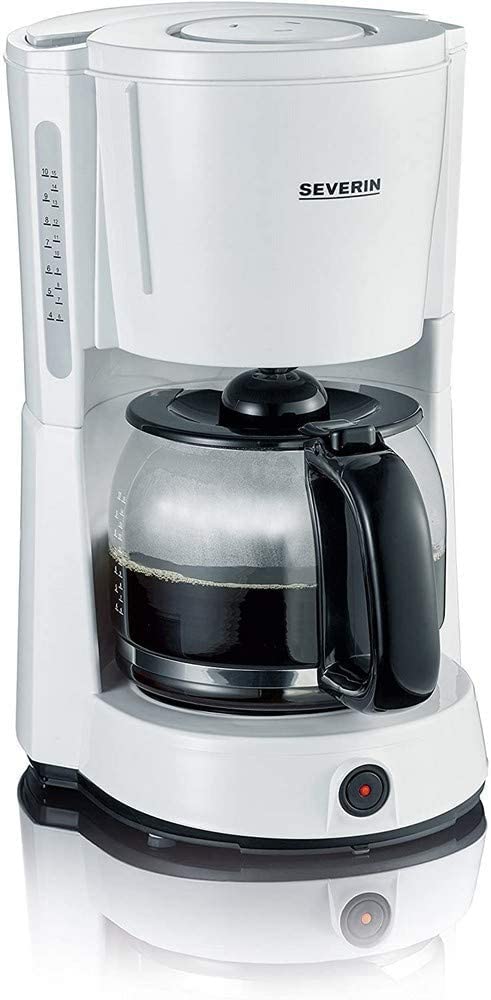
Image 1.1: Severin KA 4497 Filter Coffee Machine overview.
Nøglefunktioner:
- Integrated aroma function for enhanced coffee enjoyment.
- Capacity: Up to 10 cups (1.4 Liters).
- Removable swivel filter holder with drip stop (size 1x4).
- Glass carafe with fresh water scale.
- Control switch with indicator light.
- Automatic shut-off function.
- Warming plate to keep coffee hot.
2. Sikkerhedsinstruktioner
Overhold altid følgende sikkerhedsinstruktioner for at forhindre ulykker og skader på apparatet:
- Dette apparat er kun beregnet til husholdningsbrug.
- Nedsænk ikke apparatet, ledningen eller stikket i vand eller andre væsker.
- Sørg for, at voltage indicated on the rating plate matches your mains supply.
- Opbevar apparatet utilgængeligt for børn.
- Unplug the appliance from the mains socket when not in use, before cleaning, and in case of malfunction.
- Brug ikke apparatet med en beskadiget ledning eller stik.
- Avoid contact with hot surfaces, especially the warming plate and glass carafe during and after operation.
- Only use cold, fresh water for brewing.
3. Opsætning
3.1 Udpakning
- Fjern forsigtigt al emballage fra kaffemaskinen.
- Kontrollér apparatet for tegn på skader. Brug det ikke, hvis det er beskadiget.
3.2 Rengøring ved første brug
Before using for the first time, clean the appliance by running two full cycles with cold water only, without coffee grounds. This removes any manufacturing residues.
3.3 Placering
Place the coffee machine on a stable, level, heat-resistant surface, away from water sources and heat-emitting appliances.
4. Betjeningsvejledning
4.1 Påfyldning af vand
- Åbn låget på vandbeholderen.
- Fill the glass carafe with the desired amount of cold, fresh water. Refer to the cup markings on the carafe and the water level indicator on the side of the machine.
- Pour the water from the carafe into the water tank. Do not exceed the maximum fill level.
- Luk låget forsvarligt.
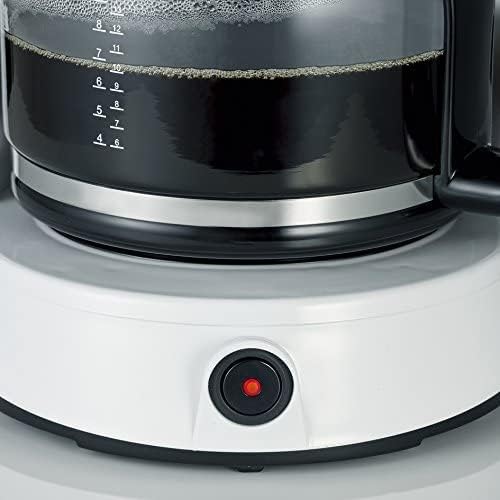
Image 4.1: Water level indicator for precise filling.
4.2 Adding Coffee Grounds
- Drej filterholderen ud.
- Insert a size 1x4 paper filter into the filter holder.
- Add the desired amount of ground coffee into the paper filter. A general guideline is one level tablespoon of coffee per cup. Adjust to personal preference.
- Swivel the filter holder back into position until it clicks.

Image 4.2: Inserting the filter basket with coffee grounds.
4.3 Brygning af kaffe
- Place the glass carafe with its lid on the warming plate. Ensure it is correctly positioned to activate the drip stop.
- Sæt apparatet i en passende stikkontakt.
- Press the ON/OFF switch. The indicator light will illuminate, and the brewing process will begin.
- Once all the water has passed through, the brewing process is complete. The warming plate will keep the coffee hot.

Image 4.3: Brewed coffee in the carafe and the illuminated power button.
4.4 Automatisk slukning
For safety and energy saving, the coffee machine will automatically switch off approximately 30-40 minutes after the brewing process is complete.
5. Vedligeholdelse og rengøring
Regelmæssig rengøring sikrer optimal ydeevne og forlænger levetiden på din kaffemaskine.
5.1 Daglig rengøring
- Tag altid stikket ud af apparatet, og lad det køle helt af, inden du rengør det.
- Remove the used paper filter and coffee grounds.
- Wash the glass carafe and its lid, and the swivel filter holder in warm soapy water. Rinse thoroughly and dry. These parts are generally dishwasher safe (top rack), but hand washing is recommended for longevity.
- Tør kaffemaskinens ydre af med adamp klud. Brug ikke slibende rengøringsmidler, og nedsænk ikke hovedenheden i vand.
5.2 Afkalkning
Depending on water hardness and frequency of use, limescale deposits may form. Descale your coffee machine regularly (e.g., every 2-4 weeks) to maintain brewing performance and flavor.
- Use a commercially available descaling agent suitable for coffee machines, following the manufacturer's instructions.
- Alternatively, a mixture of white vinegar and water (1:2 ratio) can be used.
- Run the descaling solution through the machine as if brewing coffee, without coffee grounds.
- After descaling, run at least two full cycles with fresh water to rinse out any descaling agent residues.
6. Fejlfinding
| Problem | Mulig årsag | Løsning |
|---|---|---|
| Kaffen brygger ikke. | Appliance not plugged in; power switch not activated; water tank empty. | Check power connection; press ON/OFF switch; fill water tank. |
| Kaffen smager svagt eller for stærkt. | Forkert forhold mellem kaffe og vand; kaffen er for fint/grovmalet. | Juster kaffemængden; brug en passende kværngrad. |
| Vand løber over fra filterholderen. | Too much coffee grounds; filter clogged; carafe not correctly placed. | Reduce coffee amount; clean filter holder; ensure carafe is centered. |
| Brewing process is slow. | Kalkaflejringer. | Afkalk kaffemaskinen. |
7. Specifikationer
| Feature | Detalje |
|---|---|
| Mærke | SEVERIN |
| Modelnummer | KA 4497 |
| Farve | Hvid / Sort |
| Produktdimensioner | 17 x 24 x 34 cm |
| Vægt | 2.14 kilo |
| Kapacitet | 1.4 liter (ca. 10 kopper) |
| Strøm/Wattage | 1000 watt |
| Materiale | Glas (karaffel) |
| Særlige funktioner | Glass Carafe, Drip Stop, Warming Plate, Automatic Shut-off |

Image 7.1: Product dimensions of the Severin KA 4497.
8. Garanti og support
This product is covered by a manufacturer's warranty. For detailed warranty information, please refer to the warranty card included with your purchase or visit the official Severin website. For technical support, spare parts, or service inquiries, please contact Severin customer service.